 Rocket - Think it. Type it. Launch it.
 Mini tools
Files Magic AI File Organizer for Mac
 Your AI-powered file organizer that respects privacy for macos




Go to 💼 Business
📢
Marketing
(2248)
🔍
Industries
(962)
💾
Data
(872)
💼
Sales
(705)
💰
Finance
(387)
👔
Management
(308)
💡
Startups
(296)
⚖️
Legal
(253)
👔
HR
(235)
📈
Business strategy
(202)
📅
Meetings
(125)
📊
Product management
(114)
🔒
Security
(80)
📞
Calls
(42)
💻
Tech support
(37)
🤝
Networking
(36)
💻
Virtual employees
(24)
🤖
Enterprise
(15)
🚀
Business innovation
(13)
 Younet
 CleeAI
 Avataar's GenAI Creator
 Activepieces
 BigTeam
 Olivya
 Abstra
 Sreda.ai
 DoubleO
 AI Agents
 Pipefy
 Quixl
Quixl
 Cubeo
Cubeo
 Sema4.ai
 Ridvay
 Cognition by Mindcorp
 Tray.io
 UiPath
 Mr David
 Super Amplify
Younet
148,617
CleeAI
14,316
Avataar's GenAI Creator
4,555
Activepieces
4,366
BigTeam
3,246
Olivya
3,200
Abstra
2,751
Sreda.ai
2,662
DoubleO
2,682
AI Agents
2,551
Pipefy
2,447
Quixl
1,932
Cubeo
1,859
Sema4.ai
1,709
Ridvay
1,439
Cognition by Mindcorp
1,171
Tray.io
871
UiPath
551
Mr David
534
Super Amplify
393
Go to 💾 Data
📊
Data analysis
(217)
📂
Files
(204)
📊
Market research
(169)
🔍
Data extraction
(98)
📊
Data visualization
(65)
🗄️
Databases
(41)
📊
Data entry
(24)
🗄️
Data management
(24)
📊
Business analysis
(18)
🏷️
Data labeling
(6)
🔒
Data anonymization
(2)
🧩
Data modeling
(2)
🔀
Synthetic data
(2)
 genset
genset
44
Inputs:
Outputs:
Your AI-powered file organizer that respects privacy for macos
Overview





Overview
Socials:


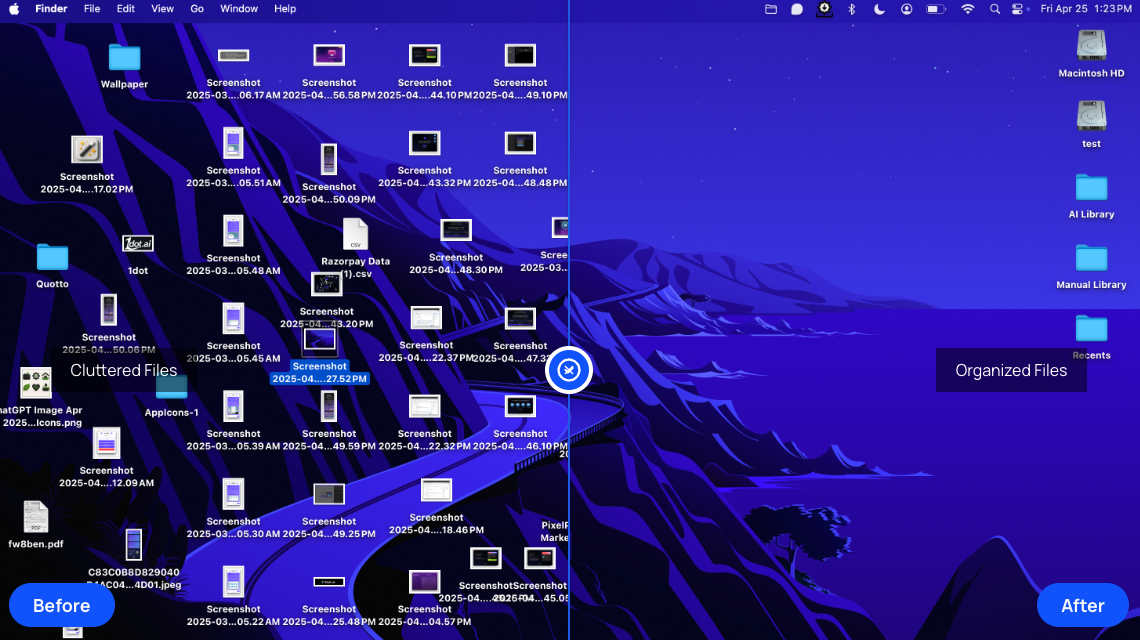
Files Magic AI is a sophisticated tool using AI technology designed to automatically organize, compare and manage files. Primarily intended to declutter digital workspaces, it categorically sorts and organizes files based on their filenames. The tool provides immediate visuals of how it can transform cluttered folders into a structured system. To assure user's peace of mind, it incorporates a one-click restore feature enabling the users to revert any changes they've made and return files to their original locations. It also provides the option of excluding specific files or entire folders from its organization process.Files Magic AI enables selection of any folder on a device to be organized, offering an automatic organization of files based also on user's daily habits.
Moreover, it integrates seamlessly with popular cloud services such as Google Drive, Dropbox, and OneDrive, thus ensuring files are organized across all platforms.Regarding privacy and security, Files Magic AI operates securely without uploading files or reading it's content. The application uses filenames and meta data only for organization and does not share or distribute user's data. All stored filename metadata is deleted automatically after 30 days, ensuring minimal data retention.
Additionally, the tool provides a search function within its app, allowing users to quickly locate files using their names.
Show more
Releases
Get notified when a new version of Files Magic AI File Organizer for Mac is released
Notify me
December 20, 2025

1dot Ai
Initial release of Files Magic AI File Organizer for Mac.

Pricing
Pricing model
Free Trial
Paid options from
$49.99
Billing frequency
One-time
Top alternatives
-
 Matt Castaldo🛠️ 1 tool 🙏 52 karmaOct 18, 2023@DokkioMatt here from Dokkio support! Thanks for checking out our page. If you'd like a free demo of Dokkio, please do not hesitate to reach out to [email protected]
 -
-
Not available for PC only Mac, it would have been worth mentioning.


Related topics


 1
1




