 Base44 Superagents-AI agent that does it all

 Mini tools
Airtable / airtable_api_proxy
Example of proxying requests to Airtable
README
Airtable API proxy demo
This demo sets up a simple API proxy that returns all records from Art
Gallery template example and allows anyone on the internet to toggle
whether a particular artist is on display.
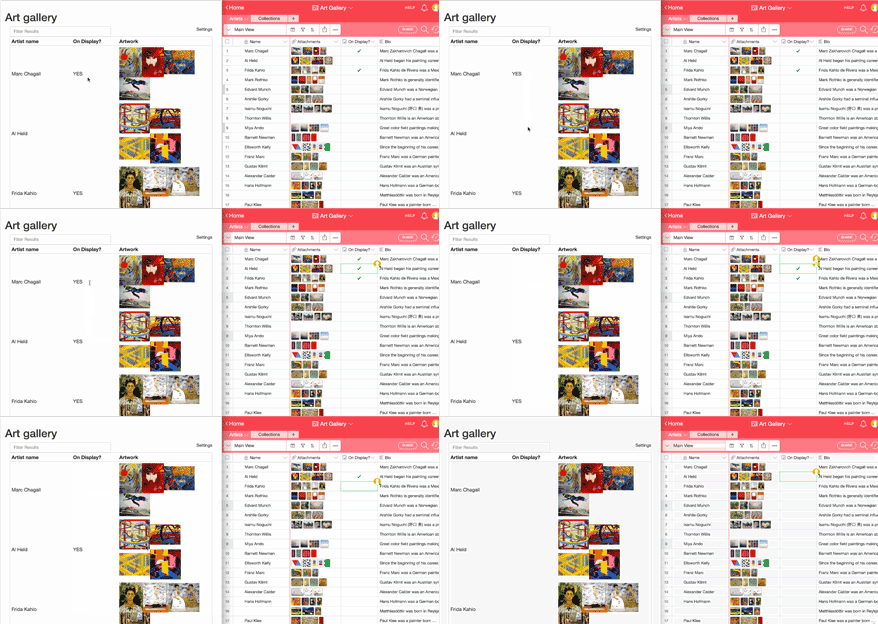
In this demo, clicking anywhere on the artist row toggles "On
Display?" checkbox in the base. You can play with a live demo on heroku.
This set up is useful if you'd like to provide read or write access to
Airtable data w/o exposing your API key, adding your own caching layer
so you're not limited by the rate limits, adding your own
authentication and authorization and many more use cases.
To run the example:
- create an Airtable account,
- create an API key,
- duplicate the Art Gallery template
- get it's Base ID (e.g. by clicking "help -> api docs". The Base ID would be in the URL
and in all of the examples).
Then run bundler to install all the dependencies
bundleAnd start up the proxy with your API key and Base ID.
export AIRTABLE_API_KEY=keyA3f3...  # your API key here
export AIRTABLE_BASE_ID=app22ddr    # your Base ID here
bundle exec rackup -p 9292 config.ru
Navigate to localhost:9292 for your proxy server.
Running on heroku
Login to heroku
heroku loginCreate an app
heroku createPush your app to heroku
git push heroku masterConfigure the app
heroku config:set AIRTABLE_API_KEY='keyASD' # Your API key here
heroku config:set AIRTABLE_BASE_ID='app33f' # Your Base ID here
Go to the app
heroku openTADA!
You should see something like this:
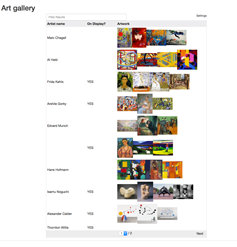
Now when someone clicks on any record, it will toggle the "On Display?" field and update your Airtable base in real time.
Live demo
Live demo is hosted on heroku. Feel free to click around.





