
 Rocket - Think it. Type it. Launch it.
 Mini tools
BaseMax / smart-table-loader
Smart Table Loader is a lightweight, browser-based tool that lets you upload and display CSV (comma separated values), Excel (.xls/.xlsx), or JSON files in a dynamic and interactive HTML table powered by DataTables.js. This tool is great for quick data analysis without the need for installing heavy software.
README
Smart Table Loader
Smart Table Loader is a lightweight, browser-based tool that lets you upload and display CSV, Excel (.xls/.xlsx), or JSON files in a dynamic and interactive HTML table powered by DataTables.js. This tool is great for quick data analysis without the need for installing heavy software.
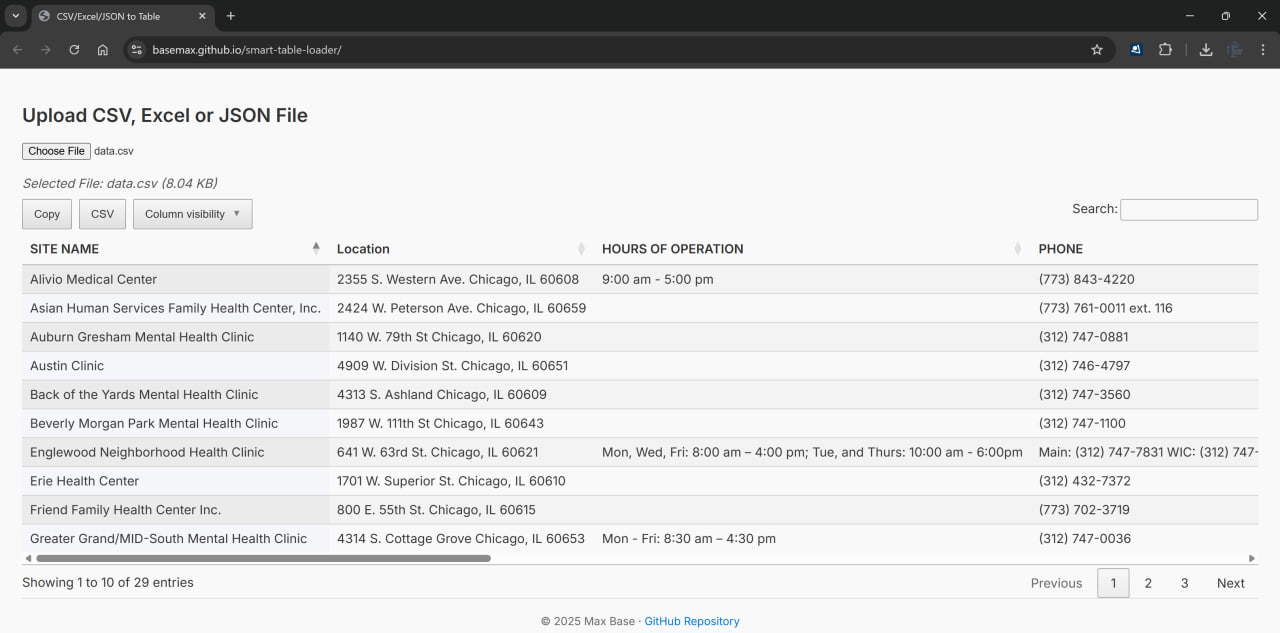
Demo: https://basemax.github.io/smart-table-loader/
🚀 Features
- Upload
.csv,.xls,.xlsx, or.jsonfiles - Automatic detection and sanitization of table headers
- DataTables integration with:
- Column visibility toggling
- Export to Excel, CSV, Copy
- Responsive and scrollable tables
- State saving (remembers table settings)
- File info display before rendering
- Minimal and clean UI using Google Fonts
🔧 Installation
Clone the repository and open index.html in any modern web browser:
git clone https://github.com/BaseMax/smart-table-loader.git
cd smart-table-loader
open index.html # or double-click to open in browser
📁 Project Structure
smart-table-loader/
├── css/
│   ├── buttons.dataTables.min.css
│   └── jquery.dataTables.min.css
├── js/
│   ├── papaparse.min.js
│   ├── xlsx.full.min.js
│   ├── jquery-3.7.1.min.js
│   ├── jquery.dataTables.min.js
│   ├── dataTables.buttons.min.js
│   ├── buttons.html5.min.js
│   ├── buttons.colVis.min.js
│   ├── buttons.print.min.js
│   └── lib.js                # Main file logic
├── index.html                # UI entry point
├── data.csv                 # Example data file
├── LICENSE
└── README.md
📊 Demo Usage
- Open
index.htmlin your browser. - Click on the "Upload" field and select a CSV, Excel, or JSON file.
- View your data rendered in a feature-rich HTML table.
🔗 Validate CSV Files
Use CSVLint.io to validate your CSV files before uploading.
🧪 Dependencies
This project uses:
- PapaParse (for parsing CSV)
- SheetJS (xlsx) (for Excel)
- DataTables and extensions
📜 License
This project is inspired by csv-to-html-table, and I have enhanced it with many additional features.
MIT License © 2025 Max Base





