
 KiloClaw - Managed 🦀
  Mini tools
microsoft / WinUI-Gallery
This app demonstrates the controls available in WinUI and the Fluent Design System.
README
<h1 align="center">WinUI 3 Gallery</h1>
Companion app for WinUI & Windows App SDK APIs
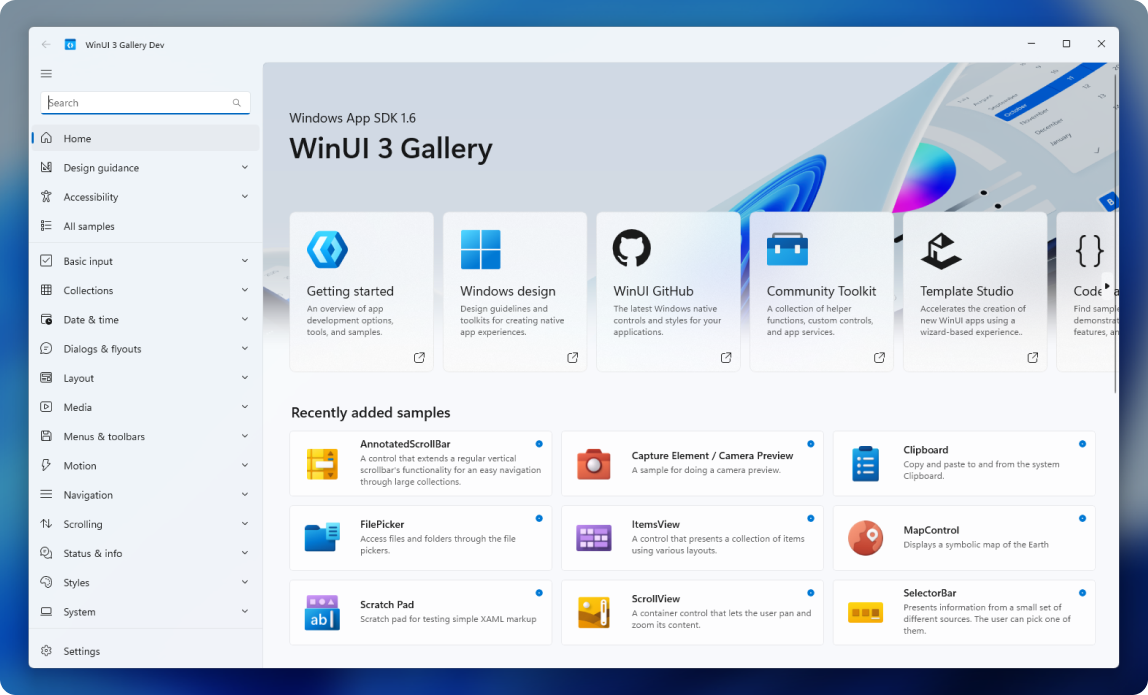
This app demonstrates all of the WinUI 3 controls and styles available to make a modern Windows app with the Windows App SDK. It is the interactive companion to the Fluent Design guidelines and shows the usage of WinUI through interactive samples, tools and code snippets.

⭐ Features
-
WinUI controls samples: each control page shows the markup and codebehind used to create each example.
-
Use the Microsoft.UI.Xaml (WinUI) library: the app includes the latest WinUI NuGet package and shows how to use the WinUI controls like NavigationView, SwipeControl, and more.
-
Adaptive UI: in addition to showing how each control responds to different form factors, the app itself is responsive and shows various methods for achieving adaptive UI.
-
Design & accessibility guidance: design and accessibility pages help make the gallery a useful developer companion app.
👏 Contribute to WinUI Gallery
Any samples or docs improvements you'd like to see? We're always looking for a helping hand. Feel free to file an issue to start the discussion, or even better, create a PR with the change you'd like to see!
Check out these help wanted issues if you don't know where to start.
You can also learn more about current happenings with WinUI Gallery in the project board.
🚀 Getting started
Quick start guide to building the WinUI 3 Gallery:
1. Set up the environment
[!NOTE]
The WinUI Gallery requires Visual Studio 2022 or later to build and Windows 10 or later to execute. If you're building an app with WinUI and Windows App SDK for the first time, follow these installation instructions.
Required Visual Studio components:
- Windows application development
2. Clone the Repository
git clone https://github.com/microsoft/WinUI-Gallery.git3. Open WinUIGallery.slnx with Visual Studio and build!
Ensure that the WinUIGallery project is set as the startup project in Visual Studio.
[!WARNING]
Try deletingnuget.configand building again if you get the following build error:Assets file 'C:\Users\...\source\repos\WinUI-Gallery\WinUIGallery\obj\WinUIGallery\project.assets.json' not found. Run a NuGet package restore to generate this file.
➡️ Further information
To learn more about Windows app development, go to the Windows Dev Center.
Related topics
🏆 Contributors
Thanks to our amazing contributors!
Made with contrib.rocks.





