 Rocket - Think it. Type it. Launch it.

 Mini tools
sipeed / MaixPy
Easily create AI projects with Python on edge device
README
MaixPy (v4)

🚀 MaixCam 2 is LIVE: Build Your Next-Gen 4K AI Camera! 🚀
MaixPy (v4): Easily create AI projects with Python on edge device
Quick Start |
 Documentation  |
 API  |
 Hardware







English | 中文
Feature Overview
MaixPy offers simple Python programming combined with powerful edge computing hardware. Integrated hardware peripheral operations, video streaming, AI vision algorithms, audio algorithms, and LLM / VLM etc. With its plug-and-play design, MaixPy enables you to quickly implement your intelligent projects.
Additionally, MaixPy provides the MaixVision IDE, MaixHub online training platform, detailed documentation, and even a C/C++ SDK with identical APIs, ensuring seamless development and production deployment.
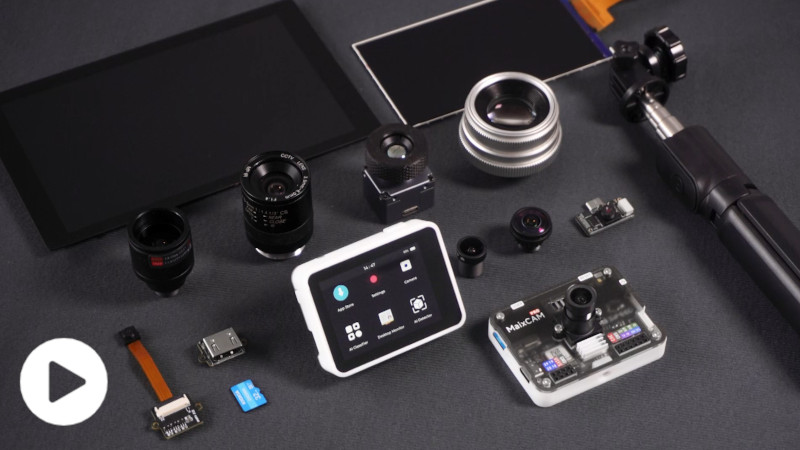
Here is a partial video demonstration of the features. For more documentation, please visit the official website: wiki.sipeed.com/maixpy/
If you like this project, please click Star on the top right of the MaixPy Project to encourage us to develop more exciting content!
Concise and Efficient Code (API) Design
With MaixPy you can easily create AI vision project within 10 lines of code:
from maix import camera, display, image, nn

classifier = nn.Classifier(model="/root/models/mobilenetv2.mud")
cam = camera.Camera(classifier.input_width(), classifier.input_height(), classifier.input_format())
disp = display.Display()

while 1:
    img = cam.read()
    res = classifier.classify(img)
    max_idx, max_prob = res[0]
    msg = f"{max_prob:5.2f}: {classifier.labels[max_idx]}"
    img.draw_string(10, 10, msg, image.COLOR_RED)
    disp.show(img)
Result:

Edge(embeded) friendly
Simply use hardware peripheral like serial port:
from maix import uart

devices = uart.list_devices()

serial = uart.UART(devices[0], 115200)
serial.write_str("hello world")
print("received:", serial.read(timeout = 2000))
MaixVision workstation
We also provide a handy MaixVision workstation software to make development easier and faster:
MaixVision
MaixHub online platform
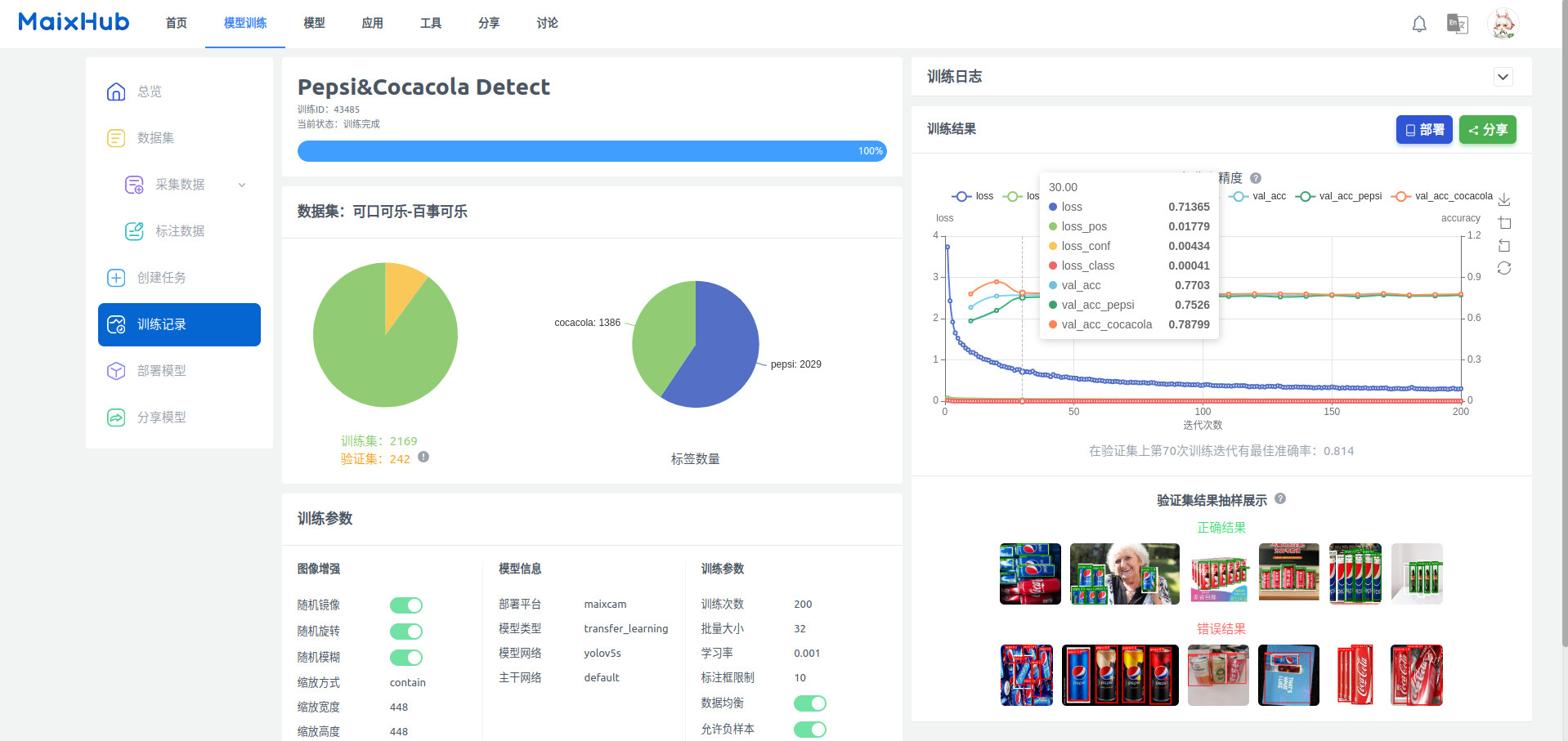
MaixHub provide free online AI train service, one click to train AI model and deploy to MaixCAM even you have no AI knowledge and expensive training equipment.
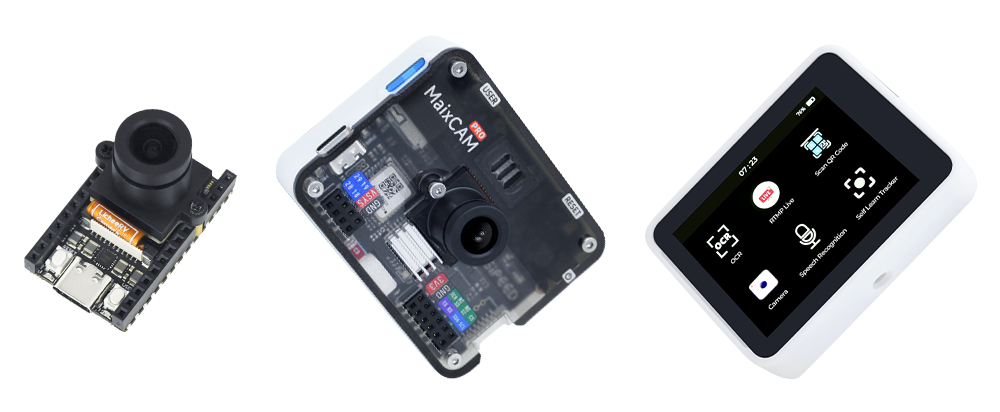
Hardware platform MaixCAM
And we provide two powerful hardware platform MaixCAM2, MaixCAM and MaixCAM-Pro.
Performance comparison
K210 and v831 are outdated, they have many limitations in memory, performance, NPU operators missing etc.
No matter you are using them or new comer, it's recommended to upgrade to MaixCAM and MaixPy v4.
Here's the comparison between them:
| Feature | Maix-I K210 | MaixCAM | MaixCAM2 |
|---|---|---|---|
| CPU | 400MHz RISC-V x2 | **1GHz RISC-V(Linux) |
700MHz RISC-V(RTOS)
25~300MHz 8051(Low Power) | 1.2GHz A53 x2(Linux)
RISC-V 32bit E907(RTT) |
| Memory | 6MB SRAM | 256MB DDR3 | 1GB / 4GB LPDDR4 |
| NPU | 0.25Tops@INT8
official says 1T but... | 1Tops@INT8 | 3.2Tops@INT8 |
| Encoder | ❌ | 2880x1620@30fps H.254/H.265/JPEG* | 38402160@30fps H.254/H.265/JPEG |
| Decoder | ❌ | 2880x1620@30fps H.264/JPEG | 1080p@60fps H.264/JPEG |
| Screen | 2.4" 320x240 | 2.3" 552x368(MaixCAM)
2.4" 640x480(MaixCAM-Pro)
5" 1280x720
7" 1280x800
10“ 1280x800| 2.4" 640x480
5" 1280x720
7" 1280x800
10“ 1280x800 |
| Touchscree | ❌ | 2.3" 552x368/2.4" 640x480 | 2.4" 640x480 |
| Camera | 30W | 500W(5M) | 800W(8M) |
| AI ISP | ❌ | ❌ | ✅ |
| WiFi | 2.4G | WiFi6 2.4G/5G | WiFi6 2.4G/5G |
| BLE | ❌ | BLE5.4 | BLE5.4 |
| USB | ❌ | USB2.0 | USB2.0 |
| Ethernet | ❌ | 100M(Optional) | 100M(on board FPC, can convert to RJ45 module) |
| SD Card | SPI | SDIO | SDIO |
| OS | RTOS | Linux(BuildRoot) + RTOS | Linux(Ubuntu) + RTT |
| Porgraming Language | C / C++ / MicroPython | C / C++ / Python3 | C / C++ / Python3 |
| SDK | MaixPy-v1 | **MaixCDK + MaixPy v4
- opencv + numpy + ...
Pure Python package or cross-compile manually | MaixCDK + MaixPy v4 - opencv + numpy + scipy + ...
Many AArch64 pre-compiled packages, and support compile on board |
| PC Software | MaixPy IDE | MaixVision Workstation | MaixVision Workstation |
| Documentation | ⭐️⭐️⭐️⭐️ | 🌟🌟🌟🌟🌟 | 🌟🌟🌟🌟🌟 |
| Online AI train | ⭐️⭐️⭐️ | 🌟🌟🌟🌟🌟 | 🌟🌟🌟🌟🌟 |
| Official APPs | ⭐️ | 🌟🌟🌟🌟🌟 | 🌟🌟🌟🌟🌟 |
| Ease of use | ⭐️⭐️⭐️⭐️ | 🌟🌟🌟🌟🌟 | 🌟🌟🌟🌟🌟 |
| AI classify(224x224) | MobileNetv1 50fps
MobileNetv2 ❌
Resnet ❌ | MobileNetv2 130fps
Resnet18 62fps
Resnet50 28fps | MobileNetv2 1218fps
Resnet50 200fps |
| AI detectonly forward part /
[include pre-post process parts(Python)] /
[dual buff mode(Python)] | YOLOv2:224x224: 15fps | YOLOv5s:224x224: 100fps
320x256 70fps
640x640: 15fps YOLOv8n:640x640: 23fps YOLO11n:224x224: 175fps
320x224: 120fps
320x320: 95fps
640x640: 23fps | YOLOv5s:224x224: 495fps
320x256: 400fps
640x480: 106fps / 73fps / 103fps
640x640: 80fps YOLO11n:224x224: 1214fps
640x480: 168fps / 77fps / 143fps
640x640: 113fps / 56fps / 98fps YOLO11s:640x480: 87fps / 53fps / 83fps
640x640: 62fps / 39fps / 59fps YOLO11l:640x640: 19fps / 16fps / 19fps |
| LLM | ❌ | ❌ | Qwen/DeepSeek 0.5B(fftf: 640ms, 9 tokens/s)
Qwen/DeepSeek 1.5B(fftf: 1610ms, 4 tokens/s)
VLM(InterVL 1B)
Mode models |
| OpenMV algorithms | test image refer to Benchmark APP | test image refer to Benchmark APP
test date: 2025.8.22,update may have optimization | test image refer to Benchmark APP
test date: 2025.8.22,update may have optimization |
| Binary | Gray 320x240: 7.4ms (135fps)
Gray 640x480: ❌
RGB 320x240: 11.3ms (88.5fps)
RGB 640x480: ❌ | Gray 320x240: 3.1ms (326fps)
Gray 640x480: 11ms (90fps)
RGB 320x240: 13.2ms (75fps)
RGB 640x480: 52.8ms (18fps) | Gray 320x240: 1.3ms (799fps)
Gray 640x480: 4.8ms (206fps)
RGB 320x240: 3.4ms (294fps)
RGB 640x480: 13.3ms (75fps) |
| Find blobs | 320x240: 8.8ms (114fps)
640x480: ❌| 320x240: 7ms (143fps)
640x480: 20ms (50fps) | 320x240: 3.7ms (271fps)
640x480: 11.1ms (89fps) |
| 1channel histogram | 320x240: 7.7ms (130fps)
640x480: ❌ | 320x240: 10.9ms (91fps)
640x480: 42.8ms (23fps) | 320x240: 1.5ms (661fps)
640x480: 5.9ms (168fps) |
| QR Code | 320x240: 130.8ms (7.6fps)
640x480: ❌| 640x480: 136.9ms (7fps)
NPU acceleration:
320x240: 22.1ms (45fps)
640x480: 57.6ms (17fps) | 640x480: 57.9ms (17fps)
NPU acceleration:
320x240: 9.2ms (109fps)
640x480: 23.2ms (43fps) |
| OpenCV algorithms | | test image refer to Benchmark APP
test date: 2025.8.22,update may have optimization | test image refer to Benchmark APP
test date: 2025.8.22,update may have optimization |
| Binary | ❌ | Gray 320x240: 2.2ms (463fps)
Gray 640x480: 7.1ms (140fps) | Gray 320x240: 0.1ms (8174fps)
Gray 640x480: 0.3ms (2959fps) |
| Gray adaptive binary | ❌ | 320x240: 5.8ms (171fps)
640x480: 21.3ms (46fps) | 320x240: 1.6ms (608fps)
640x480: 6.3ms (159fps) |
| 1channel histogram | ❌ | 320x240: 1ms (1000fps)
640x480: 6.2ms (160fps) | 320x240: 0.4ms (2308fps)
640x480: 1.7ms (604fps) |
| Find Contours | ❌ | 320x240: 2.8ms (351fps)
640x480: 8.6ms (116fps)** | 320x240: 0.4ms (2286fps)
640x480: 1.4ms (692fps) |
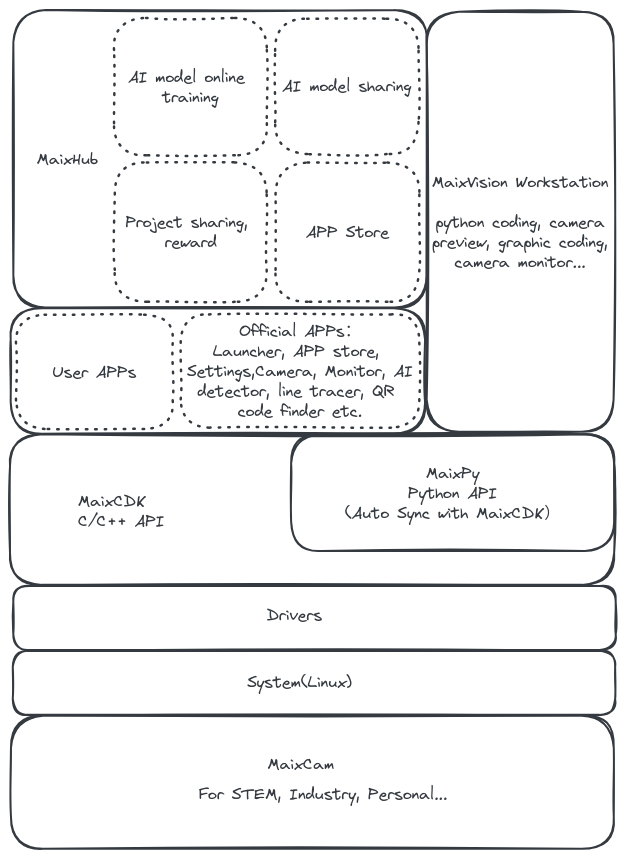
Maix Ecosystem
MaixPy not only a Python SDK, but have a whole ecosystem, including hardware, software, tools, docs, even cloud platform etc.
See the picture below:
Who are using MaixPy?
- AI Algorithm Engineer who want to deploy your AI model to embedded devices.
MaixPy provide easy-to-use API to access NPU, and docs to help you develop your AI model.
- STEM teacher who wants to teach AI and embedded devices to students.
MaixPy provide easy-to-use API, PC tools, online AI train service ... Let you focus on teaching AI, not the hardware and complicated software usage.
- Maker who want to make some cool projects but don't want to learn complicated hardware and software.
MaixPy provide Python API, so all you need is learn basic Python syntax, and MaixPy's API is so easy to use, you can make your project even in a few minutes.
- Engineer who want to make some projects but want a prototype as soon as possible.
MaixPy is easy to build projects, and provide corresponding C++ SDK, so you can directly use MaixPy to deploy or transfer Python code to C++ in a few minutes.
- Students who want to learn AI, embedded development.
We provide many docs and tutorials, and lot of open source code, to help you find learning route, and grow up step by step. From simple Python programming to
Vision,AI,Audio,Linux,RTOSetc. - Enterprise who want to develop AI vision products but have no time or engineers to develop complicated embedded system.
Use MaixPy even graphic programming to develop your products with no more employees and time. For example, add a AI QA system to your production line, or add a AI security monitor to your office as your demand.
- Contestants who want to win the competition.
MaixPy integrate many functions and easy to use, fasten your work to win the competition in limited time. There are already many contestants win the competition with MaixPy.
Compile Source Code
If you want to compile MaixPy firmware from source code, refer to Build MaixPy source code page.
License
All files in this repository are under the terms of the Apache License 2.0 Sipeed Ltd. except the third-party libraries or have their own license.
Community
- Project sharing: maixhub.com/share
- App sharing: maixhub.com/app
- Discussion: maixhub.com/discussion
- QQ group: 862340358
- Telegram: t.me/maixpy
- Github issues: github.com/sipeed/maixpy/issues





