How does AI Convert Hub's AI-optimized compression work?
AI Convert Hub's AI-optimized compression works by shrinking the size of the file while retaining its quality. The AI system fine-tunes the compression settings to achieve optimal results, reducing file sizes significantly without compromising the file's original quality.
Can AI Convert Hub handle batch processing?
Yes, AI Convert Hub can handle batch processing. This feature allows users to simultaneously convert and compress multiple files or even folders, streamlining the process and saving valuable time.
What file formats are supported by AI Convert Hub?
AI Convert Hub supports an extensive range of file formats including MP4/MOV for video, MP3/WAV for audio, JPG/PNG/WEBP for images, and also accommodates the conversion of HEIC, WEBM, and RAW formats among others. In total, AI Convert Hub supports over 200 file formats.
Does AI Convert Hub offer advanced controls?
Yes, AI Convert Hub provides advanced controls that are aware of codecs. These controls allow for adjustments of variables like CRF/bitrate/frame rate in video files, or audio channels in audio files.
Is it necessary to install software to use AI Convert Hub?
No, it is not necessary to install software to use AI Convert Hub. AI Convert Hub is a browser-based tool and requires no software installation, making it an easily accessible tool for all users.
What is the role of codecs in AI Convert Hub's functionality?
In AI Convert Hub's functionality, codecs play an important role as they are responsible for the compression and decompression of digital audio and video. AI Convert Hub's advanced controls are aware of codecs which enable adjustments for variables in video and audio files.
How does AI Convert Hub ensure data security?
AI Convert Hub ensures data security through 256-bit SSL encryption for transfers. In addition, files are deleted after processing as an added measure to protect user's privacy.
Can I adjust video frame rates using AI Convert Hub?
Yes, you can adjust the video frame rates using AI Convert Hub. It offers advanced controls that can alter variables such as CRF, bitrate, and frame rate in video files.
What are the benefits of a Pro Account on AI Convert Hub?
A Pro Account on AI Convert Hub allows you to undertake heavier tasks that may not be accommodated in the free tier. This could be beneficial if you have large batch jobs or require more extensive or frequent conversions.
How does the Free Usage Tier work on AI Convert Hub?
The Free Usage Tier on AI Convert Hub allows users to use the tool's basic features without any cost. For heavier tasks or batch jobs, an upgrade to a Pro Account may be required.
Does AI Convert Hub delete files post-processing?
Yes, AI Convert Hub deletes files post-processing as a data security measure to protect the user's privacy.
What does AI Convert Hub mean by 'professional encoding'?
'Professional encoding' in the context of AI Convert Hub refers to the sophisticated process it uses to convert one format of data into another. This method goes beyond just changing file extensions; it is a detailed, thorough process that adjusts multiple variables in video and audio files to produce high-quality results.
What variables can I adjust when converting video files with AI Convert Hub?
With AI Convert Hub, you can adjust variables such as CRF, bitrate, and frame rate when converting video files. The tool's advanced controls provide you with comprehensive options to fine-tune your video settings.
Can AI Convert Hub convert RAW files?
Yes, AI Convert Hub can convert RAW files. It supports various file formats including RAW for conversion.
How can I adjust the audio channels when converting audio files on AI Convert Hub?
You can adjust the audio channels when converting audio files on AI Convert Hub. The tool offers codec-aware controls that allow you to manipulate the audio channels and other variables as per your requirements.
Does AI Convert Hub support the conversion of HEIC and WEBM formats?
Yes, AI Convert Hub supports the conversion of both HEIC and WEBM formats. This support is part of their extensive range of over 200 supported formats.
Does AI Convert Hub retain quality when reducing file sizes?
Yes, AI Convert Hub retains quality when reducing file sizes. This is achieved through its AI-optimized compression which is designed to preserve quality while drastically reducing the file size.
In what way does AI Convert Hub's functionality go beyond simply changing file extensions?
AI Convert Hub's functionality goes beyond simply changing file extensions by using professional-grade encoding tools. This involves advanced controls aware of codecs, thus enabling adjustments for variables such as CRF/bitrate/frame rate in video files, or audio channels in audio files. This thorough conversion process results in better, more efficient results.
What security measures does AI Convert Hub take during data transfers?
AI Convert Hub uses 256-bit SSL encryption during data transfers as a security measure. This high level of encryption ensures secure routing and protects the user's data during the process.
What is AI Convert Hub?
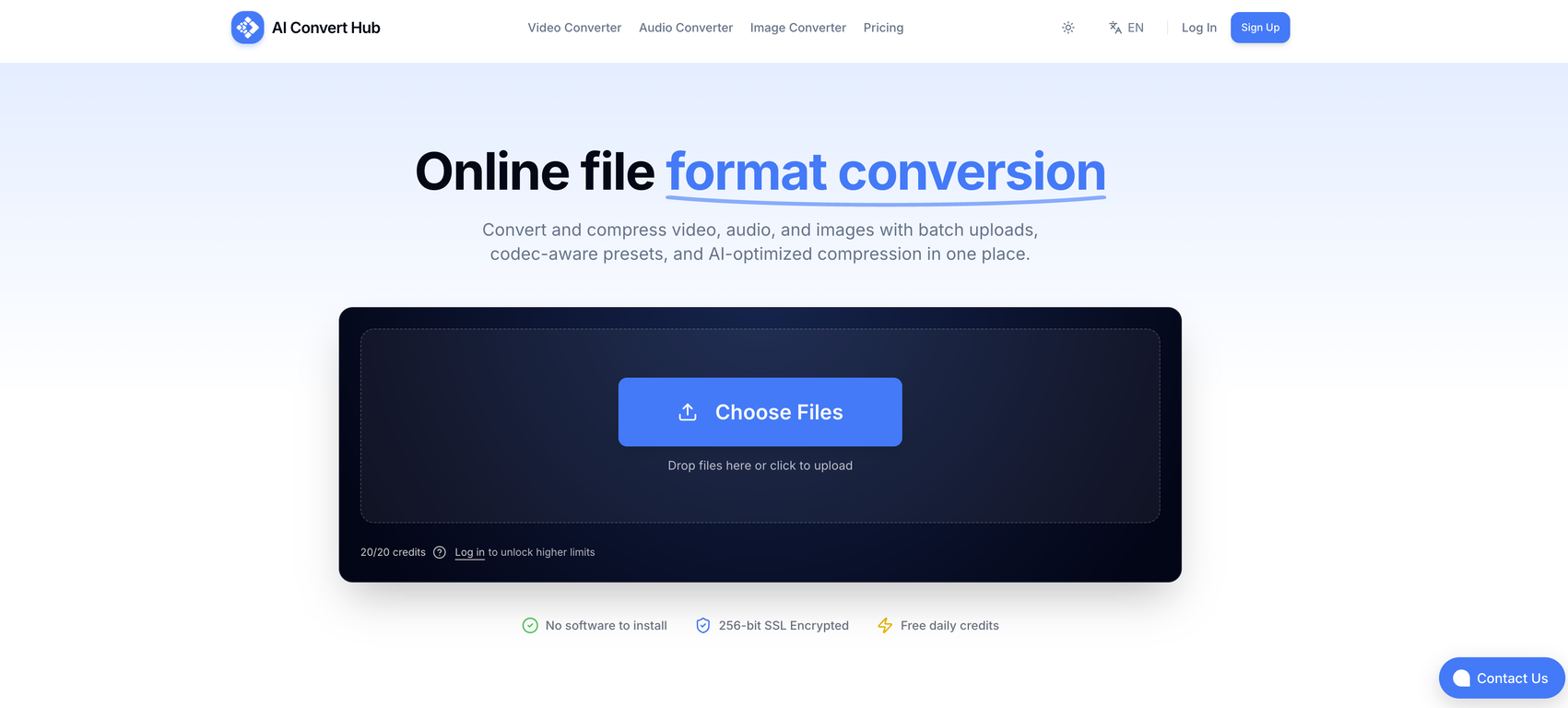
AI Convert Hub is an online tool used for professionally encoding, converting, and compressing video, audio, and image files. It offers AI-optimized compression, secure routing, batch processing, and supports a wide variety of formats.
What file formats does AI Convert Hub support?
AI Convert Hub supports over 200 file formats including popular ones like MP4, MOV for video; MP3, WAV for audio; and JPG, PNG, WEBP for images. It also accommodates the conversion of HEIC, WEBM, and RAW formats among others.
How does the AI-optimized compression work on AI Convert Hub?
AI-optimized compression at AI Convert Hub works using artificial intelligence to reduce file sizes while retaining the quality of the original file. It efficiently manages the compression to ensure no significant loss of data during the process.
Can I perform batch processing on AI Convert Hub?
Yes, AI Convert Hub is equipped with the capability to perform batch processing. Users can simultaneously convert and compress multiple files or even complete folders.
How secure is data transfer on AI Convert Hub?
AI Convert Hub prioritizes secure data handling by using 256-bit SSL for all file transfers. This provides a high level of encryption and security for files during transit to and from the system.
Is it necessary to install any software to use AI Convert Hub?
No, it is not necessary to install any separate software to use AI Convert Hub. It is a browser-based tool and can be used directly on your preferred web browser.
What file types can I convert and compress with AI Convert Hub?
With AI Convert Hub, you can convert and compress a wide range of file types. These include various video formats like MP4, MOV; audio formats like MP3, WAV; and image formats like JPG, PNG, WEBP among others.
Does AI Convert Hub retain the quality of the file during compression?
Yes, AI Convert Hub ensures the quality of the original file is preserved during the compression process. It uses AI-optimized compression to minimize data loss and maintain the quality of the file.
Does AI Convert Hub offer customization for video and audio conversion?
Yes, AI Convert Hub offers codec-aware presets that allow for customization during video and audio conversions. You can adjust variables like CRF, bitrate, frame rate in video files, or audio channels in audio files.
Can I adjust the bitrate and frame rate of a video through AI Convert Hub?
Yes, AI Convert Hub lets you adjust the bitrate and frame rate of a video during the conversion process. It provides advanced controls that are aware of these variables allowing you to customize the conversion according to your needs.
Does the conversion process on AI Convert Hub reduce the quality of my files?
No, AI Convert Hub preserves the quality of your files during the conversion process. It uses AI-optimized compression technology to ensure quality retention even when the file sizes are significantly reduced.
Can AI Convert Hub handle large scale tasks?
Yes, AI Convert Hub can handle large scale tasks with ease. The tool's batch processing feature enables it to simultaneously convert and compress multiple files or even complete folders.
How does AI Convert Hub ensure data privacy after file conversion?
AI Convert Hub ensures data privacy by deleting all files post-processing. This means that none of your files remain on the system after the conversion and compression processes have been completed.
Do I need to pay to use AI Convert Hub's services?
AI Convert Hub offers a generous free tier for users. But heavier tasks, such as large scale batch jobs, may require an upgrade to a Pro account.
What does upgrading to a Pro account on AI Convert Hub get me?
Upgrading to a Pro account on AI Convert Hub entitles you to handle heavier tasks. Although specifics are not provided, it is implied that upgrading to a Pro account allows you to work with larger files or perform more complicated batch jobs.
How does AI Convert Hub process multiple files at once?
AI Convert Hub processes multiple files at once through its distributed conversion pipeline, which processes files in parallel. This allows for quick and efficient processing of numerous files simultaneously.
What kind of advanced control does AI Convert Hub offer during conversion?
AI Convert Hub offers advanced codec-aware controls during the conversion process. These allow you to adjust variables like Critical Rate Factor (CRF), bitrate, frame rate in video files, and audio channels in audio files.
How can I access AI Convert Hub's professional-grade encoding tools?
AI Convert Hub's professional-grade encoding tools are accessible directly from your web browser. There's no need to install any additional software. These tools are integrated into the tool's conversion process and can be used as needed.
Can AI Convert Hub convert RAW formats?
Yes, AI Convert Hub can convert RAW formats alongside over 200 other file formats. It provides professional-grade encoding tools for conversions of even specialized file formats like RAW.
 Flow - 4x faster than typing

 Mini tools
 Convert and compress video, audio, and images with AI-optimized compression.
 GetSpiced
 CleeAI
 Starnus
 Activepieces
 Avataar's GenAI Creator
 Olivya
 Abstra
 Pipefy
 DoubleO
 Quixl
Quixl
 Neferdata
 Cubeo
Cubeo
 Sema4.ai
 Ridvay
 Tray.io
 Cognition by Mindcorp
 GoodWork
 Mr David
 UiPath
 Super Amplify
 genset









 Start your journey -Turn any format image, audio, video, OCR, pdf





How would you rate AI Convert Hub?
Help other people by letting them know if this AI was useful.