What are the main features of Blinkvid?
Blinkvid supports three key workflows: text-to-video, image-to-video, and reference workflows. It's designed to allow users to select the most suitable AI model for each specific job within one workspace. Its features also include still-frame animation capabilities, prompt-based workflows for fast drafts and social ads, and reference-guided workflow for precise control over video content in terms of framing, pacing, and overall tone.
How does the text-to-video workflow function in Blinkvid?
The text-to-video workflow in Blinkvid is driven by a 'prompt-first' strategy. This allows users to input a textual description or idea which is then interpreted into visual content by an artificial intelligence model. This workflow is suitable for fast drafts, social ads, and quick concept work.
How does the image-to-video workflow function in Blinkvid?
The image-to-video workflow of Blinkvid allows users to animate still images. When the composition and styling are settled on a stationary image, Blinkvid can add motion aspects to bring the image to life. This is particularly useful when the frame composition is already established, and only the movement is missing.
What is the reference-guided workflow in Blinkvid?
The reference-guided workflow in Blinkvid allows users to create videos that must adhere closely to a specific brief in terms of framing, pacing, and overall tone. By using reference images or videos, users can provide the AI with guidelines to conform to while creating the video.
What are the different AI models supported by Blinkvid?
Blinkvid supports a range of AI models including Veo 3.1, Seedance 2.0, Sora 2 and more. This enables users to select the model that best fits the needs of their specific video creation task.
What is the purpose of a multi-model AI video generator like Blinkvid?
The purpose of a multi-model AI video generator like Blinkvid is to allow users to select the most suitable artificial intelligence model for each specific job within one workspace. By doing so, it streamlines the video content creation process and accelerates production without the need to switch between different tools.
How can Blinkvid be used to create social ads?
Blinkvid can be used to create social ads through its text-to-video feature. Users provide a textual description or prompt defining the intended vibe, theme, and elements of the ad. The AI interprets this prompt and generates a social ad video, making it useful for quick draft and concept work of ad content.
Can Blinkvid animate still images?
Yes, Blinkvid has a feature that allows for still-frame animation. It enables a stationary image to be animated to exhibit movement. This comes in handy when the composition and styling are already set and only motion is required.
How does Blinkvid help in video pacing and framing?
In Blinkvid, video pacing and framing can be fine-tuned via the reference-guided workflow. This unique feature allows videos to conform closer to the original brief, ensuring precise control over these aspects of the visual content.
What do you mean by prompt-based workflows in Blinkvid?
Prompt-based workflows in Blinkvid are workflows that are initiated and guided by prompts or textual descriptions provided by the user. This feature forms the basis for fast drafts, social ads, and quickly conceptualizing ideas into video content.
Can Blinkvid help to quickly conceptualize ideas?
Yes, Blinkvid can help to quickly conceptualize ideas through its text-to-video feature. By inputting a textual description or idea into the system, the AI interprets it into an animated video, making it easy for users to visualize their concepts.
How can Blinkvid streamline the content creation process?
Blinkvid streamlines the content creation process by providing a unified platform for different AI video generation models. It reduces the need to switch between separate tools, thus accelerating the creation process. Furthermore, it incorporates various workflows, i.e., text-to-video, image-to-video, and reference workflows that expedite content production.
In what ways does Blinkvid function as an all-in-one workspace?
Blinkvid functions as an all-in-one workspace by giving users an integrated platform to conduct text-to-video, image-to-video, and reference-guided work. All these steps of the video generation process occur within a single workspace, making it uncomplicated and efficient.
Can Blinkvid create content that conforms closely to the original brief?
Yes, Blinkvid can create content that conforms closely to the original brief through its reference-guided workflow. This workflow allows the user to provide the AI with a reference, which it uses to generate a video that faithfully adheres to the user's vision in terms of framing, pacing, and overall tone.
Does Blinkvid support Veo 3.1, Seedance 2.0, and Sora 2?
Yes, Blinkvid does support AI models including Veo 3.1, Seedance 2.0, and Sora 2. These models are included in the wide range of AI models that this multi-model AI video generator supports.
How does Blinkvid improve the speed of video production?
Blinkvid increases the speed of video production by providing a single platform for different AI video generation models, reducing the need for toggling between separate tools. Its different workflows, particularly the prompt-first workflow, allow for a fast production of drafts, social ads, and quick concepts.
Is Blinkvid suitable for both individual and commercial use?
Yes, Blinkvid is suitable for both individual and commercial use. It streamlines the video creation process, making it a handy tool for individuals looking to create AI-generated videos. At the same time, its advanced features, variety of AI models, and streamlined workflows make it suitable for commercial applications as well.
What is the benefit of supporting multiple AI models in one platform like Blinkvid?
The benefit of supporting multiple AI models in a platform like Blinkvid is diversification. Each AI model has different strengths and specialties in generating video content. Having multiple AI models on a single platform allows users to choose the most suitable model for their specific job, thereby providing more flexibility and better results.
Does Blinkvid require toggling between separate tools?
No, one of the main features of Blinkvid is that it does not require users to toggle between separate tools. All tasks, whether they are text-to-video, image-to-video, or reference workflows, can be performed within Blinkvid's single, all-in-one workspace.
What is Blinkvid?
Blinkvid is a multi-model AI video generator that facilitates video content creation. It is designed with features that support text-to-video, image-to-video, and reference workflows, giving users the flexibility to produce a diverse range of video types. Many top models including Veo 3.1, Seedance 2.0, and Sora 2 are available within the tool. Furthermore, it consists of an all-in-one workspace that streamlines the video creation process. Features such as AI Celebrity Video Generator and video prompt library are available to aid user creativity and enhance their video production capabilities.
How does Blinkvid's multi-model AI work?
Blinkvid operates by offering a range of AI models within its all-in-one workspace to support different types of video creation workflows. These models can be text-to-video, image-to-video, or reference-guided workflows, catering to diverse user needs and project specifics. Additionally, Blinkvid provides practical video prompt library features and an AI Celebrity Video Generator to further enhance the video generation process. The user has the freedom to choose the most suitable AI model for each specific job.
Which AI models are available in Blinkvid?
Blinkvid supports a variety of top AI video models, including Veo 3.1, Seedance 2.0, Sora 2, and more. These models offer unique features and enable a broad spectrum of functionalities, aiding various video creation needs.
What is the function of Seedance 2.0 model?
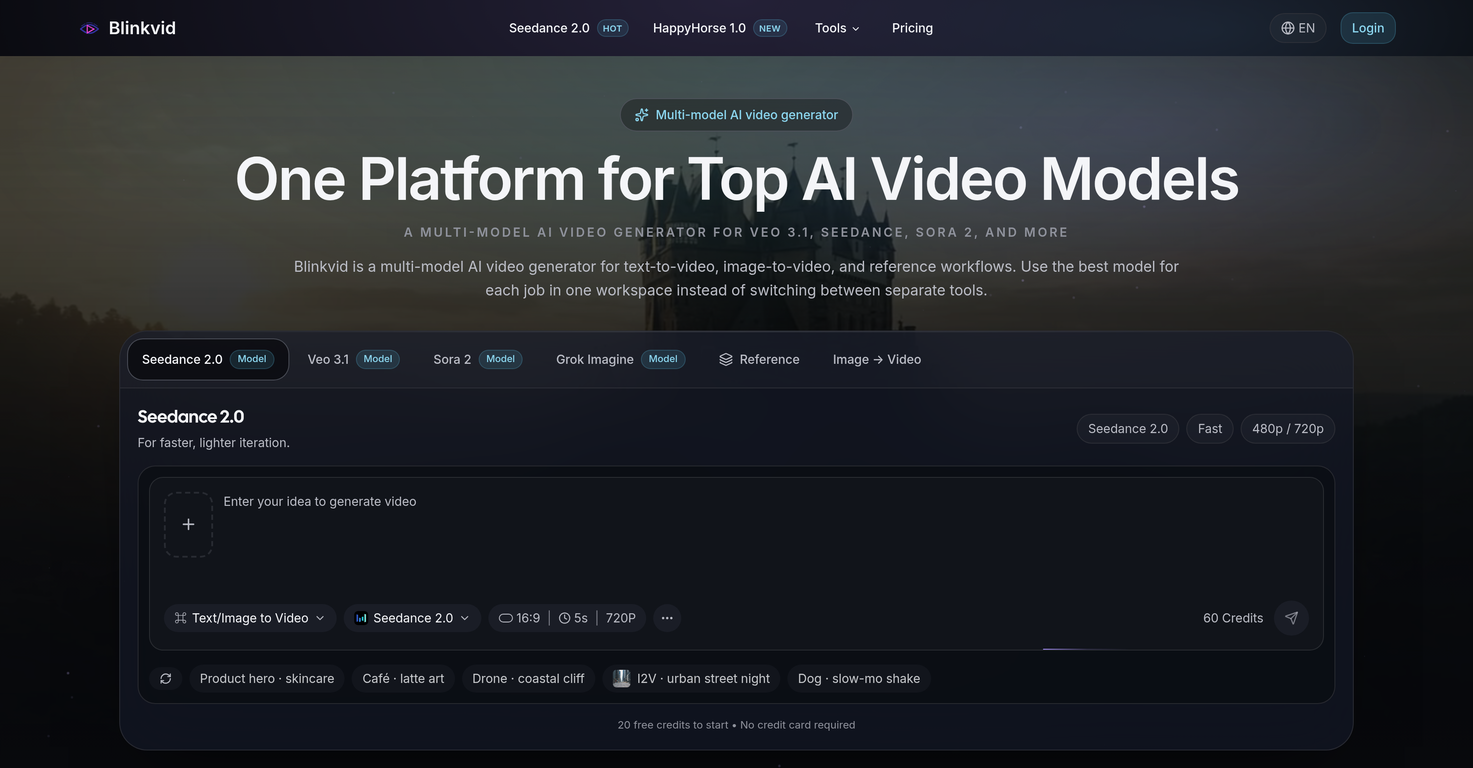
The Seedance 2.0 model in Blinkvid facilitates faster and lighter video iteration. It is designed to create videos from text and images and supports varying video resolutions (480p/720p). Therefore, it is a good option for tasks like still-to-motion video content conversion
What is the Veo 3.1 model in Blinkvid used for?
Veo 3.1 is one of the AI models available within Blinkvid. However, their website does not provide specific details about the function and capabilities of this model.
What type of workflows does Blinkvid support?
Blinkvid supports three key workflows: text-to-video, image-to-video, and reference workflows. The text-to-video workflow allows users to turn ideas into videos by providing just a descriptive text prompt. The image-to-video workflow enables still frames to be animated into moving visuals, maintaining the composition, styling, and brand direction. Lastly, the reference workflow is used when the brief needs to hold to preserve framing, mood, or pacing closely, providing a more accurate realization of the original concept.
How does the text-to-video feature work on Blinkvid?
The text-to-video feature on Blinkvid operates by starting with a descriptive text prompt provided by the user. The selected AI model then interprets this text and generated representations as moving video content. The text can be as specific as necessary to guide the model towards the desired output.
How can I use the image-to-video functionality of Blinkvid?
The image-to-video functionality of Blinkvid animates still images into moving visuals. Users upload a still image and the selected AI model carefully interprets it into a dynamically animated video while maintaining the composition and styling of the original image.
What does reference workflows mean in the context of Blinkvid?
In the context of Blinkvid, reference workflows imply video creation that strictly adheres to a given reference in the brief. This is especially useful in video production scenarios where the final product needs to mirror closely the original brief in terms of framing, pacing, and overall tone.
How can I use Blinkvid's still-frame animation capabilities?
The user can harness Blinkvid's still-frame animation capabilities by utilizing the image-to-video workflow feature. By selecting an image, the AI model adds motion elements to it, essentially turning the still frame into an animated scene. This is ideal when the composition and styling are already perfect, and only movement is needed.
What is reference-guided workflow on Blinkvid?
Blinkvid's reference-guided workflow aids in creating videos in accordance with a specific reference or brief. This workflow ensures that the final video content aligns closely with the specified requirements in aspects like framing, movement, and pacing.
Can Blinkvid animate stationary images?
Yes, Blinkvid has the ability to animate stationary images. It can infuse motion into a still image and turn it into a video, while preserving the composition and styling of the image.
What is the prompt-based workflow in Blinkvid?
Blinkvid's prompt-based workflow is a feature that allows users to instigate the video creation process by providing a descriptive text prompt. This is particularly useful for quick drafting, conceptualizing ideas, and creating social ads. The AI model interprets the user's input and generates the corresponding video content.
What is the purpose of Blinkvid's video prompt library?
Blinkvid's video prompt library serves as a resourceful tool for users who need inspiration or guidance in defining their video specifications. It provides a collection of practical prompts for different scenarios like cinematic scenes, product clips, and social ads, offering a starting point for content ideation.
How can I download and share videos created in Blinkvid?
After the video content is created in Blinkvid, the user can easily download the video in HD quality. These videos can then be shared anywhere the user desires, thus facilitating simple distribution and propagation of the generated content.
What is AI Celebrity Video Generator and how does it work in Blinkvid?
AI Celebrity Video Generator is a unique feature in Blinkvid that facilitates the creation of celebrity-styled video concepts from text or images. Users can select the model that best suits their desired look and feel, and the AI will create a video reflecting the intent. However, the specific workings of this feature are not elaborated on their website.
How does Blinkvid accelerate content production?
Blinkvid accelerates content production by streamlining the entire video creation process within one workspace. Utilizing multi-model AI technology, it enables users to switch between AI models easily depending on the job requirements without needing separate tools. This flexibility together with features like AI Celebrity Video Generator, an effective prompt library, and diverse workflow options significantly cut down time and enhances productivity.
What pricing plans does Blinkvid offer?
Blinkvid offers a variety of pricing plans to suit different user needs. These include the Basic Plan at $8.90/month, the Pro Plan at $28.90/month, and the Team Plan at $69.90/month. Each plan offers differing credit limits and features to meet varying creative and business demands.
Can I add a reference image to the descriptive text prompt in Blinkvid?
Yes, Blinkvid allows the addition of a reference image to the descriptive text prompt. This additional visual information can guide the AI model in creating video content that is closer to the user's vision.
How does Blinkvid adhere to business requirements?
Blinkvid adheres to business requirements by offering diverse workflow options, an array of top AI video models, an all-in-one workspace, and customizable pricing plans. Combining these aspects with its prompt-based workflows, still-frame animation capabilities, AI Celebrity Video Generator, and the ability to create videos that closely follow the given reference, Blinkvid exhibits scalability and flexibility that caters to different business needs.
 Tripo AI 3D Generator

 Mini tools
 One platform for top AI video models.
 freebeat AI
 DeepMode
 Magik Face
 D-ID
D-ID
 MagicLight
 HeyGen
 Kaiber Superstudio
 Seedance
 Kling
Kling
 AI Video Generator by RenderFlow AI
 neural frames
 Chraft AI
 Funy AI: AI Dance, AI Bikini, AI Kiss
 ViGi
ViGi
 Videnly
 Viddo AI - AI Video Generator
 VidGen AI Video Generator
 Wan Video
 CreatorFrames
 AIReel
 So You Want To Be A Writer?
 Minka
Minka
 Ancient AI powered spirits
 Jvb ai
 somacguffin
 Cuty
Cuty
 Superfly Stoner







 Turn Music & Ideas into Viral Videos In One Click
 kanawati🙏 1,152 karmaMar 26, 2025@freebeat AIThe concept is great.
 Create AI-generated videos with easeWE USE D-ID AT THE COLORADO VIRTUAL CREATIVE FACTORY...AND LOVE IT.
 Transform text into captivating videos instantly.You get 300 credits upon signing up, which is enough to test out the app and see its potential. I had a bit of fun with it. It takes a few minutes to generate content, but the results are impressive. There are many styles, modifiers, and customization options available. I would definitely use this for content creation or storytelling.
 Create AI spokesperson videos from text
 AI Video GenerationThey're dreaming if they think I'd give them my credit card info just for a free trial. Most useless thing ever...
 Multi-shot video generation from text and image.