How does Documentation.AI aid in the publishing process?
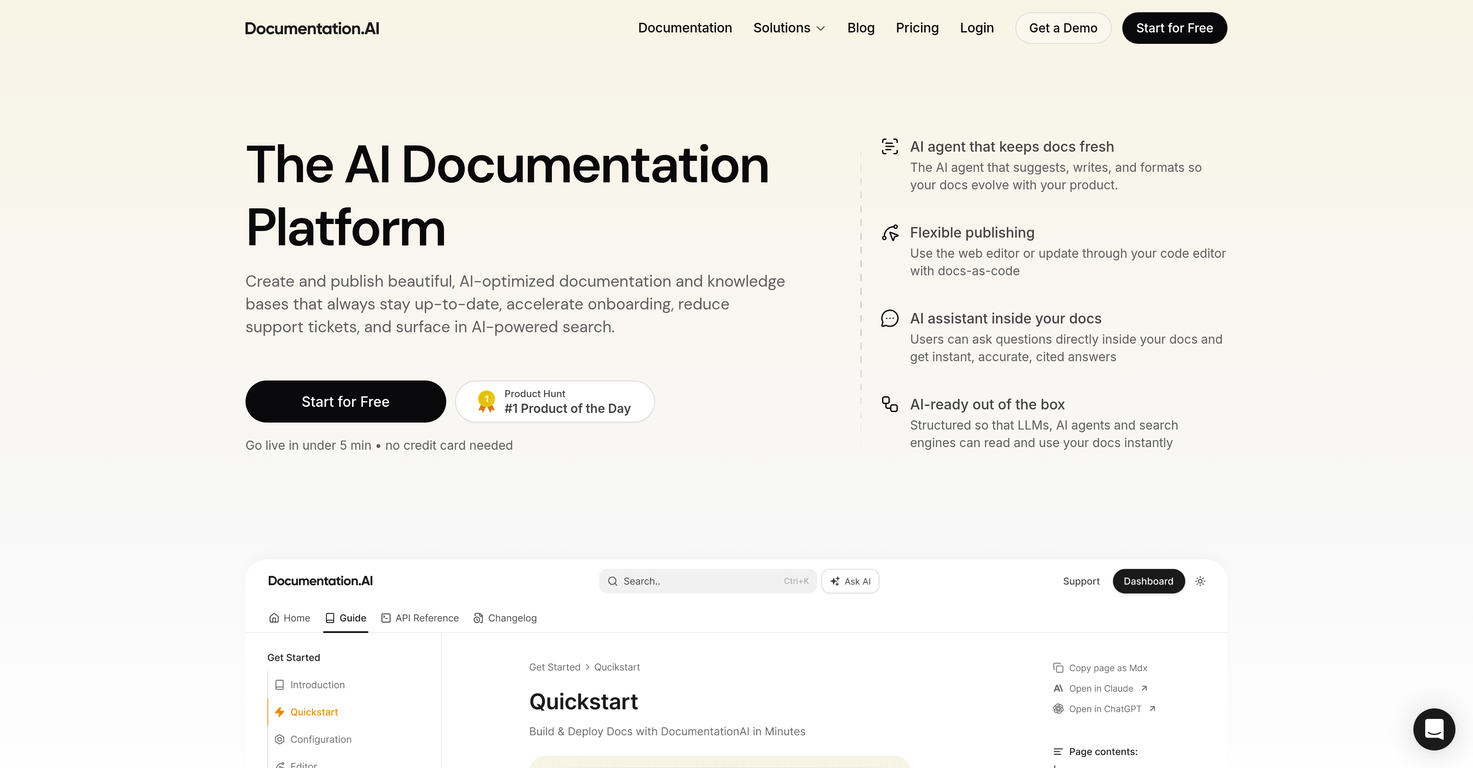
Documentation.AI aids in the publishing process by using its AI to support both web editor based publishing and docs-as-code publication through a code editor. Its built-in AI agent suggests, writes, and formats the documentation, making the process fluid and efficient.
What is the purpose of the auto-generation feature for llms.txt in Documentation.AI?
The auto-generation feature for llms.txt in Documentation.AI is designed to establish a single source of truth for AI assistants and improve SEO discoverability. By exposing clean, structured content, it helps AI assistants access the most accurate and comprehensive data thus improving their performance.
How does Documentation.AI ensure the real-time provision of information for AI agents?
Documentation.AI ensures the real-time provision of information for AI agents by maintaining an updated and immediately accessible documentation database. Unlike fixed training cutoffs in traditional models, Documentation.AI provides real-time information which allows AI agents to see the latest updates instead of outdated snapshots.
How is Documentation.AI structured for SEO optimization?
Documentation.AI is structured for SEO optimization through a number of ways. Mainly by maintaining updated, accessible and high-quality content that is structured and clean for easy indexing by search engine bots. The platform is also equipped with an auto-generation feature for llms.txt that improves SEO discoverability by exposing clean, structured content.
Can non-technical users also use Documentation.AI?
Yes, non-technical users can also use Documentation.AI. It has an intuitive and user-friendly interface with a built-in AI assistant that guides users and answers their queries. Moreover, the platform includes a Notion-style editor with simple features such as drag-and-drop blocks and slash commands to provide a user-friendly experience.
What tracking does Documentation.AI do beyond creation and updating of documentation?
Beyond creation and updating of documentation, Documentation.AI also monitors product changes, feature releases, support signals, user feedback, and audit logs. This monitoring helps to highlight whenever the present documentation is out of date and therefore, allows the platform to ensure the documentation stays accurate, precise and up-to-date.
What does it mean that Documentation.AI creates a single source of truth for AI assistants?
Creating a single source of truth for AI assistants in Documentation.AI refers to the establishment of a singular, authoritative and constant place for data that AI assistants can refer to. This is achieved through the auto-generation feature for llms.txt. This feature presents clean, structured content that becomes the definitive reference point for AI assistants ensuring consistency and accuracy.
How does Documentation.AI improve SEO discoverability?
Documentation.AI improves SEO discoverability by maintaining updated, structured, and high-quality content. The platform's AI agents create content that is easily indexable by search engines. Moreover, it provides an auto-generated llms.txt that exposes clean and structured content, improving its discoverability and boosting its visibility on search engine results.
Does Documentation.AI allow direct user interaction within the documentation?
Yes, Documentation.AI allows direct user interaction within the documentation. Its built-in Agentic AI assistant enables users to ask questions directly within the documentation, receiving instant, accurate responses. This improves the user experience by providing immediate and precise answers to their queries.
How does Documentation.AI ensure its documentation is user-friendly and accessible?
Documentation.AI ensures its documentation is user-friendly and accessible by using an intuitive interface and smart AI features. It provides a Notion-style editor with easy-to-use features for creating and publishing documentation. AI assistants are available to provide instant, accurate answers to users' queries directly within the documentation, making the process efficient and easy to use.
How suitable is Documentation.AI for individual use?
Documentation.AI is suitable for individual use. With its intuitive interface, smart AI features, and Notion-style editor, individuals can easily create, update, and use documentation. The platform is designed to accommodate the needs of both developers and non-technical users, making it a comprehensive documentation solution for individuals running personal or small projects.
How does Documentation.AI ensure high-speed delivery of documentation?
Documentation.AI ensures high-speed delivery of documentation by using modern web development practices and performance optimization techniques. It is optimized for high-speed performance, thereby making the documentation load faster and providing a seamless user experience.
Can Documentation.AI accommodate enterprise use?
Yes, Documentation.AI can accommodate enterprise use. With its robust AI capabilities and comprehensive tracking and updating mechanisms, Documentation.AI is capable of handling large scale, complex projects typically associated with enterprise use. Not only does it automate the documentation creation and updating process but also ensures the information presented is accurate, current, and accessible.
What makes Documentation.AI's interface intuitive?
Documentation.AI's interface is intuitive as it's designed to closely match common editing tools and environments that users are already familiar with. The interface includes a Notion-style editor, allowing seamless creation and editing of documentation employing drag-and-drop blocks and slash commands. These easy-to-use features collectively make the platform user-friendly, simplifying the documentation process without a hefty learning curve.
What is the main purpose of Documentation.AI?
Documentation.AI's main purpose is to facilitate the creation, updating, and deployment of documentation and knowledge bases by employing its AI capabilities. It helps keep the information accurate, relevant and easier to navigate for the users.
Who can use Documentation.AI?
Documentation.AI can be used by both technical and non-technical users, making it a suitable platform for developers as well as non-coders who need to maintain project documentation.
What are the key features of the Documentation.AI platform?
Key features of Documentation.AI include: AI-assisted editing and updating of documentation, auto-generating llms.txt files, a built-in Agentic AI assistant, an intuitive Notion-style editor, real-time specifications changes through the Model Context Protocol Server, customizable templates, an API testing playground, and functionality for tracking product changes, feature releases, user feedback, and audit logs.
How does Documentation.AI ensure that documentation stays up-to-date?
Documentation.AI ensures that documentation stays up-to-date by employing AI capabilities to suggest, write, and format documentation based on product evolutions. It also proactively tracks product changes, feature releases, support tickets, user feedback, and audit logs to detect when documentation becomes outdated, even before users encounter incorrect information.
How does Documentation.AI's AI agent contribute to the creation and updating of documentation?
Documentation.AI's AI agent contributes to the creation and updating of documentation by suggesting improvements, reworking unclear sections, fixing structure, summarizing changes, and generating clean draft updates. This ensures the documentation remains fresh and optimized as the product evolves.
Can Documentation.AI be used for docs-as-code updates?
Yes, Documentation.AI can be used for docs-as-code updates. It accommodates machine learning models and search engines that read and use the available documents. These updates can be made via any preferred code editor.
How does Documentation.AI assist in the publishing process?
Documentation.AI assists in the publishing process by providing an effortless update system through its web editor and also allowing the implementation of docs-as-code through any code editor. It further aids in publishing by maintaining an organized structure, and facilitating real-time provision of information for AI agents.
What tools does Documentation.AI offer to track product changes and user feedback?
Documentation.AI tracks product changes, feature releases, user feedback, and audit logs to determine when documentation becomes outdated. This proactive approach ensures the documentation is maintained accurately and up-to-date.
Does Documentation.AI come with an AI assistant feature for direct inquiries within the documentation?
Yes, Documentation.AI comes with a built-in Agentic AI assistant. This allows users to ask questions directly within the documentation and receive instant, accurate responses.
What measures does Documentation.AI take to ensure speed and accessibility?
Documentation.AI ensures speed and accessibility by focusing on a design that is user-friendly, accessible and delivers high-speed, SEO-optimized documentation. It achieves fast loading times for its documentation pages ensuring smooth and quick access.
How does Documentation.AI improve SEO discoverability?
Documentation.AI improves SEO discoverability through the auto-generation of llms.txt that establishes a single source of truth for AI assistants. This delivers clean, structured content enhancing the discoverability in search engines.
What type of content can be created and maintained on Documentation.AI?
With Documentation.AI, users can create and maintain a range of content including documentation, knowledge bases, and other written materials relevant to the product being documented.
What is the Notion-style editor in Documentation.AI?
The Notion-style editor in Documentation.AI is an intuitive interface that provides easy-to-use features such as drag-and-drop blocks and slash commands. This allows users to create and manage documentation effectively, regardless of their technical expertise.
What is the Model Context Protocol Server in Documentation.AI?
The Model Context Protocol Server in Documentation.AI facilitates real-time specification changes by streaming them to any model that supports the protocol. This ensures the AI tools always work with the latest versions of documentation.
Can Documentation.AI help in reducing support tickets?
Yes, Documentation.AI can aid in reducing support tickets by keeping the documentation up-to-date and thus minimising user queries and errors. The immediate responses provided by its AI assistant can also help in resolving queries faster, reducing the load on support tickets.
What functionalities does Documentation.AI provide for faster onboarding?
Documentation.AI provides AI-optimized documentation and knowledge bases that always stay up-to-date for onboarding. This quick and consistent availability of accurate information facilitates a speedier onboarding process.
How does Documentation.AI enhance user engagement?
Documentation.AI enhances user engagement by providing a UI that is designed with performance, accessibility and SEO in mind. It features an interactive API testing playground and in-document AI assistance, enabling users to get immediate responses to their queries.
What interactive elements does Documentation.AI feature?
Interactive elements that Documentation.AI features include an API playground for testing endpoints and tweaking parameters, and a built-in Agentic AI assistant that provides instant responses to user inquiries within the documents.
What customizations does Documentation.AI offer for its user interface?
Documentation.AI offers a range of customizations for its user interface, such as allowing users to change colors, fonts, layouts, or even inject their own CSS & JS. It also provides over 100 reusable blocks catering to various needs, from callouts to code tabs.
How does Documentation.AI support API testing?
Documentation.AI supports API testing through its interactive API testing playground. Here, users can test endpoints, modify parameters, and copy ready-to-run code snippets directly from the documentation.
 Base44 Superagents-AI agent that does it all
 Mini tools
 AI documentation that stays fresh and reduces support tickets.
 Gatsbi AI
 PaceAI
 DocsHound
 Kopyst
 MindyGem
 TestScribe AI
 Technical Documents Generator
 Expert in Technical Writing
 Hugging face Documentation Generator
 Grammar Generator Custom Programming Language
 KjamiTechDocs
 Product Speacifications Generators Using

 Prosetta
 DocNexus
 Velocibid
 Defapi
 CoreStory






 Ou Takuzen🙏 31 karmaMar 4, 2025@Gatsbi AIGatsbi combines AI-driven combinatorial innovation with human-developed TRIZ methodology, making it uniquely powerful for practical applications. Unlike purely research-focused systems, it delivers immediate value through features like automatic patent document generation and academic paper creation. By efficiently navigating vast solution spaces, Gatsbi identifies novel approaches to complex problems while maintaining feasibility. This tool significantly lowers barriers to innovation for organizations without dedicated scientific teams, making cutting-edge research capabilities accessible to more users across all scientific disciplines.


 0
0



