What elements in my Shopify store does RevLeak scan?
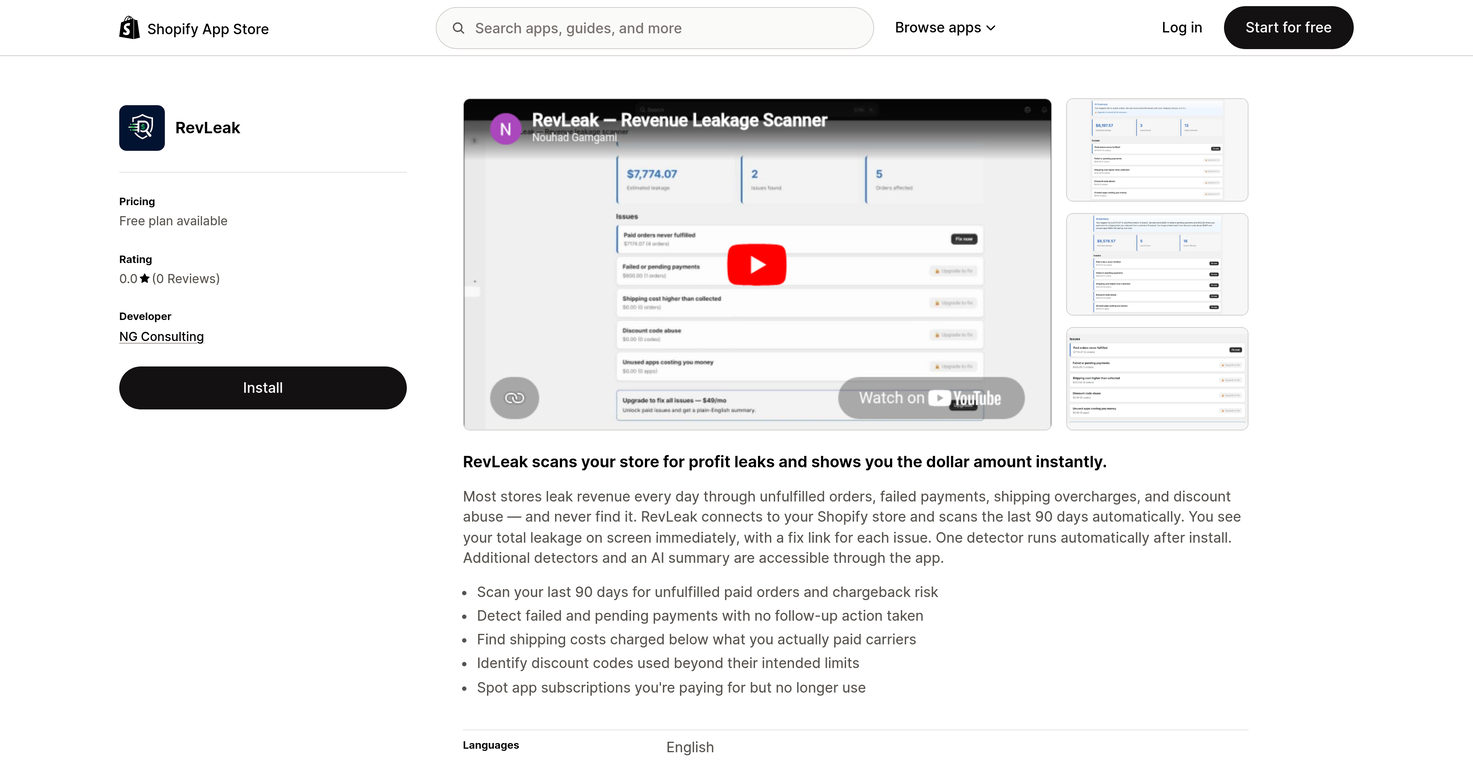
RevLeak scans for elements such as unfulfilled orders, failed payments, shipping overcharges, and potential abuse of discounts in your Shopify store.
Can RevLeak detect potential abuse of discounts?
Yes, RevLeak can detect potential abuse of discounts by identifying discount codes that have been used beyond their intended limits.
Can I get direct access to fix detected issues with RevLeak?
Yes, users of RevLeak can directly access a fix link for each detected issue to help rectify the problem.
What are the additional features I can access with RevLeak?
With RevLeak you can access additional detectors and an AI summary, beyond the initial detector run that's set up upon installation.
Does RevLeak identify unused app subscriptions?
Yes, RevLeak can identify unused app subscriptions that your store is still being charged for.
What is the main operational language of RevLeak?
The main operational language of RevLeak is English.
Can RevLeak help me with revenue analysis?
Yes, RevLeak can help with revenue analysis by identifying and illustrating your total revenue leakage details.
Does RevLeak offer business automation features?
RevLeak does offer features that automate the detection of potential profit leaks in your Shopify store. This includes automated scanning, automatic run of one detector after installation, and the direct access to fix links for detected issues.
How does RevLeak handle unfulfilled orders?
RevLeak handles unfulfilled orders by detecting and providing the total number of these orders in your Shopify store. It also provides direct access to fix links to help rectify this problem.
Can RevLeak detect unused subscriptions?
Yes, RevLeak can identify unused subscriptions that you're still being charged for.
What kind of financial management features does RevLeak offer?
RevLeak offers financial management features through helping identify areas of profit leakage including unfulfilled orders, failed payments, shipping overcharges, and discount abuses. It provides a visual representation of these losses and allows users to directly fix these issues.
Can RevLeak run automatically after installation?
Yes, RevLeak can run automatically after installation. After a successful installation, one detector will run automatically, with additional detectors and an AI summary accessible through the app.
How does RevLeak contribute to my store's operational efficiency?
RevLeak enhances your store's operational efficiency by identifying potential areas of revenue leakage, and presenting them in an easily understandable format. This allows for quick resolution of these issues, thereby minimizing losses.
In what way does RevLeak identify profit leaks?
RevLeak identifies profit leaks by scanning your Shopify store for elements such as unfulfilled orders, failed payments, shipping overcharges, and potential abuse of discounts. Once identified, the total revenue leakage is displayed on the screen for easy review.
Does RevLeak have a feature for handling failed transaction detection?
Yes, RevLeak has features for handling failed transaction detection. It can identify failed or pending payments with no follow-up action taken.
What is RevLeak?
RevLeak is an AI-powered tool developed for Shopify store owners. It is designed to identify and monitor potential profit leaks in areas such as unfulfilled orders, failed payments, shipping overcharges, discount abuse, and unused app subscriptions.
How does RevLeak work to identify profit leaks?
RevLeak works by connecting to your Shopify store and scanning it for profit leak indicators. It specifically identifies instances of unfulfilled orders, failed payments, shipping overcharges, and potential abuse of discounts. Following successful installation, one detector runs automatically, and additional detectors can be accessed through the app to identify more specific issues.
Can RevLeak scan past transactions?
Yes, RevLeak can scan past transactions. Once connected to your Shopify store, RevLeak automatically scans the last 90 days of transactions, effectively depicting a detailed account of revenue leakage during this period.
What areas does RevLeak focus on when scanning my Shopify store?
RevLeak focuses on several key areas when scanning your Shopify store. These include unfulfilled orders, failed or pending payments with no follow-up, overcharged shipping costs, abuse of discounts, and the identification of unused app subscriptions that you're still being charged for.
How does RevLeak help with unfulfilled orders?
RevLeak detects unfulfilled orders by scanning your last 90 days of transactions. It then shows the total unfulfilled paid orders and chargeback risks. With the help of a fix link provided for each issue, you can instantly rectify unfulfilled orders, helping you recover lost revenue.
What does RevLeak do with failed payments?
When it comes to failed payments, RevLeak detects such instances and identifies if no follow-up action has been taken. By identifying these areas of potential revenue leakage, you can ensure proper follow-up procedures are implemented to recover the lost revenue.
How can RevLeak help with shipping overcharges?
RevLeak aids in dealing with shipping overcharges by identifying instances where shipping costs charged are below what you actually paid to carriers. This identification assists you in spotting inadvertent overcharges and taking necessary corrective action.
Does RevLeak have a feature to tackle discount abuse?
Yes, RevLeak incorporates a feature that tackles discount abuse. It identifies instances where discount codes are used beyond their intended limits, enabling you to flag and take corrective action on these instances.
What are RevLeak detectors?
The detectors in RevLeak are features that aid in the identification of specific areas of revenue leakage. One detector runs automatically after installation, identifying unfulfilled orders, failed payments, etc. Additional detectors can be accessed through the app for more comprehensive scanning.
How can I access additional detectors in RevLeak?
Following the successful installation of RevLeak and the automatic commencement of one detector, you can access additional detectors through a feature within the app for a more thorough analysis.
What insights can RevLeak's AI summaries provide?
RevLeak's AI summaries provide detailed insights by categorizing the identified problem areas within your Shopify store. These intelligently delivered reports promote efficient revenue recovery strategies by providing a more precise understanding of where the store is losing money.
How does RevLeak handle unused app subscriptions?
RevLeak addresses the issue of unused app subscriptions by identifying them during its scanning process. It reveals the app subscriptions that you're still paying for but are no longer using, allowing you to effectively manage your store overheads by discontinuing these unused subscriptions.
Does RevLeak offer English support?
Yes, RevLeak offers support in English. The operational language of the platform is English, ensuring that navigating through features and comprehending the identified issues is simplified for English-speaking users.
In which category in Shopify can I find RevLeak?
RevLeak can be found in the analytics category in Shopify. It falls under this category because of its ability to analyze and present insightful data relating to your store's revenue leakage.
What features does RevLeak offer for efficient revenue recovery strategies?
RevLeak offers a variety of features to ensure efficient revenue recovery strategies. These include detecting unfulfilled orders, identifying failed or pending payments without follow-up, finding shipping overcharges, exposing discount code abuse, and revealing unused app subscriptions. Moreover, its AI-powered summaries provide in depth insights, allowing for precise action taking.
How does RevLeak assist in managing store overheads?
RevLeak assists in managing store overheads by spotting unused app subscriptions that are still costing you money. By showing you this expenditure, the tool assists in ensuring that only necessary costs are maintained.
Can RevLeak provide a detailed revenue leakage report?
Yes, RevLeak does provide a detailed revenue leakage report. Following its scan of the last 90 days of transactions on your Shopify store, RevLeak displays an on-screen report of the total estimated revenue leakage, along with a resolution link for each identified issue.
What are the terms of RevLeak's subscription plans?
RevLeak has two subscription plans. There is a Free plan which includes features like unfulfilled orders scan, total revenue leakage display, and instant fixing of unfulfilled orders. Additionally, there is a Pro plan priced at $49/month or $499 year (representing a 15% discount), which includes all five leak detectors, an AI-powered recovery summary, and the one-click fix feature for every issue.
How reliable is RevLeak in identifying my Shopify store's revenue leakage?
While the reliability of RevLeak is not quantitatively measured on their website, RevLeak is designed with a sophisticated AI-powered system to detect and monitor potential profit leaks. Its resources suggest a reliable mechanism for identifying revenue leakage in several crucial areas.
Can RevLeak help me to execute follow-up actions for pending payments?
Yes, RevLeak helps in executing follow-up actions for pending payments. It detects instances of failed and pending payments with no follow-up action taken, guiding you to rectify these instances and ultimately recover lost revenue.


 Mini tools
 Find the money your store is quietly losing.














 Revenue clarity for growing businesses.
 Noel Ortiz🛠️ 1 tool 🙏 5 karmaNov 4, 2025@TinkeryHey everyone! It's Noel, cofounder of Tinkery. We launched recently, growing rapidly and always welcoming feedback to continue improving the platform. Please reach out!
 Automate data entry, boost sales productivity, deliver insights.
 Your AI CFO & Product Manager Copilot
 Boost your revenue with AI-powered business insights.
 Make your revenue process efficient and predictable.
 Empower revenue teams with AI-driven insights