

 Mini tools
agent-device
CLI to control iOS and Android devices for AI agents
README
<a href="https://www.callstack.com/open-source?utm_campaign=generic&utm_source=github&utm_medium=referral&utm_content=agent-device" align="center">
<picture>
<img alt="agent-device: device automation CLI for AI agents" src="website/docs/public/agent-device-banner.jpg">
</picture>
</a>
agent-device


Let your coding agent verify its changes in the running app.
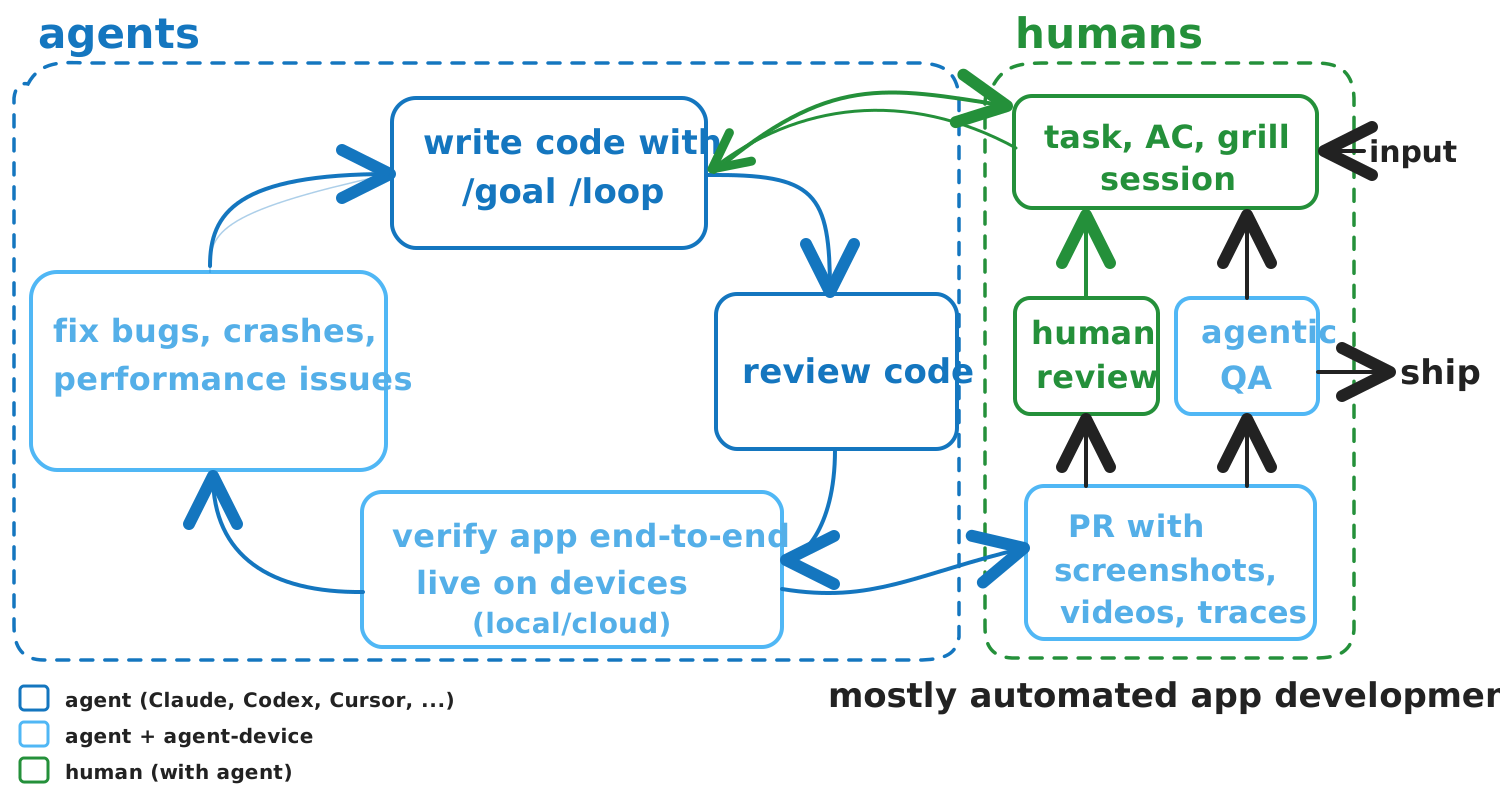
agent-device is an agent-native CLI for inspecting, interacting with, and verifying real apps on supported iOS, Android, TV, web, and desktop targets. It gives coding agents a live feedback loop through token-efficient accessibility snapshots, semantic refs and selectors, device actions, and reviewable evidence.
Your coding agent or QA harness interprets the current state and chooses each next step. agent-device provides the session-aware device execution and captures evidence when the task needs it.
If you know Vercel's agent-browser, agent-device brings the same inspect-act-verify model to mobile, TV, and desktop apps. Minimal --platform web support reuses agent-browser inside the same session and replay workflow.
Quick start
Install the CLI and check setup. It requires Node.js 22.12 or newer; web automation requires Node.js 24 or newer. Target-specific prerequisites are covered in Installation.
npm install -g agent-device@latest
agent-device doctor
agent-device --version
agent-device help workflow
Run agent-device doctor yourself before handing the CLI to an agent. The installed CLI help is the source of truth; agent-device help workflow routes agents to guidance for debugging, replay, React Native profiling, and other tasks.
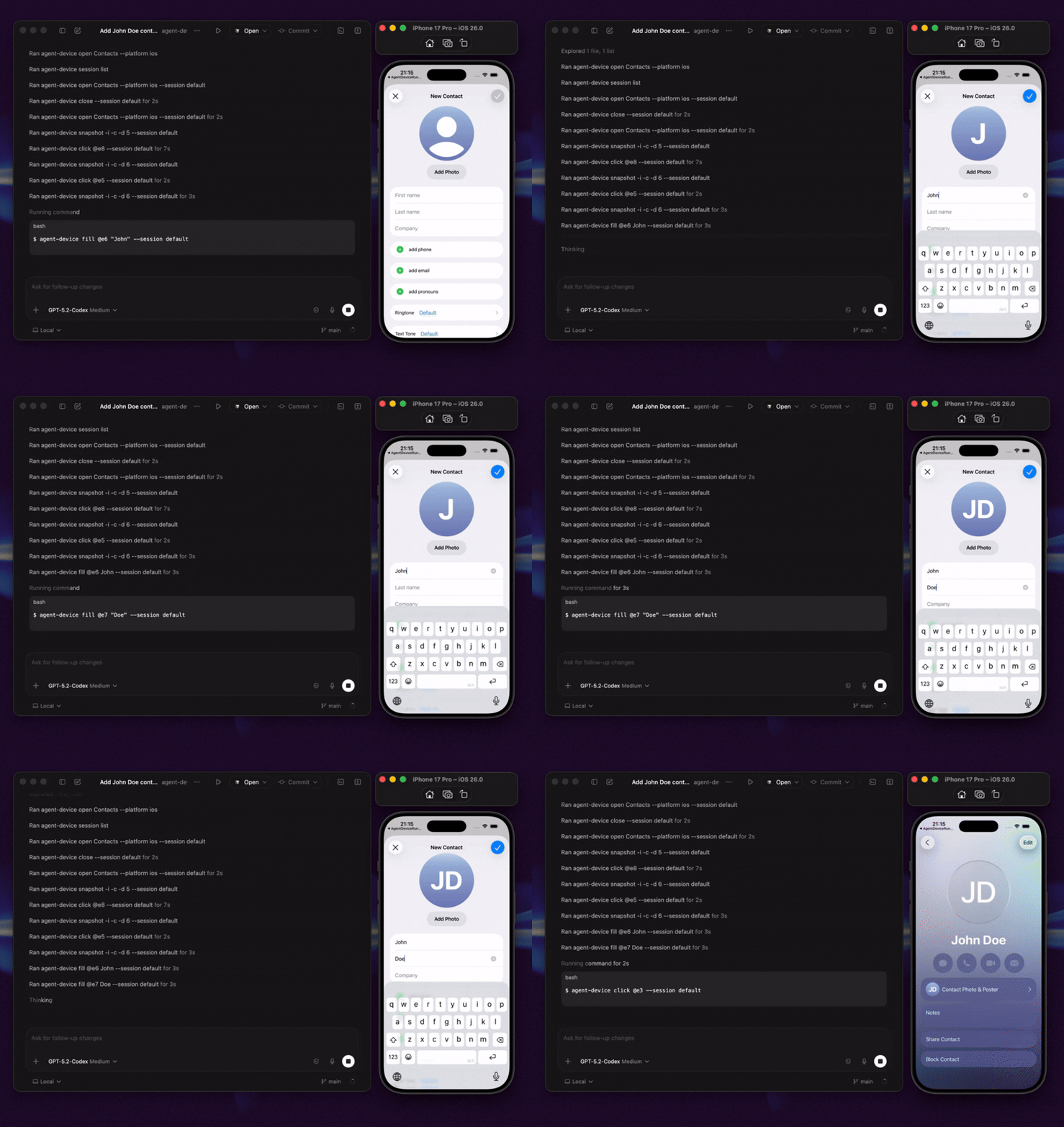
Run a short form flow in the built-in iOS Contacts app:
# Start a session.
agent-device open Contacts --platform ios

# Inspect the screen. Example output is shown below; refs vary.
agent-device snapshot -i
# @e2 [button] "Add"

# Use the ref from the snapshot and continue from the settled diff.
agent-device press @e2 --settle
# The settled diff includes:
# + @e7 [text-field] "First name"

agent-device fill @e7 "Ada" --settle
# The next settled diff includes changed values and current refs:
# - @e7 [text-field] "First name"
# + @e14 [text-field] "Ada"
# = @e15 [text-field] "Last name"

# Capture evidence and close the session.
agent-device screenshot ./contact-form.png
agent-device close
Refs belong to the snapshot or settled diff that returned them. Continue with refs from the latest output; do not assume an earlier @eN still identifies the same element. A successful settled diff is the next observation, so take another snapshot only when the diff lacks the next target or evidence.
Snapshots come from the app's accessibility tree, so high-quality labels, roles, and test IDs make agent runs far more reliable. Use screenshots and videos as evidence or visual fallback, but prefer refs and selectors for actions and assertions whenever the UI exposes enough structure.
What agents can do
- Inspect app state through structured accessibility snapshots, interactive refs, selectors, and React Native component trees.
- Act on visible UI by tapping or pressing elements, filling fields, scrolling, performing gestures, waiting, asserting state, and handling alerts.
- Diagnose failures with evidence including screenshots, video, logs, traces, network traffic, performance samples, crash context, and React profiles.
- Repeat successful workflows by recording
.adscripts for local runs and CI, with strict Maestro YAML export when a flow belongs in Maestro.
Command and evidence support varies by target. See Commands for the current platform-specific surface.
Next steps
- Set up your agent: run the CLI from Cursor, Codex, Claude Code, Windsurf, or another agent terminal. For skills, rules, direct MCP tools, and client-specific setup, see AI Agent Setup.
- Try the sample app: clone the repo and run the bundled Expo fixture for a guided dogfood run with screenshots, replay, and performance evidence. See Quick Start.
- Build production workflows: use Replay & E2E and Debugging & Profiling.
Articles and videos
Articles
- Build an AI QA agent for Expo apps with EAS Workflows
- Agent Device: iOS & Android automation for AI agents
- Building mobile QA agents with Vercel Eve
- How we optimized Agent Device for mobile app automation
Videos
- Verifying mobile apps with agent-device
- Using agent-device in an AI coding workflow
- Cloud agents that test mobile apps on real devices
Where to run agent-device
| Path | Best for | Start with |
|---|---|---|
| Local | Exploration, debugging, and development loops on simulators, emulators, physical devices, macOS apps, and Linux desktop targets. | Follow the Quick Start. |
| CI/CD | Automated PR and merge validation with replay scripts and captured artifacts. | Try the EAS workflow template. GitHub Actions template coming soon. |
| Cloud / remote execution | Linux runners, managed devices, and remote execution. | Use Agent Device Cloud, see Commands for remote profiles, or contact Callstack for team-scale QA. |
How it works
agent-device runs session-aware commands through platform backends: XCTest for iOS and tvOS, ADB plus the Android snapshot helper for Android, a local helper for macOS desktop automation, and AT-SPI for Linux desktop targets.
Node consumers can use the typed client and public subpaths for bridge integrations. agent-device/android-adb exposes the Android ADB provider contract, logcat/clipboard/keyboard/app helpers, and port reverse management.
FAQ
What is agent-device?
agent-device is a device automation CLI for AI mobile app testing and verification. It lets coding agents inspect real UI state, interact through semantic refs and selectors, and capture reviewable evidence on supported iOS, Android, TV, web, and desktop targets.
Does it work with React Native, Expo, Flutter, and native apps?
Yes. agent-device works with native iOS and Android apps and apps built with React Native, Expo, and Flutter, as long as they run on a supported target. Available commands and evidence vary by target.
How is it different from Appium, Detox, or Maestro?
agent-device is optimized for an agent that inspects runtime state and chooses each next step through structured CLI output. Appium, Detox, and Maestro remain strong fits for teams with authored test suites and existing framework infrastructure; agent-device can complement them by recording explorations as .ad scripts or exporting strict Maestro YAML.
Can agent-device run in CI?
Yes. Record explorations as .ad scripts, replay them locally or in CI, and keep screenshots, logs, and other artifacts for review. See Replay & E2E or start with the EAS workflow template.
Used by
Used by teams and developers at Callstack, JPMorgan Chase, Expensify, Shopify, Kindred, Total Wine & More, LegendList, HerLyfe, App & Flow, and more.
Documentation
Contributing
See CONTRIBUTING.md.
Made at Callstack
agent-device is open source and MIT licensed. Visit agent-device.dev, try the EAS workflow template, read the docs, or contact us at [email protected].





