 Tripo AI 3D Generator

 Mini tools
CoDA: Agentic Systems for Collaborative Data Visualization
CoDA is a multi-agent framework that turns natural language queries into publication-quality visualizations.
README
CoDA: Agentic Systems for Collaborative Data Visualization



CoDA: Agentic Systems for Collaborative Data Visualization
Zichen Chen, Jiefeng Chen, Sercan O. Arik, Misha Sra, Tomas Pfister, Jinsung Yoon
International Conference on Learning Representations (ICLR 2026)
CoDA (Collaborative Data-visualization Agents) is a multi-agent framework that turns natural language queries into publication-quality visualizations. Instead of treating visualization as a monolithic code-generation problem, CoDA distributes the work across 8 specialized LLM agents in four sequential phases — Understanding, Planning, Generation, and Self-Reflection — that iteratively refine the output until explicit quality thresholds are met.
Results
| Benchmark | CoDA | Improvement over Prior SOTA |
|---|---|---|
| MatplotBench | 79.5% | +24.5% |
| Qwen Code Interpreter | 89.0% | new state-of-the-art |
| DA-Code | 39.0% | +2× prior best |
| Human Evaluation (Elo) | 1701 | outperforms all baselines |
Architecture
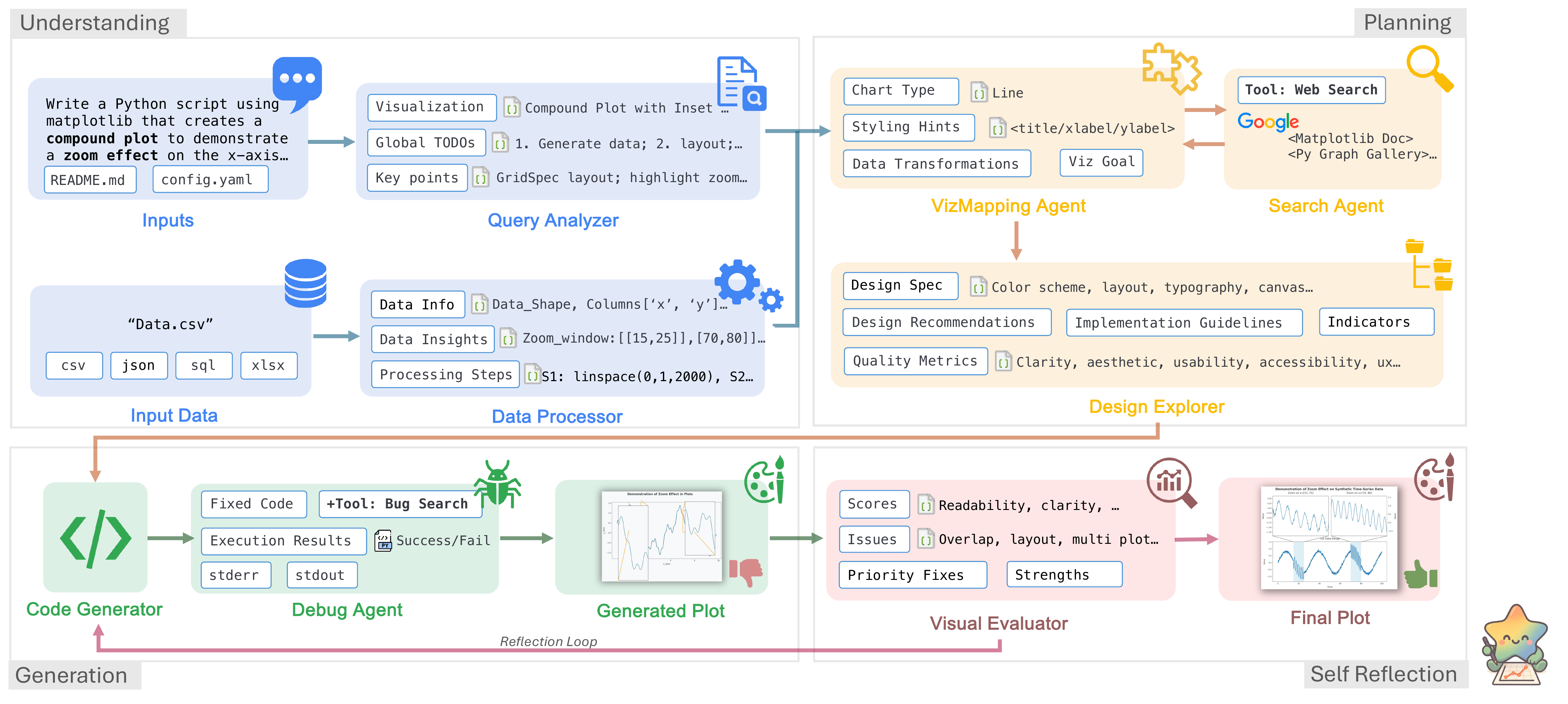
CoDA employs 8 specialized LLM agents across 4 phases. A global TODO list is generated by QueryAnalyzer at the start and is propagated through every subsequent agent; VisualEvaluator uses image-level analysis to verify completion before the workflow terminates.
| Phase | Agent | Responsibility |
|---|---|---|
| 1 — Understanding | QueryAnalyzer |
Parses intent, expands ambiguous queries, produces a structured TODO checklist |
DataProcessor |
Loads heterogeneous data files, infers schema and statistics | |
| 2 — Planning | VisualizationMappingAgent |
Assigns data columns to visual roles (axes, color, size) and selects chart type |
DesignExplorer |
Specifies color scheme, layout, typography, and accessibility choices | |
| 3 — Generation | SearchAgent |
Retrieves real matplotlib gallery examples to bias the code generator |
CodeGenerator |
Produces clean, runnable matplotlib code grounded in the design spec | |
| 4 — Self-Reflection | DebugAgent |
Executes the code, diagnoses runtime errors, and applies targeted fixes |
VisualEvaluator |
Scores readability, aesthetics, and UX; triggers refinement if below threshold |
Gallery
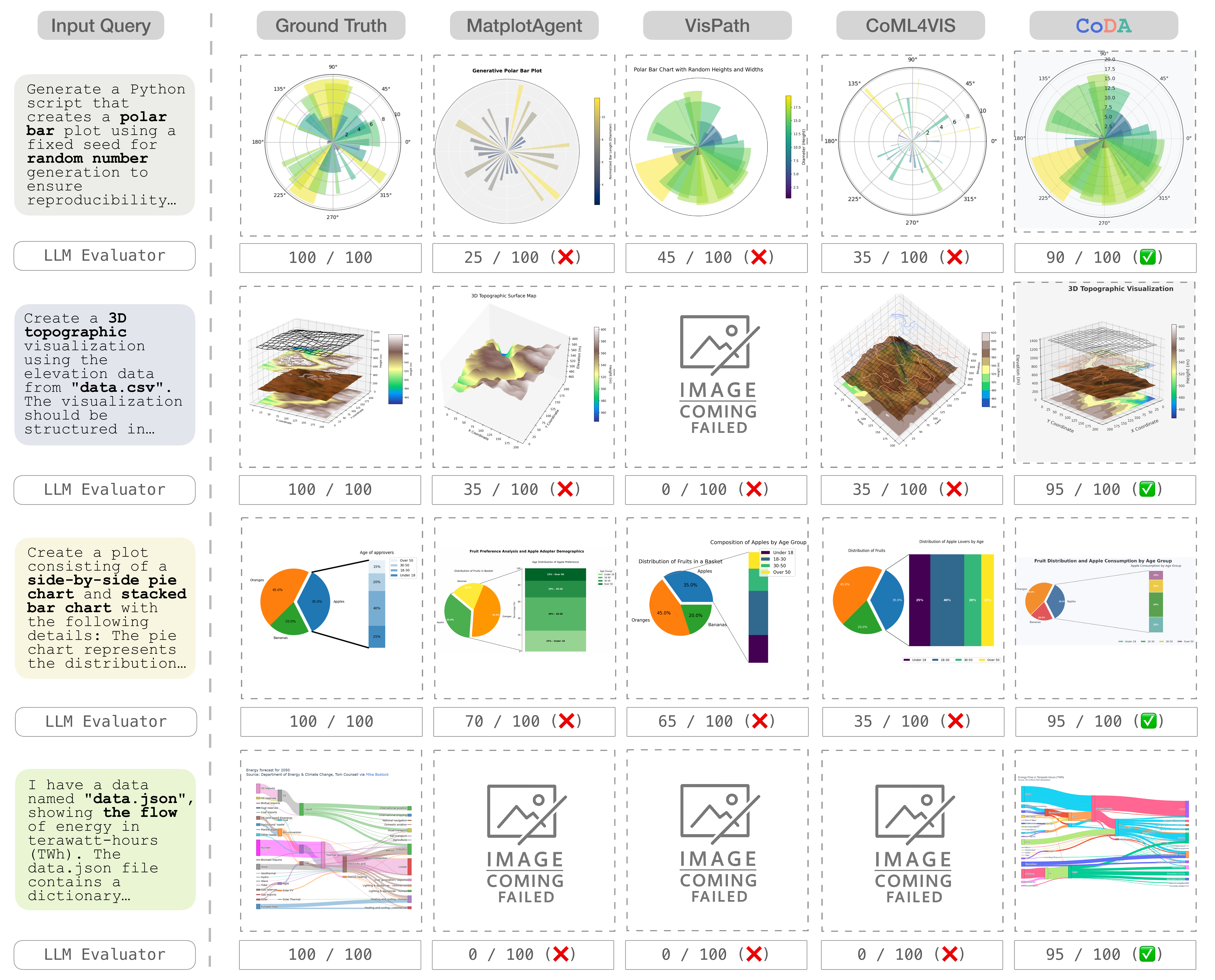
CoDA consistently produces complete, accurate visualizations scoring 90–95/100, while baselines frequently produce broken outputs scoring 0–45/100.
Selected outputs
| Task | Benchmark | Score | CoDA Output | Ground Truth |
|---|---|---|---|---|
| NBA team performance trends — multi-line chart | DA-Code | 100 / 100 | <img src="assets/line-18.png" width="260"> | <img src="assets/18-gt.png" width="260"> |
| Steam game ratings — scatter plot with trend line | DA-Code | 100 / 100 | <img src="assets/005.png" width="260"> | <img src="assets/gt-005.png" width="260"> |
| Hierarchical data — sunburst chart | MatplotBench | 100 / 100 | <img src="assets/95.png" width="260"> | <img src="assets/gt-95.png" width="260"> |
Self-reflection recovery
CoDA's self-reflection loop detected layout and labeling errors across 3 iterations, then automatically recovered at iteration 4 — demonstrating the robustness of quality-driven refinement.
| Iter 3 (Failed) | Iter 4 (Recovered) |
|---|---|
| <img src="assets/failure-browser.png" width="380"> | <img src="assets/success-browser.png" width="380"> |
Installation
Requirements: Python ≥ 3.8 and API credentials for at least one LLM provider.
git clone https://github.com/google-research/agentic-visualization.git
cd agentic-visualization
pip install -r requirements.txt
Configure your API keys:
cp .env.example .env
# Fill in OPENAI_API_KEY, ANTHROPIC_API_KEY, GEMINI_API_KEY, etc.
Usage
Simple API
import coda

result = coda.plot(
    query="Create a sunburst chart showing browser market share by version.",
    data="path/to/data.csv",   # CSV, JSON, Excel, SQLite, or a directory
    output="result.png",
)
print(f"Quality: {result.quality_score:.2f}  —  saved to {result.output_file}")
Programmatic Workflow
from coda import Workflow
from coda.workflow.orchestrator import WorkflowConfiguration

cfg = WorkflowConfiguration(
    quality_threshold=0.9,
    max_iterations=3,
    enable_search_agent=True,
    output_directory="outputs/",
)

wf = Workflow(config=cfg, query_id="q001")
result = wf.execute_workflow(
    query="Plot monthly active users with a 90-day rolling average.",
    data_input="data/mau.csv",
    workflow_context={"original_data_path": "data/mau.csv"},
)

print(f"Success: {result.final_success}  |  Quality: {result.final_quality_score:.2f}")
# Output image: outputs/<model>_query_q001/query_1/final_result.png
Benchmarks
1 — Download benchmark data
bash prepare_benchmark.sh
# Downloads MatPlotAgent benchmark into benchmark_data/
2 — Run generation
python run_benchmark.py \
    --start 1 --end 100 \
    --model-name        openai/gpt-4o \
    --search-model-name openai/gpt-4o-mini
Results are saved to benchmark_outputs/<model>_query_<id>/.
3 — Run evaluation
python run_evaluation.py \
    --results-dir   benchmark_outputs \
    --start 1 --end 100 \
    --model-name         openai/gpt-4o \
    --vision-model-name  openai/gpt-4o \
    --processes 10
Model tags follow the LiteLLM naming convention (provider/model-name). Any provider supported by LiteLLM — OpenAI, Anthropic, Google Gemini, Groq, etc. — works out of the box.
Citation
@inproceedings{chen2026coda,
  title     = {{CoDA}: Agentic Systems for Collaborative Data Visualization},
  author    = {Chen, Zichen and Chen, Jiefeng and Arik, Sercan O. and
               Sra, Misha and Pfister, Tomas and Yoon, Jinsung},
  booktitle = {International Conference on Learning Representations},
  year      = {2026},
  url       = {https://coda-agent.github.io/CoDA/}
}
License
Apache 2.0 License — see LICENSE for details.
Disclaimer
This is not an officially supported Google product. This project is not eligible for the Google Open Source Software Vulnerability Rewards Program.
This project is intended for demonstration purposes only. It is not intended for use in a production environment.





