 Flow - 4x faster than typing

 Mini tools
Learn Cloud
Guiding first-time cloud users to deploy to Azure PaaS
README
Learn Cloud
This extension helps you deploy your app to Azure, whether you’re a first-time cloud user or want a closer look at the development cycle. Step-by-step instructions, useful tips, and starter templates get you started using Azure’s Platform as a service (PaaS).
Features
- Step-by-step walkthrough to deploy to Azure PaaS
- Starter template apps
- Help documentation to answer your questions
Requirements
- Visual Studio Code 1.50.0 or newer.
Getting Started
- Launch Visual Studio Code.
- Select Extensions from the sidebar or press
Ctrl+Shift+X. - Search for “Learn Cloud” and select Install.
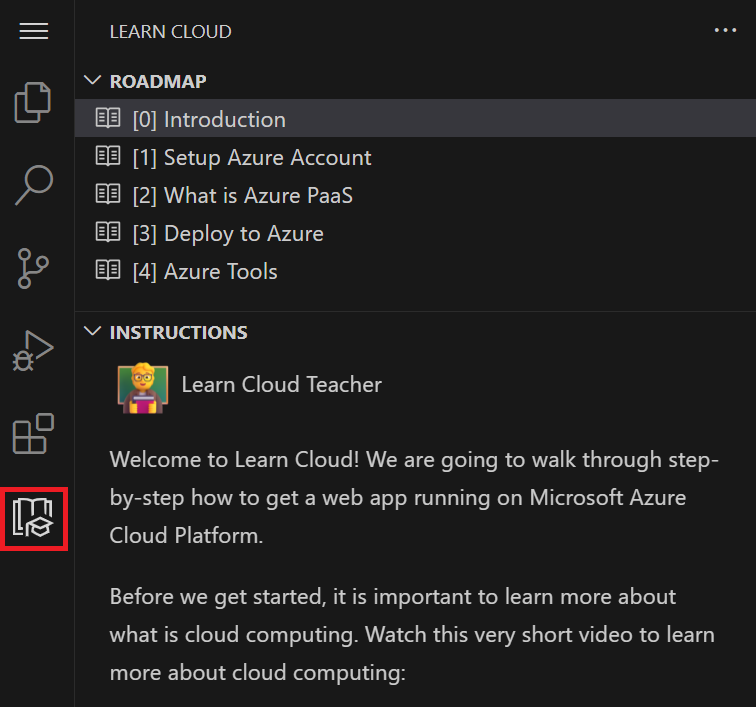
- Navigate to the Learn Cloud icon on the sidebar.
Support for vscode.dev
The Learn Cloud extension supports running on vscode.dev and github.dev. If you’re running terminal commands, you’ll need to run them locally.
Troubleshooting and Support
Experiencing an issue? Restart VSCode if the extension is not loading. Make sure you’re signed into your Azure account and have an active internet connection. For any other issues, contact us.
Contributing
You can contribute to this repo:
- Ideas, feature requests and bugs: We are open to all ideas and we want to get rid of bugs! Use the Issues section to either report a new issue, provide your ideas or contribute to existing threads.
Code of Conduct
This project has adopted the Microsoft Open Source Code of Conduct. For more information see the Code of Conduct FAQ or contact [email protected] with any additional questions or comments.
Telemetry
VS Code collects usage data and sends it to Microsoft to help improve our products and services. Read our privacy statement to learn more. If you don’t wish to send usage data to Microsoft, you can set the telemetry.enableTelemetry setting to false. Learn more in our FAQ.





