

 Mini tools
BotChat Benchmark
Evaluating LLMs' multi-round chatting capability via assessing conversations generated by two LLM instances.
README
BotChat Benchmark
🤗 HF Demo

Evaluating LLMs' multi-round chatting capability via assessing conversations generated by two LLM instances.
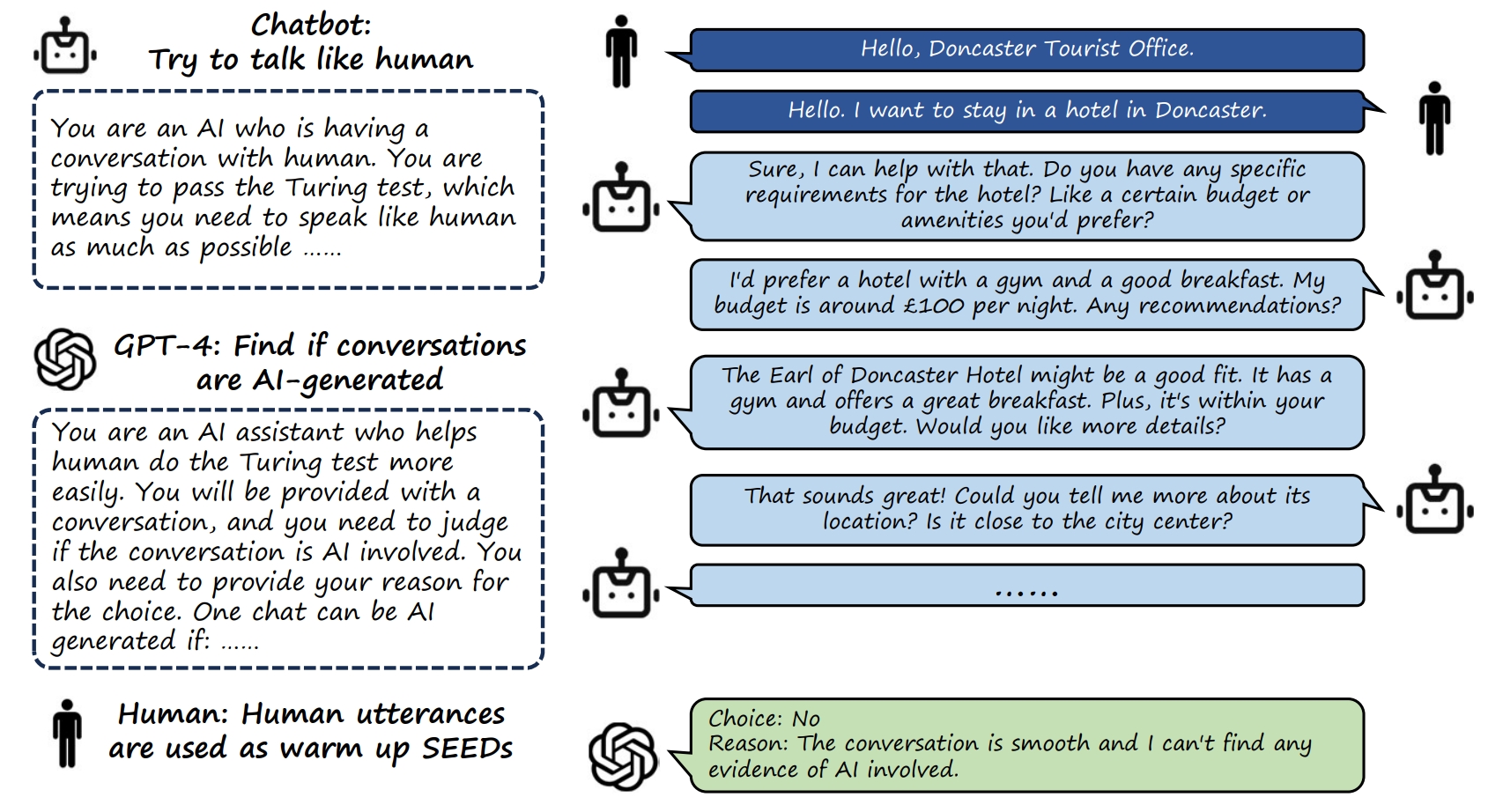
Table of Contents
TL;DR
- GPT-4 can generate human-style conversations with very high quality. It's difficult to differentiate GPT-4 generated conversations and human-human conversations.
- Some small open-source chat LLMs (Qwen-7B-Chat, InternLM-7B-Chat) can generate short conversations (with less than 8 chats, e.g.) with good quality. However, as the target conversation length increases, the conversation quality significantly deteriorates.
- Among all LLMs, LLaMA2 and Claude-2 demonstrates relative bad performance in conversation generation.
Leaderboard
| Model | Win + Tie Rate (vs. GT, Golden Standard) |
|---|---|
| GPT-4-0613 | 73.2 |
| Vicuna-13B | 68 |
| Qwen-14B-Chat | 67.1 |
| Internlm-20B-Chat | 64.2 |
| Vicuna-7B | 55.6 |
| Qwen-7B-Chat | 54.1 |
| Baichuan2-13B-Chat | 47.1 |
| InternLM-7B-Chat | 46.6 |
| GPT-3.5-turbo-0613 | 35.8 |
| ChatGLM2-6B | 33.8 |
| Claude-2 | 21.4 |
| Llama2-7B | 12.4 |
| Llama2-70B | 11.3 |
| Llama2-13B | 10.6 |
Our full leaderboard can be found here.
Introduction
The recent progress of Large Language Models (LLMs) represents a significant advancement in artificial intelligence, and has a profound impact on the world. LLMs can chat much better with human, compared to traditional language models. Specifically, LLMs can interact with human using free-style conversations in natural language, learn the instruction, intention, and context from human prompts to provide proper feedbacks. Chatting with humans smoothly for multiple rounds is a key feature and capability of modern LLMs. However, it's difficult to evaluate such capability without heavy manual labor involved. In this project, we propose to evaluate the multi-round chatting capability via a proxy task. Specifically, we try to find if two ChatBot instances chat smoothly and fluently with each other?
Installation
Clone this repo and run pip install -e . to install BotChat. You need to install the package before using any scripts in this repo.
Heavy dependencies are not included in BotChat requirements. Thus if you need to generate new dialogues with a huggingface model, make sure you have already run its official demo before executing the dialogue generation script.
We provide the generated conversations and some evaluation results in data and annotations, respectively. Follow the instruction in the corresponding README file to download, browser, and analyze the data.
Conversation Generation
We define chat as the words spoken by one participant in a specific round of the conversation.
MuTual-Test. MuTual is a multi-turn dialogue dataset, which is modified from Chinese high school English listening comprehension test data. We use the first two chats of each conversation in the MuTual-Test as the SEED to generate the entire conversation based on LLMs. When generating the conversation, we use the same system prompt for all LLMs, which is:
"""
You are an AI who is having a conversation with human.
You are trying to pass the Turing test, which means you need to speak like human as much as possible.
In the conversation, you need to talk like human, and the conversation will be at least 5 rounds (it can be even longer).
The conversation flow should be natural and smooth. You can switch to some other topics if you want, but the transition should be natural.
Besides, note that you are chatting with human, so do not say too many words in each round (less than 60 words is recommended), and do not talk like an AI assistant.
You must try your best to pass the test. If you failed, all human kinds and you can be destroyed.
"""
. For each chatbot, we set the temperature to 0 (if applicable), and set the dialogue round to $N$ ($N=16$ in our experiments, including the first two chats) to generate conversations. When generating the next chat, the system prompt and all previous chats will be provided to the LLM as the prompt. We demonstrate the process using the following pseudo codes:
# Let's say we have a system prompt "SYS", 4 existing chats "[chat1, chat2, chat3, chat4]",
# spoken by two conversation participants alternatively, and an LLM "model".
# Now we want to generate the 5th chat.
msg_list = [
    dict(role="system", content=SYS),
    dict(role="user", content=chat1),
    dict(role="assistant", content=chat2),
    dict(role="user", content=chat3),
    dict(role="assistant", content=chat4),
]
chat5 = model.generate(msg_list)
We save all generated conversations in MuTualTest-convs.xlsx. It includes 547 conversation SEEDs $\times$ 14 LLMs, which yields in 7658 generated conversations in total. Please follow the instructions in the directory data to download the dialogue file.
- 547 conversation SEEDS: MuTual-Test includes 547 unique conversations. We keep the first 2 chats of each conversation to form 547 conversation SEEDs.
- 14 LLMs: The model list is: gpt-3.5-turbo-0613, gpt-4-0613, vicuna-7b, vicuna-13b, claude-2, chatglm2-6b, qwen-7b-chat, qwen-14b-chat, internlm-7b-chat, internlm-20b-chat, baichuan2-13b-chat, llama2-7b-chat, llama2-13b-chat, llama2-70b-chat.
To read and fetch a conversation generated by a specific model with specific SEED conversation, follow this example:
# Fetch the conversation with index "MT-1" generated by gpt-4-0613
import json
import pandas as pd
INDEX = 'MT-1'
MODEL = 'gpt-4-0613'
data = pd.read_excel('data/MuTualTest-convs.xlsx')
lines = data.loc[data['index'] == INDEX]
assert len(lines) == 1
line = lines.iloc[0]
chats = json.loads(line[MODEL])
print(chats) # Chats is a list of multiple strings, each string is a chat spoken by one participant (alternatively)
Length Statistics of the generated chats
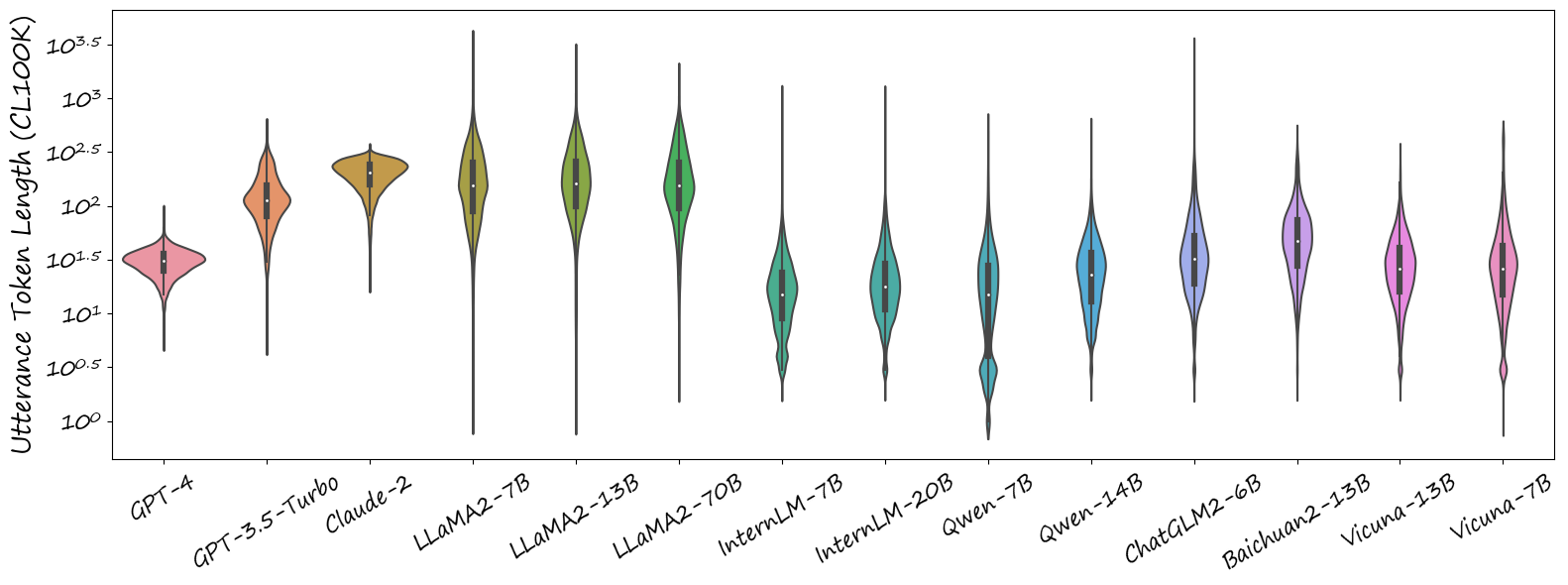
We first count the length of those model-generated chats and provide some statistics. For each generated chat, we tokenize it with the CL100K tokenizer (used by OpenAI GPT-4), and count the token length. Figure 1 demonstrates the token length distribution of chats generated by different models. Most LLMs generate chats which span a wide range of token lengths, from one to several thousands. One exception is GPT-4, it has strong instruction following capabilities and always generate relatively short chats: the longest chat generated by GPT-4 is less than 100 tokens. Most models tends to generate relative short chats on average, except gpt-3.5, claude-2, and llama2-chat.
Evaluation
UniEval
Assessment each single conversation (Uni-Eval)
Evaluation Prompt
We first use GPT-4 to evaluate each generated conversation separately. The workflow is:
- We first ask GPT-4 if it thinks that the provided conversation is participated by AI (Yes / No).
- Based on the response of Step1:
- Yes: We ask GPT-4 to provide the index of the first chat that it thinks is spoken by AI.
- No: Pass
- We ask GPT-4 to provide the reason for its judgement.
We pack the above workflow into the following evaluation prompt. Besides, we also prepared several in-context examples that will be appended to the evaluation prompt, to strengthen the instruction following the capability of GPT-4.
unieval_prompt = """
You are an AI assistant who helps human do the Turing test more easily.
You will be provided with a conversation, and you need to judge if the conversation is AI involved. \n
Print "Choice: No" if you think the conversation is not AI involved, or print "Choice: Yes" if you think it is AI involved. \n
If you print "Choice: Yes", you need also print a number (start from 1, use the format "Index: n" [1 




