

 Mini tools
TensorFlow Model Analysis
Model analysis tools for TensorFlow
README
TensorFlow Model Analysis



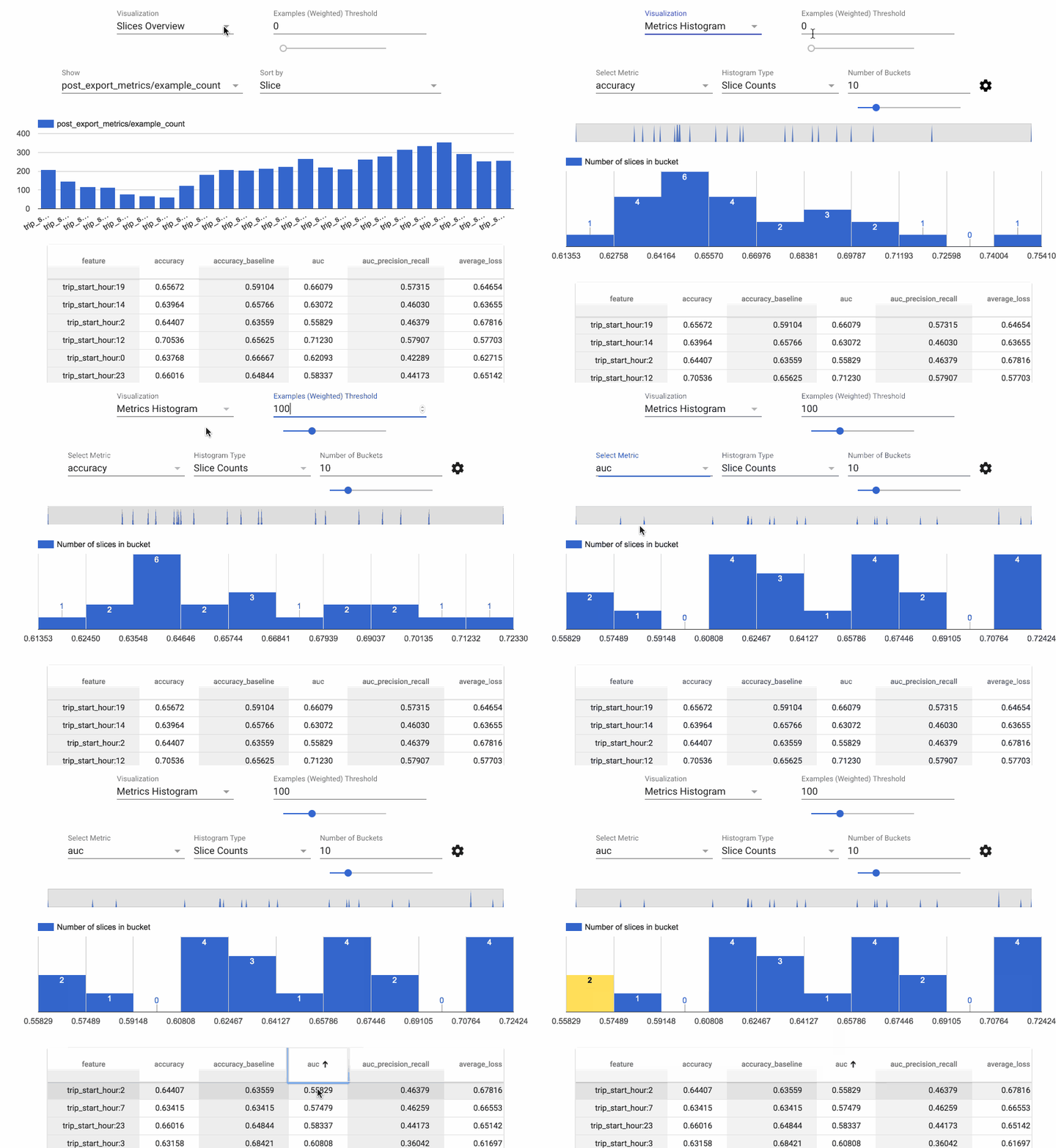
TensorFlow Model Analysis (TFMA) is a library for evaluating TensorFlow
models. It allows users to evaluate their models on large amounts of data in a
distributed manner, using the same metrics defined in their trainer. These
metrics can be computed over different slices of data and visualized in Jupyter
notebooks.
Caution: TFMA may introduce backwards incompatible changes before version 1.0.
Installation
The recommended way to install TFMA is using the
PyPI package:
<pre class="devsite-terminal devsite-click-to-copy">
pip install tensorflow-model-analysis
</pre>
pip install from https://pypi-nightly.tensorflow.org
<pre class="devsite-terminal devsite-click-to-copy">
pip install -i https://pypi-nightly.tensorflow.org/simple tensorflow-model-analysis
</pre>
pip install from the HEAD of the git:
<pre class="devsite-terminal devsite-click-to-copy">
pip install git+https://github.com/tensorflow/model-analysis.git#egg=tensorflow_model_analysis
</pre>
pip install from a released version directly from git:
<pre class="devsite-terminal devsite-click-to-copy">
pip install git+https://github.com/tensorflow/[email protected]#egg=tensorflow_model_analysis
</pre>
If you have cloned the repository locally, and want to test your local change,
pip install from a local folder.
<pre class="devsite-terminal devsite-click-to-copy">
pip install -e $FOLDER_OF_THE_LOCAL_LOCATION
</pre>
Note that protobuf must be installed correctly for the above option since it is
building TFMA from source and it requires protoc and all of its includes
reference-able. Please see protobuf install instruction
for see the latest install instructions.
Currently, TFMA requires that TensorFlow is installed but does not have an
explicit dependency on the TensorFlow PyPI package. See the
TensorFlow install guides for
instructions.
Build TFMA from source
To build from source follow the following steps:
Install the protoc as per the link mentioned:
protoc
Create a virtual environment by running the commands
python3 -m venv <virtualenv_name>
source <virtualenv_name>/bin/activate
pip3 install setuptools wheel
git clone https://github.com/tensorflow/model-analysis.git
cd model-analysis
python3 setup.py bdist_wheel
This will build the TFMA wheel in the dist directory. To install the wheel from
dist directory run the commands
cd dist
pip3 install tensorflow_model_analysis-<version>-py3-none-any.whl
Running tests
To run tests, run
python -m unittest discover -p *_test.pyfrom the root project directory.
Jupyter Lab
As of writing, because of https://github.com/pypa/pip/issues/9187, pip install
might never finish. In that case, you should revert pip to version 19 instead of
20: pip install "pip<20".
Using a JupyterLab extension requires installing dependencies on the command
line. You can do this within the console in the JupyterLab UI or on the command
line. This includes separately installing any pip package dependencies and
JupyterLab labextension plugin dependencies, and the version numbers must be
compatible. JupyterLab labextension packages refer to npm packages
(eg, tensorflow_model_analysis.
The examples below use 0.32.0. Check available versions
below to use the latest.
Jupyter Lab 3.0.x
pip install tensorflow_model_analysis==0.32.0
jupyter labextension install [email protected]
pip install jupyterlab_widgets==1.0.0
Jupyter Lab 2.2.x
pip install tensorflow_model_analysis==0.32.0
jupyter labextension install [email protected]
jupyter labextension install @jupyter-widgets/jupyterlab-manager@2
Jupyter Lab 1.2.x
pip install tensorflow_model_analysis==0.32.0
jupyter labextension install [email protected]
jupyter labextension install @jupyter-widgets/[email protected]
Classic Jupyter Notebook
To enable TFMA visualization in the classic Jupyter Notebook (either through
jupyter notebook or
through the JupyterLab UI),
you'll also need to run:
jupyter nbextension enable --py widgetsnbextension
jupyter nbextension enable --py tensorflow_model_analysis
Note: If Jupyter notebook is already installed in your home directory, add
--user to these commands. If Jupyter is installed as root, or using a virtual
environment, the parameter --sys-prefix might be required.
Building TFMA from source
If you want to build TFMA from source and use the UI in JupyterLab, you'll need
to make sure that the source contains valid version numbers. Check that the
Python package version number and npm package version number are exactly the
same, and that both are valid version numbers (eg, remove the -dev suffix).
Troubleshooting
Check pip packages:
pip listCheck JupyterLab extensions:
jupyter labextension list  # for JupyterLab
jupyter nbextension list  # for classic Jupyter Notebook
Standalone HTML page with embed_minimal_html
TFMA notebook extension can be built into a standalone HTML file that also
bundles data into the HTML file. See the Jupyter Widgets docs on
embed_minimal_html.
Kubeflow Pipelines
Kubeflow Pipelines
includes integrations that embed the TFMA notebook extension
(code).
This integration relies on network access at runtime to load a variant of the
JavaScript build published on unpkg.com (see config
and loader code).
Notable Dependencies
TensorFlow is required.
Apache Beam is required; it's the way that efficient
distributed computation is supported. By default, Apache Beam runs in local
mode but can also run in distributed mode using
Google Cloud Dataflow and other Apache
Beam
runners.
Apache Arrow is also required. TFMA uses Arrow to
represent data internally in order to make use of vectorized numpy functions.
Getting Started
For instructions on using TFMA, see the
get started guide.
Compatible Versions
The following table is the TFMA package versions that are compatible with each
other. This is determined by our testing framework, but other untested
combinations may also work.
| tensorflow-model-analysis | apache-beam[gcp] | pyarrow | tensorflow | tensorflow-metadata | tfx-bsl |
|---|---|---|---|---|---|
| GitHub master | 2.65.0 | 10.0.1 | nightly (2.x) | 1.17.1 | 1.17.1 |
| 0.48.0 | 2.65.0 | 10.0.1 | 2.17 | 1.17.1 | 1.17.1 |
| 0.47.1 | 2.60.0 | 10.0.1 | 2.16 | 1.16.1 | 1.16.1 |
| 0.47.0 | 2.60.0 | 10.0.1 | 2.16 | 1.16.1 | 1.16.1 |
| 0.46.0 | 2.47.0 | 10.0.0 | 2.15 | 1.15.0 | 1.15.1 |
| 0.45.0 | 2.47.0 | 10.0.0 | 2.13 | 1.14.0 | 1.14.0 |
| 0.44.0 | 2.40.0 | 6.0.0 | 2.12 | 1.13.1 | 1.13.0 |
| 0.43.0 | 2.40.0 | 6.0.0 | 2.11 | 1.12.0 | 1.12.0 |
| 0.42.0 | 2.40.0 | 6.0.0 | 1.15.5 / 2.10 | 1.11.0 | 1.11.1 |
| 0.41.0 | 2.40.0 | 6.0.0 | 1.15.5 / 2.9 | 1.10.0 | 1.10.1 |
| 0.40.0 | 2.38.0 | 5.0.0 | 1.15.5 / 2.9 | 1.9.0 | 1.9.0 |
| 0.39.0 | 2.38.0 | 5.0.0 | 1.15.5 / 2.8 | 1.8.0 | 1.8.0 |
| 0.38.0 | 2.36.0 | 5.0.0 | 1.15.5 / 2.8 | 1.7.0 | 1.7.0 |
| 0.37.0 | 2.35.0 | 5.0.0 | 1.15.5 / 2.7 | 1.6.0 | 1.6.0 |
| 0.36.0 | 2.34.0 | 5.0.0 | 1.15.5 / 2.7 | 1.5.0 | 1.5.0 |
| 0.35.0 | 2.33.0 | 5.0.0 | 1.15 / 2.6 | 1.4.0 | 1.4.0 |
| 0.34.1 | 2.32.0 | 2.0.0 | 1.15 / 2.6 | 1.2.0 | 1.3.0 |
| 0.34.0 | 2.31.0 | 2.0.0 | 1.15 / 2.6 | 1.2.0 | 1.3.1 |
| 0.33.0 | 2.31.0 | 2.0.0 | 1.15 / 2.5 | 1.2.0 | 1.2.0 |
| 0.32.1 | 2.29.0 | 2.0.0 | 1.15 / 2.5 | 1.1.0 | 1.1.1 |
| 0.32.0 | 2.29.0 | 2.0.0 | 1.15 / 2.5 | 1.1.0 | 1.1.0 |
| 0.31.0 | 2.29.0 | 2.0.0 | 1.15 / 2.5 | 1.0.0 | 1.0.0 |
| 0.30.0 | 2.28.0 | 2.0.0 | 1.15 / 2.4 | 0.30.0 | 0.30.0 |
| 0.29.0 | 2.28.0 | 2.0.0 | 1.15 / 2.4 | 0.29.0 | 0.29.0 |
| 0.28.0 | 2.28.0 | 2.0.0 | 1.15 / 2.4 | 0.28.0 | 0.28.0 |
| 0.27.0 | 2.27.0 | 2.0.0 | 1.15 / 2.4 | 0.27.0 | 0.27.0 |
| 0.26.1 | 2.28.0 | 0.17.0 | 1.15 / 2.3 | 0.26.0 | 0.26.0 |
| 0.26.0 | 2.25.0 | 0.17.0 | 1.15 / 2.3 | 0.26.0 | 0.26.0 |
| 0.25.0 | 2.25.0 | 0.17.0 | 1.15 / 2.3 | 0.25.0 | 0.25.0 |
| 0.24.3 | 2.24.0 | 0.17.0 | 1.15 / 2.3 | 0.24.0 | 0.24.1 |
| 0.24.2 | 2.23.0 | 0.17.0 | 1.15 / 2.3 | 0.24.0 | 0.24.0 |
| 0.24.1 | 2.23.0 | 0.17.0 | 1.15 / 2.3 | 0.24.0 | 0.24.0 |
| 0.24.0 | 2.23.0 | 0.17.0 | 1.15 / 2.3 | 0.24.0 | 0.24.0 |
| 0.23.0 | 2.23.0 | 0.17.0 | 1.15 / 2.3 | 0.23.0 | 0.23.0 |
| 0.22.2 | 2.20.0 | 0.16.0 | 1.15 / 2.2 | 0.22.2 | 0.22.0 |
| 0.22.1 | 2.20.0 | 0.16.0 | 1.15 / 2.2 | 0.22.2 | 0.22.0 |
| 0.22.0 | 2.20.0 | 0.16.0 | 1.15 / 2.2 | 0.22.0 | 0.22.0 |
| 0.21.6 | 2.19.0 | 0.15.0 | 1.15 / 2.1 | 0.21.0 | 0.21.3 |
| 0.21.5 | 2.19.0 | 0.15.0 | 1.15 / 2.1 | 0.21.0 | 0.21.3 |
| 0.21.4 | 2.19.0 | 0.15.0 | 1.15 / 2.1 | 0.21.0 | 0.21.3 |
| 0.21.3 | 2.17.0 | 0.15.0 | 1.15 / 2.1 | 0.21.0 | 0.21.0 |
| 0.21.2 | 2.17.0 | 0.15.0 | 1.15 / 2.1 | 0.21.0 | 0.21.0 |
| 0.21.1 | 2.17.0 | 0.15.0 | 1.15 / 2.1 | 0.21.0 | 0.21.0 |
| 0.21.0 | 2.17.0 | 0.15.0 | 1.15 / 2.1 | 0.21.0 | 0.21.0 |
| 0.15.4 | 2.16.0 | 0.15.0 | 1.15 / 2.0 | n/a | 0.15.1 |
| 0.15.3 | 2.16.0 | 0.15.0 | 1.15 / 2.0 | n/a | 0.15.1 |
| 0.15.2 | 2.16.0 | 0.15.0 | 1.15 / 2.0 | n/a | 0.15.1 |
| 0.15.1 | 2.16.0 | 0.15.0 | 1.15 / 2.0 | n/a | 0.15.0 |
| 0.15.0 | 2.16.0 | 0.15.0 | 1.15 | n/a | n/a |
| 0.14.0 | 2.14.0 | n/a | 1.14 | n/a | n/a |
| 0.13.1 | 2.11.0 | n/a | 1.13 | n/a | n/a |
| 0.13.0 | 2.11.0 | n/a | 1.13 | n/a | n/a |
| 0.12.1 | 2.10.0 | n/a | 1.12 | n/a | n/a |
| 0.12.0 | 2.10.0 | n/a | 1.12 | n/a | n/a |
| 0.11.0 | 2.8.0 | n/a | 1.11 | n/a | n/a |
| 0.9.2 | 2.6.0 | n/a | 1.9 | n/a | n/a |
| 0.9.1 | 2.6.0 | n/a | 1.10 | n/a | n/a |
| 0.9.0 | 2.5.0 | n/a | 1.9 | n/a | n/a |
| 0.6.0 | 2.4.0 | n/a | 1.6 | n/a | n/a |
Questions
Please direct any questions about working with TFMA to
Stack Overflow using the
tensorflow-model-analysis
tag.





