What is the AI prompt enhancer in VidForge.ai?
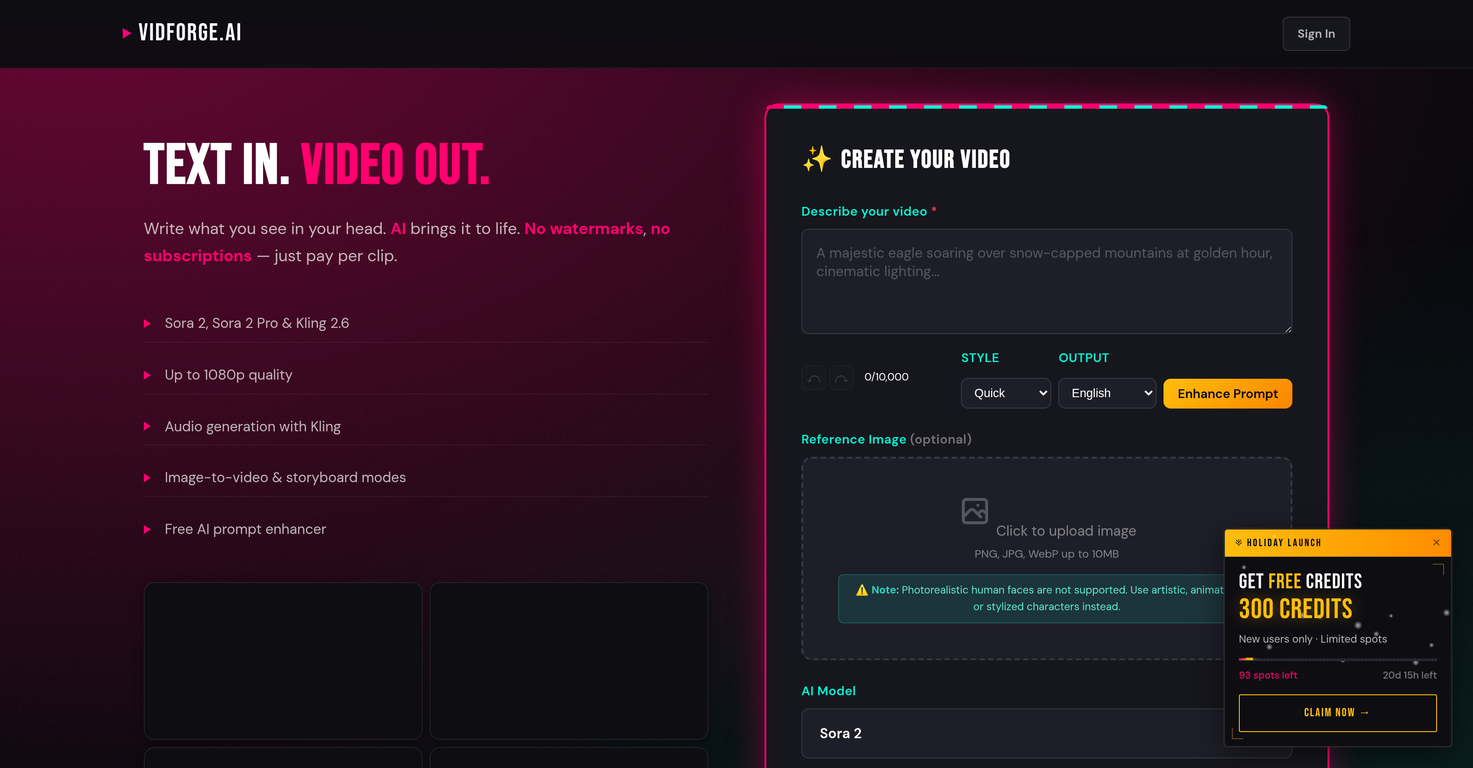
The AI prompt enhancer in VidForge.ai is a free tool designed to optimize the video creation process. It aids in the enhancement and readability of the prompt, enabling better video generation.
Which languages does VidForge.ai support for output?
VidForge.ai supports multiple languages for output, including English, Deutsch, Français, Español, Polski, 日本語, 中文, 한국어, Português, Italiano, and Nederlands. This multilingual support enhances the tool's global usability.
Can I customize the style and aspect ratio of videos in VidForge.ai?
Yes, VidForge.ai provides options for customization of video style and aspect ratio. You can choose from different video styles, and adjust the aspect ratio according to your needs.
What is the Scene Builder feature of VidForge.ai?
The Scene Builder feature of VidForge.ai is a tool that aids in constructing individual scenes within the video content narrative. It assists in the step-by-step creation of each scene, enhancing the narrative flow of the video.
Is VidForge.ai compatible with photorealistic human faces?
VidForge.ai is not compatible with photorealistic human faces. Instead, it suggests the use of artistic, animated, or stylized characters.
What is the maximum video quality I can get with VidForge.ai?
With VidForge.ai, you can get a maximum video quality of 1080p. This is facilitated by its AI models like Sora 2 and Sora 2 Pro.
Is VidForge.ai free of watermarks?
Yes, VidForge.ai generates videos without any watermarks. This emphasizes its commitment to delivering unbranded, high-quality video content.
What are the different AI models available like Sora 2, Sora 2 Pro, and Kling 2.6?
In VidForge.ai, Sora 2, Sora 2 Pro, and Kling 2.6 are the different AI models available. These models aid in the generation of videos up to 1080p quality, each with its unique capacities and video generation characteristics.
Can I create multilingual videos with VidForge.ai?
Yes, VidForge.ai supports output in multiple languages, enabling the creation of multilingual videos. Some of these languages include English, Deutsch, Français, Español, Polski, 日本語, 中文, 한국어, Português, Italiano, and Nederlands.
Are there any specific character styles VidForge.ai prefers?
VidForge.ai has a preference for artistic, animated, or stylized characters. It does not support the use of photorealistic human faces, suggestive of a preference for non-realistic character styles.
Can I adjust the video's quality levels in VidForge.ai?
Yes, you can adjust the video's quality levels in VidForge.ai. The tool provides options for different quality levels, up to a maximum of 1080p.
Does VidForge.ai provide different aspect ratio options?
Yes, VidForge.ai offers different aspect ratio options. You can tailor the aspect ratio according to your specific needs, enhancing the viewing experience of your video.
Are there any limitations to VidForge.ai's functionality?
While VidForge.ai offers an expansive suite of video generation tools, it does have limitations. The tool does not support the use of photorealistic human faces, suggesting an emphasis on using artistic, animated, or stylized characters instead.
What is VidForge.ai's pricing model?
VidForge.ai adopts a 'pay per clip' pricing model. Unlike the typical subscription-based model, users only pay for each video clip they generate using the tool.
What is VidForge.ai?
VidForge.ai is an AI video generator tool. It uses advanced artificial intelligence technology to facilitate the creation of videos. The tool does not require a subscription, and operates on a pay-per-clip model. A key feature of this tool is the support of AI models like Sora 2, Sora 2 Pro and Kling 2.6 to generate up to 1080p quality videos. It offers a free AI prompt enhancer, image-to-video and storyboard modes, and supports multiple languages, various video styles, aspect ratios, and quality levels.
What AI models does VidForge.ai use?
VidForge.ai uses the artificial intelligence models Sora 2, Sora 2 Pro, and Kling 2.6.
What kind of videos can I create with VidForge.ai?
With VidForge.ai, you can create videos up to 1080p quality. You can simply write what you visualize, and VidForge.ai brings it to life. It is emphasized that the tool is ideal for generating videos featuring artistic, animated, or stylized characters.
How does the pay per clip model work in VidForge.ai?
The pay-per-clip model in VidForge.ai means that users are not required to subscribe to a monthly or yearly plan. Instead, users pay for each clip they generate using the tool. The tool operates on credits, with the cost of a video clip determined based on its duration and quality.
Does VidForge.ai add watermarks to the videos?
No, VidForge.ai does not add any watermarks to the videos. This ensures creators can fully own and control the content they produce using this tool.
What are the image-to-video and storyboard modes in VidForge.ai?
Image-to-video mode in VidForge.ai allows users to turn static images into dynamic video content. On the other hand, storyboard mode enables users to compile multiple scenes or video clips into a coherent and compelling video narrative.
What is the AI prompt enhancer feature in VidForge.ai?
The AI prompt enhancer in VidForge.ai is a feature designed to improve the relevance and quality of video content created. Users provide a description (or 'prompt') for their video, and the AI works to generate a video that best matches that description.
Does VidForge.ai support multiple languages?
Yes, VidForge.ai supports multiple languages for output, including English, Deutsch, Français, Español, Polski, 日本語, 中文, 한국어, Português, Italiano, and Nederlands, making it broadly accessible for global audiences.
Can VidForge.ai provide videos in different aspect ratios and quality settings?
Yes, VidForge.ai provides options for different video styles, aspect ratios, and quality levels. Users can select from landscape or portrait aspect ratios, and standard (720p) or high (1080p) quality settings.
What is the Scene Builder feature in VidForge.ai?
The Scene Builder feature in VidForge.ai is a tool that allows users to craft individual scenes for inclusion within their video content. It provides a means of constructing a detailed video narrative by combining different scenes.
Why does VidForge.ai doesn't support photorealistic human faces?
VidForge.ai does not support photorealistic human faces to ensure the protection of individual privacy and to maintain a focus on the creation of artistic, animated, or stylized characters in the video content generated.
Can VidForge.ai help in creating videos with stylized characters?
Yes, VidForge.ai can certainly help in creating videos with stylized characters. The artificial intelligence models used by VidForge.ai, specifically Sora 2 and Sora 2 Pro, are adept at crafting stylized content, providing users with the creative freedom to bring their unique ideas to life.
How does the credit-based system in VidForge.ai work?
In VidForge.ai, the credit-based system is where different aspects of the video such as duration and quality have corresponding credit costs. For instance, a 10-second video costs 30 credits, and a 15-second video costs 35 credits. Users must purchase these credits in order to generate videos.
How does the text-to-video feature work in VidForge.ai?
The text-to-video feature in VidForge.ai converts the input text description, or 'prompt', into a video output. It uses AI models to analyze and interpret the text, then visualizes it into the final video. For instance, you could write 'A sunny beach with palm trees and blue waves crashing onto the shore', and VidForge.ai's AI models would generate a video matching that description.
What are the differences between the Sora 2, Sora 2 Pro and Kling 2.6 models in VidForge.ai?
The Sora 2 and Sora 2 Pro models in VidForge.ai are designed for video generation, up to 1080p quality. In contrast, Kling 2.6 is used for audio generation, providing sound for the video content. These models also cater to different types of content, with a focus on stylized content.
Does VidForge.ai have audio generation capabilities?
Yes, VidForge.ai does have audio generation capabilities. These are facilitated by the AI model Kling 2.6, which works to synchronize complementary audio with the generated video content.
How is the 1080p video quality assure in VidForge.ai?
The 1080p video quality is assured in VidForge.ai through the use of the Sora 2 Pro AI model, which is capable of generating high-definition videos. Users have the option to choose between standard (720p) or high (1080p) quality settings when creating their videos.
How is the ownership stats of the videos created with VidForge.ai?
VidForge.ai allows users complete ownership of the videos they create with the platform. Once a video is generated, the user has full rights over it with no watermarks or branding from VidForge.ai added.
What are the video style options available in VidForge.ai?
VidForge.ai provides a variety of video style options including Quick, Cinematic and Social Ad. These styles cater to different content needs, whether for fast-paced social media content, dramatic film-worthy narratives, or engaging promotional ads.