How can educators benefit from using the AI Voice Changer?
Educators can make use of AI Voice Changer to add characterful voiceovers to educational content or virtual tutors. It can help in creating engaging, dynamic, and interactive learning material that effectively sustains student interest.
How can developers use the AI Voice Changer in creating applications or virtual assistants?
Developers, particularly those involved in creating interactive applications or virtual assistants, can benefit greatly from AI Voice Changer. It allows them to add custom, interactive voices to their products, significantly enhancing the user experience.
Can I customize the pitch, speed, or tone of a voice using the AI Voice Changer?
Yes, with AI Voice Changer, users can customize voice parameters such as pitch, speed, and tone, allowing for a high level of precision in achieving the desired vocal effect.
What is the range of voice textures the AI Voice Changer can imitate?
AI Voice Changer can imitate over 100 different voice textures. These include various genders, ages, and styles, thereby offering tremendous flexibility and diversity in voice modifications.
How can the AI Voice Changer save content creators on hiring voice actors?
AI Voice Changer allows content creators to synthesize voiceovers unique to their brand, or simulate various character voices for different needs, effectively eliminating the need to hire various voice actors, thereby saving substantial hiring and production costs.
How can I preview and download the generated voice in AI Voice Changer?
In AI Voice Changer, users can preview the generated voice right after they select the voice and adjust the desired settings. If satisfied, they can download the final output directly from the platform.
Is there any size or duration limit to the audio I can upload?
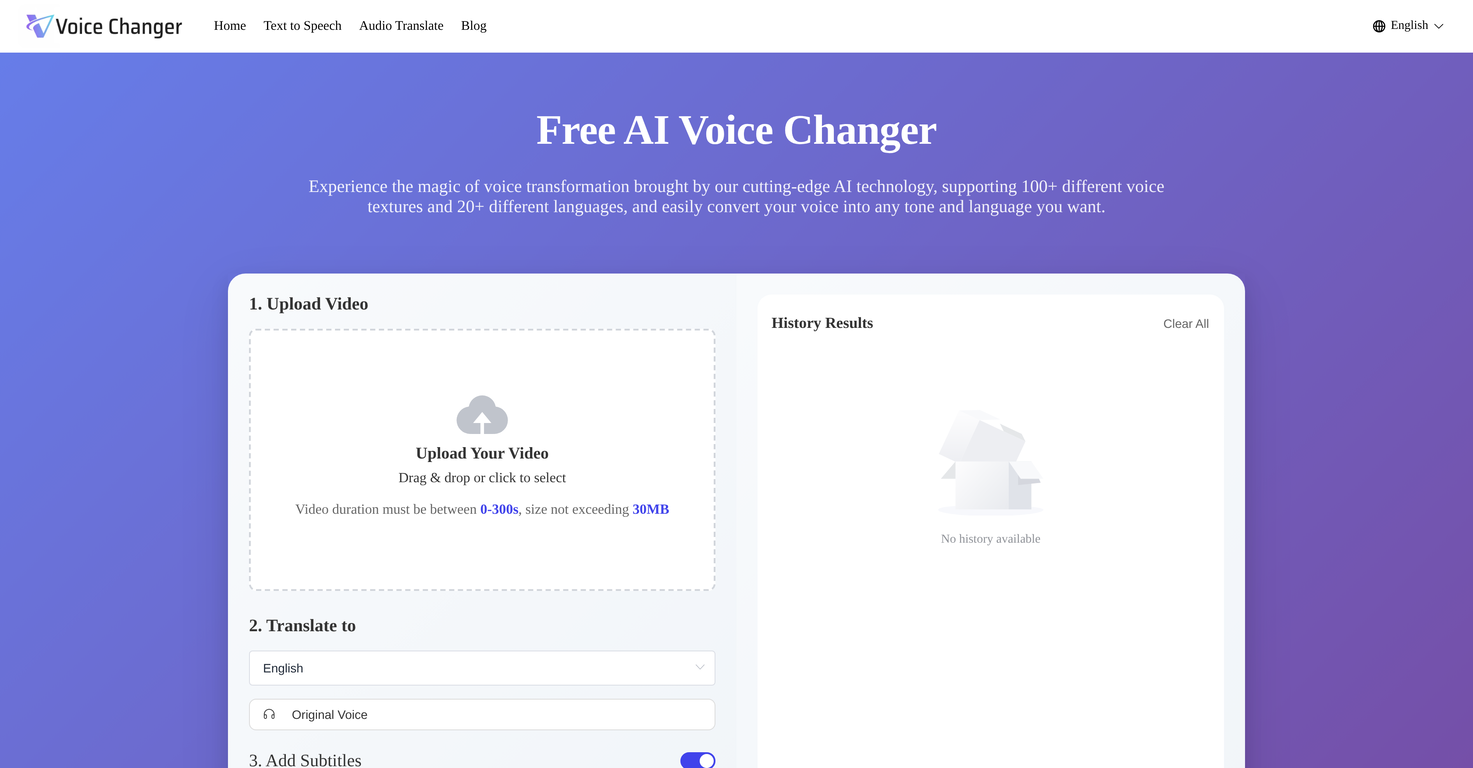
The AI Voice Changer allows the upload of videos with a duration between 0-300 seconds. The size of the video must not exceed 30MB.
Can AI Voice Changer translate and modify voices into different languages simultaneously?
Yes, the AI Voice Changer is capable of simultaneously translating and modifying voices into different languages. This makes it possible to reach a global audience by creating engaging multilingual audio content.
Which sectors or industries could benefit most from using AI Voice Changer?
Several sectors and industries, including content creation (YouTube, TikTok, Podcasts), education, animation & filmmaking, marketing & advertising, digital development (interactive applications, virtual assistants), among others, could greatly benefit from using AI Voice Changer.
Is there a mobile version for AI Voice Changer?
Currently, AI Voice Changer is mainly available as a web-based service. However, mobile applications for iOS and Android are under development and will be released in the near future.
Does AI Voice Changer's effect sound natural or does it have an artificial tone?
The voices generated by AI Voice Changer are designed to sound natural and realistic. It uses advanced deep learning algorithms which ensure that the output voice is as natural as possible and hard to distinguish from real human voices.
What is the AI Voice Changer?
AI Voice Changer is an online tool that leverages artificial intelligence technology to change and customize the user's voice in real-time, simulating a broad range of voice textures and languages.
How does the AI Voice Changer work?
AI Voice Changer transforms a user's voice by first taking an uploaded text or audio input. Users then select the desired AI voice and modify parameters like pitch, speed, and tone to achieve the specific voice effect they want. The system then generates a preview for the user to review, and once satisfied, the final altered voiceover can be downloaded.
What types of voices can the AI Voice Changer generate?
AI Voice Changer can generate an extensive variety of voice textures and languages. It leverages AI to simulate voices of different genders, ages, and styles, and also supports 20+ different languages.
How can I adjust my voice using the AI Voice Changer?
You can adjust your voice using AI Voice Changer by selecting a voice type from its library and then modifying parameters such as pitch, speed, and tone in the settings panel provided by the tool.
Is the AI Voice Changer suitable for content creation on platforms like YouTube, podcasts, and TikToks?
Yes. AI Voice Changer is suitable for use with content creation on platforms like YouTube, podcasts, and TikToks. By customizing the voiceover, it can add unique character voices to content, making it more engaging and distinctive.
What other uses does the AI Voice Changer cater for apart from content creation?
Apart from content creation, AI Voice Changer also caters to other uses such as content localization, education and training, animation and filmmaking, marketing and advertising, and software development, among others. It aids in transforming narrative voice in advertisements, translating voices in different languages for broad accessibility, creating engaging voices for virtual tutors, or adding unique vocals to animations.
How does the AI Voice Changer support educators and developers?
AI Voice Changer aids educators by adding a variety of engaging voiceovers to educational videos or virtual tutors, which can make learning more fun and interactive. For developers, it provides an effective way to incorporate personalized and vibrant voice narratives into their applications, such as when developing virtual assistants or game NPCs.
What does the voice library of the AI Voice Changer contain?
The voice library of the AI Voice Changer is comprehensive and supports 100+ different voice textures and 20+ different languages. It contains voices of diverse genders, ages, and styles, providing users with a vast range of options to choose from.
How do I use the AI Voice Changer to change my voice?
To change your voice using AI Voice Changer, you first upload your text or audio, then select the AI voice and adjust settings like pitch, speed, and tone to suit your needs. Once you've tweaked the settings, you preview and download the generated voice.
How does the AI Voice Changer ensure the voiceover sounds natural and realistic?
AI Voice Changer ensures that the voiceover sounds natural and realistic by leveraging advanced AI and deep learning algorithms. These mechanisms replicate the intonation, emotion, and natural fluency of human speech, creating an output close to real human-like voices.
Can the AI Voice Changer translate my voice into different languages?
Yes, AI Voice Changer can translate your voice into different languages. It supports over 20 different languages, ensuring extensive linguistic versatility for creating global content.
Who can use the AI Voice Changer's service?
AI Voice Changer can be used by any individual or professional who requires customized voiceover or language translation for their content. This includes content creators, animators, developers, educators, and marketers.
Can I add multiple voices in a conversation using the AI Voice Changer?
Yes, you can add multiple voices in a conversation using AI Voice Changer. It has a feature to create interactive dialogues with several AI voices, perfect for producing podcasts, audiobooks, and training scenarios.
How does AI Voice Changer make my audio content multilingual?
AI Voice Changer makes your audio content multilingual by providing the option of translating your voice into over 20 different languages. This feature helps in broadening the reach of your content to a global audience.
Can the AI Voice Changer help with content localization?
AI Voice Changer helps with content localization by providing translation capabilities to convert your voice into different languages. These languages can be selected based on your target audience, thus helping you connect with and broaden your reach to global markets.
What does the 'Preview and Download' feature of AI Voice Changer do?
The 'Preview and Download' feature of AI Voice Changer allows you to review the generated voiceover before finalizing it. After you've adjusted the voice settings to your liking, you can preview the transformed voice and ensure it fits your requirements. Once satisfied, you can then download the final voiceover.
Are there any tutorials on how to use the AI Voice Changer?
Though there's no direct mention of tutorials on their website, the process of changing your voice with AI Voice Changer is straightforward. Just upload text or audio, select the AI voice and settings, and preview and download the generated voice.
How does the AI Voice Changer add immersion to my end product?
AI Voice Changer adds immersion to your end product by generating natural and realistic voiceovers. These are achieved through perfect intonation, emotion, and natural fluency, which enhance the user experience and engagement with the content.
Do I need to sign up to use the AI Voice Changer?
No specific information about a sign-up requirement to use AI Voice Changer is mentioned on their website, but it is defined as a 'Free Online Voice Changer Tool' in the page title, suggesting that it may be used without a sign-up process.
How does the AI Voice Changer contribute to content creation for social media platforms?
AI Voice Changer contributes to content creation for social media platforms by offering a tool to customize voiceovers. This can add unique character voices, making the content more engaging. Its versatility allows content creators to generate distinctive narratives for platforms such as YouTube, TikTok, podcasts, and more.
 Rocket
 Mini tools
 Transform your voice into any tone and language.













 48
48





