What tools does WeryAI provide for video content preparation?
For video content preparation, WeryAI provides tools such as Face Swap, Lip Sync, Subtitle Removal, and Video Upscaling.
How is the image-to-video conversion done in WeryAI?
WeryAI's image-to-video conversion functionality involves users uploading a photo, and the AI models animate this into a video.
How does the video-to-video transformation work in WeryAI?
Video-to-video transformation in WeryAI works by allowing users to restyle existing footage into different aesthetic styles like anime or claymation.
Can WeryAI generate music?
Yes, WeryAI can generate music as part of its functionality.
What is the functionality of the AI chat feature in WeryAI?
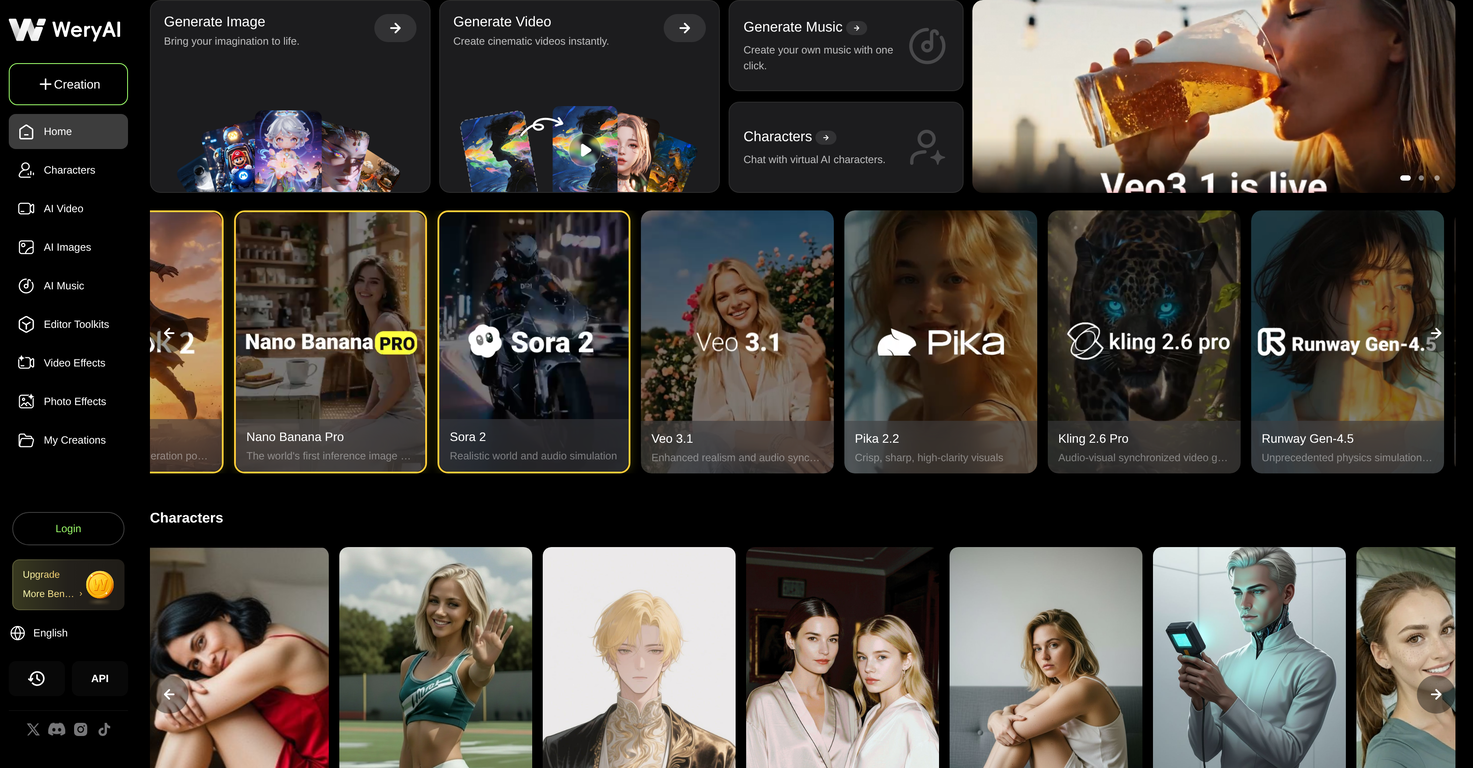
The AI chat feature in WeryAI allows users to interact with virtual AI characters.
How does face-swapping in videos work in WeryAI?
Face-swapping in videos, facilitated by WeryAI, works seamlessly by automating the process of replacing faces in the video with a different face desired by the user.
How can I export the results from WeryAI?
Users can export their results from WeryAI in High Definition or 4K resolution.
How do I select the style of my visuals in WeryAI?
Users select the style of their visuals in WeryAI by switching between different AI models, each offering a unique creative style.
What is the process for creating marketing materials in WeryAI?
To create marketing materials, users can leverage WeryAI's integrated AI models to generate and customize visual content suitable for marketing campaigns.
How does the product showcase functionality work in WeryAI?
In WeryAI, the product showcase functionality works by using AI to generate appealing showcase visuals of a product, enhancing its presentation in a marketing context.
What is the video upscaling process in WeryAI?
The video upscaling process in WeryAI works by using AI tools to increase the resolution of a video, improving its quality up to 4K.
How does background removal functionality work in WeryAI?
The background removal functionality in WeryAI works by using AI to identify and remove the background of an image or video, isolating the subject for a clean and professional look.
How do I use the different AI models in WeryAI?
In WeryAI, users can utilize different AI models by selecting a desired tool and specifying the AI model from the options to generate their visual content.
How does WeryAI support different needs of creators, marketers, designers, and developers?
WeryAI supports different needs of creators, marketers, designers, and developers by providing robust tools and features for generating high-quality visuals. It allows them to generate realistic 4K images or videos from text prompts, convert images to videos, use advanced tools like Face Swap, Lip Sync, and Video Upscaler. It also supports content generation for a variety of creative styles such as cinematic, anime, and photorealistic portraits.
What is WeryAI?
WeryAI is a free platform that provides various AI models like Kling AI, Google Veo, Sora, and Flux for generating high-quality imagery and videos. It is aimed at creators, marketers, designers, and developers who want to create professional visual content. In addition to generation, it offers diverse tools such as face swapping, upscaling, and various e-commerce specific features.
What AI models does WeryAI integrate?
WeryAI integrates various AI models such as Kling AI, Google Veo, Sora, Flux, Wan AI, and Nano Banana. These models help in creating different styles of visuals, from anime to photorealistic content.
Can WeryAI generate 4K videos and images?
Yes, WeryAI can efficiently generate 4K videos and images. Text prompts can be turned into realistic cinematic shots, anime style videos and images, and photorealistic portraits.
What are the unique features of WeryAI?
Unique features of WeryAI include but are not limited to: face swapping, video and image upscaling, text-to-video and image generation, AI character creation and body motion imitation, image-to-video and video-to-video transformation. It also has specific tools that cater to e-commerce needs like background removal, product showcases, and creation of marketing material.
How can I create high-quality visuals with WeryAI?
To create high-quality visuals with WeryAI, you start by selecting a tool. You can input prompts or upload your content, then select the kind of AI model that fits your style requirements. The platform will generate your visuals which you can then export in HD or 4K.
Does WeryAI help remove video subtitles?
Yes, WeryAI incorporates a Subtitle Removal tool which helps in erasing subtitles from videos, aiding in clean video creation.
Can I generate music with WeryAI?
Yes, apart from creating visual content, WeryAI provides a feature to 'Generate Music'. This helps you create your own tunes with just a single click.
How does the motion transfer feature in WeryAI work?
WeryAI's motion transfer feature works by animating static photos and swapping faces in videos in a seamless manner. This tool comes handy when creating consistent AI characters or making photos come to life, following a user-friendly and intuitive process.
Does WeryAI have image-to-video transformation functionalities?
Yes, WeryAI does offer image-to-video and video-to-video transformation functionalities. They enable users to animate images or restyle existing footage into different styles such as anime or claymation instantly.
How does WeryAI cater to e-commerce needs?
WeryAI caters to eCommerce needs through features like background removal, creating product showcases, and generating AI-altered marketing materials. These tools assist in product photography and creation of visually compelling marketing assets.
How do I use WeryAI?
To use WeryAI, you need to first select a tool, be it for video creation, image generation or any other. Then, input the prompts needed or upload your reference. Depending on your style preference, switch between AI models and finally generate and export the results in HD/4K format.
What would I need to do to switch between AI models in WeryAI?
To switch between AI models in WeryAI, during the creation process select the 'Choose Model' option. This will give you a dropdown of available models such as Kling, Veo, or Flux, and you can switch to the one that best suits your requirement.
How can I export the visuals I create using WeryAI?
You can export the visuals you create using WeryAI in the final step of the creation process. After generating your visuals, you have the option to 'Generate & Export', where you can download your results in HD/4K without requiring complex editing skills.
Does WeryAI allow for anime style conversion?
Yes, WeryAI has the ability to convert and restyle your images or videos into an anime style. This is achieved using the image to video and video to video transformation functionalities.
Can I upscale images using WeryAI?
Yes, WeryAI provides the functionality of upscaling images using its specific Image Upscaler tool. This helps in enhancing the visual quality of images.
How do the text-to-video and image generation tools in WeryAI work?
WeryAI's text-to-video and image generation tools work by transforming user's text prompts into realistic 4K videos and images. These tools support the conversion into different styles like cinematic shots, anime, and photorealistic portraits.
Does WeryAI provide access to Google Veo and Kling AI models?
Yes, WeryAI platform gives access to numerous AI models including Google Veo and Kling AI, enhancing the spectrum of creating professional visual content.
What is the process to create AI characters in WeryAI?
Creating AI characters in WeryAI involves the use of the AI character and body motion transfer tool. This can make a static photo dance with Motion Imitation, swap faces in a video or even create consistent AI characters for story-telling.
How can I restyle images into different forms using WeryAI?
You can restyle images into different forms using WeryAI's 'Image-to-Video & Video-to-Video' feature. With this, you can upload a photo to animate it or transform existing footage into styles such as anime or claymation.
Does WeryAI provide tools for product photography?
Yes, WeryAI provides tools that cater to product photography. These comprise functionality to remove backgrounds instantly, to generate AI-altered product showcases, and to create marketing assets.