What is the LEETA ID Photo—passport photo app?
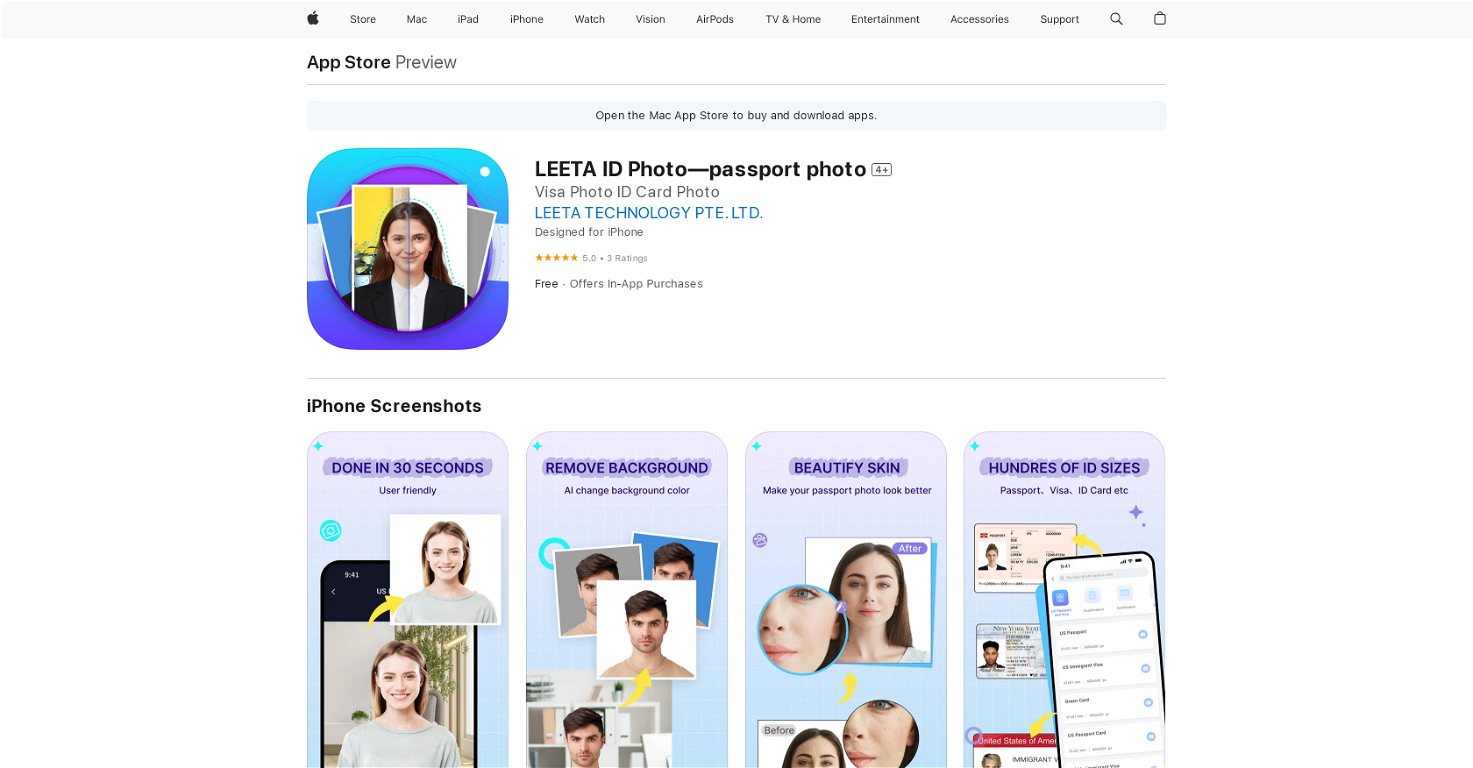
LEETA ID Photo—passport photo is a mobile application, powered by AI, that allows users to create passport photos with ease and speed. The app helps users to adjust their pose and facial expression to achieve the best photo. The app ensures that the resulted photos meet international standards, making it suitable for passport applications and renewals.
How does LEETA ID Photo—passport photo app use AI technology?
LEETA ID Photo—passport photo app utilizes advanced AI technology to analyze users’ selfies. The AI guides them on adjusting their pose and facial expressions to achieve an optimum photo. Additionally, the AI collects facial features and can automatically crop and remove the photo background. It also has automatic resizing capabilities according to the global standards.
Can LEETA ID Photo—passport photo app be used for document applications other than passports?
Yes, the LEETA ID Photo—passport photo app can be used for a variety of document applications other than passports. Along with passport photos, the app enables users to generate ID, visa, identification card, driver's license, and other regulatory photos.
What are the features of the LEETA ID Photo—passport photo app?
The main features of the LEETA ID Photo—passport photo app include professional photo editing, advanced AI for resizing and positioning, automatic background changes, auto-layout setting for ease of printing, and 180 days storage of electronic data. Not to mention, the app offers numerous regulatory photo sizes from more than 150 countries.
Does the LEETA ID Photo—passport photo app allow users to change the background of their images?
Yes, the LEETA ID Photo—passport photo app does allow users to change the background of their images automatically. Once the facial features are recognized, the app can auto-crop and remove the photo background. Users can choose the background color according to their preference.
What platforms is the LEETA ID Photo—passport photo available on?
The LEETA ID Photo—passport photo app is available on the Apple App Store, and thus can be downloaded on iPhone, iPad, and iPod touch.
Can I read customer reviews and ratings for the LEETA ID Photo—passport photo app on the App Store?
Yes, customer reviews and ratings for the LEETA ID Photo—passport photo app are available on the App Store. Users can read these to ensure that the app meets their specific needs.
How does the auto-layout setting work in LEETA ID Photo—passport photo app?
The app's auto-layout setting works by automatically formatting the photo according to the size of the photo paper selected by the user. Once the size is selected, the AI will automatically layout the format which can be printed at nearby Walmart, CVS, Costco, etc. or on a home printer.
Does LEETA ID Photo—passport photo app store the electronic data of the pictures taken?
Yes, the LEETA ID Photo—passport photo app stores the electronic data of the photos taken for 180 days. Users can download it at any time for use during that period.
From how many different countries does the LEETA ID Photo—passport photo app offer regulatory photo sizes?
The LEETA ID Photo—passport photo app offers a wide range of regulatory photo sizes. It provides hundreds of ID photo sizes from more than 150 countries.
How fast can I create passport and ID photos using the LEETA ID Photo—passport photo app?
With the help of advanced AI technology, the LEETA ID Photo—passport photo app requires only 30 seconds to generate ID and passport photos.
Does the LEETA ID Photo—passport photo app require registration to use?
The LEETA ID Photo—passport photo app does not require registration to use. Furthermore, it doesn't feature any ads, providing a seamless user experience.
What are the requirements to use the LEETA ID Photo—passport photo app on my iPhone?
To use the LEETA ID Photo—passport photo app on your iPhone, the device needs to run iOS 12.0 or later.
How does the LEETA ID Photo—passport photo app resize photos to match specific requirements?
The LEETA ID Photo—passport photo app utilizes AI technology to resize photos to fulfill specific requirements. This involves properly positioning and framing the photo to match international standards of different regulatory photos.
Can LEETA ID Photo—passport photo app be used to create photos for visa applications too?
Yes, LEETA ID Photo—passport photo app can be used to create photos for visa applications too. The app supports the necessary requirements to generate visa photos along with passport, identification card, and driver's license photos.
Are in-app purchases available in the LEETA ID Photo—passport photo app?
Yes, the LEETA ID Photo—passport photo app offers in-app purchases. User can purchase ID/Passport photos for $1.99.
What kind of regulatory photos can be created using the LEETA ID Photo—passport photo app?
With the LEETA ID Photo—passport photo app, users can create a variety of regulatory photos including passport, visa, identification card, driver's license, qualification exam, document application photos, and more.
Is LEETA ID Photo—passport photo app suitable for users with limited technical expertise?
Yes, LEETA ID Photo—passport photo app is suitable for users with limited technical expertise. The user-friendly interface and guided processes make it easy for anyone to create high-quality regulatory photos.
Is there any cost associated with using the LEETA ID Photo—passport photo app?
While the LEETA ID Photo—passport photo app is free to download and offers some services at no cost, there are in-app purchases available for certain features, such as ID/Passport photos, which cost $1.99.
 Base44 Superagents-AI agent that does it all
 Mini tools





 PlatePhoto
 Transform snapshots into perfect passport photos in seconds.OpenJunYang Peng🙏 22 karmaNov 29, 2024@xPassportPhotoIt's so friendly that it's completely free
 Open
Open AI-powered passport photos that meet official requirements.Open


 0
0





