What information does the comprehensive report from Verify Backlinks include?
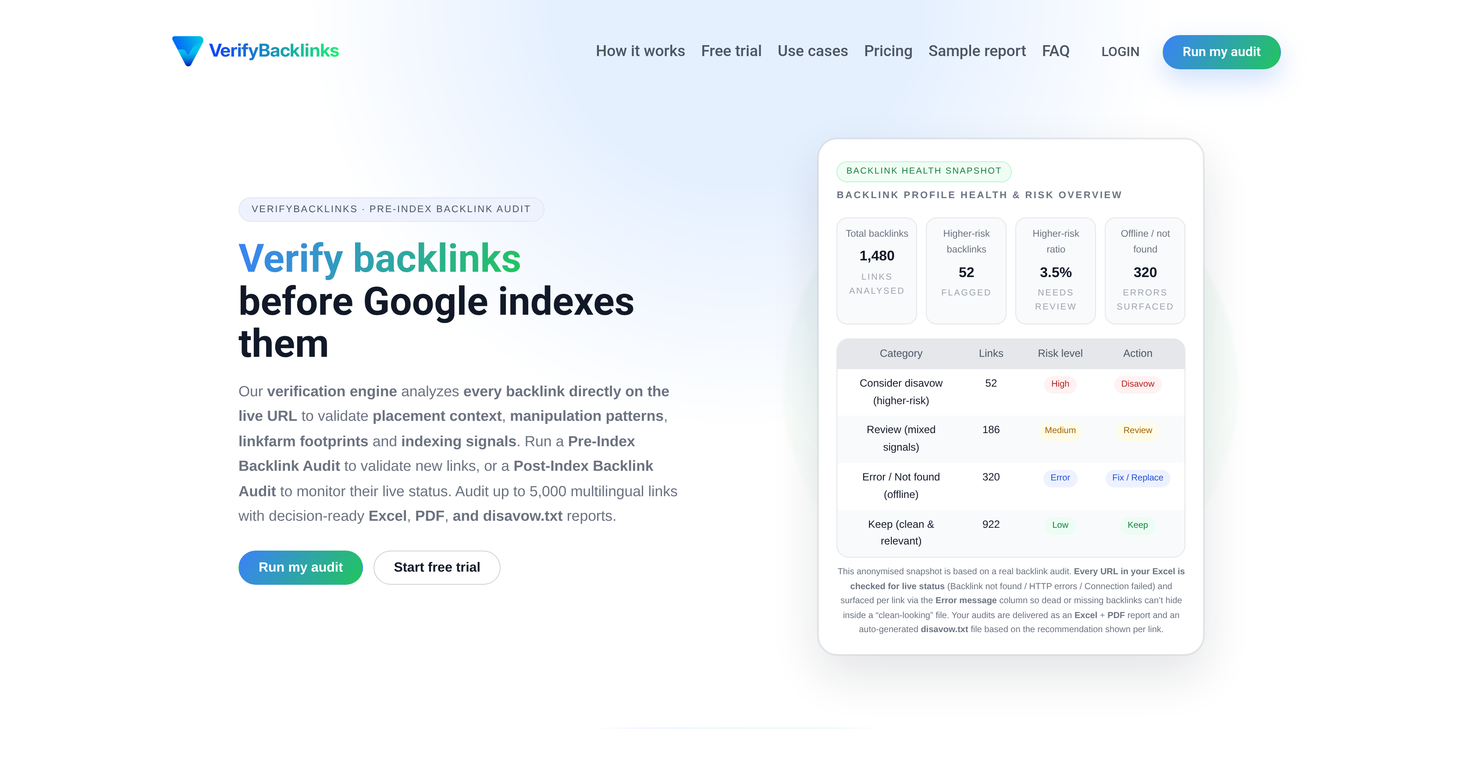
The comprehensive report from Verify Backlinks includes the status of each backlink, labeling them as 'clean and relevant' or otherwise, with a 'Keep/Review/Disavow' categorization. It also flags links with unclear presence, follow attributes, and page context directly on the live URL.
Does Verify Backlinks support the management of backlink profiles before they get indexed?
Yes, Verify Backlinks supports the management of backlink profiles before they are indexed. This proactive management of the backlink profile helps in optimizing SEO strategies and minimizing risks from harmful backlinks.
How does Verify Backlinks minimize manual work during the audit process?
Verify Backlinks minimizes manual work during the audit process by automatically extracting and framing backlink data for the audit. This eliminates the need for users to reformat their backlink data files.
What does Verify Backlinks mean by validating backlinks?
When Verify Backlinks speaks about validating backlinks, it refers to the process of verifying each backlink's presence, attributes, and page context on the live URL before it is indexed by search engines. This validation process helps identify clean and relevant backlinks and those that need to be disavowed or reviewed.
Can Verify Backlinks handle multilingual links?
Yes, Verify Backlinks can handle and audit up to 5,000 multilingual links. It supports businesses with global backlink profiles, catering to their international SEO needs.
What kind of errors does Verify Backlinks check for in the backlinks?
Verify Backlinks checks for errors such as missing or dead backlinks and HTTP connections that have failed. These errors are highlighted per link in the report under the error message column.
Is Verify Backlinks suitable for in-house SEO teams and affiliate site owners?
Yes, Verify Backlinks is suitable for in-house SEO teams and affiliate site owners. The tool is designed to cater to various entities including SEO agencies and businesses, providing vital data that helps in effectively managing backlink profiles.
Can Verify Backlinks audit backlinks after they're indexed by search engines?
Yes, Verify Backlinks offers a Post-Index Backlink Audit which can be run after the backlinks are indexed by search engines. This feature helps in monitoring the live status of backlinks post-indexing.
Does Verify Backlinks analyze the live URL for backlink presence?
Yes, Verify Backlinks analyzes every backlink directly on the live URL to validate placement context, manipulation patterns, linkfarm footprints, and indexing signals.
What does it mean when Verify Backlinks says it checks for follow attributes?
When Verify Backlinks checks for follow attributes, it is checking for dofollow/nofollow/sponsored/UGC attributes of each link. These attributes determine how search engines treat these links, affecting the overall SEO impact of the backlinks on the website.
What kind of SEO reporting does Verify Backlinks provide?
Verify Backlinks provides a comprehensive SEO report in the format of an Excel spreadsheet, a PDF summary, and a ready-to-use disavow.txt file. The report notes whether backlinks are clean and relevant or require reviewing, flagging errors and providing insights to guide SEO strategy.
Does Verify Backlinks offer a free trial?
Yes, Verify Backlinks offers a free trial. You can upload a backlinks Excel file for testing, and Verify Backlinks will perform live pre-index URL checks on your first 5 links and return clear labels for each.
Can I check the live status of backlinks with Verify Backlinks?
Yes, with Verify Backlinks you can check the live status of backlinks. The system analyzes each backlink on the live URL to validate its presence, attributes, and page context, and to detect any potential issues or manipulations.
How does Verify Backlinks' pre-index backlink audit work?
Verify Backlinks' pre-index backlink audit works in three steps: Users upload their backlink data in Excel format, the tool validates these backlinks before they're indexed by search engines, and outputs an Excel + PDF audit plus a ready-to-use disavow.txt file featuring link-level labels of 'Keep', 'Review', or 'Disavow'.
What does Verify Backlinks do?
Verify Backlinks is a live-URL backlink verification engine that examines backlinks directly on the live URL. It conducts Pre-Index and Post-Index Backlink Audit to validate new links and verify existing ones. It is built to validate the value carried by a backlink on the live page.
What are the key features of Verify Backlinks?
Key features of Verify Backlinks include live URL checks, pre-index and post-index backlink audits, manipulation pattern detection, multilingual link analysis, messy headers handling, multiple sheets handling, follow attributes check, page context analysis, disavow.txt generation, and Excel & PDF report generation.
Does Verify Backlinks check each backlink for live status?
Yes, Verify Backlinks checks each URL for link presence and follows attributes in real-time, flagging with clear notes and messages when a link can't be confirmed.
What is a Pre-Index Backlink Audit?
A Pre-Index Backlink Audit is a process performed by Verify Backlinks to validate new links before search engines index them. This audit involves checking each backlink for link presence, follow attributes, and page context directly on the live URL.
What does a Post-Index Backlink Audit entail?
A Post-Index Backlink Audit is a service of Verify Backlinks that checks the live status of backlinks after they've been discovered and indexed by search engines.
How does Verify Backlinks handle links from different languages?
Verify Backlinks is capable of analyzing multilingual links. It evaluates each backlink for language alignment as one of its evaluation parameters.
Can I use Verify Backlinks if my backlink list has multiple sheets and messy headers?
Yes, Verify Backlinks can accommodate backlink lists with multiple sheets and messy headers. It automatically detects backlink URLs and prepares the file for audit without requiring any reformatting from the user.
What file formats does Verify Backlinks support for reports?
Verify Backlinks supports Excel, PDF, and disavow.txt file formats for audit reports. An Excel workbook, a polished PDF summary, and a ready-to-use disavow.txt file are delivered at the end of the audit.
Is Verify Backlinks suitable for SEO agencies?
Yes, Verify Backlinks is an apt tool for SEO agencies. The agencies can use it to validate vendor deliveries, share clear outcomes with clients, and keep verification standards consistent across different campaigns.
Can affiliate site owners benefit from Verify Backlinks?
Affiliate and niche site owners can benefit from Verify Backlinks by verifying their backlinks before pointing links at their pages, thereby avoiding potential costly mistakes.
Does Verify Backlinks evaluate backlinks for topical relevance?
Yes, Verify Backlinks evaluates backlinks for topical relevance. It includes this as part of the real page signals used for each backlink evaluation.
How does Verify Backlinks handle manipulation patterns and linkfarm footprints?
Verify Backlinks detects and handles manipulation patterns and link-farm footprints. These are flagged as part of the risk label in the audit output.
What signals does Verify Backlinks use to analyze backlinks?
Verify Backlinks uses real page signals for backlink analysis. These include placement context, manipulation patterns, link-farm footprints, indexability signals, topical relevance, and language alignment.
Can Verify Backlinks generate a disavow.txt file?
Yes, Verify Backlinks can generate a disavow.txt file. This option will include only links marked 'Consider disavow', prepared for Google Search Console submission.
Do I need to connect Google Search Console to use Verify Backlinks?
No, there is no need to connect Google Search Console to use Verify Backlinks. The system operates entirely based on the uploaded data, keeping the user in full control of what they wish to submit to Google.
What do 'Keep', 'Review', and 'Consider Disavow' classifications mean in Verify Backlinks?
In Verify Backlinks, 'Keep' means the backlink is fine to keep, 'Review' indicates that the backlink has mixed signals and needs review, and 'Consider Disavow' suggests that the backlink is high risk and should be considered for disavowal.
What kind of data can I expect in a Verify Backlinks report?
A Verify Backlinks report delivers in-depth audit data including risk labels, explanations, error messages, placement context details, language fields, follow type, topical and language context, spam topics, risky footprints, noindex directives, canonical conflicts, and more in a structured Excel workbook, a summary PDF, and a disavow.txt.
How does Verify Backlinks assist in improving SEO performance?
Verify Backlinks assists in improving SEO performance by ensuring that the backlinks to your site carry value and are not associated with manipulative patterns or link-farm footprints. By maintaining the integrity of your backlink profile, Verify Backlinks can contribute to improved rankings and better site visibility.
Can I audit a backlink after it has already been indexed?
Yes, you can audit a backlink after it has already been indexed using Verify Backlinks’ Post-Index Backlink Audit feature.
How is backlink health maintained using Verify Backlinks?
Verify Backlinks maintains backlink health by carrying out live pre-index and post-index audits to confirm the validity and value of backlinks, flagging any that are higher-risk or potentially harmful, and generating reports that allow for any necessary remedial actions such as the disavowal of harmful links.