 Tripo AI 3D Generator

 Mini tools
Productivity Page
Boost your productivity on any Apple device.
Go to 🚀 Productivity
 TheLibrarian.io
 Supernormal App
 Saidar
 MiroAI
 Collate
 Runable
 ComputerX
 Slashspace (Formerly RabbitHoles AI)
 AiAssistWorks - GPT Gemini Claude AI for Sheets Docs Slides
 ConsoleX AI
 Ask Steve
 Alfred by Simbli.ai
 Kolva
Kolva
 Affint
 Octofy
 Sup AI
 BrowseWiz
 ZeroTwo
 Support Flow
 Hyperis
TheLibrarian.io
643,182
Supernormal App
202,732
Saidar
132,837
MiroAI
131,216
Collate
130,092
Runable
125,031
ComputerX
124,134
Slashspace (Formerly RabbitHoles AI)
119,354
AiAssistWorks - GPT Gemini Claude AI for Sheets Docs Slides
113,361
ConsoleX AI
68,643
Ask Steve
52,374
Alfred by Simbli.ai
43,535
Kolva
43,424
Affint
40,180
Octofy
38,940
Sup AI
37,204
BrowseWiz
36,716
ZeroTwo
35,673
Support Flow
33,733
Hyperis
30,440

Productivity Page
Inputs:
Outputs:
Boost your productivity on any Apple device.
Overview





Overview
Generated by ChatGPT
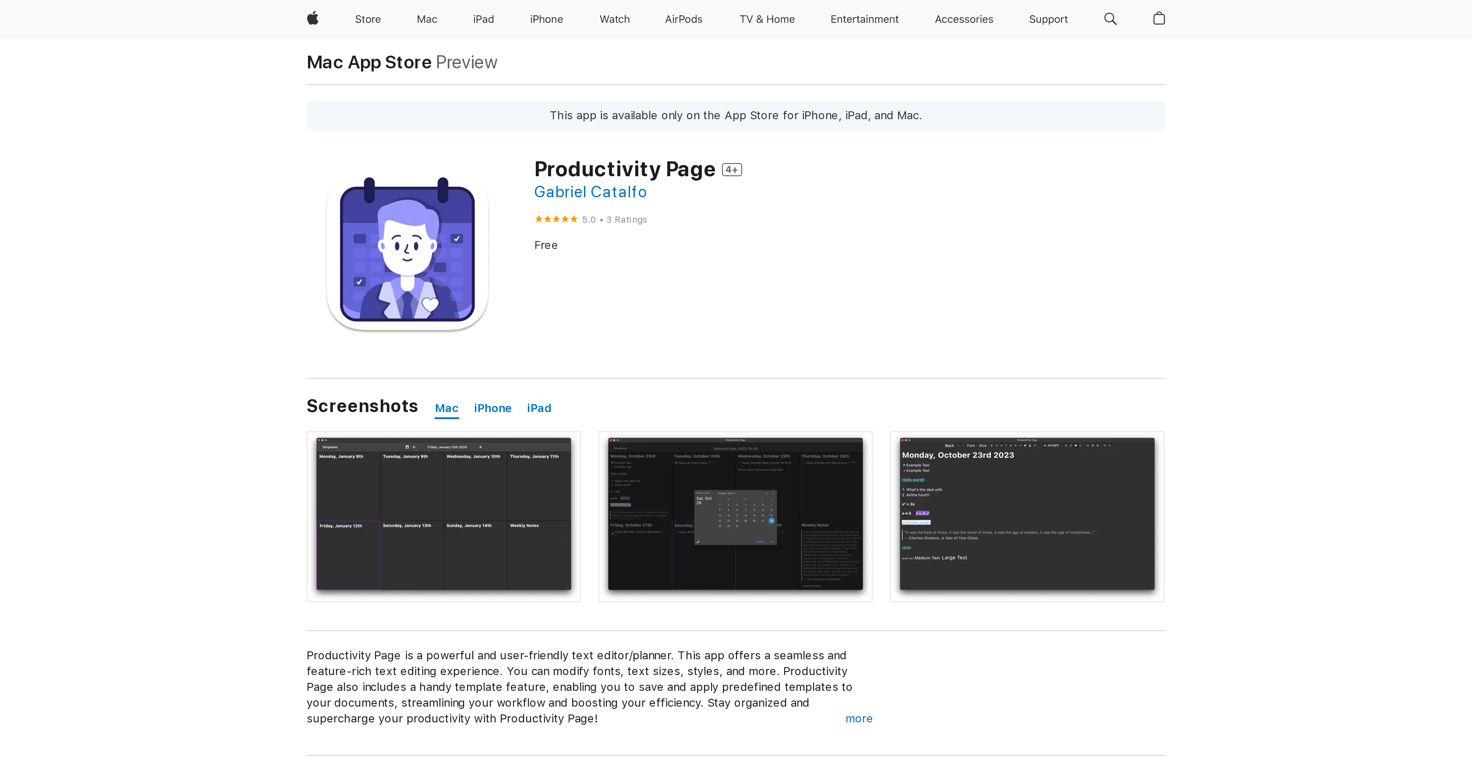
Productivity Page is a versatile text editor and planner designed to enhance efficiency and organization. With a user-friendly interface, it offers a seamless text editing experience, allowing users to customize fonts, sizes, styles, and more to suit their preferences.One notable feature of Productivity Page is its template functionality, which enables users to save and apply predefined templates to documents, streamlining workflow and saving time. This feature enhances productivity by providing structured formats for common tasks.
Furthermore, Productivity Page introduces Jake, an AI-powered productivity assistant integrated directly into the app. Jake assists users in various tasks, including organizing notes, planning schedules, and generating ideas. Leveraging advanced natural language processing technology, Jake can understand user queries and provide intelligent responses, fostering interactive and efficient planning and note-taking experiences.
Overall, Productivity Page offers a robust set of features tailored to enhance productivity and organization. Whether users are editing text, managing schedules, or brainstorming ideas, Productivity Page and its integrated AI assistant, Jake, aim to streamline workflows and maximize efficiency.
Show more
Releases
Get notified when a new version of Productivity Page is released
Notify me
March 6, 2024
Initial release of Productivity Page.
Top alternatives
-
 Your WhatsApp AI assistant for instant productivity.Duck Typer🙏 262 karmaFeb 12, 2025@TheLibrarian.ioGreat tool! Was very helpful in content production
 -
 The AI assistant app that turns meetings into completed work
 -
 Your AI Secretary for Admin Tasks, now on SMSWorks well and connects with my apps easily. I’m considering using it for daily reports and posts
 -
 Unlock creative power with AI-driven collaboration.Miro has massively improved how we collaborate and execute. The AI features have made a real difference in day-to-day productivity, helping us structure ideas quickly and get to decisions faster. What really surprised me is the new prototyping feature: it’s now much easier to turn a workshop board into an actual prototype and iterate with the team. If you’re running product work, workshops, roadmaps, or even GTM planning, Miro is worth it.
 -
 Unlimited free and private summaries and chat with PDFI’ve been using Collate to go through technical PDFs, and it’s been surprisingly handy. Summarizing docs and being able to ask questions directly saves me time, especially when I’m skimming through research or API references. No sign-ups, works offline, and everything stays on my device — which I appreciate.
 -
 The Best Way to Work with AIUsed it for PPT generation and performed extremely well, especially the numbers and data part.



























0
0





