 Rocket - Think it. Type it. Launch it.
 Mini tools
SeaArt
 SeaArt: Explore, Create, Collaborate.
Go to 📷 Images
 Photo AI
 Freepik AI Image Generator
 Stockimg AI
 Midjourney
 CreativePixel
 INLINER
 BestPhotoAI
 Ideogram
 SD Telegram bot
 Getimg.ai
 Shoots by Diktatorial
 Seedream
 Picsman - AI Photo Editor
 PixAI Art
 NewHero AI
 GenTube
 Reface
 FLUX
FLUX
 Stable Diffusion
 TinderProfile.ai
Photo AI
246,793
Freepik AI Image Generator
131,206
Stockimg AI
104,604
Midjourney
87,366
CreativePixel
81,143
INLINER
68,181
BestPhotoAI
68,009
Ideogram
62,461
SD Telegram bot
55,121
Getimg.ai
53,799
Shoots by Diktatorial
47,259
Seedream
47,014
Picsman - AI Photo Editor
45,385
PixAI Art
43,320
NewHero AI
39,800
GenTube
36,697
Reface
34,485
FLUX
32,882
Stable Diffusion
31,927
TinderProfile.ai
31,904
Go to 🎨 Creativity
📷
Images
(3196)
🔠
Text
(2056)
💻
Software
(1818)
🎥
Videos
(938)
🔊
Audio
(721)
🎨
Art
(547)
🎨
Design
(269)
🌪️
Brainstorming
(204)
🖌️
3D
(60)
📸
Multimedia
(16)
 So You Want To Be A Writer?
 Minka
Minka
 Ancient AI powered spirits
 Jvb ai
 somacguffin
 Cuty
Cuty
 Superfly Stoner
So You Want To Be A Writer?
336
Minka
214
Ancient AI powered spirits
213
Jvb ai
165
somacguffin
166
Cuty
163
Superfly Stoner
137

SeaArt: Explore, Create, Collaborate.
Overview
Featured alternatives
 Crano AI
 Funy AI: Video, Image
Crano AI
478,316
Funy AI: Video, Image
642,794
Overview
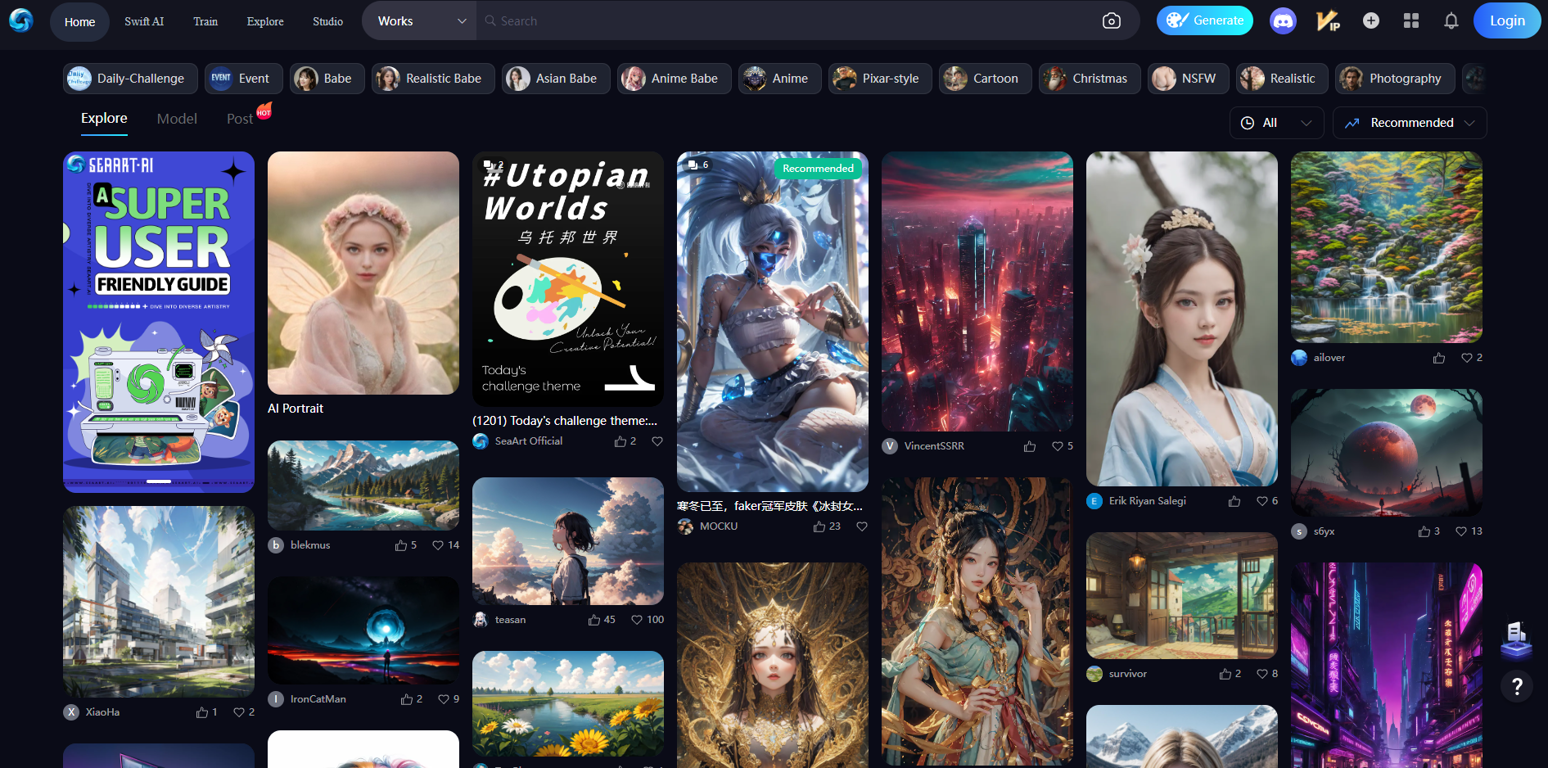
SeaArt stands out as a comprehensive AI tool tailored for image processing and creative content generation. The tool boasts a diverse array of functionalities neatly organized into distinct categories for user ease.Within the "Generate" section, users can leverage AI-powered features such as AI Portrait, AI Filters, HD Restoration, Sketch to Img, and Remove Background, providing practical solutions for refining and manipulating images.
The tool's "Explore" capability facilitates seamless navigation through thematic categories like Realistic Babe, Anime, Christmas, NSFW, Game, Landscape, among others. Notably, it includes specialized categories like League of Legends, Genshin, Furry, and Uniform Cosplay, catering to a broad spectrum of user preferences.
Under the "Model" section, users can engage in daily challenges, fostering a creative community where artists contribute to themed competitions like "Utopian Worlds." The tool's Works section supports collaboration, allowing users to post, share, and explore artistic creations.
Additionally, the "Studio" feature suggests a focus on optimizing workflows and includes guides for effective utilization. Distinctive functionalities like "Pixar-style" and "Cartoon" underscore the tool's versatility in accommodating various artistic styles.
In summary, SeaArt emerges as a robust tool for artists and content creators, offering a rich set of AI-powered features for image manipulation, thematic exploration, and collaborative artistic endeavors.
Show more
Releases
Get notified when a new version of SeaArt is released
Notify me
December 1, 2023

zhangfengming
Initial release of SeaArt.
Author

Pricing
Pricing model
Free Trial
Paid options from
$3.04/month
Billing frequency
Monthly
Top alternatives
-
Arvoly XSL🙏 122 karmaOct 31, 2023@Photo AIIt's not free, it forces you to input an email before shoving a price tag in your face.
-
Freepik helps people to create better designs, faster.
-
-
-
Six months ago I was building some landing pages and found myself wasting way too much time downloading stock photos, cropping them, resizing, rehosting... the whole thing felt broken. I looked around for a tool that just let me describe the image I wanted and get it in the right format instantly—but nothing really existed. So I built Inliner AI. Now when I need an image, I just write what I want directly into a URL like this: https://img.inliner.ai/my-project/panda-playing-guitar-on-stage_1200x750.png Hit enter and boom Inliner generates an original AI image, intelligently cropped, resized for the web, and served instantly via CDN. Need a quick edit? Just append it to the URL: .../remove-the-guitar_900x750.png No uploads, no UI, no waiting. You can also upload your own products, people, or logos and compose them into generated scenes. For more control, there's a Studio web GUI where you can play with prompts and dimensions and compare variants side by side before committing. Where this gets really powerful is when you show your LLM how to use these URLs. Once it knows the pattern like: https://img.inliner.ai/my-project/xxx-yyy-zzz.png It can generate, tweak, and iterate on image assets dynamically, right inside your prompts or your code. Everything stays self contained in the link. We also include copy/pasteable instructions for Claude, GPT, Cursor, and more so you can wire this up in minutes. If you're building a product, designing a page, or just prototyping something new try it out and let me know what you think!






 0
0





