Go to section
Spotlight SureThing.io - "OpenClaw" for BeginnersTask automation
The front page of AI.Used by 90M+ humans.

Generate image
Tasks
Generate text
Free mode
Trending
Leaderboard
Characters
 Mini tools
New
Featured
Lists
Agents
Requests
Jobs
Map
Newsletter
Starter pack
Free tools
Speech to text
Text translator
Remove background
Settings
Edit profile
My tools
Gallery
Dashboard
Inbox
Get featured
Contact TAAFT
For you
Popular
Job impact index
Most saved
Affiliate program
Submit AI tool
Notification preferences
Glossary
Home
Timeline
My profile
Create tool
Deals
Companies
Models
Robots
Papers
Fundraises
Devices
Organizations
Events
Prompt Pack
Merchendise
APIs
Features
Tools
Countries
Collections
Videos
News
Investors
Repositories
Mini tools
New
Featured
Lists
Agents
Requests
Jobs
Map
Newsletter
Starter pack
Free tools
Speech to text
Text translator
Remove background
Settings
Edit profile
My tools
Gallery
Dashboard
Inbox
Get featured
Contact TAAFT
For you
Popular
Job impact index
Most saved
Affiliate program
Submit AI tool
Notification preferences
Glossary
Home
Timeline
My profile
Create tool
Deals
Companies
Models
Robots
Papers
Fundraises
Devices
Organizations
Events
Prompt Pack
Merchendise
APIs
Features
Tools
Countries
Collections
Videos
News
Investors
Repositories
Mini tools
New
Featured
Lists
Agents
Requests
Jobs
Map
Newsletter
Starter pack
Free tools
Speech to text
Text translator
Remove background
Settings
Edit profile
My tools
Gallery
Dashboard
Inbox
Get featured
Contact TAAFT
For you
Popular
Job impact index
Most saved
Affiliate program
Submit AI tool
Notification preferences
Glossary
Home
Timeline
My profile
Create tool
Deals
Companies
Models
Robots
Papers
Fundraises
Devices
Organizations
Events
Prompt Pack
Merchendise
APIs
Features
Tools
Countries
Collections
Videos
News
Investors
Repositories

▼ Top rated
Gmail generator
Free mode
100% free
Freemium
Free Trial
Featured matches
-
 Duck Typer🙏 263 karmaFeb 12, 2025@TheLibrarian.ioGreat tool! Was very helpful in content production
 -
-
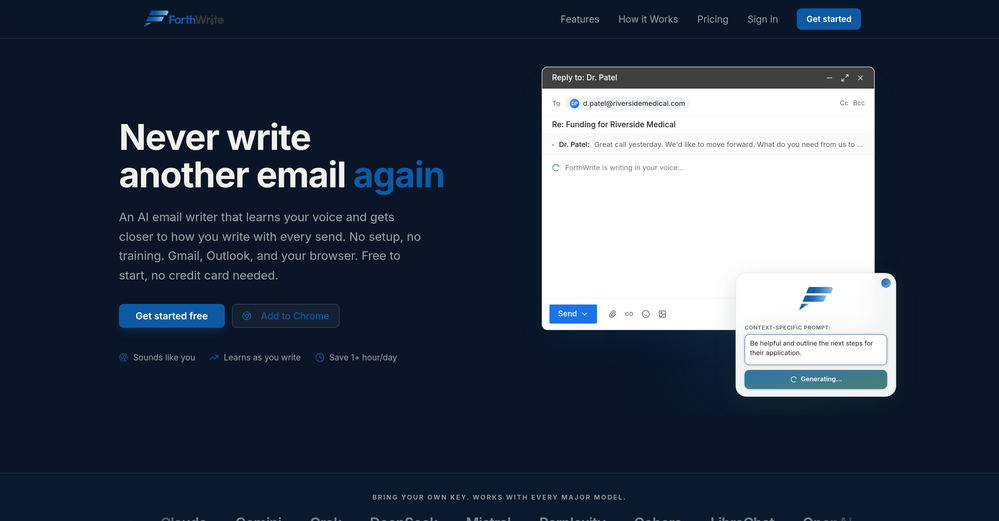 I've tried a lot of AI email tools and they all produce the same generic output. ForthWrite is different because it actually learns from the gap between what it drafts and what I end up sending. After a few weeks the drafts need almost no editing. Works right inside Gmail via the Chrome extension, so there's no new app to learn. The 60-day guarantee made it easy to commit. Highly recommend for anyone who sends a high volume of professional email.
 -
-
 Open
Open
What's new:
Template editor UI redesign: 3-column to 2-column layout with AI/Editor/Code tabs
HTML view showing the raw code of the current template, with live preview so changes render instantly on the left-side email preview
HTML upload and paste, letting users bring in their own markup directly
Beautify to auto-format and clean up the HTML for readability
Personalization token helper, copy-to-clipboard, right inside the Code tab
HTML structure validation on save, prompting an auto-update when:- the pasted/uploaded HTML isn't table-based
- the unsubscribe link is missing
- security issues are detected
-
Minor bugs fixed and better optimisation, new features coming next week
-
 Gave it a try, before i used to use Calendly and manually tag them as important. Used some trackers on Appstore but this works just as well if not better, really like it!
 -
-

-
 Open
Open













Other tools
-
 AI-powered assistant for crafting compelling, personalized emailsOpen
 -
- SpotlightSureThing.io - "OpenClaw" for BeginnersTask automation
-
 OpenI had the opportunity to use Trimbox for 4 months now, and I must say, I am thoroughly impressed by its simplicity and efficiency. The tool has significantly aided me in composing emails, consistently leaving a positive impression (if I provided a well-thought-out prompt that is). Additionally, the one-click unsubscribe feature, which allows for unsubscribing without the need to open the emails, and the option to delete all emails from a sender with also just one click, have been invaluable in managing my inbox quickly and effectively. And as for me, the price is 27,99 € a year with both features in an unlimited version.
 -
unexpectedly nice email service with useful ai features. heavily recommended.
-
Hey AI fans, I am Kalo, co-founder of Breezemail. If your inbox is anything like mine, you spend at least 20% of your life opening, answering, and unsubscribing from emails. Arguably, the only thing more tedious than this is fixing your grandma’s Windows XP (arguably). Or you just gave up, and your inbox app has a cute red dot with a truncation ellipsis (…), also known as the symbol of inbox doom. Either way, the whole inbox situation is an absolute disaster. We wanted to solve this challenge using AI. Breezemail will help you enter the holy land of Inbox Zero. It’s an email categorizer tool that keeps important emails in your inbox and categorizes the rest into folders using natural language prompts. How does it work? 1. Breezemail has a default Important category which leaves all your real human emails in your inbox. 2. Everything else is organized into AI folders (or labels). Labels using natural language prompts, for example, “All emails from my family”. 3. We give you a bunch of pre-defined categories to start with, and you can create your own custom categories, the same way you would write a ChatGPT prompt (yes, our tool also uses ChatGPT). We’ve been testing it in-house for both our personal and business emails, and it worked so well that I no longer hate link builders and outreach people because their requests are neatly organized into a couple of folders. For my personal inbox, I can finally see all my receipts in one place, and all stock newsletters are ready for daily review in a different folder. Go try it out now for free. We’d love to hear your feedback, so please don’t be shy and drop me a line back. Currently, the tool is only available for Outlook, but we are working on a Gmail app, too. If you’d like to try it for Gmail, please let us know. Thank you, Kalo
-
 Open
Open - Didn't find the AI you were looking for?
-
 OpenAmazing! This is exactly what I‘ve been looking for for years
 -
Ready to Send is the best thing I’ve seen in a while. I wake up every morning to drafts written to my important emails 🤯