 Tendem
 Mini tools
▼ Price
Design document preview
Free mode
100% free
Freemium
Free Trial
Featured matches
-
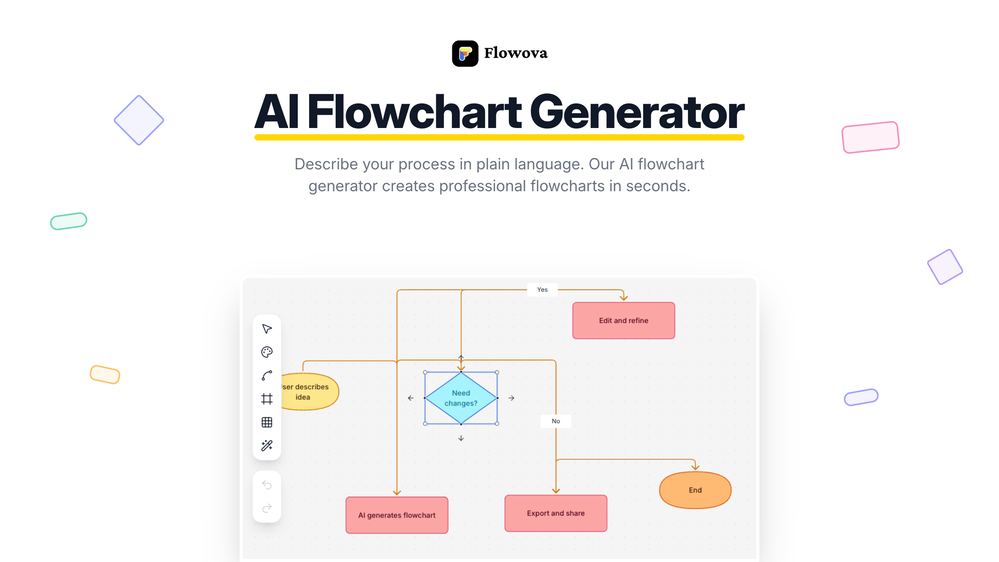
 jmcraft🛠️ 1 tool 🙏 5 karmaDec 14, 2025@Flowova AI👋 Hey, I'm the founder of Flowova! We built this because we were tired of spending hours dragging boxes in traditional flowchart tools. A few things you might not know: - Works with anything — text, images, PDFs, Word, PPT, Excel, even photos of whiteboard sketches - 40+ themes designed for presentations - Full Mermaid code support for developers Happy to answer any questions! 🚀
 -
 NextDocs v1.4 – Multivariant Generation Released: January 2026 This release introduces multivariant generation, letting you create up to four versions of the same document simultaneously. Compare outputs from different AI models, pick your favorite, and continue editing – all in one seamless workflow. Create. Compare. Choose. --- Multivariant Generation Generate up to 4 document variants at once: - Side-by-Side Comparison – View all variants next to each other as they generate - Mix and Match Models – Use the same model or compare outputs from different AI models (GPT-4o, Claude, Gemini) - Live Theme Switching – Change themes on any variant while it's still generating - One-Click Selection – Pick your favorite and continue editing from there - Works Everywhere – Presentations, canvas documents, and pageless documents all support multivariant generation Example: Create two presentation variants, apply a dark theme to one while generating, compare them side by side, and continue with the version you prefer. --- Document Types NextDocs supports multiple document formats: Canvas Documents – Full design flexibility with drag-and-drop elements. AI can freely position objects, create complex layouts, and use rich design elements. Perfect for presentations, posters, and social media content. Pageless Documents – Flowing content similar to Google Docs. Clean, continuous editing without page breaks. Ideal for reports, articles, and long-form writing. Both document types support multivariant generation, theme switching, and one-click export. --- Export Anywhere Take your documents everywhere with one click: - PDF Export – High-quality output with all styling preserved - Google Slides – Seamless export for presentations - Google Docs – Continue editing pageless documents in Google's ecosystem - All themes and formatting maintained across export formats --- What's New in v1.4 - Multivariant generation (up to 4 versions simultaneously) - Side-by-side comparison view - Multi-model comparison (GPT-5.2, Claude Opus 4.5, Gemini 3 Pro) - Live theme switching during generation - Improved canvas and pageless document editors - Enhanced export quality for all formats - Performance improvements and bug fixes --- Ready to create multiple versions and pick your favorite? Start Creating with NextDocs: https://nextdocs.io Questions or feedback? We're here to help: [email protected] --- Your ideas. Multiple versions. One perfect result. — The NextDocs Team



Other tools
- Spotlight: Tendem (Task automation)
-
basic image generation like any prompt on chatgpt. no value added here.
-
-
It was pretty easy to make some fancy stuff with a decent prompt. I made a music player
-
 Open
Open -
You have the option to waitlist or you can login with your email/pass or google account. I chose google. Once inside you have a suite of tools but im sure when you go to publish you have to sign up for a paid plan. So if your looking for a free option it will be branded. Use at your own risk. Thanks
- Didn't find the AI you were looking for?
-
quick to pick up, slick results. turned my prompts into clean logo drafts n poster layouts fast; pixel-art style worked after a couple tweaks. wish it had true vector export and tighter font control, but for fast art ideas it’s great. 5/5
-
"Your free trial expires 1 week from now. Subscribe now to avoid losing your access" "Categories of document you want to write" available options: 1. Blog Post, 2. Letter, 3. Product Description 4. Contracts and Bindings
-
Uizard is so great for spinning out ideas and iterating. You can generate designs from text prompts as well as individual screens and themes. Also has a ton of other cool AI features like turning screenshots into editable designs and attention heatmaps. I suck at design so this is a game changer for me.
-
Good at precise environment and scene image generation. Bad at fingers and hands.
-
 Automated AI-powered tools to generate Code & Api documentation from your sourceOpenDocuWriter.ai has helped us to document all our codebase. And to understand old legacy code as well.



























Post





