
 Mini tools
▼ Latest
Kpop
Free mode
100% free
Freemium
Free Trial
Verified tools
-
 Fabián Bozoglilanian🙏 17 karmaJun 4, 2023@MusicStar.aiNot available in Uruguay
 -
I tried out the AI music generator vlogmusic.io, and it’s absolutely amazing! You can actually generate 66 free songs every day—plus, vocal separation, the AI lyric generator, and commercial licenses are all free too. What’s even more incredible is that if you run out of credits, just email the vlogmusic.io team, and they’ll give you more credits for free. It’s totally unbeatable—I really hope this free period lasts longer!
- Sponsor
 Rocket - Start building, Now!💻 Vibe coding
 -
I don't know how to use it because it's difficult to use
-
Hey again Kanawati - just wanted to circle back and thank you (and others) for the thoughtful feedback 🙏 We took it seriously and rethought our pricing. We've now updated the price to $8.95 - and that includes fully custom lyrics your own personalized song, made from scratch based on your input. This is introductory pricing, so it might go up in the future - but for now, we wanted to make it more accessible while still delivering something truly meaningful. Appreciate you helping us grow and improve! 💜
-
A very good music generator, with nice voices and able to handle complex sound prompts and lyrics.
-
-
1- No custom email sign up. 2- What is "Resona"? Do mean Persona? 3- Audio analyzing failes for no obvious reason. 4- Why can't I delete my creations, and why can't I delete my account?
-
the revolutionary free AI song generator that's simplifying music creation for everyone! As a longtime music enthusiast who's struggled with traditional tools, this platform is a breath of fresh air. Built on advanced algorithms that mimic composition patterns, GSong.ai lets you generate unique songs instantly from a brief description in default mode or fine-tune with custom lyrics, titles, and styles in custom mode.













Other tools
-
-
 OpenJust tried it and it’s working fine for me. The results are actually nice, worth trying again!
 -
-
It says it’s free but it wanted me to pay before it generated. Don’t say it’s free if it’s not.
- Didn't find the AI you were looking for?
-
Greetings Kalyani. Tool offers you 1 credit upon sign up, you can use that in order to test it out. That counts as a free trial. Have fun !
-
They should allow verified artists and their team to make corrections. I'm an artist and I searched my material on here. I think there is potential, but AI doesn't always get it right.
-
-
 Transform photos into vibrant comic book illustrations.Open
 -
 OpenVideo editing is the process of selecting, trimming, and arranging footage to create a cohesive story or visual narrative. Here are some fundamental concepts and techniques: Types of Video Editing Linear editing: A straightforward, sequential approach to editing, where clips are arranged in a linear timeline. Non-linear editing: A more flexible approach, where clips can be arranged and rearranged freely in a timeline. Key Video Editing Techniques Cutting: A transition between two clips, where one clip ends and another begins. Cutting on action: Cutting between two clips while an action is in progress, to create a seamless transition. J-cut: Cutting from one clip to another while audio from the second clip starts playing before the video cuts to it. L-cut: Cutting from one clip to another while audio from the first clip continues to play. Video Editing Software Popular video editing software includes: Adobe Premiere Pro: A professional-level editing software with advanced features and integration with other Adobe tools. Final Cut Pro: A professional-level editing software for Mac users, known for its user-friendly interface and advanced features. DaVinci Resolve: A free and paid editing software that offers advanced color grading and audio editing tools. Best Practices for Video Editing Plan your edit: Develop a clear vision and storyboard before starting to edit. Organize your footage: Label and categorize your clips to make them easily accessible. Keep it simple: Avoid overusing transitions and effects; focus on telling a clear story. Advanced Video Editing Techniques Color grading: Adjusting the color and brightness of footage to create a specific mood or atmosphere. Audio ducking: Automatically reducing the volume of background audio when dialogue is present. Motion graphics: Adding animated text, logos, or other graphics to enhance the visual narrative. Video editing involves selecting, trimming, and arranging footage to create a cohesive story. Linear and non-linear editing are two fundamental approaches. Key techniques include cutting, cutting on action, J-cuts, and L-cuts. Popular software includes Adobe Premiere Pro, Final Cut Pro, and DaVinci Resolve. Best practices involve planning, organizing footage, and keeping it simple. Advanced techniques include color grading, audio ducking, and motion graphics. Capcat pro Capcat pro Download image-to-image-generator generated imagetransparent pixel Image to Image Generator Image to Image Generator Download image-to-image-generator generated imagetransparent pixel Image to Image Generator Image to Image Generator Download image-to-image-generator generated imagetransparent pixel Image to Image Generator Image to Image Generator Download image-to-image-generator generated imagetransparent pixel Image to Image Generator Image to Image Generator Download image-to-image-generator generated imagetransparent pixel Image to Image Generator Image to Image Generator Download image-to-image-generator generated imagetransparent pixel Image to Image Generator Image to Image Generator Download image-generator generated imagetransparent pixel Image Generator Image Generator Copy Video Editing Basics Video editing is the process of selecting, trimming, and arranging footage to create a cohesive story or visual narrative. Here are some fundamental concepts and techniques: Types of Video Editing Linear editing: A straightforward, sequential approach to editing, where clips are arranged in a linear timeline. Non-linear editing: A more flexible approach, where clips can be arranged and rearranged freely in a timeline. Key Video Editing Techniques Cutting: A transition between two clips, where one clip ends and another begins. Cutting on action: Cutting between two clips while an action is in progress, to create a seamless transition. J-cut: Cutting from one clip to another while audio from the second clip starts playing before the video cuts to it. L-cut: Cutting from one clip to another while audio from the first clip continues to play. Video Editing Software Popular video editing software includes: Adobe Premiere Pro: A professional-level editing software with advanced features and integration with other Adobe tools. Final Cut Pro: A professional-level editing software for Mac users, known for its user-friendly interface and advanced features. DaVinci Resolve: A free and paid editing software that offers advanced color grading and audio editing tools. Best Practices for Video Editing Plan your edit: Develop a clear vision and storyboard before starting to edit. Organize your footage: Label and categorize your clips to make them easily accessible. Keep it simple: Avoid overusing transitions and effects; focus on telling a clear story. Advanced Video Editing Techniques Color grading: Adjusting the color and brightness of footage to create a specific mood or atmosphere. Audio ducking: Automatically reducing the volume of background audio when dialogue is present. Motion graphics: Adding animated text, logos, or other graphics to enhance the visual narrative. Video editing involves selecting, trimming, and arranging footage to create a cohesive story. Linear and non-linear editing are two fundamental approaches. Key techniques include cutting, cutting on action, J-cuts, and L-cuts. Popular software includes Adobe Premiere Pro, Final Cut Pro, and DaVinci Resolve. Best practices involve planning, organizing footage, and keeping it simple. Advanced techniques include color grading,
 -
 Transform photos into cinematic Funko-Pop portraits.Open
 -
 Transform photos into bold WPA-style geometric art.Open
 -
 Create adorable Funko Pop-style characters from any concept!OpenChanged the prompt to improve results.
 -
Changed the prompt to improve results.
-
 Transform photos into Lichtenstein pop-art portraits.Open
 -
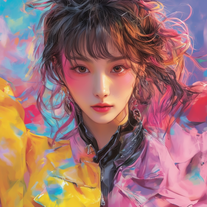
 Transform words into vibrant pop art portraits.Open
 -
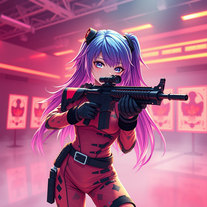 Transform ideas into 3D anime-inspired battle scenes.Open
 -
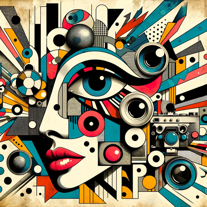
 Transform ideas into vibrant pop art masterpieces.Open
 -
 Create AI-powered coloring books with whimsical pop culture mashups.Open
 -
-
 Craft multilingual pop-rock lyrics effortlessly.Open
 -
 Open
Open -
 Adaptable expert on current entertainment and media trends.Open
 -
 Transform your photos into Funko Pop style characters.Open




























Post





