

 Mini tools
 Rename, organize, and search files by content with local AI
 The Drive AI
 TidyDocs
 Renamer.ai
 Sortio
 AetheriumAI
 AODocs
 Desktop Docs
 Bit.ai
 Document CoPilot
 UPDF AI Assistant
 FilePower AI
 Qypt AI
 Macro.com
 Clivio
 Layup
Layup
 JotBot
 Tygra
Tygra
 Wrapsody
 Document Transcribe
 IntelliParse
 GetSpiced
 CleeAI
 Starnus
 Activepieces
 Avataar's GenAI Creator
 Olivya
 Abstra
 Pipefy
 DoubleO
 Neferdata
 Quixl
Quixl
 Cubeo
Cubeo
 Sema4.ai
 Ridvay
 Tray.io
 Cognition by Mindcorp
 GoodWork
 Mr David
 UiPath
 Super Amplify
 genset





RenameClickv2.10.13Version updatev2.10.13May 26, 2026RenameClick has grown from an AI batch file renamer into an offline-first desktop workspace for cleaning up messy folders on Mac and Windows. It can rename files by content, organize them into folders, search by meaning, automate watched folders, and send files directly from Finder or File Explorer. RenameClick is now also available on the Mac App Store.
What’s new:
AI Search: Find files by describing what is inside them, such as “invoice,” “beach photo,” or “medical report,” instead of relying on filenames.
Auto Flow: Watch folders like Downloads, Scans, Screenshots, or Desktop and automatically rename, categorize, and move new files.
AI folder organization: Sort files into folders using built-in or custom category presets for documents, media, receipts, contracts, screenshots, and more.
Metadata folders and Match folders: Build folder paths from dates, EXIF location, camera metadata, or route files into existing project/client folders.
Right-click rename: Send files and folders straight into RenameClick from Finder on macOS or File Explorer on Windows.
Custom naming control: Use custom AI instructions, filename format patterns, EXIF placeholders, output languages, and slug-case formatting.
File extension filters: Limit Rename, AI Search, and Auto Flow to images, documents, or exact extensions like PDF, DOCX, PNG, JPG, CSV, and TIFF.
Mac App Store release: RenameClick is now available from the Mac App Store, alongside the direct Mac and Windows downloads.
RenameClick keeps the core workflow review-first: AI analysis and AI Search are free, credits are used only when successful rename or move changes are applied, and local processing keeps your files on your machine by default.
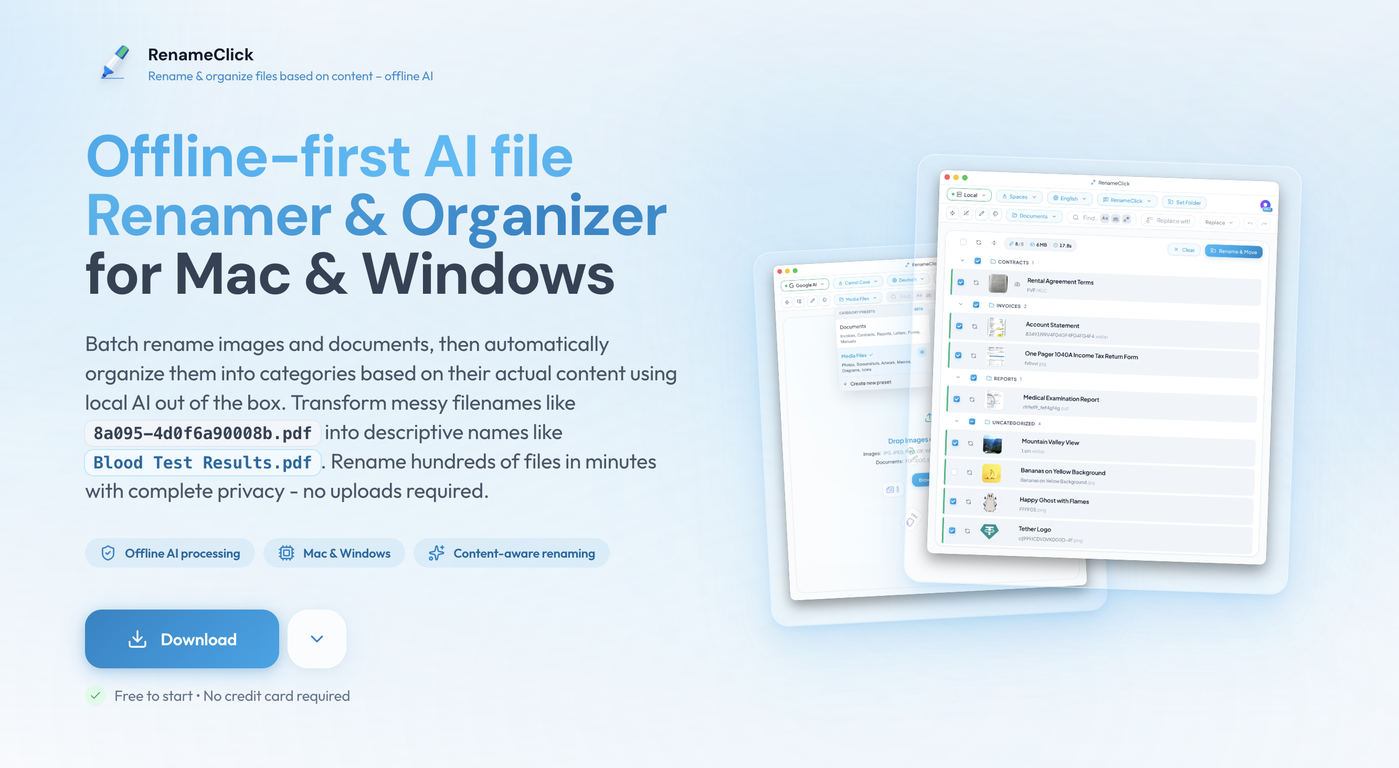





Overview

What it does:
Batch Rename — Drag files in, get AI-generated names based on content. Review before applying. Undo anytime.
Auto-Organize — Sort files into category folders (Invoices, Screenshots, Receipts...) using AI categorization with custom or built-in presets.
AI Search — Find files by describing what's in them. "red car on a highway" finds the right photo across thousands of files.
Auto Flow — Set up folder watchers that automatically rename and organize incoming files. Perfect for Downloads, Scans, or Screenshot folders.
Right-Click Integration — Right-click any file or folder in Finder (Mac) or Explorer (Windows) and choose "Rename with RenameClick."
Privacy-first: Runs a local vision-language model via llama.cpp. Your files stay on your machine by default. Optional cloud providers such as OpenAI, Google Gemini, and Alibaba Cloud are available if you want them. Power users can also connect LM Studio or Ollama.
Supports: 19 formats total. Images: JPG, JPEG, PNG, GIF, WEBP, BMP, SVG, HEIC, HEIF, TIFF, TIF. Documents: PDF, DOC, DOCX, TXT, MD, CSV, RTF, ODT.
Key Features
- Smart File Sorting Into Folders
- Content-aware Ai File Renaming
- Auto Flow Watched Folder Automation
- Offline Local Ai Processing
Releases
What’s new:
AI Search: Find files by describing what is inside them, such as “invoice,” “beach photo,” or “medical report,” instead of relying on filenames.
Auto Flow: Watch folders like Downloads, Scans, Screenshots, or Desktop and automatically rename, categorize, and move new files.
AI folder organization: Sort files into folders using built-in or custom category presets for documents, media, receipts, contracts, screenshots, and more.
Metadata folders and Match folders: Build folder paths from dates, EXIF location, camera metadata, or route files into existing project/client folders.
Right-click rename: Send files and folders straight into RenameClick from Finder on macOS or File Explorer on Windows.
Custom naming control: Use custom AI instructions, filename format patterns, EXIF placeholders, output languages, and slug-case formatting.
File extension filters: Limit Rename, AI Search, and Auto Flow to images, documents, or exact extensions like PDF, DOCX, PNG, JPG, CSV, and TIFF.
Mac App Store release: RenameClick is now available from the Mac App Store, alongside the direct Mac and Windows downloads.
RenameClick keeps the core workflow review-first: AI analysis and AI Search are free, credits are used only when successful rename or move changes are applied, and local processing keeps your files on your machine by default.

Pricing
Top alternatives
-
 AI agents to organize files
 -
 All Your Documents, Searchable in Seconds.Sebastian Lorentz🙏 67 karmaSep 14, 2025@TidyDocsI was part of the beta trials and TidyDocs has made it so much easier to manage my receipts and invoices.
 -
 AI-Powered Bulk File Renamer & OrganizerA very simple-to-use, yet very powerful app. It made my work so much easier, my scanned and downloaded files are no longer a mess.
 -
 Sort your files with a prompt
 -
 Unlock hidden insights from your PDFs with AI.No answer. I sent the documents several times and got no reply.
 -
 AI-powered cloud content services for agile business







