
 Mini tools
▼ Latest
Course content development
Free mode
100% free
Freemium
Free Trial
Featured matches
-
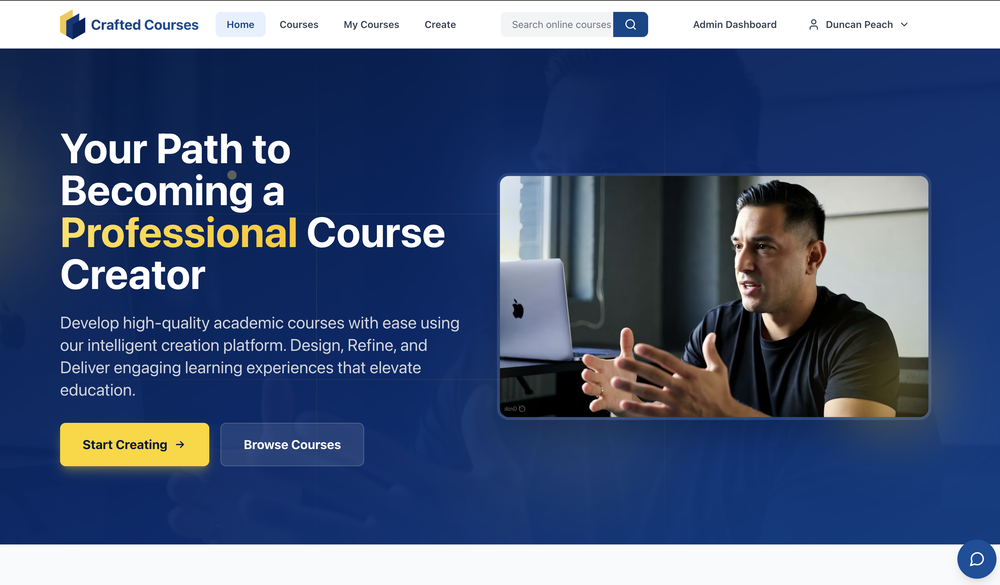 Core Course Creation Features AI-Driven Content Generation — Describe your course (target audience, learning objectives, key topics), choose a template, and the platform automatically generates structured course content, including outlines, modules, lessons, slides, and assessments. Rapid Setup — Build complete professional courses in minutes rather than spending weeks on manual creation. Powerful Editor for Customization — Real-time editing of slides, chapters, and content via a user-friendly interface. Tailor everything to match your teaching style. Multimedia Enhancements — Add images, audio narration (voiceovers), custom topics, and other materials to enrich the course. Quiz & Assessment Generation — Automatically create quizzes for each chapter/module, with customizable difficulty levels, question counts, and engaging assessment formats. Template-Based Creation — Start with ready templates to ensure professional structure and flow. Delivery & Management Features Publish & Share — Deploy courses easily and share them with learners/students. Learner Management — Track student progress, collect feedback, and handle enrollments. Engaging Learning Experience — Students access structured content with slides, quizzes, assessments, and optional audio narration. Business/Enterprise Features Admin Dashboard — Centralized tools for team/corporate training. Staff Management — Staff directory, automated invitations, role-based access control, and enrollment status tracking. Course Administration — Manage compliance, generate reports, and oversee training programs. Analytics Dashboard — Insights into course performance, learner engagement, and more. Other Notable Aspects Intuitive & User-Friendly — Designed for both solo creators and teams, with step-by-step guidance (Describe → Generate → Customize → Share). Credit-Based Pricing Model (mentioned in some pages) — Flexible credits for accessing full AI features, suitable for individual creators and ambitious teams (exact plans not detailed on the main page). Professional & High-Quality Focus — Emphasizes accurate, engaging, and educationally sound output, with users able to refine AI-generated material as needed.


Verified tools
-
Putri Destiani🙏 37 karmaMay 29, 2025@AiCoursifyyes,the good idea
-
-
 Rapidly generate AI training videos without equipment or editing.Open
 - Sponsor
 Wispr Flow-Now on Android!🎤 Dictation
 -
-
Suppppeeeeerrr! Wowwww! Mindsmith is absolutely fantastic! It is incredibly useful, easy to use, and very professional.
-
-
 Create high-quality multimodal eLearning in minutes from text prompts or documentsOpenIt's an amazing product that generates eLearning from a document or text prompt. It also has a full editor for tweaking after the generation. We use this exclusively for producing our commercial eLearning. Ready in minutes.
 -
Great platform to increase your productivity. The infographic generator is my favorite tool.
-











Other tools
-
-
I have tried Trial version to create the first course. It was possible to generate just one Quize for 1 module only (out of 5). It was not possible to create Module script. When after spending time on course preparation I wanted to generate the course, the text I could read was: "Something went wrong, contact the support".
-
-
To start a learning application, I think this is a great platform to support adaptive and personalized learning.
- Didn't find the AI you were looking for?
-
Sometimes the writing style not as good as human, but the key points it offers is excellent. Pretty easy to use.
-
 AI-powered tool to create engaging training course outlines instantly.OpenI used 2 of my Interest Topics and it seems to have gotten a good outline, when reading through the outline I thought of other information that I could add to it if I wanted to.
 -
 AI-powered scenario generator for interactive learning.Open
 -
 Elearning creator, instructor, script & storyboard guide.Open
 -
 Open
Open -
 Expanded instructional design expert with 'RiseUp G1' feature.Open


























Post





