
 Mini tools
▼ Latest
Data annotation
Free mode
100% free
Freemium
Free Trial
Featured matches
-
 Open
Open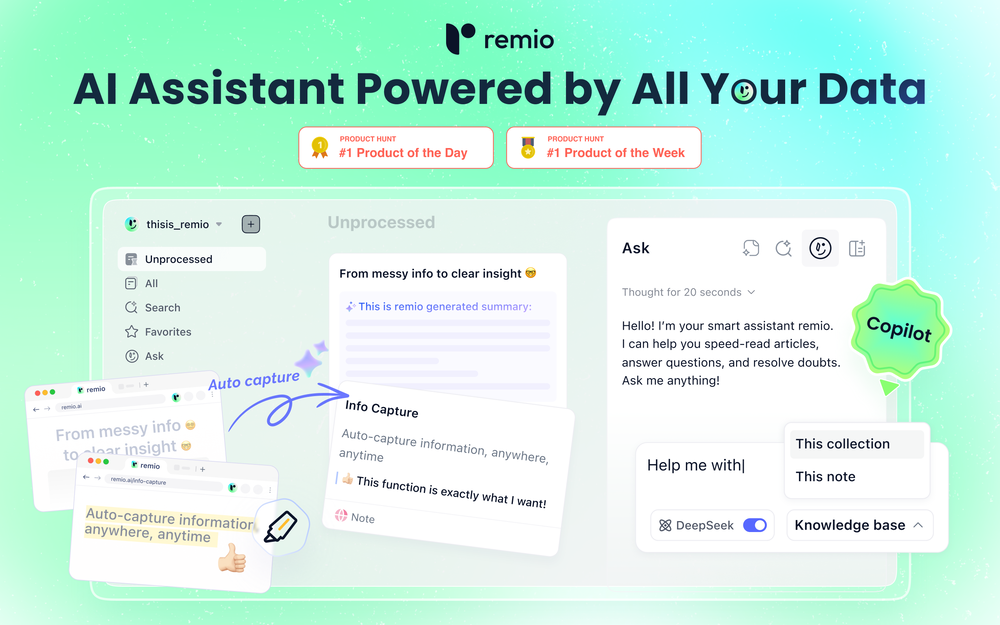 remio v2.10.0 Early Spring Update! With a limited time 30% discount! 1.📱remio Mobile App is now live on the App Store & Google Play Capture notes, voice memos, and photos anytime, anywhere—so every spark of inspiration goes straight into your knowledge base. Everything you add or save on your phone will automatically sync to your computer. 2.🍌Nano Banana Image Generation Unleash your creativity. Generate infographics and design assets directly within your knowledge base using Nano Banana. 3.💬Ask with Chat History Context Your AI chats are no longer isolated. Reference historical chats in your Q&A for deeper context. Adding to favorites/later & rename are also supported to keep your chats organized. 4.📧Outlook Email Sync Expand your knowledge net. Sync, search, and chat with your Outlook emails just like you do with Gmail. 5.📈Enhanced Slides Parsing & Preview Enjoy upgraded parsing accuracy and full visual rendering for all your .pptx presentations. 6.⬆️More experience improvements Q&A prompt suggestions on the Chat home screen, LaTeX formula rendering, and enhanced multilingual meeting features, plus more.

Verified tools
-
Tony Medviediev🛠️ 1 tool 🙏 7 karmaDec 2, 2025@ScholanticVery convenient and easy to use!
-
🚀 Supercharge Your AI Workflow with Keymate! AI enthusiasts, researchers, and productivity power-users — meet Keymate, your new favorite AI-powered assistant to collect, manage, search, and chat with your digital knowledge. ✨ Why Keymate? 🔹 Collect any source – PDFs, Google Docs, YouTube videos, emails, web links — all in one private memory space. 🔹 Chat with your content – Ask complex questions and get grounded answers directly from your own documents. 🔹 Add notes and organize collections – Structure your memory the way you think. 🔹 Boost with AI context – Keymate uses a 128K context window and multi-LLM setup to deliver better, focused results. 🔹 Secure
-
I’ve been using it for a month now and I have decided to keep it for a year. There definitely are some kinks they can still work out like file management, but it’s very good at it’s core function: it generally does a good job answering questions and most times identifies PDFs automatically and correctly. The browser plugin works great, and it’s very nice that Papers allows you to add your university’s library API so you can automatically download PDFs that are accessible through your institution (sometimes it refuses to download some papers, so you just have to downlow it yourself and manually add it). The iPad and Android apps are serviceable. Every once in a while it will mess up the PDF identification, especially with papers from either very old sources or online-only journals. Things they must work on: * A much better system to annotate PDFs (the post-it type notes are cumbersome). * Introduce a notepad attached to each PDF or some way to easily link and save the AI’s output to the PDF. Currently, you have to add a little post it note and then paste the text there. * Keep the AI answers available after closing the documents. If you close the document by mistake or have several open and wish to close some, the ai conversation will be reset. * I REALLY wish that you could get citations and links to where the info was from extracted from PDFs. Currently, I have found Coral.ai does a much better job of showing you where the info came from and it even highlights it for you. Give it a try, their 30-day no credit card needed trial allowed me to truly test it, and now I’m a yearly subscriber looking forward for new additions and releases.
- Sponsor:
 Base44💻 Vibe coding
 -
It's right there in the pricing popup - you just need to click 'Cancel Plan'.








Other tools
-
Not bad, its freemium and the feature is good like private pdf and support OCR
-
- Didn't find the AI you were looking for?
-
-
-
 Open
Open

























Post





