How does Igly automate product visual listings?
Igly automates product visual listings by providing tools to generate, edit, batch, and compose product visuals. It offers preset options to prepare images for various online platforms.
Can Igly generate images for different online platforms like Amazon, Etsy, Shopify, and TikTok shop?
Yes, Igly has the capacity to generate listing-ready image sets for various online platforms including Shopify, Amazon, Etsy, and TikTok Shop.
Does Igly maintain consistency across all platforms?
Yes, Igly not only speeds up the visual listing process but also maintains consistency across all platforms, ensuring uniformity in the presentation of a product.
How can Igly help with fashion catalogs?
For fashion catalogs, Igly brings tools like flat lay, ghost mannequin, and model shots. It allows uploading a garment, selecting a model, and staging on-model images without leaving the workflow.
What is the batch processing feature in Igly?
The batch processing feature in Igly enables sellers to run entire product folders for editing rather than doing individual edits. This significantly improves the efficiency of the image editing process.
Does Igly provide tracking for each item during the visual creation process?
Yes, Igly provides item-specific tracking during the visual creation process. It tracks every item, allowing for retry of any misses, and exports the most appropriate results.
Can I append or replace product's media from within Igly's workspace?
Yes, users have the option to append or replace a product's media from within Igly's workspace, providing a seamless experience.
How does Igly manage the entire workflow of visual listing?
Igly manages the entire workflow of visual listing by starting with raw supplier photos and ending with a tidy product gallery ready to publish. It handles the process of visual editing, batch processing, and appending or replacing product media.
How is Igly useful in transforming raw supplier photos into marketplace-ready listings?
Igly is useful in transforming raw supplier photos into marketplace-ready listings by offering tools for image processing, editing, and automation. It turns messy supplier photos into tidy and consistent product galleries ready for publication.
Does Igly provide connection to online stores?
Yes, Igly provides the option to connect online stores, and you can pick a specific product and either append or replace its media from within the workspace.
How does Igly's batch editing feature work?
Igly's batch editing feature enables users to run entire product folders for editing rather than doing individual edits. The system keeps track of every item and exports the most suitable results.
Are there options to pick a model when uploading a garment in Igly?
Yes, when uploading a garment in Igly, sellers have the option to pick a model. The tool allows staging of on-model images within the seller workflow.
Does Igly facilitate workflow management for my product images?
Yes, Igly facilitates complete workflow management for product images. It supervises the entire process from receiving raw supplier photos to ending with a well-organized product gallery that's ready for publishing on different online marketplaces.
How can Igly enhance my product images for online selling?
Igly can enhance product images for online selling by offering tools for image processing, editing, batch processing, and automation. It creates high-quality product visuals and ensures a consistent look and feel across all platforms.
Can Igly export my product visuals to various online marketplaces?
Yes, Igly can export product visuals to various online marketplaces including Shopify, Amazon, Etsy, and TikTok Shop. Users just need to select the desired platform and Igly prepares the visuals for that specific marketplace.
How does Igly work with product visuals on Amazon?
For Amazon, Igly offers marketplace presets and listing kits that include main image, studio shot, lifestyle scene, feature block, scale shot, detail, and included items, all prepared into listing ready sets.
How can I use Igly to create on-model images for my fashion catalog?
In Igly, you can create on-model images for your fashion catalog by uploading a garment and selecting a model. This feature allows for staging of images within the workflow, without seeking external resources.
What kind of features does Igly offer for online sellers?
Igly offers a variety of features for online sellers. These include options to generate, edit, and batch product visuals, upload garments and pick models for on-model images, batch processing, workflow management, and export of visually ready products to various marketplaces.
What is Igly?
Igly is an AI-based tool used by online sellers for creating visual listings for their products. It simplifies the production, editing, and batching of product visuals, transforming raw product photos into marketplace-ready image sets for a variety of platforms. Igly also maintains consistency across these different platforms.
How does Igly help online sellers?
Igly simplifies and automates the task of creating product visuals for online sellers. Users can upload raw product photos, which Igly then turns into a polished, marketplace-ready image set. It allows batch processing, meaning users can run folders full of product photos for editing, rather than editing individual photos. With Igly, users can connect their online stores, select a particular product and either append or replace the product's media.
What does Igly's process of producing, editing, and batching product visuals involve?
Igly's process involves several stages. It starts with the uploading of raw supplier photos. These photos are then processed as a batch, which means that entire product folders are run for editing, replacing the need for individual photo edits. The process results in a cleaned-up, listing-ready product gallery. In addition, Igly provides the option to connect to an online store, select a product, and then append or replace the selected product's media.
Can Igly automate product image editing for various platforms like Shopify, Amazon, Etsy, and TikTok Shop?
Yes, Igly can automate product image editing for various platforms including Shopify, Amazon, Etsy, and TikTok Shop. It allows direct connection to Shopify to update product media, provides marketplace presets that eliminate the need to manually resize images for each platform, and features an integrated system to manage the entire workflow from start to finish.
Is Igly suitable for all types of products?
Yes, Igly is designed to be suitable for all types of products. Its wide range of editing and processing features allows for versatile usage across different product categories.
What specific features does Igly offer for fashion catalogs?
For fashion catalogs, Igly offers features such as the option to upload a garment, choose a model, and create on-model images. It's thus possible to create flat lay, ghost mannequin, and model shots for fashion catalogs that need more than one look.
How does the batch processing feature in Igly's workstation work?
The batch processing feature allows users to run entire product folders for editing instead of performing individual edits. This feature makes the process of preparing product visuals for listings more efficient and less time-consuming.
How does Igly keep track of each item during the editing process?
Igly keeps track of every item during the editing process using its batch processing feature. A system is in place to monitor each item during the process, retry any misses, and export the most appropriate results.
Can I connect my online store to Igly?
Yes, you can connect your online store to Igly. From within Igly's workspace, you can connect your store, select a product and then append or replace chosen product media.
Does Igly help in creating Amazon listing kits?
Yes, Igly provides templates for constructing Amazon listing kits. These kits can include main image, studio shot, lifestyle scene, feature block, scale shot, detail and included items.
What is the Seller Studio technology in Igly?
Seller Studio technology in Igly is designed to ease the process from the product folder to live Shopify media. It establishes a shorter path for the images to be uploaded, processed, and then published as product media on Shopify. This enhances the overall efficiency of the ecommerce workflow.
Does Igly provide any quality assurance for the visuals?
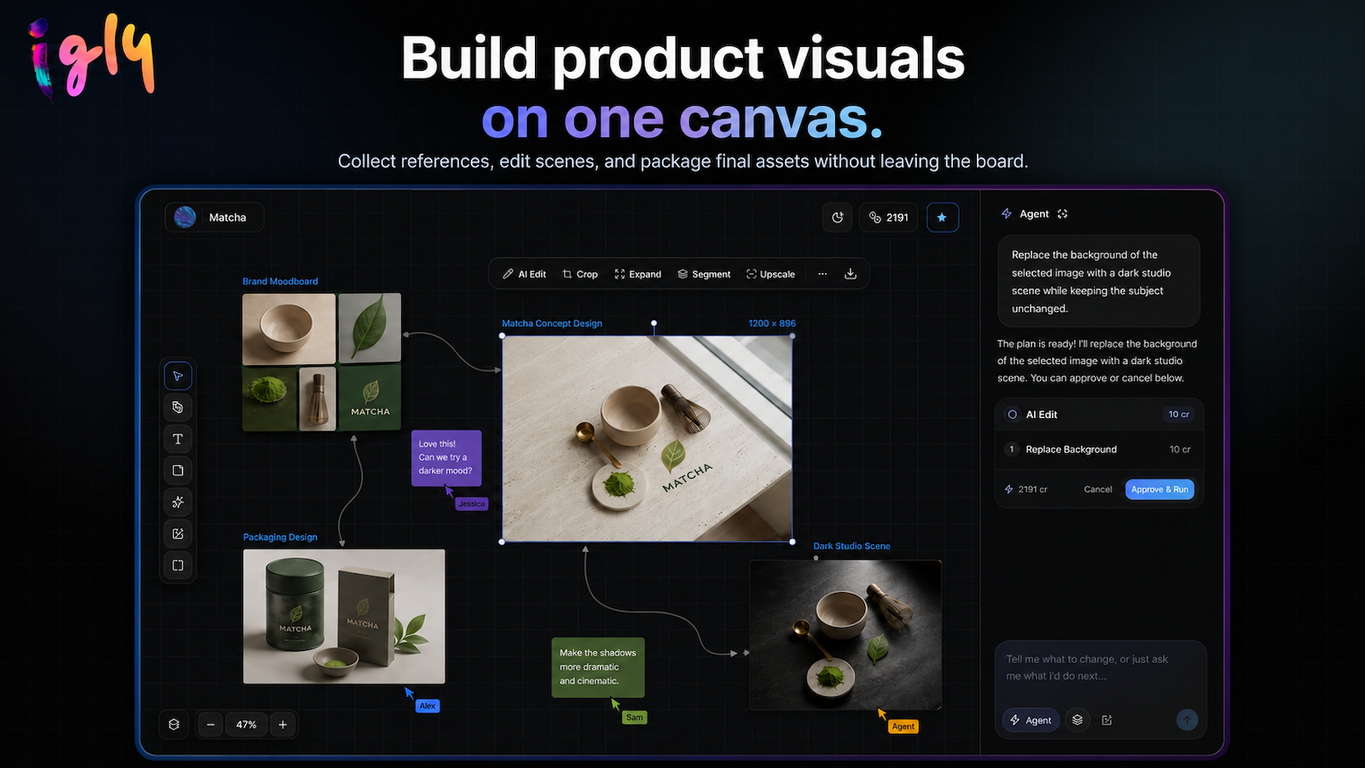
Yes, Igly does provide quality assurance for the visuals through its Canvas Quality Assurance feature. It allows you to compare variants, reorder a gallery, and stage final assets before they go live.
How does Igly turn raw supplier photos into polished product visuals?
Igly, designed as a product visual studio, functions to turn raw supplier photos into polished product visuals. It starts with importing disorganized supplier photos, which are processed through a one-workflow system. At the end of this workflow, a tidy product gallery is produced, suitable for publishing in various marketplaces and Shopify.
How can I use Igly to update my Shopify product media?
Updating Shopify product media with Igly involves connecting your Shopify store to Igly. You can then select a product and either append or replace the selected product's media directly from Igly's workspace.
Can Igly automatically resize images suitable for various marketplaces?
Yes, Igly can automatically resize images for various marketplaces. Presets for multiple marketplaces such as Amazon, Shopify, Etsy, and TikTok Shop are included within the platform. This eradicates the need for manual resizing at the end of the process.
What templates and presets does Igly provide for constructing listing kits?
Igly provides templates for constructing listing kits, including presets for various marketplaces like Amazon, Shopify, Etsy, and TikTok Shop. Also available are templates for creating Amazon listing kits which comprise the main image, studio shot, lifestyle scene, feature block, scale shot, detail and included items.
What do agent runs in Igly do?
Agent runs are a feature where you can brief a catalog job. The agent plans the tool calls, runs the pipeline, and then hands back the results.
What is the process to create product detail page galleries in Igly?
Creating product detail page (PDP) galleries in Igly involves using product photos to generate front, side, back, detail, scale, and lifestyle variants. These variants could then be batched into listing-ready outputs.
What is Canvas QA in Igly and how does it work?
Canvas QA in Igly is a feature that lets you compare variants, reorder a gallery, and stage final assets before they go live. This ensures that the visual quality of the staged assets is up to par with your expectations before they are published.
Does Igly train models on user uploaded product images?
No, Igly does not train models on user uploaded product images. User uploads and outputs are kept private to the user's account. From a data privacy standpoint, no training is performed on user data, and service providers only receive information necessary to perform the task.