
 Mini tools
▼ Price
Visio process
Free mode
100% free
Freemium
Free Trial
Featured matches
-
-
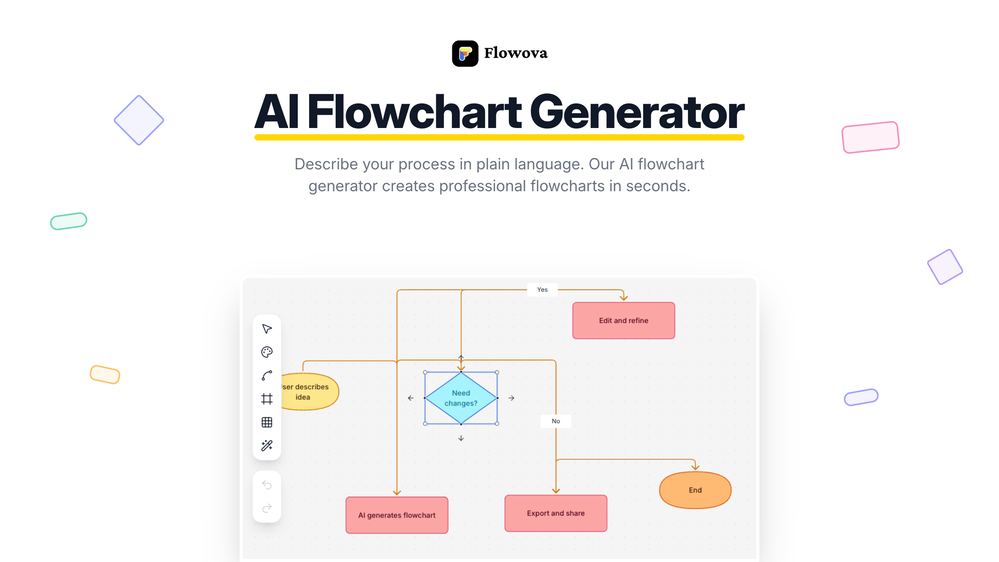
 jmcraft🛠️ 2 tools 🙏 9 karmaDec 14, 2025@Flowova AI👋 Hey, I'm the founder of Flowova! We built this because we were tired of spending hours dragging boxes in traditional flowchart tools. A few things you might not know: - Works with anything — text, images, PDFs, Word, PPT, Excel, even photos of whiteboard sketches - 40+ themes designed for presentations - Full Mermaid code support for developers Happy to answer any questions! 🚀
 -
-





Other tools
-
Isn't it possible that when downloading a diagram from it, the diagram to have white background rather than black background.
- Sponsor
 Rocket - Think it. Type it. Launch it.
 -
Hi Taaft community! I’m the creator of ConceptViz. We built this tool specifically for educators and researchers who deal with complex information daily. ConceptViz uses AI to instantly transform dense lesson plans, curriculum notes, or research frameworks into clear, structured diagrams. Our goal is to help K12 teachers make abstract concepts tangible for students and to help researchers map out logical workflows without the manual drudgery of drawing. I’d love to hear how this fits into your academic or classroom workflow—your feedback will help us build a better tool for the education community! 🚀
-
Was very useful for my class assignment. Very easy to edit on and the AI converts sketches into great wireframes.
-
Seems great. Just setup an account to try it out. Basically bounced ideas off it for SOPs for a fire department and it actually does a wonderful job.
- Didn't find the AI you were looking for?
-
Uizard is so great for spinning out ideas and iterating. You can generate designs from text prompts as well as individual screens and themes. Also has a ton of other cool AI features like turning screenshots into editable designs and attention heatmaps. I suck at design so this is a game changer for me.
-
Looks promising but found it very slow to load and create templates and previews
-
 Turn Any Workshop Recording Into a Process Map in 60 SecondsOpen🚀 RapidMap — Product Update Turn workshop recordings into client-ready deliverables in minutes This release focuses on one thing: removing the gap between running a workshop and delivering something clients can act on. ✨ What’s New 🎙️ 1. Recording → Process Map (End-to-End Input Defined) You can now: - Upload Zoom / Teams recordings - Or voice recording during workshops RapidMap automatically: - Transcribes - Structures roles and handoffs - Generates a clean swimlane diagram (export for BPMN or Visio) Impact --> - Eliminates manual note-to-diagram translation - Removes 8–10 hours of post-workshop work 🧠 2. AI-Generated First Draft (Not a Blank Canvas) Instead of starting from scratch, you now get: - A structured, editable process map - Organised by roles, steps, and decisions Impact --> - You review and refine — not build - Cuts diagram creation from hours → minutes 📊 3. Built-In “Before / After + ROI” Layer RapidMap now automatically: - Highlights bottlenecks - Suggests improvements - Estimates time savings Impact --> - Turns diagrams into business cases - Makes it easier to: - Justify work - Win follow-on projects 🏗️ 4. Built-In Consulting Thinking RapidMap now embeds: - Pain point detection - Automation opportunities - Optimisation insights Impact - Standardises discovery quality - Helps solo consultants deliver consistent, high-quality outputs 🎯 5. Designed for Independent Consultants Product experience now explicitly supports: - Solo operators - Fractional COOs - Small delivery teams Impact --> - Deliver Big 4–level outputs without a team - Improve perceived expertise and pricing power Try It on a Real Workshop - Don’t test this on a simple process. 👉 Upload your messiest workshop recording: Multiple stakeholders Unclear handoffs Lots of back-and-forth **If it doesn’t save you at least 5 hours, you get a full refund.**
 -
Limitless possibilities, but templates available are subpar
-
 Create stunning hand-drawn flowcharts from text instantly.OpenI use AI Flowchart Generator to create flowcharts for my blog posts. It’s incredibly easy to use and saves me so much time. Now, I can turn my text to flowchart and make my posts more interesting and helpful for readers!




























Post





