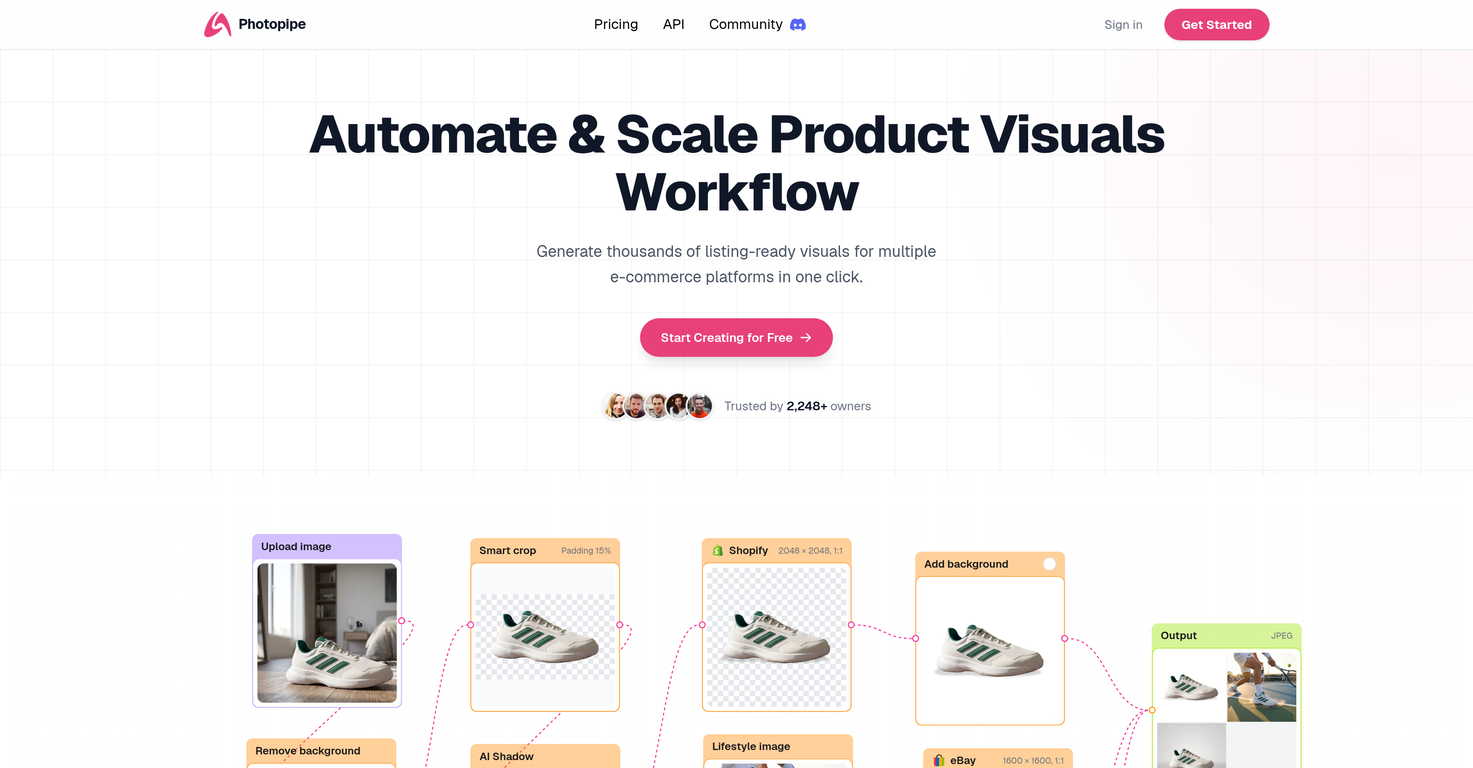
How does Photopipe use AI to enhance product visuals?
Photopipe uses AI in several ways to enhance product visuals. It incorporates an automatic background remover, a realistic shadow generator and an auto positioner for images. Furthermore, it leverages AI for image upscaling, yielding a higher resolution visual production.
What are the key features of Photopipe?
Key features of Photopipe include an automatic background remover, a realistic shadow generator, an auto positioner for images, the ability to change image backgrounds, and resizing capabilities for different e-commerce platforms. It also supports AI image upscaling for higher resolution visual production and allows for custom workflow creation.
Can Photopipe remove image backgrounds automatically?
Yes, Photopipe includes an automatic background remover, which can remove the background from an image.
Can Photopipe generate visuals for different e-commerce platforms?
Yes, Photopipe can generate thousands of ready-to-use visuals suitable for a variety of e-commerce platforms such as Amazon, Shopify, Facebook, eBay, Etsy, Instagram, and more.
How does Photopipe's custom workflow feature benefit businesses?
Photopipe's custom workflow feature allows businesses to tailor processes according to their needs, saving significant time and boosting productivity.
What are the steps to build a custom workflow in Photopipe?
Their website does not provide specific steps on how to create a custom workflow in Photopipe.
What e-commerce platforms is Photopipe compatible with?
Photopipe supports a wide array of e-commerce platforms such as Amazon, Shopify, Facebook, eBay, Etsy, Instagram, Poshmark, Depop, Mercado Libre, Shopee, Lazada, Vinted, Naver, TikTok, Youtube, LinkedIn, WhatsApp, Pinterest and Line.
How many visuals can Photopipe generate in one click?
Photopipe can generate thousands of product visuals in a single click.
Can you change image backgrounds with Photopipe?
Yes, with Photopipe, users can change the background of their images. They can choose a specific color or an image as their new background.
What is the capacity of Photopipe's image auto positioner?
The exact capacity of Photopipe's image auto positioner is not specified on their website.
Are there different plans available for different user requirements in Photopipe?
Yes, Photopipe offers various plans catering to user bases with different requirement capacities. These include Starter, Pro, and Premium packages with varying features and monthly export limits.
Can users discontinue their Photopipe plans at any time?
Yes, users have the flexibility to cancel their Photopipe plans at any time, as there are no hidden fees or long-term commitments.
How does Photopipe's realistic shadow generator work?
Photopipe's realistic shadow generator uses AI to add realistic drop shadows to images, enhancing the depth and appeal of the visuals, but the specifics of its operation are not disclosed on their website.
How efficient is Photopipe in creating and editing product visuals?
Photopipe is described as a fast and efficient solution for creating, editing and enhancing product visuals for e-commerce businesses.
Does Photopipe support image upscaling for higher resolution?
Yes, Photopipe supports AI-powered image upscaling to achieve higher resolution in visuals.
How can Photopipe help automate the process of product visual creation and management for my e-commerce business?
With its suite of AI-enhanced tools for background removal, shadow generation, image positioning, background alteration, and resizing for different platforms, Photopipe can help automate and optimize the process of product visual creation and management for an e-commerce business. Additionally, its custom workflow feature allows tailored processes for increased productivity.
What type of businesses can benefit from using Photopipe?
E-commerce businesses that need to create, edit and manage product visuals can greatly benefit from using Photopipe. This includes businesses selling on platforms like Amazon, Shopify, eBay, Facebook, Instagram, Etsy and more.
What is Photopipe?
Photopipe is an artificial intelligence-powered platform designed to assist and automate the process of creating, editing, and enhancing product visuals for e-commerce businesses. It includes a suite of comprehensive tools for swiftly producing high-quality, ready-to-use visuals for various platforms.
What are some of the key features of Photopipe?
Photopipe rife with key features such as an automatic background remover, a realistic shadow generator, an auto positioner for images, the capability of changing image backgrounds, and options for resizing images for different e-commerce platforms. It also allows AI image upscaling for higher resolution productions and enables the creation of custom workflows.
Which e-commerce platforms does Photopipe support?
Photopipe supports a broad range of e-commerce platforms including Amazon, Shopify, Facebook, eBay, Etsy, Instagram, Poshmark, Mercado Libre, Depop, Shopee, Lazada, Vinted, Naver, Shopline, and even social media platforms like TikTok, Youtube, LinkedIn, WhatsApp, and Pinterest.
How does Photopipe help in automating the creation of product visuals?
Photopipe automates product visual creation by leveraging AI tools for background removal, shadow generation, smart positioning, and image resizing or upscaling. It allows businesses to generate thousands of ready-made visuals in a single click. Additionally, businesses can use its custom workflow feature to further streamline and automate their specific needs.
What is the functionality of the automatic background remover in Photopipe?
The automatic background remover in Photopipe employs artificial intelligence to seamlessly eliminate backgrounds from images, focusing on the product for clearer representation and enabling users to replace it with a desired backdrop of either a specific color or a different image.
What does the realistic shadow generator tool in Photopipe do?
Photopipe's realistic shadow generator creates authentic-looking drop shadows on images, which can enhance the overall visual appeal and realism of the product representation.
How does the auto positioner for images work in Photopipe?
The auto positioner tool in Photopipe allows users to automatically position their product image in a specified area of the canvas. This feature ensures a proper and consistent placement of images, which is crucial for professional visual presentation.
What are the image resizing capabilities of Photopipe?
Photopipe provides image resizing capabilities tailored to the specific dimensions required by different e-commerce platforms. This allows users to create properly sized images that fit perfectly across different online platforms.
Can I change image backgrounds using Photopipe?
Yes, Photopipe has a feature that enables users to change the background of their product images. They can select a specific color or choose another image as the new background.
What is AI image upscaling in Photopipe?
AI image upscaling in Photopipe is a feature that makes use of artificial intelligence to improve the resolution of images, enabling the production of higher quality and more detailed visuals.
How can Photopipe save time and increase productivity for my business?
Photopipe can save time and boost productivity by enabling mass production of product visuals and allowing for easy resizing and upscaling. It also allows businesses to build custom workflows tailored to meet their unique needs and requirements, eliminating repetitive manual tasks.
How can I customize workflows in Photopipe?
In Photopipe, users have the capability to create custom workflows based on their business needs, arranging and automating a series of tasks in the most efficient manner. This feature helps streamline operations, save time, and eliminate manual processes.
How does the monthly export feature in Photopipe work?
The monthly export feature in Photopipe pertains to the number of image exports a user can make in a month, depending on their subscription plan. Three tiers are offered with varying limits: The Starter plan allows 3000 exports, Pro allows for 8000, and Premium permits up to 20000 exports per month.
What are the details of the Photopipe subscription plans?
Photopipe offers three subscription plans: Starter ($29/month), Pro ($49/month), and Premium ($99/month). Each plan includes varying features and monthly exports. Every plan carries all the core features including background removal, shadow generation, image resizing, smart cropping, and custom workflow creation. The AI edit/enhance feature is also included in all the plans.
Can I discontinue my Photopipe plan anytime?
Yes, Photopipe allows for the discontinuation of its plans at any given time as per the user's need. There are no hidden fees and users can cancel their subscription anytime without hassle.
What is smart cropping in Photopipe?
Smart cropping in Photopipe refers to the intelligent trimming of images based on their content. This feature can automatically determine the best place to crop an image, maintaining the focus on important elements whilst adjusting to the required dimensions of various platforms.
What do you mean by 'AI edit/enhance' in Photopipe?
'AI edit/enhance' in Photopipe refers to the application of artificial intelligence in improving and refining the quality of images. This could include adjusting lighting, contrast, saturation, or clarity, or even upscaling the image for higher resolution output.
How to use Photopipe's feature to create visuals for individual platforms like Facebook, Amazon, etc.?
Photopipe allows users to generate ready-to-use visuals for individual e-commerce platforms with just one click. First, users need to upload an image and then apply desired features like background removal, resizing, or shadow generation. After optimizing the image, users can export it in the desirable dimensions specific to the targeted platform like Facebook, Amazon, etc.
What is Photopipe's policy on unused exports?
The Photopipe website does not explicitly detail a policy regarding unused exports. For more detailed information, users may need to reach out to Photopipe's customer service directly.
How can I cancel my plan on Photopipe?
To cancel a plan on Photopipe, you would typically navigate to your account settings and follow the cancellation process. The exact method might vary and if users encounter difficulties, they should contact the Photopipe support team for assistance.