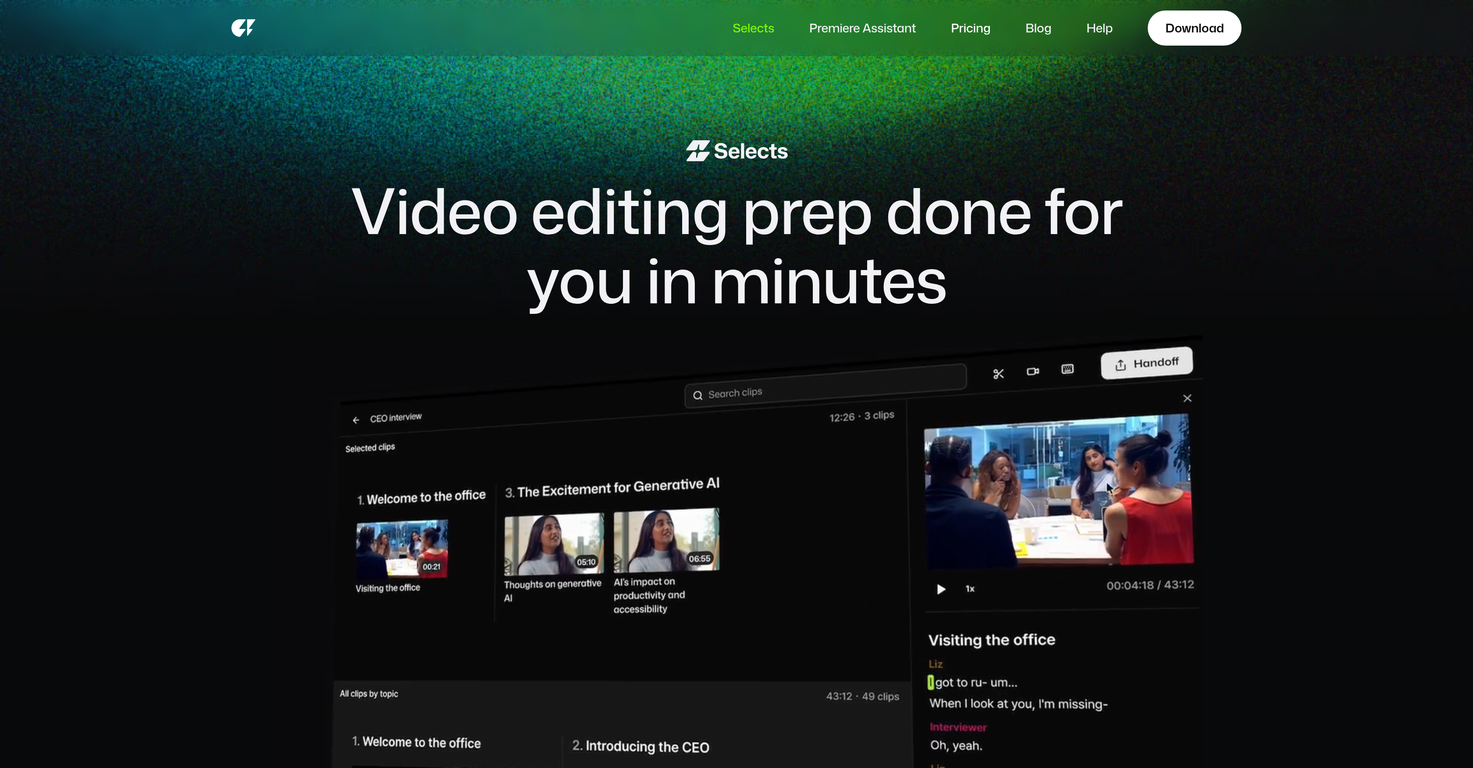
What does the smart stringout with chapters feature of Selects by Cutback do?
The smart stringout with chapters feature in Selects by Cutback allows for organized and efficient reviewing of the footage. Your footage is automatically segmented into topic-based chapters, enabling you to review hours of footage in minutes. This functionality can greatly reduce time spent searching through footage and enhance the speed of the editing process.
How does the precision cutting function in Selects by Cutback work?
Precision cutting in Selects by Cutback allows users to remove unnecessary parts of the video easily. Users can cut silences, filler words, and mistakes with just a click, thanks to the AI's industry-leading accuracy. This refined level of control can significantly improve the quality of the final edited video.
What is the natural language search feature of Selects by Cutback?
The natural language search feature in Selects by Cutback enables users to discover specific moments in their video footage rapidly. Users can search using natural language terms and quickly locate precise clips without the need for time-consuming scrubbing. This minimizes time spent on navigating through lengthy footage.
How does Selects by Cutback structure long-form content?
Utilizing its AI capabilities, Selects by Cutback can structure long-form content into an easily navigable video. By detecting natural breaks within the content, Selects forms a structured video segmented into manageable, polished chapters. This is especially beneficial for creators working with extended videos, as it makes the content easier to edit and review.
Is Selects by Cutback compatible with my existing workflow?
Yes, Selects by Cutback is fully compatible with your existing editing workflow. It is designed to sync with major video editing software like Adobe Premiere Pro, Final Cut, and DaVinci Resolve. This seamless integration allows you to harness the advanced AI capabilities of Selects by Cutback without disrupting your established editing process.
How does Selects by Cutback present an organized, color-coded, non-destructive editing environment?
Through its AI technology, Selects by Cutback presents an organized, color-coded, non-destructive editing environment. Chapters are color-coded for easy identification, and markers, labels, and transcripts are included. All edits made within Selects by Cutback are non-destructive, ensuring that you always have the highest level of control over your content.
How can transcripts be shared through Selects by Cutback?
Transcripts created within Selects by Cutback can be easily shared. After being generated, these transcripts can be shared for paper cuts. This ease of sharing extends the collaborative capabilities of the tool, allowing team members or individuals to access vital information about the project.
How does Selects by Cutback handle video exports?
When the rough cut is complete and meets the user's requirements, Selects by Cutback can handle the video export process. This streamlines the process of preparing your video for the final production stage or allowing it to be used within other platforms or tools.
How does Selects by Cutback handle multi-cam files?
Selects by Cutback employs its advanced AI to manage multi-cam files. The software can automatically sync gigabytes worth of multi-cam files, saving editors significant time on syncing footage manually and ensuring more precise synchronization.
Can Selects by Cutback support 4K and 360 degrees videos?
Yes, Selects by Cutback does support high-resolution formats, including 4K and 360 degrees videos. This ensures that creators working with high-resolution footage can still take advantage of Selects by Cutback's time-saving features without compromising on video quality.
How can I use the natural language search to find specific moments in the video footage with Selects by Cutback?
To find specific moments in the video footage with Selects by Cutback, the natural language search feature can be used. This powerful feature allows you to enter descriptive terms related to the footage in consideration, and the AI system will scan the footage and return precise moments in the video that correspond to your search terms. It simplifies the process of finding accurate points in long and complex footages.
How does the AI in Selects by Cutback help in structuring the footage into a navigable video?
The AI in Selects by Cutback streamlines the process of structuring the video footage into an easily navigable format. By segregating the footage into topic-based chapters, it creates an organized structure. This functionality particularly shines when working with long-form content, organizing it into a video that is convenient to navigate and edit.
How can Selects by Cutback sync gigabytes of multi-cam files?
The multi-cam support feature in Selects by Cutback is capable of syncing gigabytes of multi-cam files in a short timeframe. It efficiently records all the footage from the various cameras used during filming, collates them, and syncs them up perfectly. This functionality is highly beneficial in projects involving multiple camera angles.
How does Selects by Cutback help in achieving precision in cutting
Selects by Cutback's precision cutting ability enables high precision in trimming unwanted parts from video footage. It allows users to manually target and remove specific elements such as silences, filler words, and errors. The AI's robust recognition capabilities, combined with an intuitive user interface, provide an easier, faster, and more accurate cutting experience.
What is Selects by Cutback?
Selects by Cutback is an AI-powered video editing tool designed to streamline the post-production process and automate initial preparations. It simplifies sorting, organizing, and reviewing raw footage for creators and studios.
How does Selects by Cutback automate the video editing process?
Selects by Cutback uses AI to automatically and quickly prepare raw videos for detailed editing. Users can drop their raw files into the tool and get organized, ready-to-edit projects in a matter of minutes. Features such as pro-grade multi-cam support, smart stringout with chapters, precision cutting and natural language search tools ensure accuracy and efficiency in the review and organization stages.
What software does Selects by Cutback sync with?
Selects by Cutback syncs with several popular video editing software like Adobe Premiere Pro, Final Cut, and DaVinci Resolve.
What types of video projects can Selects by Cutback support?
Selects by Cutback supports a variety of video project types including podcasts, live streams, documentaries, events, and vlogs.
How can Selects by Cutback help with the organization of my raw video files?
Selects by Cutback automatically organizes your raw video files into easy-to-navigate chapters based on topics. It also supports color-coding for additional organization and precision.
Can Selects by Cutback handle multi-camera projects?
Yes, Selects by Cutback supports multi-camera projects. It can automatically sync multiple camera files and even switch cameras based on the speaker.
What is the 'smart stringout with chapters' feature in Selects by Cutback?
The 'smart stringout with chapters' feature in Selects by Cutback automatically organizes your footage into topic-based chapters. This helps in navigating and reviewing hours of footage in a significantly less amount of time.
How does Selects by Cutback's natural language search work?
The natural language search feature in Selects by Cutback allows users to find specific moments in the footage instantly. This works by typing in related words or sentences into the search tool, eliminating the need for manual scrubbing.
Is Selects by Cutback compatible with my existing workflow?
Yes, Selects by Cutback is designed to fit seamlessly into your existing workflow. It can hand off prepared projects to Adobe Premiere Pro, Final Cut, or DaVinci Resolve. Projects exported to these platforms maintain the same color-coding and organization as in Selects.
Can I share and export transcripts with Selects by Cutback?
Yes, Selects by Cutback allows the sharing of transcripts. This feature can be particularly helpful for collaboration or paper cuts.
Does Selects by Cutback allow video exporting?
Yes, Selects by Cutback allows the export of videos if the Selects rough cut is ready to go.
What does the 'precision cutting' feature do in Selects by Cutback?
The 'precision cutting' feature in Selects by Cutback allows you to trim unwanted parts such as silences or filler words with industry-leading accuracy.
Can I edit 4K and 360° videos with Selects by Cutback?
Yes, Selects by Cutback supports editing for both 4K and 360° videos.
Can Selects by Cutback be used for podcast and livestream editing?
Yes, Selects by Cutback can be used for editing both podcasts and live streams. Its capabilities extend beyond traditional video editing, to serve the needs of different project types.
How does Selects by Cutback streamline the reviewing process?
Selects by Cutback streamlines the reviewing process by automatically organizing footage into topic-based chapters. It helps you review hours of footage in minutes, and with its natural language search, you can find specific moments instantly without needing to scrub through the whole content.
Can Selects by Cutback transform prepped footage into story-driven rough cuts?
Yes, the Storyline feature of Selects by Cutback allows transformation of prepped footage into story-driven rough cuts using AI. This feature helps in experimenting with the structure and pacing instantly.
How does Selects by Cutback provide effective project management?
Selects by Cutback aids effective project management by organizing footage into color-coded chapters, markers, labels, and transcripts. Furthermore, edits within Selects are non-destructive, allowing the user to remain in control.
What is the 'narrative perspective' feature in Selects by Cutback?
The 'narrative perspective' feature in Selects by Cutback is the tool's ability to transform prepped footage into story-driven rough cuts. This allows for easy crafting of narratives and experimenting with pacing.
Where can I download Selects by Cutback?
Selects by Cutback can be downloaded from their website.