
 Mini tools
▼ Latest
Graph designer
Free mode
100% free
Freemium
Free Trial
Featured matches
-
 Caren Cioffi🛠️ 1 tool 🙏 103 karmaAug 26, 2024@Agenda HeroThanks for the feedback, and also for the tip for the community. One more tip: if you upload an image directly, you can add context that might be missing in the image. For example, the duration is 3 hours or prefix every event title with Name:
 -
 How has this not received a single review. It’s a brilliant analytical writer of up to 5,000 words
 -
 Automate planning, scheduling, and follow-up directly from your inbox and calendar.Open
 Full transparency: I'm one of the founders of Trickle, but I'm also genuinely one of our heaviest users!
 -
 Miro has massively improved how we collaborate and execute. The AI features have made a real difference in day-to-day productivity, helping us structure ideas quickly and get to decisions faster. What really surprised me is the new prototyping feature: it’s now much easier to turn a workshop board into an actual prototype and iterate with the team. If you’re running product work, workshops, roadmaps, or even GTM planning, Miro is worth it.
 -

-
-
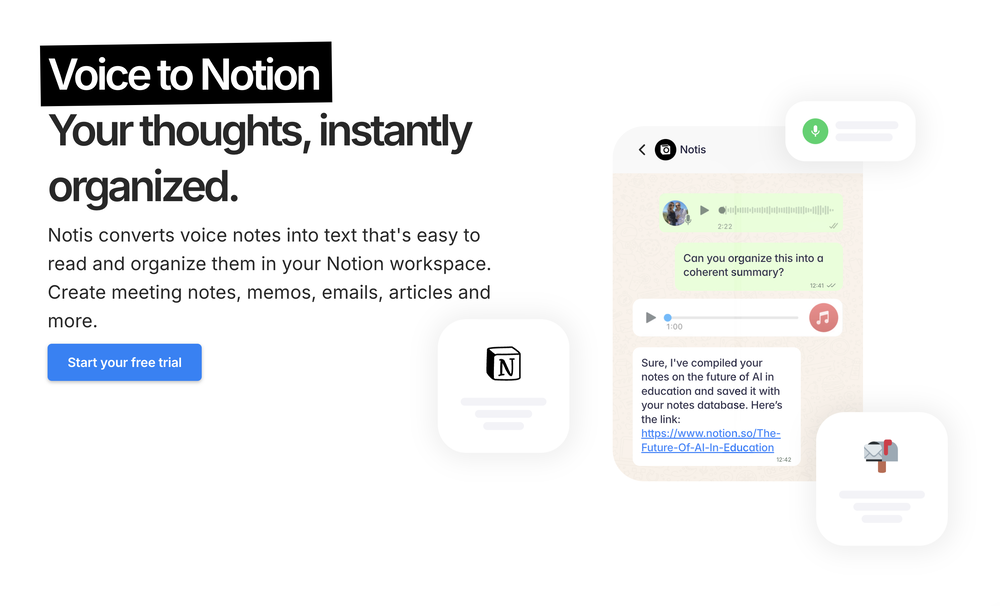 Notis is the AI intern one message away from your entire tool stack. Dictate ideas, delegate the busywork, and watch it update everything from your CRM to your socials — right from WhatsApp, iMessage, Telegram, or emails. In this week's release: - Much more reliable Stripe subscription startup + trial recovery (no more getting stuck in a bad billing state). - New safety rails in the orchestrator: delegation limits, hard cap on loop iterations, stricter budget gating. - Onboarding cleanup + fixes - Portal now lands on Integrations by default. - Cost tracking fixes.
 -
 New: one-shot snapshot plan for makers Between February 25, 2026 and March 11, 2026, we shipped a set of upgrades focused on activation, reliability, and retention. Added a one-shot snapshot offer for indie makers and micro-SaaS. New affordable plan starting from 19$ The snapshot provides a one-time AI visibility check with no subscription. The goal is to offer a fast first diagnostic before upgrading to full monitoring. Maker one-shot report You can now unlock a true one-shot Lucid report designed for makers and indie builders. The flow is faster to access, easier to understand, and built to lead naturally into ongoing monitoring. Smoother maker checkout We improved the full maker checkout experience: cleaner redirects, fewer broken states, better guest handling, and more resilient recovery when a run does not start correctly on the first try. Clearer upgrade experience We added a stronger upgrade journey for maker users, with better preview states, clearer locked sections, and a more structured path from one-shot value to recurring monitoring. Truth Layer persistence Truth Layer insights are now better persisted across the product experience, making the analysis feel less ephemeral and more operational over time. Linear closed loop Lucid now connects action planning more tightly with execution. Actions sent to Linear can later be measured against weekly runs once the work has actually shipped. More reliable live measurement We improved live run feedback across the app, including progress counters, engine-level progress behavior, and automatic refresh of derived cards after completion. Pause subscription flow Users can now pause a subscription instead of going straight to cancellation, which creates a better retention path for teams that want to step back temporarily. Expanded GEO research pipeline Google Scholar is now included in the GEO research pipeline, expanding the source base Lucid can use for research workflows. Stronger maker follow-up We shipped better upsell and follow-up logic for maker users, including onboarding preview improvements and a more structured post-purchase sequence.
 -
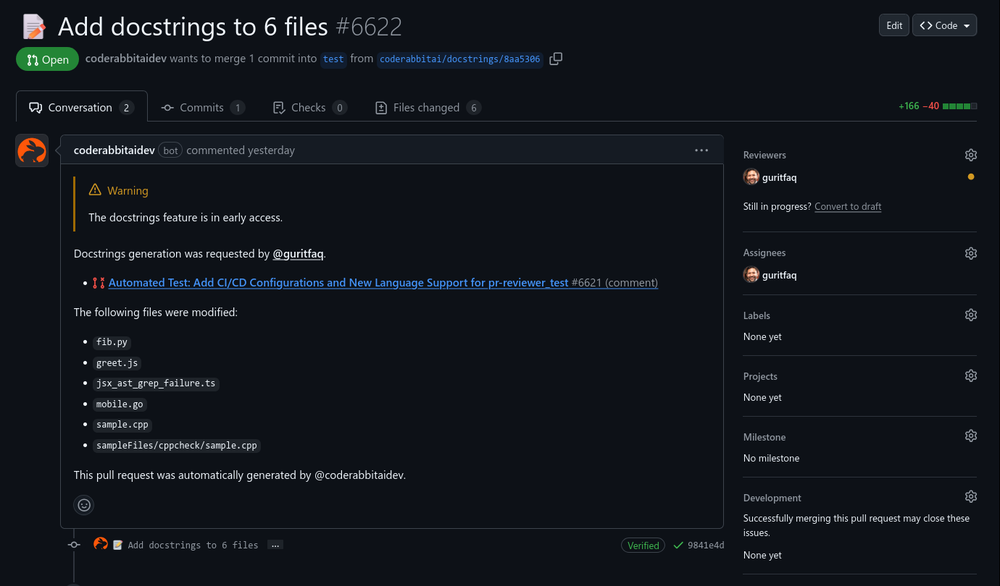 Reducing manual efforts in first-pass during code-review process helps speed up the "final check" before merging PRs
 -
 Open
Open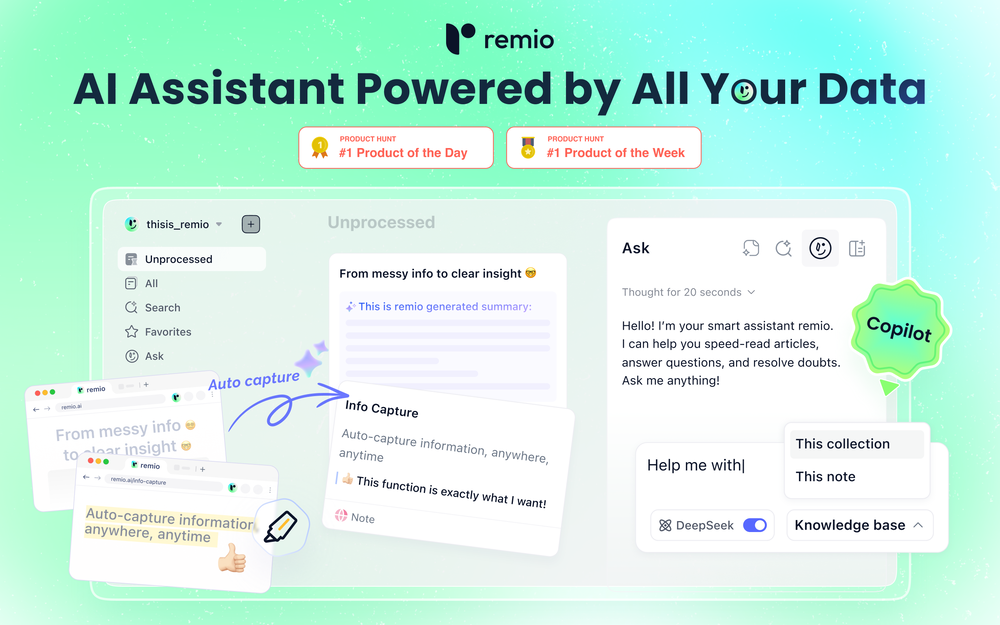 🚀Meet remio v2.12.0, which added lots of new and useful features to boost your productivity! Let's dive in! 1.🍌 Visualize thoughts faster with Nano Banana 2 Turn complex logic into professional diagrams and infographics instantly with the most affordable model. 2.🎧 Put Podcasts into your personal library Simply paste a link to save full transcripts from your favorite podcasts and get instant summaries. You can chat with your podcast library to find specific insights without listening to every second. 3.💬 Write at the speed of thought With global voice input, remio transforms natural speech into clear and polished writing across all your apps. Experience a creation process up to 5x faster than typing. 4.🔗 Seamless sharing of notes & recordings Knowledge is most powerful when it flows. You can now generate shareable links for your notes and recordings, and move insights from your personal library into team discussions. 5.🆙Advanced models upgrade Switch to the latest Gemini 3.1 and Claude Sonnet 4.6 models for superior accuracy and speed.













Verified tools
- Sponsor
 Rocket - Start building, Now!💻 Vibe coding
 -
Great tool! Was very helpful in content production
-
 Open
Open -
The only CRM I've actually stuck to. Its AI does everything.
-
This team took the time to understand the industry, problem and its users and designed a perfectly engineered solution. Kudos.
-
Hey everyone, I'm Florent, maker of Facet! Please feel free to give me any feedback good or bad you have, it will help me make great improvements! We already have dozens of users and try to use all feedback to enhance the application!
-
Reddit's been a blind spot for us forever and this actually makes it manageable. The AI catches relevant threads before they blow up so we can jump in early. Organic reach has been wild compared to paid channels.
-
The Advert generator buil in web it's such a good time saver. Must be worked on better details in the adverts though.
-
Thank you for making everything simple, i can't and don't need to understand a app and what is doing. This is just how i want it, very good and keep going!
-
 OpenMultiple models reviewing content is so helpful because we can better understand when there's a strong case for X, or divergences about Y, and ultimately get a more full understanding because of that. Great work!
 -
Its a promising project and works well so far. Wishing them all the best and godspeed.
-
Base44 is an AI-powered platform for building fully-functional apps with no code and minimal setup hassle. The platform leverages advanced AI technology to translate simple, natural language descriptions into working apps. Let’s make your dream a reality. Right now.
-
Fabricate v2.0 — Build Apps Just by Describing Them 🚀 Faster App Generation — Apps now build up to 3x faster than before 💬 Smarter AI — Just describe what you want in plain English and get a working app 🎨 Better Looking Apps — Upgraded design system with modern, polished templates 🔐 Built-in Login & User Accounts — Add sign-up/login to your app with one click 💳 Accept Payments Instantly — Stripe payments built in — no coding needed 🗄️ Database Included — Your app stores data automatically, no setup required 🌍 One-Click Publish — Go live worldwide in seconds 🐛 AI Error Fixing — Fabricate spots and fixes bugs for you automatically
-
-
I’ve been using UX sniff for a little while now and I absolutely love it! It’s brilliant! It’s very easy to use, very easy to set up and the support has been spot on. It’s really been helping me with my Business - Pawfection Pet Products. I highly recommend this product.
-
Easily the best Chat GPT alternative... A hidden Gem. A few issues with reasoning models but overall awesome product
-
 Enterprise-grade open-source AI inference at unlimited scale.Open
 -
Rocket is fast as heeeelll for spinning up prototypes when an idea hits. I've shipped small tools and MVPs with this as the foundation, saves days of boilerplate setup. Great one :)
-
 100% Free AI-powered website compliance audits in minutes.OpenUsed this tool to fix my compliance issues in a day.
 -
 Your AI-powered file organizer that respects privacy for macosOpenGood Replacement for the sparkle. Keep it up
 -
 AI-powered analytics that unlock smarter business insights.OpenI used Analytify and found it incredibly easy to set up and integrate with Google Analytics, giving me real-time stats and page-level insights without needing any coding knowledge.
 -
Helping brands get more traffic and conversion from AI search in the most effective way. Also including AI presence management features for individuals.
-
 Modular & Cross-Platform Vibe Coding Editor and Workflow Automation on Any DeviceOpengood!A different kind of AI tool that has been very helpful for my work!
 -
I used this tool to generate a financial model for my startup, and it was super intuitive.
-
Used this for a eulogy I had to write and I'm not gonna lie, it helped me find the right words when I was completely stuck. Sometimes you just need that push to express what you're feeling. Surprisingly thoughtful tool
-
-
- Your AI sidebar now works inside Google Docs. Whether you're drafting, editing, or reviewing, it's right there with you. No tab switching, no breaking your flow. - Clico now runs on chatgpt.com too. Refine and polish AI-generated content on the spot, without ever leaving the page. - The whole web experience is noticeably faster. Less waiting, more doing.
-
I am planning to automate my trading system and customise an agent , I chatted with the support right from the dashboard they answered in 15 mins
-
Went from a C to an A in Cognitive Psychology using Thea!!
-
-
Used this for scheduling my last 3 interviews and honestly forgot how annoying it was before. One company wanted to do 4 rounds and instead of me going back and forth with their HR person a dozen times, Workmate just handled it. Saved me from that weird anxiety of 'did I respond fast enough' or 'is this time actually gonna work.'
-
-
-
Very cool app! Build was fast as, and with a few tweaks I fully launched my website in 1 hour!
-
Amazing deep research feature! Haven't seen this level of execution through any other tool. It gives a designed socket to view a presentation at the end.
-
-
WhatsApp and Messenger integrations don't work very well. Support team is very sporadic. Still couldn't get it to work consistently despite best effort to fix.
-
Impressive work from the team at Tented.ai, their approach to AI-driven automation is genuinely next-level.
-
I've been playing around with this for a few hours. It's made me say "WOW" too many times than i wish to admit. I'm going to follow this and see how it evolves. For now, i managed to create quite a nice Expenses app for personal use. | It did have some problems when it came to moving some components on other pages, but for how short the prompts it uses can be, it is really impressive. With some proper prompts it can generate some strong stuff.
-
Thanks for the feedback! Would love to hear what you’d like to see next
-
-
 Open
Open -
 Your expert guide to fine jewelry, sizing & gift ideasOpen
 -
I made my website with Pagesmith. Seems the best for fast content based sites.
-
Thanks for trying out My AI Food Buddy! The goal of this app is to help households waste less food and save more on groceries. Indeed, while many use databases in their professional life, I realised there was no easy way to create and manage a database with your pantry. Please share any feedback (is it useful? easy to use?) as I am exploring whether to invest more on this app Thanks a lot
-
 Pay-as-you-go productivity. Meeting transcription at $0.25/hour, AI tasks, document search — noOpenMeeting Intelligence — Record, transcribe, and get AI-generated summaries with headlines, sentiment analysis, and action items from every meeting Custom Meeting Reports — Generate tailored reports from any meeting with customizable templates and one-click PDF export Meeting Series Detection — AI automatically identifies recurring meetings and tracks patterns, decisions, and follow-ups across sessions Premium Transcription — Enhanced speaker detection, entity recognition, chapters, and audio event tagging for professional-grade transcripts
 -
-
Gave it a try, before i used to use Calendly and manually tag them as important. Used some trackers on Appstore but this works just as well if not better, really like it!
-
 Jude Knows the Bible Better Than Anyone You've Ever MetOpen
 -
-
 Pencil’d Answers Calls, Books Appointments, and Captures Leads when you’re not available.OpenGreat product, helps me run my one-person shop without having to hire a separate assistant.
 -
 Create digital vCards and WhatsApp shops in minutes.Open
 -
-
Incredibly easy way to connect to Amazon products and pull information
-
Been looking forever to find an app like this! Reviews supplement and provides helpful information to optimize your health
-
I just published a children's drawing book on Amazon in 2-3 hours of fiddleing with this tool. Really really good!
-
 Define your ideal customers and craft a winning marketing strategy with Elsa.OpenI rarely leave reviews, but Elsa amazed me. After a few weeks of using it, I'm still excited. Props, guys.
 -
-
-
xeditai.com has options that most chat AIs lack, 1) Options to choose multiple vendor 2) Save content online 3) Regenerate by Section/Paragraph switch model to regenerate 4) Edit/Add text or image 5) Add branding and export 6) Run Parallel and copy across by Section/Paragraph 7) Run Strategy mode to a maximum of 3 LLMs to evaluate/synthesize/debate 8) Optionally switch templates to target output to different format 9) Tweak roles, thinking, model params 10) Use suggested next steps to follow up or target next template by process for e.g. BRD-> PRD
-
This is not the case. You can create both a blog and a podcast with the free account. We have a support link, please use that and I would be happy to walk you through this if the videos did not help.
-
Hi Rod, you did not click the "include" for each section you wanted to include. I did that for you so you can now see your page. Looks good so far.
-
Hi everyone, Jon here. I love Deep Research but hated reading the slop churned out by the major apps. Try this passion project out and let me know what you think!
-
-
We’ve just launched CASi Scout — a product that helps writers generate smart, relevant content ideas based on breaking news, strategic angles, and their client’s audience and product.
-
Protaige really made my life easier in creating Campaign across different platforms in a single click just by providing my Briefs. Thank you! Awesome Time Saving AI Tool. Really loved using it.
-
All I can say is WoW! I don't know too terribly much about Tarot, but my reading was 110% spot on. And I am not referring only to the fact of the cards drawn couldn't have come closer if I hand-picked them but it was the analysis of each card individually, as well as overall. I'll be using this regularly from now on.
-
Great tool. It's a very efficient way for searching through podcasts. Also made a video on it here: https://www.youtube.com/watch?app=desktop&v=dCE3b3ycDTw
-
look nice! I still explore more on this platform, and this tool is the first and the best one I have even used!
-
My favourite AI application. Great clean UI and even better pricing.
-
 Open
Open -
-
Recently released an AI Chat Bot for websites and was testing different models for my ”conversion-focused” approach, this would have made it so much easier! Could be interesting to be able to plug into this via API with all my data
-
AgentFuel.bot auto-generates social media content specifically for the real estate industry, has a document chat tool and the road map is super strong. If you are a commercial or residential real estate agent, mortgage loan officer or in title, anywhere in the world this tool is worth a look.
-
Like copilot, but for power users. Nice for my n8n workflows command center
-
 Your AI stream companion that entertains chat and boosts tipsOpeninteresting tool, thank you
 -
-
Great tool for engaging customers and repurposing content! I also made a video on it https://youtu.be/cIEUz3bxPRc
-
Hey! Thanks for your interest — we’ve opened up applications for the Early Access Program of our AI Agent for Mobility and Logistics. You can apply here: https://getswitch.io/agentic-ai-for-mobility-and-logistics/
-
Had an incredibly insightful meeting with the team. It’s definitely worth your attention if you’re planning to automate your property management.
-
-
Ahaha Sam was really nice to me, we did some brainstorming together. It s great for getting some strategies ideas, especially if you have a small business like me
-
As someone who's worked with food businesses, I know how crucial visual appeal is for driving sales - especially in the digital space where customers make split-second decisions based on photos. What stands out to me is how this tool addresses a real pain point. Professional food photography is expensive and time-consuming, but this AI solution makes high-quality food images accessible to everyone from small restaurants to food bloggers. The instant transformation aspect is particularly valuable for businesses that need to update their menus frequently or manage multiple locations. I can see this being a game-changer for food delivery apps where compelling visuals directly impact order volume. The fact that it's specifically trained for food photography rather than being a generic photo enhancer shows thoughtful development. Would love to see some before/after examples if the developers are sharing any - the concept is solid and fills a clear market need. Definitely keeping this on my radar for future projects!
-
 Open
Open -
 Grotto Slice – Your Shortcut from Image to KlaviyoOpen
 -
 OpenMagnetify's clean and simple interface makes it incredibly easy to jump in and start creating marketing materials. The lead magnet templates are a total game-changer for creating lead magnets to grow our list. Magnetify has already become an essential tool for our marketing strategy!
 -
I gain time with TopFrog! It is very helpful, and I recommend it highly!
-
The models here really help w/ finding investment properties.
-
 AI agent for Jupyter: Generate code, run cells with natural language.Open
 -
It's a powerful AI-powered personal knowledge system that brings together links, files, notes, and documents in one unified workspace. It's like Notion meets Raindrop meets Google Drive, but with an AI layer that helps you resurface forgotten content, cluster related topics, and even draft documents based on your saved materials.
-
 Turn everyday items into enriching learning experiences.Opentried this tool and while it wants you to sign up at some point, it does provide some good options whenever you run out of ideas, definitely recommend it
 -
Hi! I'm Regitze, founder of Digibate - your AI-powered marketing assistant built especially for small businesses and solopreneurs. We help you create, schedule, and publish content effortlessly across platforms, including product photoshoots, social posts, newsletters, and more. We're constantly working on improving Digibate, and your feedback means the world to us. If you have any thoughts, ideas, or wishes for future features, please don’t hesitate to share - we’d love to hear from you! 💡
-
Hello everyone, As a AI power user, I constantly faced the multi-tab scramble and the uncertainty of getting truly reliable answers from various AI tools. That frustration led me to build Singulairity AI. My goal was simple: to create a unified, intelligent, and trustworthy platform where you can access leading AI models with unprecedented clarity and efficiency. I poured my efforts into features like Intelligent Auto-Routing, Side-by-Side Response Comparison, and the innovative Truth Mode to give you the confidence I always sought. I truly hope Singulairity AI enhances your workflow. Please review the tool and share your invaluable feedback; it's essential for Singulairity's continued evolution.
-
I am a SRED consultant. The ability to upload documents and instantly get SR
-
-
I have used cheers to review several different companies around me and it has been a much better experience than traditional methods like QR codes. I love seeing cheers when I try out new businesses.
-
 Assign Jira tickets directly to Cursor agents and get PRs and Previews.Open
 -
Hey, wonderful TAAFTers! We made outwrite.ai to quickly generate articles, blogs, and posts that are structured in the EXACT format that AIs prefer to find, scan, and include your brand when buyers are asking questions about your category. You become part of THE answer AI gives. Most brands still create content for Google's algorithm: keywords, backlinks, LOTS of money, and...hope. AI search doesn't work the same way as Google. When someone asks ChatGPT, Gemini, or Perplexity for a product recommendation, the AI produces a single answer. If your brand isn't in that answer...you're invisible. That's the challenge outwrite.ai solves: LLM citation optimization. Now, page 10 brands can get cited along with Fortune 500 market leaders...without a penny spent on ads.
-
It's great, I built it and use it daily :)
-
threw it at our dusty help center and it cooked. pulled context from tickets and updates and wrote clean articles and faqs. inbox got quieter fast. solid tool.
-
I would call it a "documentation generator for MCP". Would be great to see support for LM Studio too. Other than that, it looks like this tool already follows the best practices for MCP docs. For example, here is a demo for web scraping with Tavily: https://mcpshowcase.com/p/mcp-server-directory/tavily-mcp-server The docs on how to connect your MCP to different AI assistants are essential, but also a pain to maintain on your own. Also nice to see the auto-generated use cases and sample chats!
-
Really love using PR.co. Super easy to set up and our team can share press stuff way faster now. It saves us a ton of time and just makes the whole PR job less stressful.
-
Love the app. Used it to find a good balance in performance to play at a higher graphics setting but with over 100 FPS which was really useful in making Marvel Rivals more enjoyable to play this season!
-
 OpenI built Remy to solve a problem I face every day: Newsletter overload 📬 Remy is your personal AI assistant that summarizes all your newsletters into a single digest email. Go from a cluttered inbox to a clear, concise briefing in one go.
 -
 Ellie, your AI for crafting personalized email replies.Open
 -
-
This its best AI bot i have used, its very quick and accurate, nice experience, its like im talking to real human with all emotions
-
-
 Open
Open -
 Generate catchy, SEO-friendly titles to boost sales.OpenHi Alex! It's working for me, try again
 -
Been loving this tool so far, it's awesome to keep my inbox organized with the auto-tagging feature. I'll try the auto-draft as well, seems promising 🙏
-
Weesp makes your task list proactive. Instead of hunting tasks across tools, Weesp captures them straight from Slack and Email (for now :P). It automates follow-ups, takes accountability for your tasks, and eliminates the hours wasted maintaining task systems. Operate where your work happens —> no context switching, no dropped balls, just a team that actually follows through. Try Weesp free, sign up to the waitlist today.
-
Best tool to interact with local AI and search your local files. Instant insights from files and loved the inline citation feature so that I know where the answer is coming from. I can easily verify answer and know more about the context.
-
 Open
Open -
I built NewsForYou.ai to make staying informed effortless and meaningful. Your personal AI briefing delivers curated news tailored to your interests — plus smart extras like business insights, tech repos, or daily curiosities to help you grow every day. 🚀
-
this makes up for me missing trump so much on twitter, epic!
-
We went very heavy building for last month. New Features (Last Month) Core Product • 25+ AI model selection — tiered by plan (Free: 3 models, Writer: 12+, Author: 19+, Pro: 26+) including GPT-4o, Claude, Gemini, DeepSeek, Llama • Chapter quality improvements — anti-leak prompts, post-processing cleanup, better story continuity with outline + previous chapter context • Free tier parsing fixes — robust outline parser (4 strategies), null-safe, screenplay support • Chapter-by-chapter editing — refine any chapter after generation • 9 writing styles + custom style option • 14 genre modifiers for prompt quality Publishing & Export • One-click KDP publishing (Pro tier) — PDF 6×9" + EPUB + upload guide ZIP • AI Audiobook generation (Author+) — OpenAI TTS, 6 voices, per-chapter, built-in player, ZIP download • Book download (.txt export) • Styled PDF export with share gate AI Image Generation • AI book cover generation — Gemini 2.5/3.1 Flash (replaced DALL-E for better text rendering) • Tiered image gen — Free gets gemini-2.5-flash, Paid gets gemini-3.1-flash-image-preview Growth & Monetization • Stripe pricing tiers (Free / Writer $9.99 / Author $19.99 / Pro $39.99) • Annual billing (20% discount) with monthly/annual toggle • Promo code support (LAUNCH30 = 30% off) • Plan upgrade/downgrade — Stripe-integrated, prorated, webhook-verified • Referral program — 25 bonus pages per referral • Affiliate dashboard for tracking referrals • Share gate for free downloads — must follow 2+ social platforms + share book + upload screenshot • Shareable public book pages (viral loop) Marketing & SEO • 8 SEO blog posts + 8 genre landing pages deployed • Homepage SEO — meta tags, OG tags, FAQ schema, sitemap • GA4 Analytics installed (G-T4N802EGYC) • Google Ads conversion tracking — gtag.js with sign_up + purchase events • OAuth conversion tracking — Google OAuth signups now tracked (was undercounting by ~50%) • 9 email blast templates (refreshed today with real stats + new capabilities) • 3-email drip campaign (automated cron) • Social proof counter + testimonials on homepage • Product Hunt, TAAFT, Uneed badges on homepage (added today) • Books showcase carousel — auto-scrolling horizontal slideshow (added today) • Daily automated marketing — morning + evening social media + email crons Admin & Infrastructure • Admin dashboard (/admin) with Stripe-verified revenue metrics • PII fix — library/share pages no longer expose emails • Chapter access control — guests see 1 chapter preview, verified users see full book • Public library with infinite scroll • Cloudflare R2 backup — daily 3AM automated backups • Security hardening — 9 exposed secrets removed • Stripe webhook verification — direct DB manipulation blocked • E2E testing skill — automated post-deploy testing • KDP daily publishing cron — auto-writes + publishes a book to Amazon every day Listings & Directories • TAAFT (There's An AI For That) — ~70 signups attributed • Uneed — live listing • Product Hunt — launched Feb 21 That's 50+ features/changes in one month. The platform went from basic book generation to a full write → design → narrate → publish pipeline. 🎯
-
Really smooth experience with Vivgrid, makes taking agents to production way easier.
-
Easy-to-use platform to access multiple LLMs from one dashboard. Very convenient for teams as one person can purchase the API key and share its access with the team. It helps keep costs low. Wish they add the image generation feature and real-time search feature soon.












































































































































































































Other tools
-
Another ClawdBot inversion, love it. Gotta hope for safety!
-
 Approve/reject Claude code permission requests from anywhere on MacOpen
 -
 Open
Open -
Hey Thanks for the insightful review. You have raised some important points. It is $9/month and we do have a trial now and adding more options.
- Didn't find the AI you were looking for?
-
 Instant coaching for women leaders, no calendars required.Open
 -
That's what I needed! Helped me get my first 30 jobs in month















Post





