
 Mini tools
▼ Popular
Ux design process
Free mode
100% free
Freemium
Free Trial
Featured matches
-
 Joran Hofman🙏 9 karmaJan 22, 2026@MiroAIMiro has massively improved how we collaborate and execute. The AI features have made a real difference in day-to-day productivity, helping us structure ideas quickly and get to decisions faster. What really surprised me is the new prototyping feature: it’s now much easier to turn a workshop board into an actual prototype and iterate with the team. If you’re running product work, workshops, roadmaps, or even GTM planning, Miro is worth it.
 -
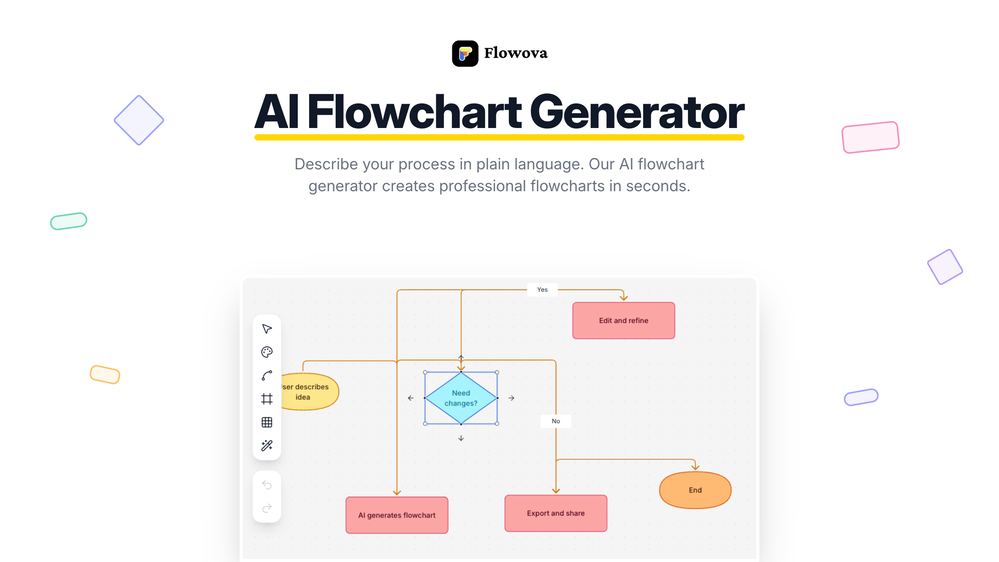 👋 Hey, I'm the founder of Flowova! We built this because we were tired of spending hours dragging boxes in traditional flowchart tools. A few things you might not know: - Works with anything — text, images, PDFs, Word, PPT, Excel, even photos of whiteboard sketches - 40+ themes designed for presentations - Full Mermaid code support for developers Happy to answer any questions! 🚀




Other tools
-
Isn't it possible that when downloading a diagram from it, the diagram to have white background rather than black background.
-
- Sponsor
 KiloClaw - Managed 🦀 OpenClaw hosting
 -
-
Glad to hear that! That's why i wanted more info , in order to help you out to obtain the product! Enjoy! Have fun!
-
As a technical entrepreneur, working with designers is often way too slow - when I have an idea, I want a prototype the same day - not days/weeks later. I created UX Canvas because I wanted a better way to communicate my UI/UX ideas to developers, without having to spend thousands on hiring UI/UX designers or opening Figma and spending days/hours manually creating, iterating on, and prototyping designs myself. UX Canvas unlocks the ability for anyone - technical or not - to rapidly prototype their design ideas and instantly share them with team members in minutes. If you can put your idea into words, you can design it. No design skills required. (Although they are helpful) The agent has the ability to do cool things like generate it’s own image assets to be used in the design, and you can even export your designs to clean React/Typescript code - so you can hand the code over to your developers (or other AI tools like Cursor, Windsurf, etc.) to bring your product idea to life. Try it for free and let me know what you think! https://uxcanvas.ai
- Didn't find the AI you were looking for?
-
Uizard is so great for spinning out ideas and iterating. You can generate designs from text prompts as well as individual screens and themes. Also has a ton of other cool AI features like turning screenshots into editable designs and attention heatmaps. I suck at design so this is a game changer for me.
-
Very helpful tool in my design process and coming up with new features!
-
eh, not the best, but with a liiiittle bit of shaping your prompt, you can get great results
-
 Open
Open




































Post





