How does Distill.cv format CVs?
Distill.cv formats CVs by automating several processes. This includes turning any PDF or Word CV into a clean, Applicant Tracking System (ATS)-safe document. During formatting, elements like tables are removed, fonts are normalised, and layout is standardised.
What recruitment agencies does Distill.cv work with?
Distill.cv is designed to work with various recruitment agencies across the United Kingdom, Australia, New Zealand, and Europe.
What applicant tracking systems is Distill.cv compatible with?
Distill.cv is compatible with several popular applicant tracking systems. These include Bullhorn, Vincere, JobAdder, and Firefish, as well as 30+ other systems used by UK, ANZ, and EU agencies.
What personal information does Distill.cv remove from CVs?
Distill.cv anonymises CVs by removing sensitive personal information. This includes the candidate's name, email address, phone number, photo, and graduation year.
How is Distill.cv used across different platforms?
Distill.cv can be used across various platforms such as the web, API, and email. Users can begin processing a CV by forwarding it to Distill.cv's processing email.
What is Distill.cv's data retention policy?
Distill.cv operates on a zero-retention policy. Files are processed in RAM and deleted immediately after being processed.
How is Distill.cv GDPR compliant?
Distill.cv adheres to UK GDPR, EU GDPR, and Equality Act standards. It processes files in RAM and deletes them immediately after, ensuring candidate data is not used for public model training.
Can Distill.cv convert both PDF and Word CVs into clean documents?
Yes, Distill.cv can convert both PDF and Word CVs into clean, Applicant Tracking System (ATS)-safe documents.
What standard does Distill.cv use for styling the CVs?
Distill.cv styles the CVs according to the specific standard of the agency that's using the tool. This involves normalising the fonts and standardising the layout.
What does Distill.cv mean by making every CV client-ready?
By making every CV client-ready, Distill.cv means it processes CVs to a form that is ready to be forwarded to clients. This involves formatting, branding, and anonymising the CVs according to recruitment agency standards.
How does Distill.cv ensure data security?
Distill.cv ensures data security through its zero-retention policy. Files are processed in RAM and are deleted instantly, ensuring that candidate data is never used for public model training.
What is the process to use Distill.cv via email?
To use Distill.cv via email, simply forward a CV to
[email protected]. The engine identifies the text, strips the junk, applies the brand kit, and sanitizes the data. A perfectly formatted .docx or .pdf then lands in your inbox, ready to send to the client.
Is Distill.cv compatible with Bullhorn, Vincere, JobAdder, and Firefish?
Yes, Distill.cv is compatible with Bullhorn, Vincere, JobAdder, and Firefish, among several other applicant tracking systems.
How quickly does Distill.cv process a CV?
Distill.cv processes a CV in approximately 30 seconds, after which the CV is immediately deleted from the system.
How does the anonymisation feature in Distill.cv work?
The anonymisation feature in Distill.cv operates by stripping sensitive personal information from CVs. This includes name, email, phone, photo, and graduation year.
Can Distill.cv handle removal of sensitive data like graduation year and photo from CVs?
Yes, Distill.cv can handle the removal of sensitive data such as graduation year and photos from CVs. It's one of the key anonymity features of this tool.
Does Distill.cv offer services globally?
Distill.cv offers its services globally. While it's made in New Zealand, it caters to agencies across the world.
What is the maximum file size that Distill.cv can process?
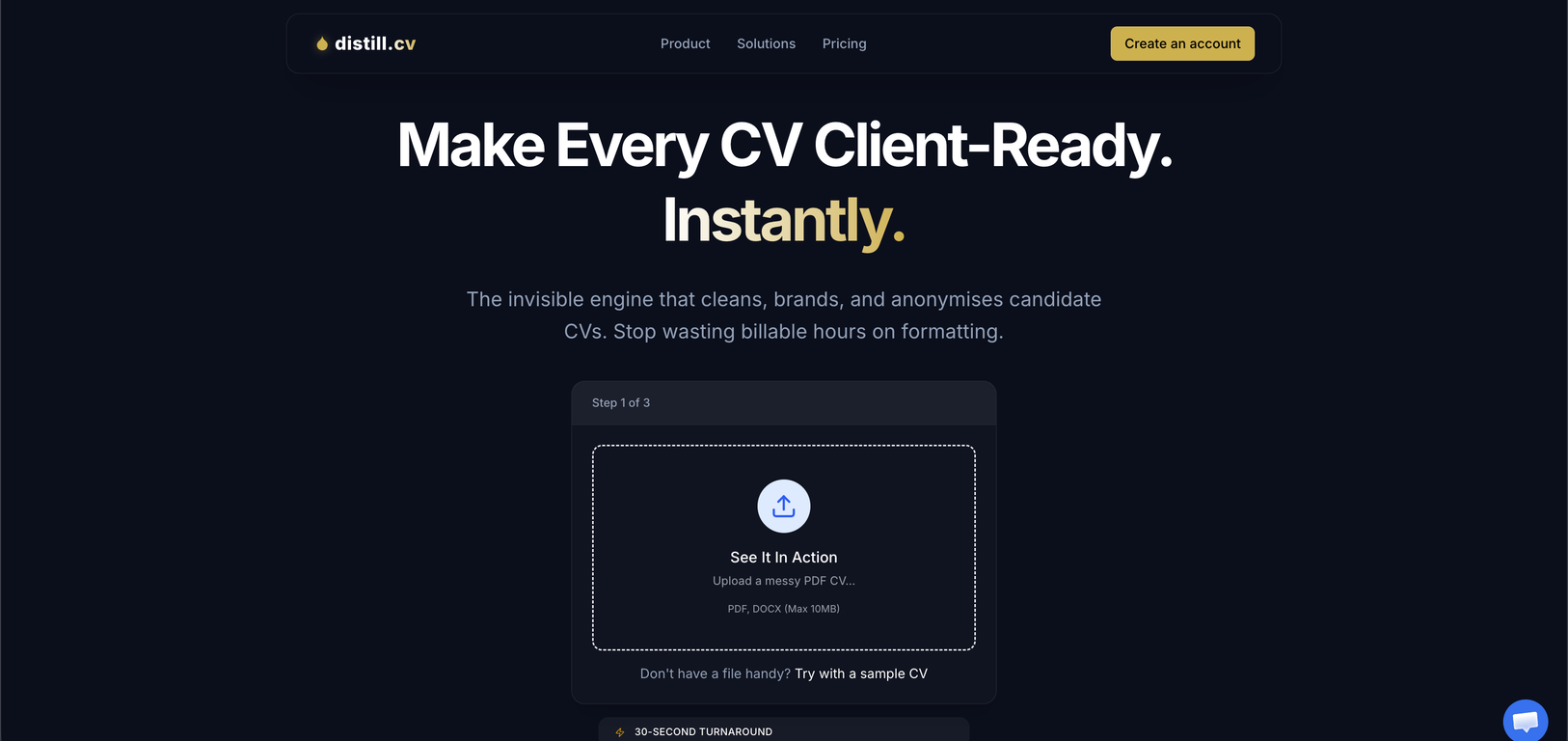
The maximum file size that Distill.cv can process is 10MB.
Is Distill.cv a tool for in-house recruitment or recruitment agencies?
Distill.cv is designed to suit the needs of both in-house recruitment and recruitment agencies.
What is Distill.cv?
Distill.cv is an Automated CV Engine designed specifically for recruitment agencies. It specializes in automating CV formatting, branding, and anonymisation. The system can process any PDF or Word CV and transform it into a clean and professional-looking document that is compatible with multiple applicant tracking systems (ATS). Additionally, it removes sensitive personal info such as names, emails, phone numbers, photos, and graduation years for anonymous candidate selection. Distill.cv integrates seamlessly across web, API, or email platforms.
How does Distill.cv automate CV formatting?
Distill.cv uses an engine that automatically identifies text in a CV, discards irrelevant data and restructures the document according to a specific agency's standards. This includes removing tables, normalising fonts and standardising the layout. It turns any PDF or Word CV into a professionally styled, applicant tracking system (ATS) compatible document.
What is the ATS compatibility of Distill.cv?
Distill.cv is compatible with numerous popular applicant tracking systems, including but not limited to Bullhorn, Vincere, JobAdder, and Firefish. These are systems widely used by UK, ANZ and EU agencies.
How does Distill.cv ensure data privacy?
Distill.cv operates via a zero-retention policy, processing files in RAM and deleting them instantly after processing. This strategy ensures that candidate data is never used for public model training. As a result, data privacy is maintained in strict adherence to UK GDPR, EU GDPR, and Equality Act standards.
What is the concept of zero-retention policy in Distill.cv?
The concept of the zero-retention policy refers to the practice of processing files and deleting them instantly after processing. This method in Distill.cv means that no data is stored or kept once the CV has been processed. It aims to protect sensitive candidate data and prevent misuse.
What ATS systems is Distill.cv compatible with?
Distill.cv is compatible with multiple applicant tracking systems that are frequently used by UK, ANZ, and EU agencies. These include Bullhorn, Vincere, JobAdder, and Firefish among others.
What personal information does Distill.cv remove for anonymisation?
Distill.cv removes personally identifiable information like names, emails, phone numbers, photographs, and graduation years for anonymised candidate selection. This aligns with the principles of blind hiring and GDPR compliance.
What platforms can I use Distill.cv on?
Distill.cv can be used on multiple platforms, including web, API, or email. It also provides the option to operate it directly from the user's inbox.
How does Distill.cv handle CV branding?
Distill.cv automates CV branding by identifying and stripping non-essential components from the document, afterwards applying your agency's brand kit to the standardized content. It ensures that all processed CVs are styled according to the specific agency's standards, ensuring unified and professional representation.
What measures does Distill.cv take to adhere to GDPR compliance?
To adhere to GDPR compliance, Distill.cv uses a zero-retention policy, anonymously processes CVs by removing sensitive personal data, and ensures that no candidate data is used for public model training. It follows UK GDPR, EU GDPR, and Equality Act standards.
How does Distill.cv manage document normalization?
Distill.cv automates document normalization by transforming any PDF or Word CV into a clean, ATS-safe document styled according to specific agency standards. This involves the removal of tables, normalization of fonts, and standardization of the layout.
How can Distill.cv be integrated with my current recruitment tools?
Distill.cv provides options for integration through web, API, or email. You can either forward a CV to be processed or use the tool from your existing platform, ensuring a seamless integration with your current recruitment tools.
Can Distill.cv process CVs sent through email?
Yes, Distill.cv can process CVs sent through email. You can directly forward a CV to a specified Distill.cv email address, then the engine identifies the text, applies your brand kit, sanitizes the data, and sends back a clean, branded, and anonymised CV to your inbox.
How does Distill.cv process CVs?
Distill.cv processes CVs by first identifying the text in the document, stripping away the junk, applying the agency's brand kit, and sanitizing the data. It is designed to turn any messy PDF or Word CV into a clean, ATS-safe document within seconds.
What compatibility does Distill.cv have with EU recruitment agencies?
Distill.cv has wide compatibility with EU recruitment agencies - it outputs files that parse correctly with various applicant tracking systems commonly used by EU (and UK/ANZ) agencies.
How does Distill.cv standardize CV layout?
Distill.cv standardizes the CV layout by stripping away any unnecessary or distracting elements like tables and miscellaneous formatting. It then applies a clean, standardized template that conforms with the specific agency's standards.
In what formats can I receive processed CVs from Distill.cv?
You can receive processed CVs from Distill.cv as either a .docx or .pdf file, instantly ready to be sent to clients.
How does Distill.cv handle fonts in CVs?
Distill.cv handles fonts in CVs by normalising or standardising them to match the particular formatting standards of the recruiting agency. This feature is part of the overall CV formatting process that the tool offers.
What type of files can Distill.cv process?
Distill.cv can process CVs that are in PDF or Word (DOCX) format up to a maximum file size of 10MB.
Does Distill.cv offer a trial or demo?
Yes, Distill.cv offers a free trial. To start your free pilot, you can create an account. No credit card information is required for this initial trial.
How would you rate Distill.cv?
Help other people by letting them know if this AI was useful.