Can EzEditor AI Magic Editor be used to create trending avatars?
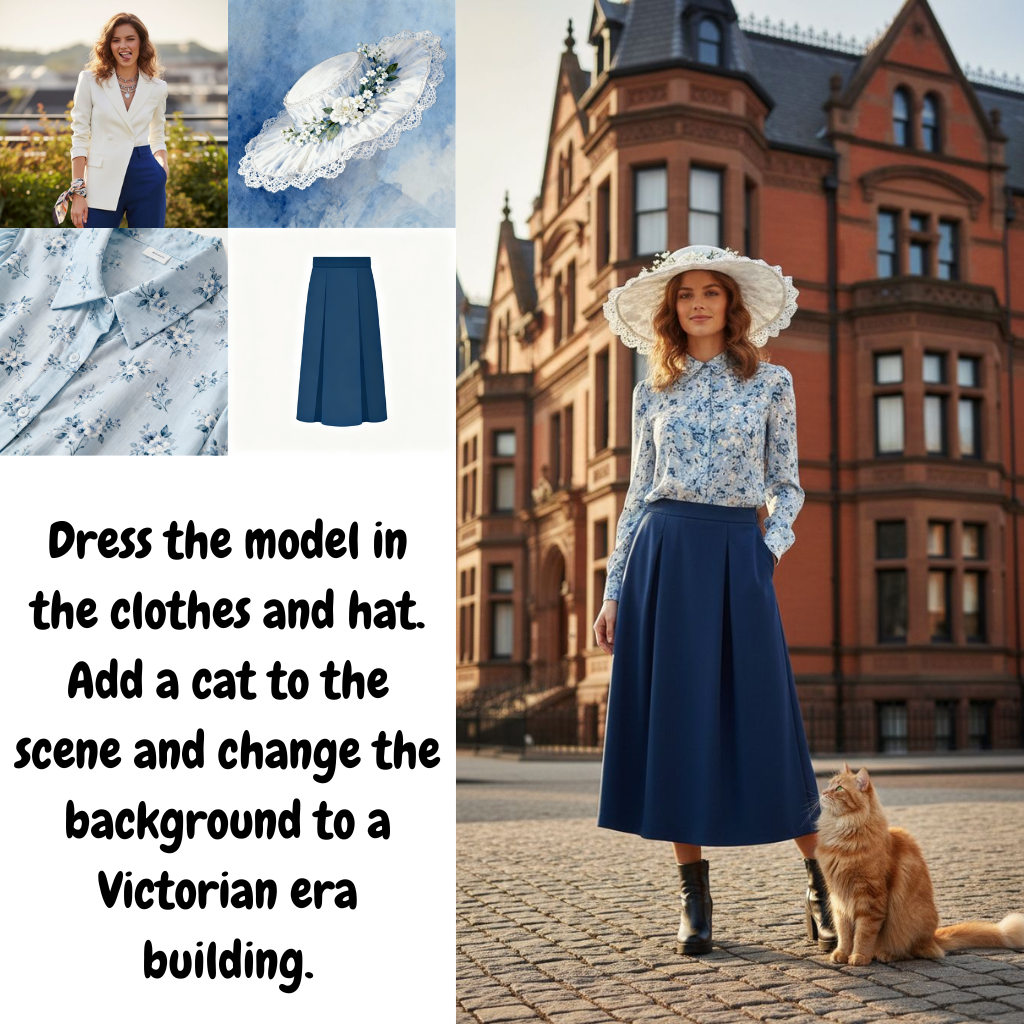
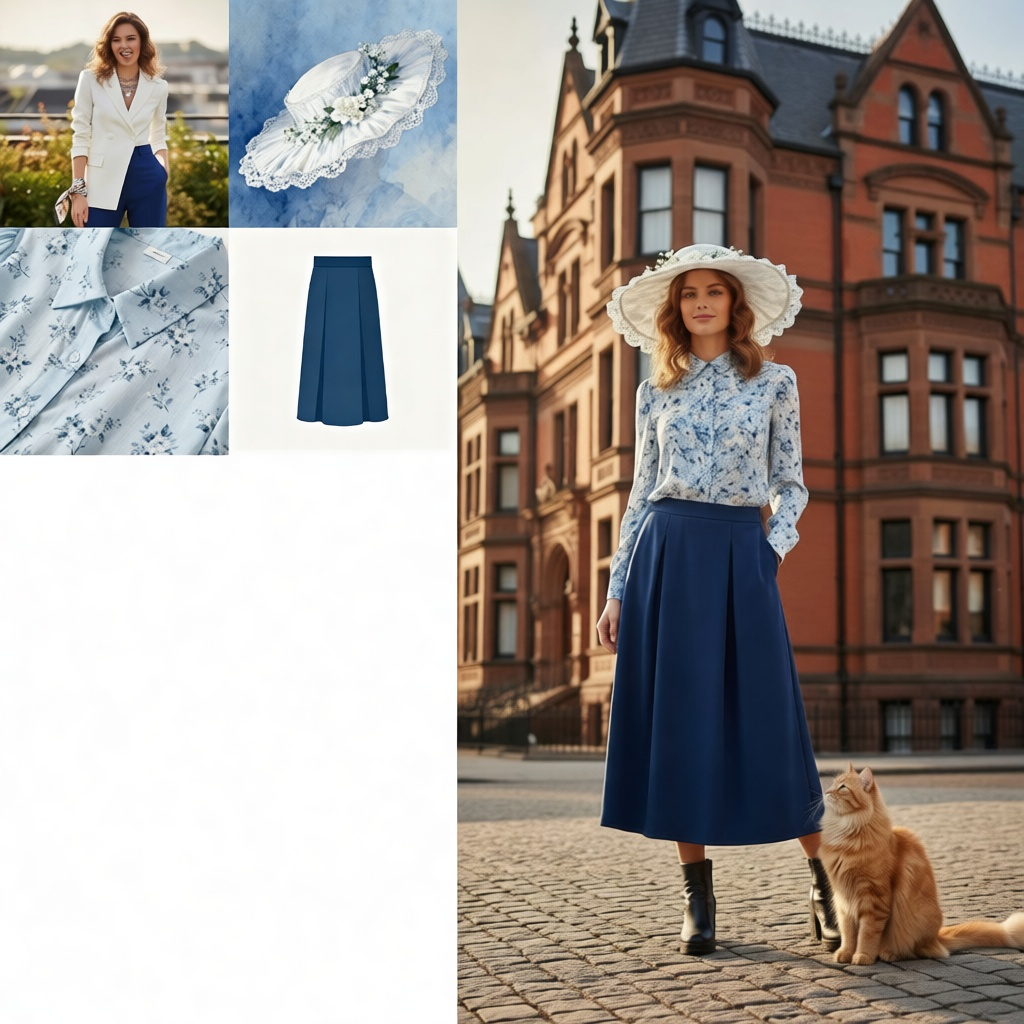
Yes, EzEditor AI Magic Editor allows you to transform your pictures into trending avatars. You just need to describe the transformation with a text command and the tool will execute it.
How to add or replace objects in my images using EzEditor AI Magic Editor?
To add or replace objects in your images using EzEditor AI Magic Editor, you simply need to describe the change in text. The AI will understand your text instruction, identify the correct area in the image, and implement the modification accordingly, eliminating the need for manual selection or masking.
How can I change clothes in a photo using EzEditor?
To change clothes in a photo using EzEditor, you input instructions like 'change red shirt to blue suit' into the prompt box. The AI will understand these instructions, identify the right area, and implement the change.
How does the Generative Fill Tool in EzEditor work?
The Generative Fill Tool in EzEditor works in tandem with text instructions from the user. Once you describe what you want to add or change in the image, the Generative Fill Tool will automatically detect and fill or replace the correct part of the image based on the instruction.
What are the free daily credits on EzEditor and how do they work?
EzEditor provides free daily credits, which can be used to access its high-quality AI editing. These credits are refreshed daily, and there's a bonus of additional credits when you log in, making the editing tool accessible to everyone.
How to use text prompts in EzEditor AI Magic Editor for editing photos?
To use text prompts in EzEditor AI Magic Editor for editing photos, you first upload the desired image. You then input your alteration request as clear text, like 'change hair to blonde', 'add a cat on the sofa', or 'extend background'. The system will use that prompt to edit your photo automatically.
Can EzEditor help me create viral trends with my pictures?
Yes, EzEditor can help you create viral trends with your pictures. It allows you to generate '3D blind box' styles or expand images to fit any aspect ratio. You can also transform portraits into trending avatars or experiment with various artistic styles using text commands.
How to modify images to fit my desired dimensions using EzEditor?
To modify images to fit your desired dimensions using EzEditor, you need to prompt the AI to 'extend background'. The tool will enlarge your photo to meet your desired aspect ratio while maintaining image quality.
Is the EzEditor AI Magic Editor user-friendly?
Indeed, EzEditor AI Magic Editor is designed to be user-friendly. It requires no manual selection or masking for image modification, just text-description. Its browser-based nature also means no installation hassles.
Can EzEditor AI Magic Editor guarantee high quality results?
EzEditor AI Magic Editor guarantees high-quality results. Its sophisticated AI handles the bulk of the work, ensuring changes to the image are implemented seamlessly and naturally. Moreover, your finalized edits are downloadable in high quality without watermarks.
How can EzEditor AI Magic Editor identify correct area in the image based on text instructions?
EzEditor AI Magic Editor identifies the correct area in the image based on your text instructions by analyzing the image context. For instance, if your instruction is 'add a vase on the table', it accurately identifies the table's location in the photo.
How does the EzEditor AI Magic Editor differ from other comparable products?
EzEditor AI Magic Editor differs from comparable products in its text-based operation, which eliminates manual selection or masking. Its Generative Fill Tool automatically detects the target area. Furthermore, it offers free daily credits and requires no installation as all significant processing occurs on its cloud servers.
What does 'No Installation Required' exactly mean in terms of using EzEditor AI Magic Editor?
'No Installation Required' means you can use EzEditor AI Magic Editor without needing to download and install any software on your device. As the tool is browser-based, you can access and use it directly from your web browser.
Can I use the EzEditor AI Magic Editor from any device?
Yes, you can use the EzEditor AI Magic Editor from any device. Since the tool is browser-based, it is readily accessible across different devices - be it a desktop, laptop, or mobile device, as long as you have an internet connection and a web browser.
What is EzEditor AI Magic Editor?
EzEditor AI Magic Editor is a browser-based photo-editing tool powered by artificial intelligence. The tool provides a range of functionalities such as adding or replacing objects in an image, changing clothes, and altering the dimensions of the image. This is done by simply describing the change in text and the AI understands and implements the changes accordingly.
What are the main features of EzEditor AI Magic Editor?
The main features of EzEditor AI Magic Editor include object addition, clothing replacement, aspect ratios adjustment, AI image manipulation, and Image Outpainting. It can also modify a photo's weather and help with social media content creation. Furthermore, the tool offers easy-to-use interface and provides free daily credits, making high-quality AI editing accessible to many users.
How does EzEditor AI Magic Editor use artificial intelligence?
EzEditor AI Magic Editor utilizes artificial intelligence to understand and implement text prompts made by the user. The AI parses the text instructions, identifies the correct area in the image to modify, and makes the changes accordingly. It can understand complex instructions and accurately localizes the specified area in the photograph based on the context.
How can EzEditor AI Magic Editor change the dimensions of a photo?
EzEditor AI Magic Editor can modify the dimensions of a photo through a feature called 'Outpainting'. This lets the AI automatically extend the background of an image to fit various aspect ratios. This comes in handy when resizing photos for various social media posts, providing flexibility in content creation.
How does the Smart AI Magic Editor & Generative Fill Tool function?
The Smart AI Magic Editor & Generative Fill Tool functions by enabling users to make modifications to their photos simply by typing out their changes in text. This tool automatically understands user's instructions, locates the correct areas in the image, and applies the changes accordingly. It offers an efficient alternative to manual selection or masking areas.
Do I need to install any software to use EzEditor AI Magic Editor?
No, there's no need to install any software to use EzEditor AI Magic Editor. The tool is browser-based, meaning that it can be accessed and used directly from any device with an internet connection. And because it performs all the significant processing on its cloud servers, you don't need a powerful computer to use it.
Can EzEditor AI Magic Editor be used to create trending avatars?
Yes, EzEditor AI Magic Editor can be used to create trending avatars. With its flexible prompt engine, you simply type prompts like 'turn into clay style' or '3D toy figure' and the AI Editor transforms your portraits into the described styles, helping you create unique, customized avatars.
How can EzEditor AI Magic Editor alter clothes in a photo?
EzEditor AI Magic Editor can alter clothes in a photo by understanding and executing text instructions from the user. By simply typing instructions like 'change red shirt to blue suit,' the AI recognizes and replaces the shirt with a suit in the photo, matching the lighting, shadows, and perspective of the original photo to deliver high-quality results.
Does EzEditor AI Magic Editor provide free daily credits?
Yes, EzEditor AI Magic Editor does provide free daily credits. The company offers these daily credits, along with a bonus when users log in, making high-quality AI editing accessible to a wide range of users. Users can use these credits to generate transformations or variations of their images.
How can EzEditor AI Magic Editor transform images into different artistic styles?
EzEditor AI Magic Editor can transform images into different artistic styles through its flexible prompt engine. Users can type in commands like 'turn into clay style' or '3D toy figure' and the tool will implement the aesthetic changes accordingly, allowing users to experiment with various artistic styles and concepts.
What is the quality of the results provided by EzEditor AI Magic Editor?
The quality of the results provided by EzEditor AI Magic Editor is high. The tool's algorithms ensure that all added or changed elements match the lighting, shadows, and perspective of the original photo. This leads to seamless editing and alterations, producing a finished product that looks natural and realistic.
How does EzEditor AI Magic Editor understand and implement my instructions?
EzEditor AI Magic Editor uses its robust AI capabilities to understand and implement your instructions. When you type in a description of the change you want, the AI analyzes this text, identifies the corresponding areas in the image, and applies the changes accordingly. It can even understand complex commands within context, accurately localizing the specified area in the image based on the instructions.
Does EzEditor AI Magic Editor require me to make any manual selections?
No, EzEditor AI Magic Editor does not require you to make any manual selections. You simply need to describe the change you want to make in text, and the AI will automatically understand your instructions, find the right spots in the image, and implement the changes. This tool eliminates the need for tedious manual selection or masking.
What operations does EzEditor AI Magic Editor perform on its cloud servers?
EzEditor AI Magic Editor performs all complex AI processing necessary for photo editing on its cloud servers. This includes understanding text prompts, identifying the correct area in the photo, implementing modifications, and ensuring that new elements match the lighting, shadows, and perspective. Processing on their cloud allows users to enjoy the full power of the AI editor without needing a powerful computer.
How can I use EzEditor AI Magic Editor to change weather conditions in a photo?
EzEditor AI Magic Editor allows you to change weather conditions in a photo by simply describing the change in text. For example, you can instruct the AI to 'make it sunset' or 'turn day into night', and it will transform the photo according to your instructions, giving the image a different vibe.
How can EzEditor AI Magic Editor help me with social media content creation?
EzEditor AI Magic Editor can assist with social media content creation in several ways. Its Outpainting feature can extend the background of a photo, making it possible to resize the photo to fit various aspect ratios required for different social media platforms. Moreover, the tool's ability to add, replace, or alter elements in an image based on text prompts enables the creation of unique and engaging content for social media.
Can EzEditor AI Magic Editor perform aspect ratios adjustment?
Yes, EzEditor AI Magic Editor can adjust the aspect ratios of a photo. This is accomplished through its Outpainting feature, which extends the background of an image to fit various aspect ratios, thereby providing flexibility for uploading images across various social media platforms with different size requirements.
Can I use EzEditor AI Magic Editor's object addition feature to add objects to my pictures?
Yes, you can use EzEditor AI Magic Editor's object addition feature to add objects to your pictures. On describing the object you want to add and its position, for example: 'add a vase on the table', the AI understands the text prompts, identifies the correct position, and adds the object seamlessly into the picture.
What is EzEditor AI Magic Editor's outpainting feature?
EzEditor AI Magic Editor's Outpainting feature allows users to extend the background of a photo in a natural-looking manner. If a photo requires more scenery or needs to fit a certain aspect ratio, the 'Outpainting' feature will generate the extra background based on its understanding of the image structure. This is especially useful for cropping images or adjusting their aspect ratio.
How does EzEditor AI Magic Editor ensure automatic matching of lighting and shadows when editing photos?
EzEditor AI Magic Editor ensures automatic matching of lighting and shadows when editing photos through its sophisticated AI algorithms. These algorithms automatically match the lighting and shadows of the original image with the added or altered elements, maintaining the photo's original perspective. This results in seamless, high-quality edits that look natural and realistic.