
 GitLab Transcend - Intelligent orchestration
 Mini tools
Mumble AI: Voice-first workspace for Mac & iOS
 Voice-first AI workspace for meetings, notes, and dictation. Works offline.







Go to 💼 Business
📢
Marketing
(2417)
🔍
Industries
(1042)
💾
Data
(928)
💼
Sales
(743)
💰
Finance
(406)
👔
Management
(330)
💡
Startups
(309)
⚖️
Legal
(265)
👔
HR
(244)
🔒
Security
(213)
📈
Business strategy
(209)
📅
Meetings
(132)
📊
Product management
(125)
📞
Calls
(43)
💻
Tech support
(38)
🤝
Networking
(37)
💻
Virtual employees
(30)
🤖
Enterprise
(15)
🚀
Business innovation
(13)
💼
Freelancing
(12)
 CleeAI
 GetSpiced
 Starnus
 Activepieces
 Avataar's GenAI Creator
 Olivya
 Abstra
 DoubleO
 Pipefy
 AI Agents
 Sreda.ai
 Neferdata
 Quixl
Quixl
 Cubeo
Cubeo
 Sema4.ai
 Ridvay
 Tray.io
 Cognition by Mindcorp
 GoodWork
 Mr David
CleeAI
14,812
GetSpiced
9,540
Starnus
6,722
Activepieces
5,872
Avataar's GenAI Creator
5,588
Olivya
4,597
Abstra
3,912
DoubleO
3,615
Pipefy
3,554
AI Agents
2,856
Sreda.ai
2,803
Neferdata
2,555
Quixl
2,469
Cubeo
2,342
Sema4.ai
2,179
Ridvay
1,560
Tray.io
1,311
Cognition by Mindcorp
1,238
GoodWork
1,208
Mr David
669
Go to 📅 Meetings
📝
Meeting summaries
(51)
🗓️
Calendar
(25)
📝
Meeting notes
(12)
📝
Meeting transcription
(7)
📅
Meeting scheduling
(5)
📊
Meeting analysis
(4)
 Hedy AI
 Meet-Ting
 Vexa
Vexa
 Convo
Convo
 Fathom
 Waitroom
 Amie - AI Note Taker
 Teameet
 Chadview
 Read Highlights
 Zoom IQ
 TimeOS
 Superpowered Me
 Meeting Ink by DeepWave
 Meeting culture
 Timetics.ai
 Rumi
Rumi
 Leexi
Leexi
 Qik Meeting
 Nyota
Nyota
Hedy AI
149,808
Meet-Ting
26,663
Vexa
12,388
Convo
12,300
Fathom
5,706
Waitroom
4,876
Amie - AI Note Taker
4,232
Teameet
3,630
Chadview
3,225
Read Highlights
3,137
Zoom IQ
2,872
TimeOS
2,537
Superpowered Me
2,451
Meeting Ink by DeepWave
1,594
Meeting culture
1,444
Timetics.ai
1,418
Rumi
1,402
Leexi
1,335
Qik Meeting
1,230
Nyota
1,218
Inputs:
Outputs:
Voice-first AI workspace for meetings, notes, and dictation. Works offline.
Overview







Overview
Socials:





Mumble AI: Voice-first workspace for Mac & iOS
Mumble AI is a voice-first productivity app for Mac that combines meeting recording, dictation, and voice notes in one place.
Record meetings without a bot joining call, dictate into any app with a keypress, and capture voice notes that auto-organize themselves.
A built-in agent with skills lets you take actions like scheduling, research, and content creation by voice.
Runs on both local and cloud AI, so you can choose between on-device privacy and cloud accuracy across 40+ languages. Free plan available.
Key Features
- Meetings: Record meetings with no bot joining your call. Mumble captures audio directly from your Mac, transcribes live with speaker labels, and delivers a structured summary the moment your meeting ends. Auto-detects meetings from your Google Calendar and works with any meeting app that plays audio through your Mac.
- Voice Notes: Capture ideas by voice anytime. Smart Notes automatically organizes your recordings into collections, and AI Draft turns them into emails, docs, or other content without manual rewriting.
- Dictation: Global voice input that works in any app on your Mac. Press a key to switch between clean text, bullet points, or a custom action.
- Local and Cloud Modes: Cloud mode offers the highest accuracy across 50+ languages. Local mode for privacy and keeps recording and transcription 100% on your Mac. Switch any time.
More:
- AI-generated template for meetings or notes.
- Automatic task extraction from task notes.
- Automatically build a contact directory from your meetings
----------
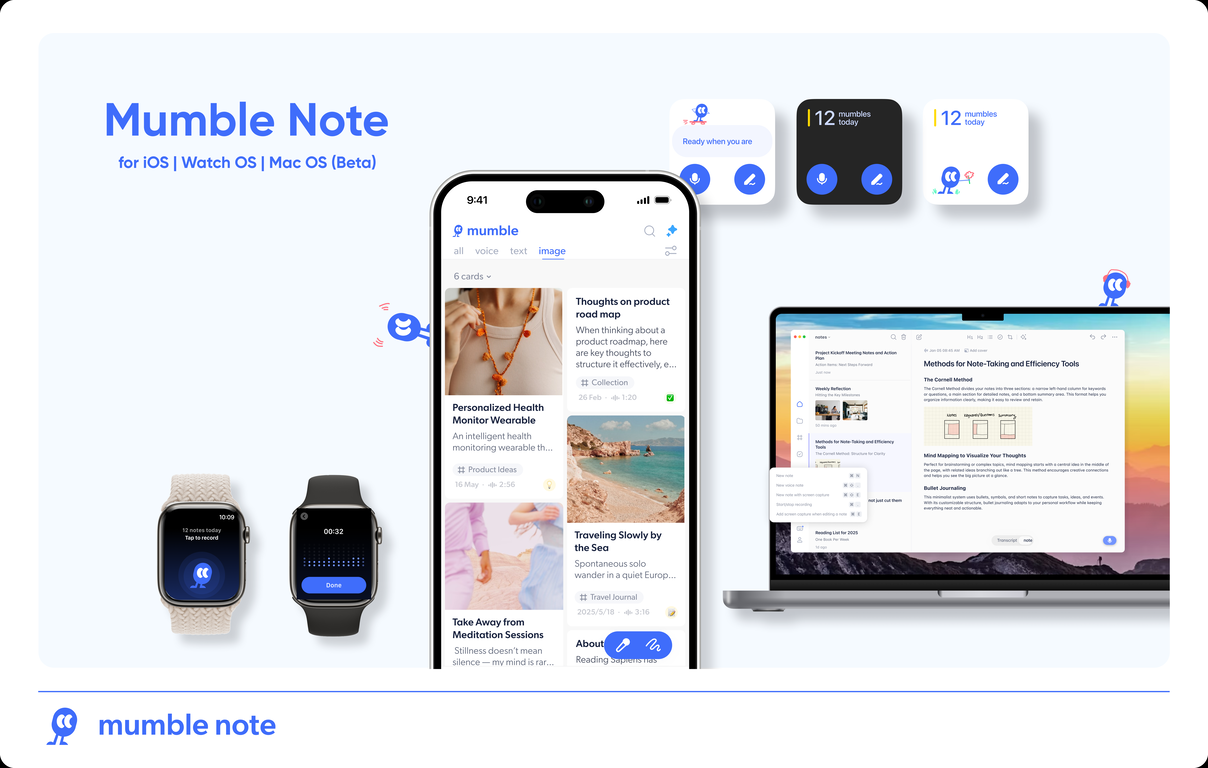
Mumble Note is an AI notetaker for iOS designed to be the fastest way to capture your scattered thoughts, and turn them into organized notes. You can speak, type or do them both. AI will combine your inputs together and generate structured, actionable and easy-to-retrieve notes, and automatically group notes into different collections based on the content.
Users have been using Mumble Note for meeting notes, quick idea capture, voice journaling, and so much more. It's on iPhone and Apple Watch, with a Mac version coming soon. Perfect for capture and syncing thoughts on the go.
Mumble Note transforms casual, freeform spoken thoughts into structured and functional notes. Users can talk freely to input their meeting notes, ideas, to-dos, or any thoughts, which are instantaneously transformed into organized notes by the AI. The application also allows users to add images, extract text from the image and subsequently take voice notes on them. It provides functionalities beyond transcription, such as turning voice inputs into structured notes that can be easily adjusted or modified. It can generate AI images covers, create to-do lists, ask AI to rewrite or translate notes, any sync tasks with other apps like Apple & Google Calendar, Reminders, Things 3, WhatsApp.
Mumble Note also assists users in organizing and retrieving notes through AI collections. The notes are sorted into AI collections for easy navigation, retrieval, and idea formation. The technology connects scattered notes into organized insights, allowing users to generate creative output. Privacy and security are prioritized, ensuring that all information remains encrypted during transcription.
Just talk. Let Mumble turn your meetings, tasks, ideas into notes, to-dos and output, instantly
Supported features
Key Features
- Transcribe Your Voice Notes & Meetings
- Generate Ai Summary & Insights
- Identify Tasks In Your Notes And Create To-do List
- Auto-group Voice Notes Into Different Topics
- Integration With Reminder, Calendar, Whatsapp, Google And Things 3
- Ai Translation Of Voice Notes
- Identify Frequently Used Words In Speech
- Multi-language Support
- Cloud Mode & Local Offline Mode
- No-bot Meeting Recording
- Smart Dictation
- Live Transcript With Speaker Lables
- Ai-generated Templates
- Dictation Tool With Customizable Outputs
- Smart Voice Notes With Auto-organization
- People Database With Meeting-based Context
Show more
Releases
Get notified when a new version of Mumble AI: Voice-first workspace for Mac & iOS is released
Notify me
Apr 21, 2026
One Mac app for meeting, dictation, and voice notes.
Meeting notes
- Record any meeting directly from your Mac. No bot joins your call
- Live transcription with automatic speaker labels
- AI-generated summaries
- Works with Google Meet, Zoom, Teams, and other meeting apps
Dictation
- System-wide dictation that works in any app
- Different output formats: Default, Bullets, Custom, and Emoji
- Open and search on website with voice
- Define your own output formats with custom prompts (e.g. rewrite as email, translate, shorten)
Voice notes
- Capture ideas on the go. Mumble rewrites them into clean, structured notes
- Smart Notes auto-organize related voice memos by topic
Local mode
- Recording and transcription run on-device. Audio never leaves your Mac.
- Dictation runs entirely locally
- All voice workflow works offline. No internet required.
Tasks page
- AI extracts action items from task notes automatically
- Create tasks manually with assignees and due dates
- Track everything in one place across all your conversations
Templates
- Pre-built meeting templates and note templates for multiple use cases
- Quick formats: lightweight formatting options (Auto, Bullet Points, Clean-up) for both meetings and notes
- Create your own custom templates and formats
People
- Mumble builds a contact directory from your meetings automatically
- See key moments, follow-ups, tasks, and Smart Notes per person
Add notes about anyone by voice directly from their profile
- AI briefings with key reminders before your next meeting
2
0
Meeting notes
- Record any meeting directly from your Mac. No bot joins your call
- Live transcription with automatic speaker labels
- AI-generated summaries
- Works with Google Meet, Zoom, Teams, and other meeting apps
Dictation
- System-wide dictation that works in any app
- Different output formats: Default, Bullets, Custom, and Emoji
- Open and search on website with voice
- Define your own output formats with custom prompts (e.g. rewrite as email, translate, shorten)
Voice notes
- Capture ideas on the go. Mumble rewrites them into clean, structured notes
- Smart Notes auto-organize related voice memos by topic
Local mode
- Recording and transcription run on-device. Audio never leaves your Mac.
- Dictation runs entirely locally
- All voice workflow works offline. No internet required.
Tasks page
- AI extracts action items from task notes automatically
- Create tasks manually with assignees and due dates
- Track everything in one place across all your conversations
Templates
- Pre-built meeting templates and note templates for multiple use cases
- Quick formats: lightweight formatting options (Auto, Bullet Points, Clean-up) for both meetings and notes
- Create your own custom templates and formats
People
- Mumble builds a contact directory from your meetings automatically
- See key moments, follow-ups, tasks, and Smart Notes per person
Add notes about anyone by voice directly from their profile
- AI briefings with key reminders before your next meeting
September 6, 2024
Initial release of Mumble AI: Voice-first workspace for Mac & iOS.
Author


Follow
Pricing
Pricing model
Freemium
Paid options from
$3/month
Billing frequency
Monthly
Refund policy
No Refunds
Keeping you safe
Good to know

Top alternatives
-
 Discord voice transcription and note taking app for teams and DnD sessionsOpen
 -
Tan Arin🛠️ 1 tool 🙏 28 karmaJul 31, 2025@Discord NotesBotHey this is Tan, I'm the creator of NotesBot. I created this tool because I needed it for my own meetings. After using myself and getting great summarization reviews from my peers, I decided to release it to the public. After release, we realized people were also using it for Dungeons and Dragons, I then added a DnD mode. This tool is non-invasive, very easy to set up, and perfect for meetings. I hope you enjoy using it!
-
Super simple, beautiful integration into a broad range of workflows.








#67
0
0



