TAAFT Tutorial
Generate image
Tasks
Generate text
Free mode
Trending
Leaderboard
Characters
 Mini tools
New
Featured
Lists
Agents
Requests
Jobs
Map
Newsletter
Starter pack
Free tools
Speech to text
Text translator
Remove background
Settings
Edit profile
My tools
Gallery
Dashboard
Inbox
Get featured
Contact TAAFT
For you
Popular
Job impact index
Most saved
Affiliate program
Submit AI tool
Notification preferences
Glossary
Home
Timeline
My profile
Create tool
Deals
Companies
Models
Robots
Papers
Fundraises
Repositories
Devices
Organizations
Events
Prompt Pack
Merchendise
APIs
Features
Tools
Countries
Collections
Videos
Mini tools
New
Featured
Lists
Agents
Requests
Jobs
Map
Newsletter
Starter pack
Free tools
Speech to text
Text translator
Remove background
Settings
Edit profile
My tools
Gallery
Dashboard
Inbox
Get featured
Contact TAAFT
For you
Popular
Job impact index
Most saved
Affiliate program
Submit AI tool
Notification preferences
Glossary
Home
Timeline
My profile
Create tool
Deals
Companies
Models
Robots
Papers
Fundraises
Repositories
Devices
Organizations
Events
Prompt Pack
Merchendise
APIs
Features
Tools
Countries
Collections
Videos
Mini tools
New
Featured
Lists
Agents
Requests
Jobs
Map
Newsletter
Starter pack
Free tools
Speech to text
Text translator
Remove background
Settings
Edit profile
My tools
Gallery
Dashboard
Inbox
Get featured
Contact TAAFT
For you
Popular
Job impact index
Most saved
Affiliate program
Submit AI tool
Notification preferences
Glossary
Home
Timeline
My profile
Create tool
Deals
Companies
Models
Robots
Papers
Fundraises
Repositories
Devices
Organizations
Events
Prompt Pack
Merchendise
APIs
Features
Tools
Countries
Collections
Videos

▼ Latest
Template generation
Free mode
100% free
Freemium
Free Trial
Featured matches
-
 Johnny Ruhlen🙏 4 karmaMar 6, 2026@TentedImpressive work from the team at Tented.ai, their approach to AI-driven automation is genuinely next-level.
 -
 Grotto Slice – Your Shortcut from Image to KlaviyoOpen
-
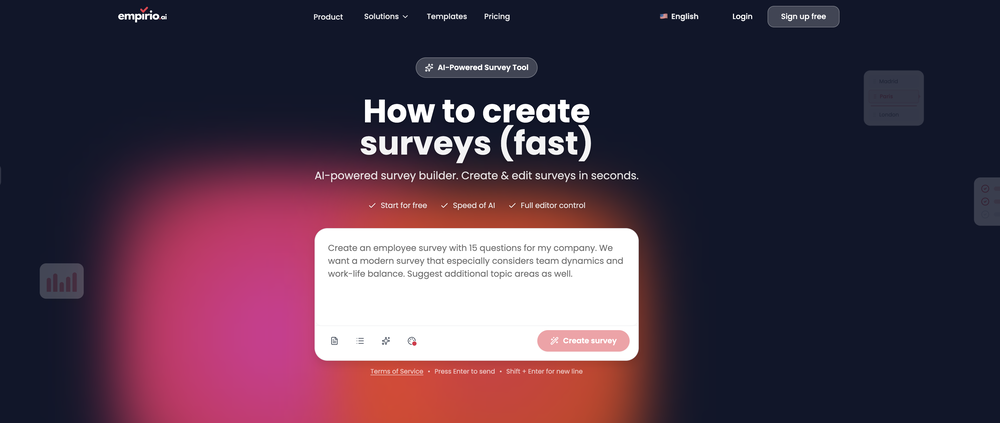 empirio.ai is a user-friendly tool that allows you to quickly and easily create a survey in just a few minutes. With the AI, you can rapidly generate questions on a topic and customize them. It offers templates that can be personalized to your needs, and it is fully compliant with data protection regulations. Highly recommended!
 -
-
-

-
-
-
 Turn notes into perfect infographics from 500+ designs.Open
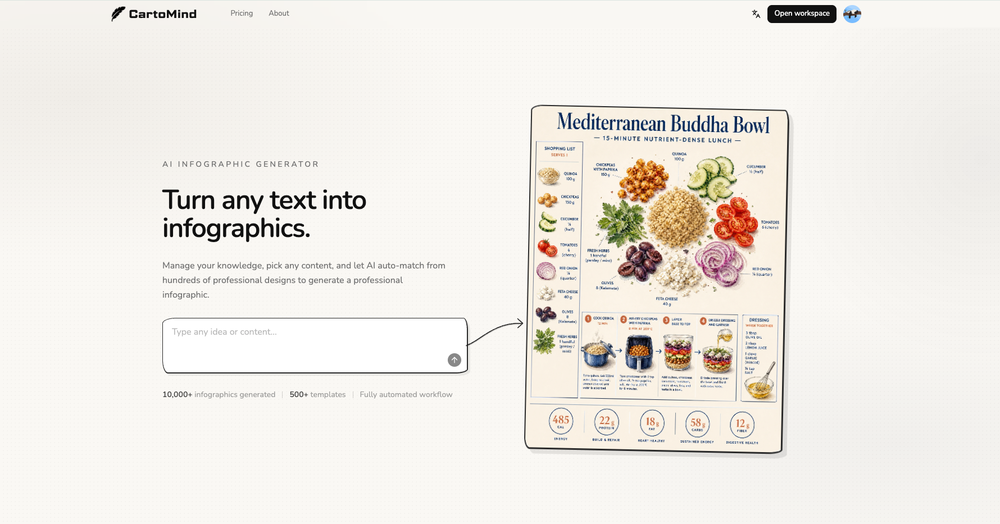 Hi TAAFT! I'm Henry, the founder of CartoMind. CartoMind offers a fully automated AI workflow to help you quickly organize text content and generate the perfect infographics to match. 【Why did I build this?】 When creating infographics with AI today, users are often forced to choose between two extremes. You either use generic AI image SaaS tools that trap you in complex prompt engineering and steep design learning curves with zero knowledge management, or you use products like NotebookLM. While they are fantastic for knowledge management, their infographic generation is just an afterthought, lacking design freedom and rich templates. 【Here is where CartoMind stands out:】 1. Lightweight knowledge & note management: We support uploading multiple file formats and automatically parsing text, allowing you to freely select the exact knowledge snippets you want to visualize. 2. Fully automated workflow: Based on your selected content, our AI automatically distills the key text elements and instantly matches you with the ideal infographic design from over 500 professional combinations. 3. Massive template library: A rich selection of infographic templates offering a true what-you-see-is-what-you-get experience. 【Who is using it?】 Marketers, educators, social media creators... In fact, anyone who needs to make their domain knowledge "visible" and loves to share it will find it incredibly useful. 【I can't wait for you all to try it out!】
 -








Verified tools
-
- Sponsor
 Tripo AI 3D Generator
 -
-
 You ask hard questions, five expert AIs debate, you win breakthrough answersOpenI can use five different models thread to dissect and cross-check my ideas in the same thread. The selling point for me is seeing AIs catch one another's hallucinations and making corrections - critical for reports I want the answer stress-tested, not just generated.
 -
-
I really loved this tool for learning DSA , the AI coach is really helpful and the platform provides structured learning paths and questions
-
-
 Boost your creativity with AI-powered brainstorming.OpenI can't explain how impressed i am by this. I've seen tools to help you brainstorm ideas, but not one to break your task down into big steps, then little steps for each of these. Plus "games" to help come up with more ideas for your project. I'm excited to use this!
 -
-
- New: A big batch of templates — more scenes and use cases, ready to use out of the box - Spotlight this release: 3D Planet — an interactive globe template built entirely no-code on HappySeeds, fully rotatable and zoomable for exploring global ecosystems - The template includes a built-in Endangered Animals Guide: tap markers on the globe to see habitats and fun facts about endangered animals - The template features hand-drawn icons and clean info cards, making the content more engaging and easy to digest - Works everywhere — smooth on both desktop and mobile, great for classrooms, science outreach, or personal exploration Built by a community creator on HappySeeds — shared here as a real example of what the platform can do.
-
Genuinely did not expect the sheer capability of this tool. I thought it would just make the text part of the e-mail but no, it just can generate the entire thing, and it allows you to take it and edit it further to your liking. Mind blown.
-
This is a great overview! It clearly explains how the AI simplifies the entire process, from design to content creation. Perfect for anyone looking to launch a business quickly.
-
Since I found this AI, it’s been such a breeze to post my content on all my platforms. My life has become so much easier just by introducing this AI into my social media content creation work.
-
 OpenI recently tried legasite.io The process was straightforward. You paste in your site’s URL, choose a template, and wait. It didn’t take long before I got a downloadable version built with modern structure (Next/React.js). That alone saved me a decent chunk of manual setup time. The generated layout was clean and usable. Overall, I’d say it’s genuinely useful if you’re modernizing legacy sites and want a head start with the possibility of refining the output if the original website has messy interactions or complex structures.
 -
 OpenHere's the rundown. If you thought image editing like Photoshop or Affinity Photo, you were wrong. It's 100% insert a photo and put a filter over it or change it into another AI image. Signing up for an account gets you 4 credits. Enough for one image to image generation. Instead, you should go to aistudio.google.com. This Dreamega site is just using google to generate their stuff anyways. You can do this yourself without paying per generation, the only difference is you need to type the prompt yourself. Is it worth paying some overblown monthly subscription on Dreamega for something you can do yourself or something you'll probably only do once?
 -
 Open
Open -
I’ve been using Image Combiner for quick image blending tests, and it does exactly what I need without making the workflow complicated. The interface is clean, uploads are simple, and the generated combinations are useful enough to iterate on quickly.
-
-
 Transform images with AI-powered creative editing tools.Open
 -
I tested a few AI presentation tools and this one works smoothly inside Google Slides.
-
 Extract structured data from images and PDFs into usable tables with AIOpen
 -
 Open
Open -
Excellent site. Super clean interface. Developer was very fast to get back to me on my question. Would highly recommend buying from these guys.
-
 Transform unstructured documents into actionable data instantly.Open
 -
I got some free credits to try the app when I signed up, I could create a few great infographics
-
To be honest I never really thought AI could help me in anything more than writing the email. But I'm delightfully proved wrong by Mailmodo. I mean it does everything for you!
-
Solid hub for socials. Schedules to a lot of platforms in one place with ai post ideas and short-form tools, plus a free tier to try things out. I like the planner and analytics, ui feels busy at first but once you learn the flow it moves fast.
-
 Build professional, on-brand decks — 10x faster. Inside PowerPoint or online.OpenI think Slidely is the only tool that has worked for me when creating my client presentations. The presentations aren't web pages or images like the other tools but actual PowerPoint slides which I really like.
 -
 Chrome extension that turns lazy prompts into pro-level instructions.Open
 -
It’s a brilliant tool that instantly transforms your ideas into dynamic, professional presentations with ease and impact. Overall a nice one!🙌
-
 OpenThe PowerPoint presentation I made met my expectations very well
 -
One platform gives me access to various high-quality video models — it’s been used to generate 110k viral social media posts.
-
I had to tweak a few things to match my brand style, but overall it saved me a ton of time. Definitely handy if you need something fast and professional-looking.
-
Hey, appreciate the feedback! I have to respectfully disagree though. While resumebuild is a great tool, UseResume.ai actually takes a different approach with its AI builder workflow and the editor. As for ATS readiness - all our templates generate documents with machine readable text (not images). I've personally tested them through Workday, Breezy, and others (e.g. Google's job portal), with perfect parsing accuracy. Would be curious to hear what specific ATS issues you encountered? Always looking to improve!
-
-
I recently started using Pin Generator, and I can confidently say it’s a game-changer for Pinterest creators. This tool is the best combination of all current Pinterest creation tools, including Canva, but it takes things to a whole new level. Compared to Tailwind, Pin Generator is far superior, allowing me to create everything I need quickly and effortlessly. One of the standout features of Pin Generator is its bulk creation capability, which feels like Canva Bulk Creation on steroids. I no longer have to manually add backgrounds, making the process of creating quotes and other bulk content incredibly fast and easy. The options for using it across multiple accounts are exceptional, providing flexibility and efficiency. Pin Generator has revolutionized my Pinterest workflow, saving me not just hours, but days of work. The efficiency it brings is unparalleled, allowing me to focus on other important tasks while maintaining a robust Pinterest presence. A special shoutout to Ollie, the creator of Pin Generator. His responsiveness to emails and openness to suggestions for future additions have been impressive. He’s even helped me figure out how to use some features I was initially unsure about. His support and dedication to improving the tool make a significant difference. Overall, I couldn’t be happier with Pin Generator. If you’re looking for a powerful, efficient, and user-friendly Pinterest creation tool, Pin Generator is the way to go.
-
 Open
Open




























































Other tools
-
Confusing to start, but eventually it made sense. I would consider using this to design your own brand's email
-
would've loved to test out more features as a free user but it looks really promising. keeping an eye 👀 (or two) on this one until i decide.
-
I tried this and found it kind of disappointing. It’s expensive to pay maybe $4 or $5 just for the prompt. It didn’t feel worth it to me. But it was still helpful for getting some design ideas and playing around with the free ones
- Didn't find the AI you were looking for?
-
Really useful tool here. Saves a lot of time when creating diagrams. Made a video about it here: https://www.youtube.com/watch?v=ClySYyEBvno
-
Hi Raian, I was able to generate a site and it worked pretty good, can you give it another try?
-
i wasted time to explain which format to build, provided all details including even the finished product to match it and simply the normal reply for any free AI tool on? how? explain!
-
You can't do anything without paying
-
CVGist is different from other AI tools in that all you need to do is write one paragraph about yourself and it does the rest.
-
Awesome! Pricing is also good. Would recommend 100%
-
It works great and is super easy to use. There are several different layouts to choose frim that are all quite nice.
-
-
Decent creation tools, but doesn't allow downloading the resume for free.
-
 Open
Open -
 Design unique AI personas with depth and personalityOpen
 -
 Creates professional portfolio outlines with personalized guidance.Open
 -
 AI-powered viral graphic design for trending content.Open
 -
Very nicely done and detailed, Well structured and professional
-
 AI-powered templates for efficient paranormal investigations.OpenBetter than others I've found thus far, yet still lacking what I consider a full, complete or thorough report form. Still, a great place to start.
 -
 AI-powered business continuity planning and strategyOpen
 -
 Assists with PDF and template formatting for a professional look.OpenThough doesn't format pdf correctly, however saved my time, so far good tool
 -
 Creates empathetic and effective customer service responsesOpen
 -
 Open
Open -
 Engage, gain insights and automate tasks with AI.Open
 -
 Notion template and integration advisor, avoiding legal/financial adviceOpen
 -
 Providing handy tips, pricing insights, and unique template names.Open
 -
 Open
Open -
 Generating software use cases from a template repository.Open
 -
 Extracts and formats procedures from manuals into templates.Open
 -
 Assists in document management, creation, and summarization.Open
 -
 Automatically generates concise summaries from your support logs.Open
 -
 Open
Open -
 Transform your vision into a stunning, SEO-optimized website with ease.Open
 -
 Expert in drafting Mutual Non-Disclosure Agreement.Open
 -
 Legal Expert in drafting Business Cooperation AgreementOpen
 -
 Your legal expert for drafting full-time employment agreements.Open
 -
 Assists with `fastapi-htmx` package queries for accurate solutions.Open
 -
 Open
Open -
 AI Legal Assistant for research, document summarization, and drafting support.Open
 -
 Generates artistic prompts using a specific template.Open
 -
 Startup document generator for Florida entrepreneurs.Open