Go to section
Sponsor
 Flow - 4x faster than typing
🎤 Dictation
Flow - 4x faster than typing
🎤 Dictation
The front page of AI.Used by 90M+ humans.

TAAFT Tutorial
Generate image
Tasks
Generate text
Free mode
Trending
Leaderboard
Characters
 Mini tools
New
Featured
Lists
Agents
Requests
Jobs
Map
Newsletter
Starter pack
Free tools
Speech to text
Text translator
Remove background
Settings
Edit profile
My tools
Gallery
Dashboard
Inbox
Get featured
Contact TAAFT
For you
Popular
Job impact index
Most saved
Affiliate program
Submit AI tool
Notification preferences
Glossary
Home
Timeline
My profile
Create tool
Deals
Companies
Models
Robots
Papers
Fundraises
Repositories
Devices
Organizations
Events
Prompt Pack
Merchendise
APIs
Features
Tools
Countries
Collections
Videos
Mini tools
New
Featured
Lists
Agents
Requests
Jobs
Map
Newsletter
Starter pack
Free tools
Speech to text
Text translator
Remove background
Settings
Edit profile
My tools
Gallery
Dashboard
Inbox
Get featured
Contact TAAFT
For you
Popular
Job impact index
Most saved
Affiliate program
Submit AI tool
Notification preferences
Glossary
Home
Timeline
My profile
Create tool
Deals
Companies
Models
Robots
Papers
Fundraises
Repositories
Devices
Organizations
Events
Prompt Pack
Merchendise
APIs
Features
Tools
Countries
Collections
Videos
Mini tools
New
Featured
Lists
Agents
Requests
Jobs
Map
Newsletter
Starter pack
Free tools
Speech to text
Text translator
Remove background
Settings
Edit profile
My tools
Gallery
Dashboard
Inbox
Get featured
Contact TAAFT
For you
Popular
Job impact index
Most saved
Affiliate program
Submit AI tool
Notification preferences
Glossary
Home
Timeline
My profile
Create tool
Deals
Companies
Models
Robots
Papers
Fundraises
Repositories
Devices
Organizations
Events
Prompt Pack
Merchendise
APIs
Features
Tools
Countries
Collections
Videos

▼ State of the art
Text optimization
Free mode
100% free
Freemium
Free Trial
Other tools
-
yiming zhou🙏 43 karmaOct 14, 2025@Image Editor OnlineA very clean website — simple, clear, and fast to generate results.
-
AIReel provides a convenient way to generate videos or images from text prompts or photos using several AI models in one place. When trying different prompts and images, the platform produced AI creations with noticeably different visual styles depending on the model selected. Compared with accessing many AI video models directly on their native platforms, the overall cost is more affordable, making it easier to experiment with AI-generated content, including both AI videos and AI images.
-
 What is My AI Ninja? My AI Ninja simplifies content creation for social media posts, carousels, long blog posts and editorial calendars tailored to your business, writing style, and audience profile. Powered by AI, it transforms your insights into authentic, engaging content. The tool is not limited to generating text; it also comes equipped with features to aid with the appropriate illustration of the content, ensuring a comprehensive package for your content requirements with a simple and efficient user interface. ► Why My AI Ninja? Social media growth is crucial but time-consuming. Balancing authenticity with efficiency is a challenge. That’s where My AI Ninja comes in: → Save Time: No more hours spent crafting posts. → Stay Authentic: Content reflects your voice, not a cookie-cutter template. → Achieve Results: Build influence without sacrificing your focus. ► How It Works: → We Understand You: The AI learns your tone, style, and goals. → Simplified Input: Share ideas via text or voice notes; we handle the rest. → Authentic Output: From social media posts to blogs and carousels, every piece feels uniquely you. ► What You Gain: → Direct connection with your audience. → Insightful sharing that feels natural. → Expanded reach while staying true to your expertise. ►►►Join Hundreds of Entrepreneurs My AI Ninja already supports hundreds of users in turning ideas into impactful content. With new features on the horizon, it’s the perfect time to amplify your voice and share
 - SponsorFlow - 4x faster than typing🎤 Dictation
-
I've known WebFill for a while, I use it almost every day, the interface is pretty good, what I like the most is that it solves any MCQ. Congratulations on the launch!
-
-
I tested. Loved it. Tried with 3 different websites. Full Marks to the output! Worth paying for!
-
KikiVoice does a great job with voice cloning — the results sound very natural and close to the original, and there’s no sign-up required.
-
 Humanize AI text into undetectable and convincing human content.OpenBest one! The only one that does not add mistakes to fool AI detectors.
 -
Clean UI, multiple video models in one place, and fair credit refunds when generations fail. Nice that you can try it for free before committing.
- Didn't find the AI you were looking for?
-
Total game changer. I’ve been using it for about two weeks now, and honestly, I don’t think I need my copywriter or editor anymore. I usually use a mix of Perplexity Claude ChatGPT to generate content for my sites. But no matter how advanced my prompts are, the output often still gets flagged as AI generated by tools like Originality or ZeroGPP.. and it still reads a bit synthetic. After running the content through Humantone, though, it actually sounds like something a real person wrote. Clean, natural, quality. I still make a few light edits here and there, but man… it saves a ridiculous amount of time.
-
I found the tool in the newsletter and have been using it for work. So far, I am happy.
-
-
 OpenGreat templates for a real estate agent. This AI is way more convenient than ChatGPT
 -
-
Hi there! The tool works just fine, all you need to do is copy the text you want to rewrite and paste it in the little prompt box, where it says "Enter your prompt here". Click "Generate" and you're done!
-
Great tool. I use it a lot. It's free, you don't have to sign up, and it's quick. I also made a video on it https://youtu.be/wWQHOtY6cYE
-
-
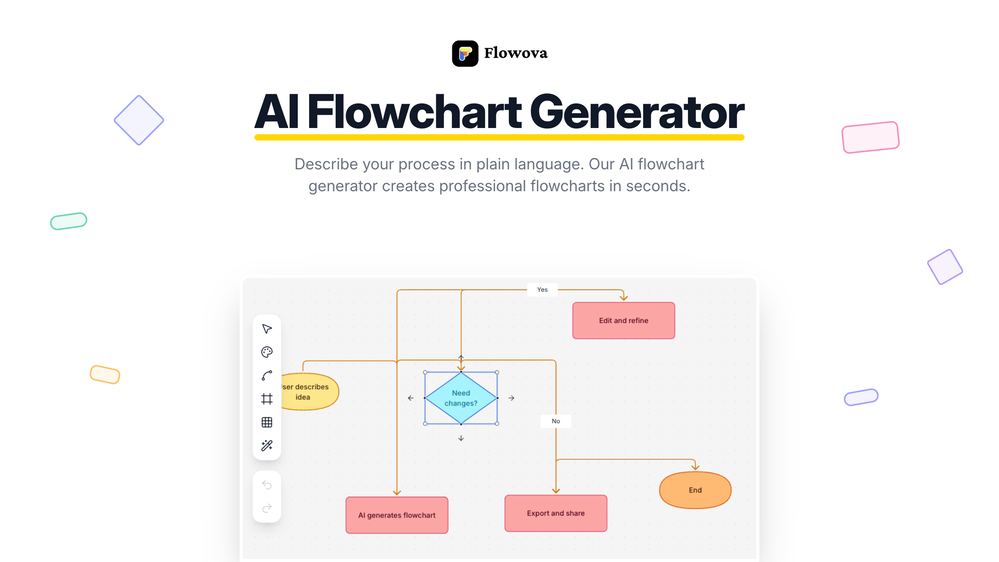 👋 Hey, I'm the founder of Flowova! We built this because we were tired of spending hours dragging boxes in traditional flowchart tools. A few things you might not know: - Works with anything — text, images, PDFs, Word, PPT, Excel, even photos of whiteboard sketches - 40+ themes designed for presentations - Full Mermaid code support for developers Happy to answer any questions! 🚀
 -
 Transform YouTube videos into polished documents and quizzes.OpenSuper helpful tool for content creators like myself. I have a Patreon where I give my Patreons quizzes and video summaries based on my YouTube video and this website speeds the whole process up tremendously.
 -
Helped condense 2-3 hours of work to 30 minutes, just gotta review well. 5 stars
-
its a language simulator but it comes up in text editor results. it only reveals its not an editor after we create an account. the creator has no integrity
-
 Generate full-length faceless YouTube videos from text and earnOpenNoodle Tomato is an amazing video creation tool. You can create shorts or full length videos on ANY subject. Choose your voice, bullet points about what you want the video to be about. It then creates the script, all of the videos into parts that are editable. After it compiles the video you can download it directly, post it to YouTube and it's that simple. You need 0 knowledge of AI prompting or video editing.
 -
It really does a good job at humanizing, very little adjustment needed for the end product.
-
Quality very good… As for the trial, don’t get me wrong, it’s better than nothing but not being able to download it is frustrating, especially when you are the songwriter.
-
-
 Open
Open -
 AI-powered outreach and multimedia delivery to help sales and marketing teams close.Open
 -
Great platform. I like their content readability optimiser, pretty quick and useful. Also made a video on it: https://www.youtube.com/watch?v=UBMWiqNAo2w
-
-
 AI-powered social content calendar that automatically creates content.Open
 -
 Extract Wisdom from Any Link -- 6 AI Models, Haiku 4.5 SynthesizedOpenExtract wisdom from YT, websites, PDFs, any link. Multiple models catch what single perspectives miss. Organized thematically. Honest about uncertainty. Built for understanding, not compression. All feedback welcome!
 -
Hey Michael 🙂 Thanks for the honest feedback , and I totally understand where you're coming from. We recently added the tutorial to help new users understand the app quickly, but we hear you , we’ll look into making it optional. Also, just to clarify: we do offer a free plan! You should be able to create and preview documents without paying. If you ran into any issues, please reach out to us at [email protected] , we’d be happy to give you extra free credits and make things right. We’d love the chance to turn that 2⭐️ into a 5⭐️ , and your input helps us get better. Appreciate you giving it a shot! Best, The Writedoc.ai Team
-
It's super easy to use, and the humanizer works. I tried a sample text, and it could pass ZEROGPT and GPTZERO (as a human). Recommended.
-
Very useful tool, especially that it's free and easy to use.
-
-
Thank you — this honestly means a lot 🙏 "No design experience needed" was exactly the goal, so it's awesome to hear it clicked for you. Thanks for creating with MagicReels, and don't hesitate to reach out if you ever need anything!
-
So far, I love it! I added a caller to the podcast and referred to them as a 'female caller,' but it was actually a male. That was the only issue. Also, I wish the podcast could be a bit longer, but all in all, I love this!"
-
-
This tool is exceptionally useful and I find it highly enjoyable to utilise Thanks
-
It really helps in coding. I let chatgpt create a code, and copy paste and ask claude to check it if it can be done better. Well, it is really fun! I also use its Image creation tool to create posts for social media. Having a tool that uses Stability AI API to create photorealistic images is really helpful. Overall 5 Stars, especially for only 8.99 per month. It is the same price like a coffee latte but has really much more value :D
-
I'd love to help you breathe some life into your article about the benefits of exercise. To get started, could you share the text with me? That way, I can get a feel for your writing style and the tone you're aiming for. Also, just to clarify, are you looking for a casual and conversational tone, or something more professional and informative? Any guidance you can provide will help me tailor the rewrite to your needs. Please go ahead and share the article, and I'll do my best to make it engaging, easy to read, and true to your original message. (If you have any specific instructions or a preferred tone in mind, feel free to let me know and I'll do my best to accommodate them.)
-
tried it for quick photo cleanups, solid results. the bg remover is free with HD downloads and does clean cutouts on tricky edges. the full editor gives 5 daily credits, not badd
-
 ⭐⭐⭐⭐⭐ Great AI Presentation Tool! I really liked the Brand PPT feature. It helped me create professional, on-brand presentation slides in under 60 seconds. The AI-generated content was well-structured, the design looked polished, and the editing process was simple. It has saved me a lot of time compared to creating presentations manually. Highly recommended for anyone who needs fast, professional-quality PowerPoint presentations.
 -
Great free tool. Simple and easy to use. Best of all don't need any subscriptions.
-
 Open
Open -
Dear user, our tool is functioning normally. If you encounter any issues while using it, please feel free to contact us for assistance ([email protected]).
-
 Chrome extension that turns lazy prompts into pro-level instructions.Open
 -
Hello everyone! Thank you for anyone that are using or just checking my tool. Please let me know if you have any questions or feedback!
-
-
Hi, thanks for the rating. VidLogi is fully operational and actively updated with new features regularly. We have just rolled out several new services, and much more is coming soon.
-
-
CodePup AI is incredible — it makes generating professional websites effortless with zero coding required.
-
 Boost visibility with instant AI-generated SEO content.Open
 -
it is good, but the limit of words is very annoying , because you can find free ai ais that do the same as free version but with a lot more words instead of using this ai and paying a plan
-
its good, but uses a credit system and needs premuim
-
UI is chill, export is fine. Free credits disappear fast if you experiment. 3/5 for now, nothing extremely special :j
-
A price list is needed in USD. Otherwise it sounds absolutely amazing!
-
 AI video translation with dubbing and lip-sync.Open
 -
Great platform! Very impressed by the ability to combine documents to generate full research reports or extract data in large PDF files.
-
Use it every day! Best AI support for work
-
This tool generates image Alt texts, not images.
-
 Convert YouTube videos to text with 99% accuracy.OpenI’ve used Riverside before and it’s a really solid tool for recording and producing high-quality audio and video. If you’re looking for a YouTube transcript generator, I’ve also been using Saveto AI. It’s been pretty handy for turning videos into clean text and quick notes.
 -
If you got a small paragraph of words you want to change to sound more organic, this tool's got your back. It even checks if your initial prompt looks AI-Generated or Human, but will still help you out in case of the latter. Free version is a good demo of its capabilities.
-
-
 Turn notes into perfect infographics from 500+ designs.OpenHi TAAFT! I'm Henry, the founder of CartoMind. CartoMind offers a fully automated AI workflow to help you quickly organize text content and generate the perfect infographics to match. 【Why did I build this?】 When creating infographics with AI today, users are often forced to choose between two extremes. You either use generic AI image SaaS tools that trap you in complex prompt engineering and steep design learning curves with zero knowledge management, or you use products like NotebookLM. While they are fantastic for knowledge management, their infographic generation is just an afterthought, lacking design freedom and rich templates. 【Here is where CartoMind stands out:】 1. Lightweight knowledge & note management: We support uploading multiple file formats and automatically parsing text, allowing you to freely select the exact knowledge snippets you want to visualize. 2. Fully automated workflow: Based on your selected content, our AI automatically distills the key text elements and instantly matches you with the ideal infographic design from over 500 professional combinations. 3. Massive template library: A rich selection of infographic templates offering a true what-you-see-is-what-you-get experience. 【Who is using it?】 Marketers, educators, social media creators... In fact, anyone who needs to make their domain knowledge "visible" and loves to share it will find it incredibly useful. 【I can't wait for you all to try it out!】
 -
 Get 99.9% accurate TikTok transcripts in seconds.OpenOne tool that really impressed me—I honestly can’t believe something this good is free. Even if it becomes paid later, I’d still keep using it. The results are just that good.
 -
AITextHumanize has quick and qualitative response. It is great for academic writing and blogs. Served me well for everyday tasks and content writing.
-
AutoNotes saves me hours as a therapist every week. My notes are faster, more organized, and actually aligned with treatment plans without extra effort. It feels like having a clinical assistant built into my workflow.
-
 Open
Open -
 Transform AI-generated content into natural, human-like text.Open
 -
-
No information about the company or its leadership anywhere on the site...very low trust factor.
-
 Transform any topic into high-performing Instagram captions.Open
 -
 Open
Open -
I think it delivers on all of its claims, specially the transcription and Blogs.
-
Hmmmm I’d say it’s a pretty useful tool, it generates solid outlines if you’re working on an article. You can’t just use them as-is, since you’ll still need to add details and review everything, but as a starting point it’s really good for getting an idea
-
 Open
Open -
 Open
Open -
 Translate everyday text into professional LinkedIn posts.Open
 -
 Open
Open -
 Get expert AI feedback on your UCAS personal statement.Open
 -
 Turn keywords into SEO-optimized YouTube descriptions instantly.Open
 -
 Transforms verbose text into razor-sharp, high-impact language.Open
 -
Either I write like AI, or this tool is really bad at telling the difference. I question these detectors, especially when you give them something you know you wrote and they claim it is 80% AI-generated. I tested it by pasting in something I wrote entirely on my own, without using AI. I didn’t even proofread it, just ran a basic spell check, and that was it. The tool still claimed that 80% of it was written by AI. Then it rewrites the supposedly “AI-generated” text using AI, which essentially makes it AI-written. 😆 That’s kind of a weird concept.
-
 Open
Open -
 Open
Open -
 Generate SEO-friendly headlines from your content instantly.Open
 -
 Open
Open -
-
 Easily format and optimize your documents.Open
 -
 Open
Open -
 Open
Open -
 Expert in reformatting text for clarity and engagementOpen
 -
 Optimizing Korean sentences for better embeddings.Open