 Rocket - Think it. Type it. Launch it.
 Mini tools
NoteX AI Meeting Agent
 Best multilingual AI meeting agent for global teams
Go to 📝 Meeting summaries
 Jamy
Jamy
 Wave AI Note Taker, Transcription and Summary Tool
 Otter.ai
 Limitless - Personalized & Secure Memory AI
 Bubbles Notetaker
 Jamie
Jamie
 Tactiq
 Bluedot
 Fireflies
 TL;DV
TL;DV
 TeamsMaestro - Free AI Meeting Note Taker
 Noty.ai
 MeetGeek
 Cogram
 Upheal
 Goelo
Goelo
 Laxis
Laxis
 Bliro - Bot-free AI Meeting Assistant
 TMate
TMate
 Vocol
Vocol
Jamy
56,501
Wave AI Note Taker, Transcription and Summary Tool
32,751
Otter.ai
24,800
Limitless - Personalized & Secure Memory AI
16,197
Bubbles Notetaker
14,213
Jamie
10,843
Tactiq
10,265
Bluedot
10,077
Fireflies
8,672
TL;DV
6,541
TeamsMaestro - Free AI Meeting Note Taker
5,487
Noty.ai
4,769
MeetGeek
4,618
Cogram
4,438
Upheal
4,378
Goelo
4,265
Laxis
4,107
Bliro - Bot-free AI Meeting Assistant
4,106
TMate
3,366
Vocol
3,063
Go to 💼 Business
📢
Marketing
(2250)
🔍
Industries
(966)
💾
Data
(872)
💼
Sales
(706)
💰
Finance
(387)
👔
Management
(308)
💡
Startups
(297)
⚖️
Legal
(254)
👔
HR
(235)
📈
Business strategy
(202)
📅
Meetings
(125)
📊
Product management
(114)
🔒
Security
(80)
📞
Calls
(42)
💻
Tech support
(37)
🤝
Networking
(36)
💻
Virtual employees
(24)
🤖
Enterprise
(15)
🚀
Business innovation
(13)
 Younet
 CleeAI
 Avataar's GenAI Creator
 Activepieces
 BigTeam
 Olivya
 Abstra
 DoubleO
 Sreda.ai
 AI Agents
 Pipefy
 Quixl
Quixl
 Cubeo
Cubeo
 Sema4.ai
 Ridvay
 Cognition by Mindcorp
 Tray.io
 UiPath
 Mr David
 Super Amplify
Younet
148,954
CleeAI
14,325
Avataar's GenAI Creator
4,577
Activepieces
4,399
BigTeam
3,270
Olivya
3,222
Abstra
2,771
DoubleO
2,693
Sreda.ai
2,664
AI Agents
2,564
Pipefy
2,463
Quixl
1,938
Cubeo
1,865
Sema4.ai
1,713
Ridvay
1,445
Cognition by Mindcorp
1,173
Tray.io
881
UiPath
553
Mr David
536
Super Amplify
397
Go to 📅 Meetings
📝
Meeting summaries
(47)
🗓️
Calendar
(25)
📝
Meeting notes
(13)
📅
Meeting scheduling
(5)
📝
Meeting transcription
(4)
📊
Meeting analysis
(3)
 Hedy AI
 Meet-Ting
 Vexa
Vexa
 Convo
Convo
 Fathom
 Waitroom
 Amie - AI Note Taker
 Teameet
 Read Highlights
 Chadview
 Zoom IQ
 Superpowered Me
 TimeOS
 Timetics.ai
 Meeting Ink by DeepWave
 Leexi
Leexi
 Meeting culture
 Calendly Notetaker
 Rumi
Rumi
 Nyota
Nyota
Hedy AI
139,466
Meet-Ting
25,600
Vexa
11,439
Convo
10,224
Fathom
5,568
Waitroom
4,187
Amie - AI Note Taker
3,739
Teameet
3,122
Read Highlights
2,927
Chadview
2,926
Zoom IQ
2,761
Superpowered Me
2,405
TimeOS
2,351
Timetics.ai
1,367
Meeting Ink by DeepWave
1,343
Leexi
1,308
Meeting culture
1,305
Calendly Notetaker
1,244
Rumi
1,171
Nyota
1,142

NoteX AI Meeting Agent
Inputs:
Outputs:
Best multilingual AI meeting agent for global teams
Overview




Overview
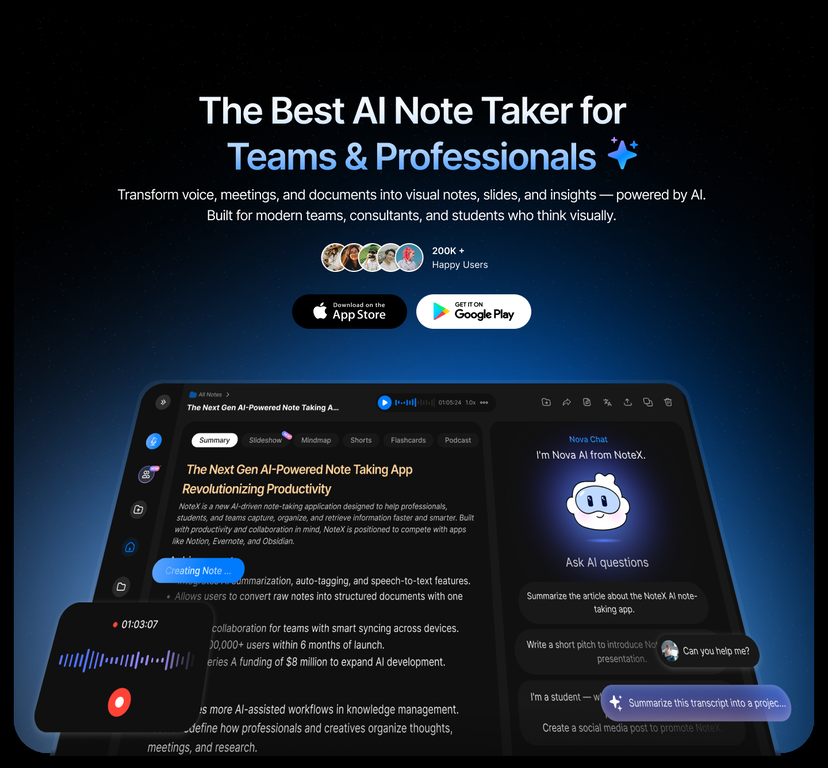
NoteX AI Meeting Agent is the most advanced multilingual meeting assistant built for busy global professionals.It seamlessly captures conversations across online meetings, in-person discussions, and hybrid sessions, then instantly transcribes, translates, and summarizes them into clear decisions, action items, and structured knowledge.
Designed for teams working across languages, time zones, and platforms, NoteX ensures everyone stays aligned—without rewatching meetings or chasing notes.
Why global teams choose NoteX:
🌍 Best-in-class multilingual transcription & translation
🎙️ Works across all meeting types: Zoom, Meet, Teams, Webex, in-person
🧠 AI summaries, decisions & action items—ready to share
🔍 Searchable meeting knowledge hub for teams
⚡ Fast, accurate, privacy-first, enterprise-ready
NoteX AI — One AI. Every meeting. Every language.
Show more
Releases
Get notified when a new version of NoteX AI Meeting Agent is released
Notify me
January 16, 2025

notexai
Initial release of NoteX AI Meeting Agent.
Author

Follow
Pricing
Pricing model
Freemium
Paid options from
$12.99/month
Billing frequency
Monthly
Top alternatives
-
 Yusef Jacobs🛠️ 1 tool 🙏 22 karmaJul 2, 2025@Jamy👋 Hey everyone — I’m Yusef, founder of Jamy. We built Jamy because we were tired of wasting time after meetings — rewriting notes, chasing action items, and trying to remember what was actually said. Jamy handles all of that automatically: it joins your calls, transcribes, summarizes, pulls tasks and quotes, and even sends branded follow-ups. It works with Zoom, Google Meet, Teams, and phone calls — and connects with tools like Slack, Trello, and Notion. If you’re curious, give it a spin — jamy.ai. Would love your feedback! — Yusef
 -
 The Smartest Way to Capture, Transcribe & Summarize AnythingOpenVery smooth and effective. It could detect even Hindi language and could summarise pretty reasonably
 -
very accurate transcription. summaries are spot on. and can transcribe conversations in real-time. easy to use
-
 Recall anything you've said or heard in meetings or conversationsOpenI like the desktop version, it can record and transcribe my meetings. Pretty accurate transcript and summary.
 -



Related topics


 21
21





