Go to section
Spotlight SureThing.io - "OpenClaw" for BeginnersTask automation
The front page of AI.Used by 90M+ humans.

Generate image
Tasks
Generate text
Free mode
Trending
Leaderboard
Characters
 Mini tools
New
Featured
Lists
Agents
Requests
Jobs
Map
Newsletter
Starter pack
Free tools
Speech to text
Text translator
Remove background
Settings
Edit profile
My tools
Gallery
Dashboard
Inbox
Get featured
Contact TAAFT
For you
Popular
Job impact index
Most saved
Affiliate program
Submit AI tool
Notification preferences
Glossary
Home
Timeline
My profile
Create tool
Deals
Companies
Models
Robots
Papers
Fundraises
Devices
Organizations
Events
Prompt Pack
Merchendise
APIs
Features
Tools
Countries
Collections
Videos
News
Investors
Repositories
Mini tools
New
Featured
Lists
Agents
Requests
Jobs
Map
Newsletter
Starter pack
Free tools
Speech to text
Text translator
Remove background
Settings
Edit profile
My tools
Gallery
Dashboard
Inbox
Get featured
Contact TAAFT
For you
Popular
Job impact index
Most saved
Affiliate program
Submit AI tool
Notification preferences
Glossary
Home
Timeline
My profile
Create tool
Deals
Companies
Models
Robots
Papers
Fundraises
Devices
Organizations
Events
Prompt Pack
Merchendise
APIs
Features
Tools
Countries
Collections
Videos
News
Investors
Repositories
Mini tools
New
Featured
Lists
Agents
Requests
Jobs
Map
Newsletter
Starter pack
Free tools
Speech to text
Text translator
Remove background
Settings
Edit profile
My tools
Gallery
Dashboard
Inbox
Get featured
Contact TAAFT
For you
Popular
Job impact index
Most saved
Affiliate program
Submit AI tool
Notification preferences
Glossary
Home
Timeline
My profile
Create tool
Deals
Companies
Models
Robots
Papers
Fundraises
Devices
Organizations
Events
Prompt Pack
Merchendise
APIs
Features
Tools
Countries
Collections
Videos
News
Investors
Repositories

▼ Latest
Video generator text
Free mode
100% free
Freemium
Free Trial
Featured matches
-
-
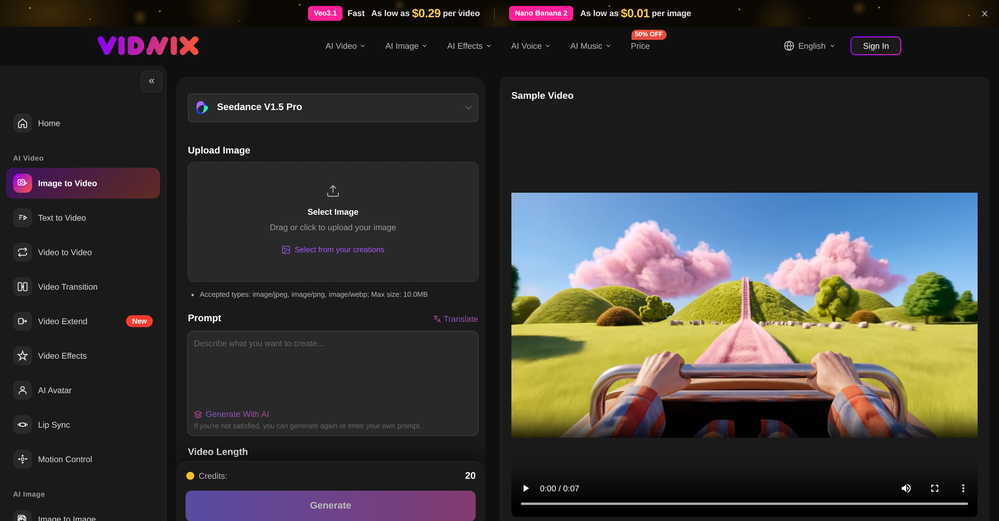 GOO DAGE🙏 25 karmaApr 24, 2026@Vidnix | AI Image to Video GeneratorThe generation speed is very fast, and having access to multiple mainstream models on a single platform — including the latest ones like Seedance2 and GPT Image2 — is great. The pricing is really affordable. I've already become an annual member.
 -
 Solid. Not perfect but it gets the job done and the updates have been pretty consistent
 -
 Open
Open
-

-
-
 I think it delivers on all of its claims, specially the transcription and Blogs.
 -
-
-












Verified tools
-
Really enjoying VioEvo so far. It helps me test ideas quickly without getting stuck tweaking every little thing. Looking forward to seeing more models added over time.
- SpotlightSureThing.io - "OpenClaw" for BeginnersTask automation
-
 Turn simple prompts into viral videos, stunning images, and realistic audio.Open
 -
 Remove subtitles, captions, and watermarks from videos instantly.Open
 -
High quality, really fast and generous free tier. Great tool! Comes even with speaker annotation!
-
AudioScribe has been really helpful for turning meeting recordings into clean transcripts without much hassle. I especially like the AI summaries and speaker identification, since they make it much easier to review long conversations and pull out the key points. Solid tool overall, and definitely worth a 5-star rating.
-
Been using TranscriptTool whenever I need to quickly turn short videos into text. I like that it keeps things simple and makes it easier to review claims or pull quotes without having to watch clips repeatedly. Handy tool for anyone dealing with video content regularly.
-
I tried all other apps who have asked for subscription, but this app helped me convert the Voice message to Text for free. Awesome
-
GoFaceless turns a single prompt into a finished, ready-to-post video — script, AI voiceover, B-roll, music, titles, and captions, fully assembled. No timeline to wrestle with, no stock clips to hunt down.
New in this release:
- Edit by chatting — change the voice, script, pacing, language, or any setting just by typing, and it re-renders instantly.
- Full timeline control when you want it — trim, split, reorder, and adjust volume on any track.
- Reusable AI presenters + faceless B-roll — pick a character once, reuse it across every video.
- 30+ languages, vertical and landscape (16:9), with grounded visuals that match real places and facts.
Describe your video, get a finished one back, then refine it in plain English. Faceless content on autopilot.
-
Been using Playyy for a while now and it's become a core part of my design workflow. I'm juggling a few different brands and projects at once, a clothing label's brand identity book, podcast cover art, poster design, and the brand kit feature has been a lifesaver for keeping each one's visual style separate and consistent. No more mixing up palettes or fonts across projects.
-
Pay-as-you-go without subscription
-
 AI video translation with dubbing and lip-sync.Open
 -
 Use every top AI model and 100+ effects in one account.Opena friend sent me this the other day. veo, grok, seedance all run from one upload and it's actually fast. ui doesn't fight me. no complaints.
 -
 OpenHonestly, the kissing effect on Viyou is remarkably fluid—way better than other AI tools I’ve tried. The preset scenes are a great touch and super fun to play with. My only tip? The default prompts could be a bit more polished to get even better details, but the results are already top-tier. Definitely worth checking out!
 -
 OpenI was struggling to create some free Christmas and New Year's e-cards, and these templates are really good. I recommend giving them a try. The only downside is that each free template can only be used once.
 -
Vireel offers the best realistic ai image to video and ai text to video tools. Incredible no watermark quality!
-
AI Video Prompt (1 Minute): > Create a 1-minute ultra-realistic cinematic video about a poor 12-year-old boy named Ali. Ali lives with his widowed mother in a small mud house in a village. They struggle to afford food, but Ali is hardworking, humble, and always smiles. Every morning, Ali wakes up before sunrise, helps his mother, carries vegetables to the market, shines shoes, and works honestly all day. One afternoon, he finds a wallet full of money on the road. Although his family is poor, Ali chooses to return the wallet to its owner. The owner is deeply touched by Ali's honesty and rewards him with a good job and financial support. In the final scene, Ali and his mother are smiling in their improved home, grateful for a brighter future. Ultra-realistic, emotional storytelling, cinematic lighting, realistic facial expressions, smooth camera movements, golden-hour colors, inspiring background music, 4K, movie-quality visuals.
-
Works wonders for anime, has me taking it in consideration for a tool rotation.
-
After testing Viyou AI Motion Control, I’m impressed by how it solves the 'stiff' movement common in AI video. While competitors struggle with physical contact, I found Viyou excels at fluid, complex interactions like hugging and dancing. It’s my go-to tool for cinematic storytelling where precise subject behavior matters most.
-
 Web platform for video translation, text-to-speech conversion, image creation, media editingOpenGenerated a pretty accurate video translation. Also, was quite impressed with a price tag.
 -
Scrollsequence is a game-changer for interactive storytelling! Smooth animations, intuitive setup, and impressive control over scrolling sequences make it perfect for engaging web experiences. Highly recommend for designers and developers looking to elevate their sites. 🙌
-
it removed the watermark cleanly while keeping the original quality.
-
 Edit smarter, faster and easier with Filmora’s powerful AI video tools.Open
 -
This app now supports both iOS & macOS: https://whispernotes.app
-
This is truly a wonderful experience that brings joy and delight.
-
By using AI to generate ASMR videos with sound, you can choose your favorite ASMR scenes to DIY. It's so cool.
-
-
 Transcribe audio, video, or links into text. 1,000+ platforms, 100+ languages.OpenI built Vocova to solve a simple problem — people consume content across languages and platforms every day, but turning that content into accurate, readable text is still painfully fragmented. You need one tool to download, another to transcribe, another to translate. It should be one step. We build Vocova the way you'd build a piece of art — every detail is intentional. How natural the speaker labels read, how precisely timestamps align with every word, how a bilingual export looks like a polished document rather than a raw data dump. We don't ship anything that we wouldn't be proud to put our name on. Vocova supports 100+ languages, imports from 1,000+ platforms, and translates into 145+ languages. Try it and let me know what you think — your feedback directly shapes what we build next.
 -
Speed is amazing ! I will definitely utilize the tool in the future for film generation
-
 Create Stunning PPTs in Seconds with the AI PPT MakerOpen
 -
 Extract Wisdom from Any Link -- 6 AI Models, Haiku 4.5 SynthesizedOpenExtract wisdom from YT, websites, PDFs, any link. Multiple models catch what single perspectives miss. Organized thematically. Honest about uncertainty. Built for understanding, not compression. All feedback welcome!
 -
We're live folks! Do check us out and drop your feedback or requests.
-
 AI-powered outreach and multimedia delivery to help sales and marketing teams close.Open
 -
Been using CloneViral for my UGC ad campaigns and it's honestly a game-changer. The Agent Mode feature is what sold me - you basically describe what you want, and their AI agents collaborate to handle everything from scripting to final video. No more jumping between 5 different tools. The UGC Ads generator is surprisingly good. I can create authentic-looking user testimonials and product demos in minutes instead of hiring creators or spending days editing. Quality is solid enough that my clients can't tell the difference. Not perfect, but for the price and time it saves me, it's become essential in my workflow. If you're doing any kind of social media marketing or content creation at scale, worth trying out.
-
After registration, a 403 error is directly displayed and the service cannot be used.
-
This release introduces Flint, a new family of each::labs image models designed to deliver frontier-quality results with production-ready economics.
- flint-image: Generate four distinct images from a single prompt in one call for $0.20, compared with $0.60 for a standard generation.
- Flexible output controls: Set the output format and aspect ratio for each run, so generated images fit directly into your layout.
- Available across each::labs: Access Flint through the API at api.eachlabs.ai or the visual no-code AI Flows builder, with pay-per-call pricing and no subscription required.
- Coming next: Additional Flint models for clean 4K image generation and editing, available at the same $0.20 per-call price.
-
 Transform photos into cinematic videos with AI.OpenOnly app I could create video for free! Thanks
 -
the founder is cool, definitely a recommendation if you have personal requests and grow the app along with you.
-
 Create any AI Videos, Images and Music - No creative limitsOpenI mainly used Himedia AI for image creation and got surprisingly realistic outputs. Prompt control feels intuitive compared with some other tools.
 -
 Start from real examples. Turn one good clip into a full video.OpenI was surprised by MotionGen's image2 model. I've uploaded a photo and it accurately suggested hairstyle variations I actually loved. Didn't expect that at all.
 -
Using Meloflow felt almost magical—it instantly turned my rough ideas into music that sounded alive, polished, and truly my own.
-
Clean UI, multiple video models in one place, and fair credit refunds when generations fail. Nice that you can try it for free before committing.
-
 Transform your music into stunning visual experiences with AIOpenThe generation effect is good, the pictures are exquisite, and the transition animations of the pictures are smooth The only drawback is that it would be better if the generation time were a little faster
 -
AIReel provides a convenient way to generate videos or images from text prompts or photos using several AI models in one place. When trying different prompts and images, the platform produced AI creations with noticeably different visual styles depending on the model selected. Compared with accessing many AI video models directly on their native platforms, the overall cost is more affordable, making it easier to experiment with AI-generated content, including both AI videos and AI images.
-
Great reader app that allows for importing many articles. I hope the interface can be made to look a bit better. 期待を込めて5星を。
-
 Open
Open -
 Open
Open -
It works surprisingly well. Clean plus you can actually try it first without having to drop money right away. helps if you are not sure it'll fit your needs. Solid stuff.
-
 Unlimited transcripts, summaries, 99.8% accuracy, speaker recognition, superfastOpenI already have another transcription tool, but this one is much better. I love the different features such as the summary, quiz, and chapters. It does a great job of them. I've only done one transcript so far to try it out, but I'm truly impressed and am going to grab another code. A couple things that would make it even better are: - the ability to rename the files and organize them through folders. - the ability to download a copy of the other features as well as the transcript. Copying and pasting it works, but doesn't keep the format.
 -
-
best part? it doesn't fight my process. i can iterate fast, try different moods and play with compositions while the idea's still hot.
-
-
-
Sorry for inconvenience, Its up and running now
-
Immo currently best solution if you want to convert / enchant your how-to tutorials to more professional!
-
I’ve found Jogg.ai to be super convenient, especially for creating short ad videos for products! If you haven’t tried it yet, you should check out this tutorial: https://www.jogg.ai/blog/4-steps-to-create-your-product-video-ads-in-minutes/
-
I tried to look at what their avatars look and sound like but could not find it on their website. I'm not going to make a purchase if I can't see what I'm buying.
-
Can't test without entering a credit card directly after sign up, I won't be using without testing it first. sorry!
-
The video generation is surprisingly smooth. Motion looks natural, transitions are clean, and the final clips maintain a consistent visual style from beginning to end. It saves me a lot of editing time.
-
realistic lip sync working very good recommended
-
create a ppt with example and small case study on augmented marketing mix
-
 Generate images, video, and audio with 150+ AI models.Open
 -
-
 Turn prompts into polished images and videos, instantly.Open
 -
 Open
Open -
I was lucky enough to join the early canary testing for this platform, and it’s been impressively simple and transparent to use.
-
-
Looks pretty clean and easy to use! The upload process is straightforward, though the top section feels a little crowded. Maybe add a bit more info about how the credits work.
-
The "Lion and Sun" symbol is seen on streets where protests are underway, fires are spreading, and the nation has risen up for freedom.
-
It's great to have free tools of such high value
-
As a student, I regularly work with research papers and long PDFs. PodcastorAI has been a helpful way to turn that content into something I can listen to while commuting or walking. I like that it creates a structured podcast rather than simply reading the text aloud. The dialogue format is surprisingly engaging and makes dense material easier to get through. I still rely on the original documents for deeper study, but for review and knowledge retention, it's been a genuinely useful tool.
-
 Open
Open -
The output images are great, there are many features, and you can upload any picture to generate a complete set of e-commerce product images with one click. I feel like I can fire my company's graphic designer.
-
Phenomenal quality outputs, reasonable & kind permittance to utilize for free & I said phenomenal but it’s whatever word which is above phenomenal! Kudos!
-
 Open
Open -
 Open
Open -
-
Very simple and easy to use. The premium feature of Lyrics helper really helped me to write lyrics exactly the way i wanted.
-
Hi, thanks for the rating. VidLogi is fully operational and actively updated with new features regularly. We have just rolled out several new services, and much more is coming soon.
-
Hi 👋 I'm Vera, the maker of Whisper Web. I built it because I needed a frictionless way to turn recordings into structured text — meeting notes, interview quotes, podcast transcripts, YouTube research. Whisper Web runs entirely in your browser. Drop an audio or video file (up to 2GB), record from your mic, or paste a YouTube URL. You get a clean transcript with automatic speaker labels and a structured AI summary covering key points, action items, decisions, and quotes — all in under 3 minutes. 100+ languages, auto-detected. Six export formats: TXT, DOCX, PDF, SRT, VTT, and JSON. Privacy-first by design. Free to try, no credit card. Would love your feedback — drop a recording you've been putting off and tell me how it went. — Vera
-
 Convert IG Reels into text with 99.9% accuracy.OpenI hadn't come across this tool until just a few days ago, when I spotted it on TAAFT. It was truly a pleasant surprise; the development team genuinely offers their services completely free of charge—a remarkably generous approach compared to other tools. It saves both time and money. My sincere thanks to the development team for creating such an excellent tool.
 -
 Transform images with AI-powered creative editing tools.Open
 -
 Get 99.9% accurate TikTok transcripts in seconds.OpenOne tool that really impressed me—I honestly can’t believe something this good is free. Even if it becomes paid later, I’d still keep using it. The results are just that good.
 -
 Generate full-length faceless YouTube videos from text and earnOpenNoodle Tomato is an amazing video creation tool. You can create shorts or full length videos on ANY subject. Choose your voice, bullet points about what you want the video to be about. It then creates the script, all of the videos into parts that are editable. After it compiles the video you can download it directly, post it to YouTube and it's that simple. You need 0 knowledge of AI prompting or video editing.
 -
 Open
Open -
 Multi-model AI video generator for turning images and prompts into short videos.OpenAll tools and models in one place, handy and cost-effective!
 -
-
-
 OpenThe features are incredibly comprehensive. I really love it — the AI videos I created got a ton of praise when I shared them. Likes galore!
 -
One platform gives me access to various high-quality video models — it’s been used to generate 110k viral social media posts.



























































































































































Other tools
-
 Convert audio and video to text with AI precisionOpen
 -
 Apply spooky Halloween filters and scary makeup effects online for free.Open
 -
 🎯 3 free transcripts every day. 🔥 Unlimited transcription starting at $10/mo.OpenNo other tool quite like this, it's pretty straightforward. Needed to extract a long interview from YouTube and it extracted everything, providing it in different meaningful formats in less than two minutes. Awesome
 -
I forgot to take videos on my trip, so I gave this a shot with just the photos I had. Surprisingly, it created a short clip that actually looked real, super cool. Just wish it didn’t take forever to render
-
too expensive for me, I just want to make memes, not pay that much
-
-
I recently started using Napkin AI, and I couldn't be more impressed! This tool is incredibly user-friendly and intuitive, making it easy to generate clear visual representations from text. Moreover, the interface is clean and visually appealing, which enhances the overall user experience. Napkin AI is a fantastic companion. Highly recommended for anyone looking to elevate their creative process!
-
When uploading a 30-minute video file, I was surprised to receive the transcript in just a few seconds. The speed and quality of the transcription process blew me away, especially considering the complexity of the video content.
-
Diffusion pulls out extremely good images from simple prompts. Renders were a little slow on higher quality, but totally worth it for the results. The controls feel clear enough and the outputs look legit. Good one here!
-
- Didn't find the AI you were looking for?
-
I’m the developer of ClaviSay, and I’ve always struggled with learning foreign languages. But since I need to use them for work, I wondered if I could create an AI that would help me read more efficiently and save unfamiliar words—all while I’m actually reading content like BBC or Medium. Now I’ve made it happen—ClaviSay. All features are free, so feel free to use them as you like. You can also provide feedback at any time; ClaviSay offers a dedicated feedback channel. Thank you all.
-