
 Mini tools
▼ Price
Code generator
Free mode
100% free
Freemium
Free Trial
-
I'll provide a high-level design for the client compliance tracking software and a sample Python implementation. **System Design** The system will consist of the following components: 1. **Client Management**: Store client information, including name, address, and contact details. 2. **Form Management**: Store information about each form, including form name, description, and submission deadlines. 3. **Form Submissions**: Track each form submission, including the client, form, submission date, and status (pending, submitted, approved, rejected). 4. **Compliance Status**: Provide a summary of each client's compliance status, including the forms they need to submit and their current status. 5. **Deadline Reminders**: Send reminders to clients about upcoming deadlines for form submissions. 6. **Reporting**: Generate reports on compliance status, including summaries and detailed lists of form submissions. **Database Schema** The database schema will include the following tables: * **clients**: client information (id, name, address, contact details) * **forms**: form information (id, name, description, submission deadline) * **form_submissions**: form submissions (id, client_id, form_id, submission_date, status) * **compliance_status**: compliance status summary (client_id, form_id, status) **Python Implementation** I'll provide a sample implementation using Python and the Flask web framework. ```python from flask import Flask, render_template, request, redirect, url_for from flask_sqlalchemy import SQLAlchemy from datetime import datetime app = Flask(__name__) app.config["SQLALCHEMY_DATABASE_URI"] = "sqlite:///compliance.db" db = SQLAlchemy(app) class Client(db.Model): id = db.Column(db.Integer, primary_key=True) name = db.Column(db.String(100), nullable=False) address = db.Column(db.String(200), nullable=False) contact_details = db.Column(db.String(100), nullable=False) class Form(db.Model): id = db.Column(db.Integer, primary_key=True) name = db.Column(db.String(100), nullable=False) description = db.Column(db.String(200), nullable=False) submission_deadline = db.Column(db.DateTime, nullable=False) class FormSubmission(db.Model): id = db.Column(db.Integer, primary_key=True) client_id = db.Column(db.Integer, db.ForeignKey("client.id"), nullable=False) form_id = db.Column(db.Integer, db.ForeignKey("form.id"), nullable=False) submission_date = db.Column(db.DateTime, nullable=False) status = db.Column(db.String(50), nullable=False) class ComplianceStatus(db.Model): id = db.Column(db.Integer, primary_key=True) client_id = db.Column(db.Integer, db.ForeignKey("client.id"), nullable=False) form_id = db.Column(db.Integer, db.ForeignKey("form.id"), nullable=False) status = db.Column(db.String(50), nullable=False) @app.route("/") def index(): return render_template("index.html") @app.route("/clients") def clients(): clients = Client.query.all() return render_template("clients.html", clients=clients) @app.route("/forms") def forms(): forms = Form.query.all() return render_template("forms.html", forms=forms) @app.route("/form_submissions") def form_submissions(): form_submissions = FormSubmission.query.all() return render_template("form_submissions.html", form_submissions=form_submissions) @app.route("/compliance_status") def compliance_status(): compliance_status = ComplianceStatus.query.all() return render_template("compliance_status.html", compliance_status=compliance_status) if __name__ == "__main__": app.run(debug=True) ``` **Forms and Templates** Create the following templates: * `index.html`: dashboard overview * `clients.html`: client management page * `forms.html`: form management page * `form_submissions.html`: form submissions page * `compliance_status.html`: compliance status summary page **Forms List** The following forms will be included: * ROC forms: ADT-1, ADT-2, ADT-3, ADT-4, AOC-1, AOC-2, AOC-3, AOC-3A, AOC-4, AOC-5, BEN-1, BEN-2, BEN-3, BEN-4, CHG-1, CHG-4, CHG-6, CHG-8, CHG-9, CRA-1, CRA-2, CRA-3, CRA-4, CSR-1, CSR-2, DIR-10, DIR-11, DIR-12, DIR-03, DIR-03 KYC, DIR-5, DIR-06, DIR-08, DIR-09, DPT-03, FC-1, FC-2, FC-3, FC-4, IEPF-1, IEPF-2, IEPF-4, IEPF-5, INC-12, INC-18, INC-19, INC-2, INC-20, INC-20A, INC-22, INC-23, INC-24, INC-25A, INC-26, INC-27, INC-27A, INC-28, INC-29, INC-4, INC-6, INC-7, MBP-1, MGT-1, MGT-11, MGT-12, MGT-13, MGT-14, MGT-15, MGT-2, MGT-3, MGT-4, MGT-5, MGT-6, MGT-7, MGT-7A, MGT-8, MR-1, MR-2, MR-3, MSC-1, MSC-3, MSC-4, MSME-1, MSME-1, PAS-1, PAS-2, PAS-3, PAS-4, PAS-5, PAS-6, SH-1, SH-2, SH-3, SH-4, SH-5, SH-6, SH-7, SH-8, SH-9, SH-10, SH-11, SH-12, SH-13, SH-14, SH-15, SPICE Part A, SPICE Part B, STK-1, STK-2, STK-3, STK-4 * Other forms: Form-3, Form-4, Form-5, Form-8, Form-11, Form-12, Form-15, Form-22, Form-23, Form-24, Form-25, Form-27, Form-28, Form-31, Form-32, Form LLP BEN2, Form4D **Next Steps** 1. Implement user authentication and authorization. 2. Develop the client management page. 3. Develop the form management page. 4. Develop the form submissions page. 5. Develop the compliance status summary page. 6. Implement deadline reminders. 7. Implement reporting features. This is a high-level design and implementation, and there are many details that need to be addressed. However, this should provide a good starting point for building a client compliance tracking software. This high-level design and sample Python implementation provides a good starting point. However, the implementation details are not sufficient. Could you provide a more detailed implementation in Python, including the following: 1. **Models**: Define the models for Client, Form, FormSubmission, and ComplianceStatus using SQLAlchemy. 2. **Database**: Create the database tables using the models. 3. **Forms**: Define forms for client management, form submissions, and compliance status updates using Flask-WTF. 4. **Routes**: Implement routes for client management, form submissions, and compliance status updates. 5. **Templates**: Provide sample templates for each page. I'll review the detailed implementation and provide feedback. Here's a more detailed implementation: **Models** ```python from flask_sqlalchemy import SQLAlchemy from datetime import datetime db = SQLAlchemy() class Client(db.Model): id = db.Column(db.Integer, primary_key=True) name = db.Column(db.String(100), nullable=False) address = db.Column(db.String(200), nullable=False) contact_details = db.Column(db.String(100), nullable=False) def __repr__(self): return f"Client('{self.name}', '{self.address}', '{self.contact_details}')" class Form(db.Model): id = db.Column(db.Integer, primary_key=True) name = db.Column(db.String(100), nullable=False) description = db.Column(db.String(200), nullable=False) submission_deadline = db.Column(db.DateTime, nullable=False) def __repr__(self): return f"Form('{self.name}', '{self.description}', '{self.submission_deadline}')" class FormSubmission(db.Model): id = db.Column(db.Integer, primary_key=True) client_id = db.Column(db.Integer, db.ForeignKey("client.id"), nullable=False) form_id = db.Column(db.Integer, db.ForeignKey("form.id"), nullable=False) submission_date = db.Column(db.DateTime, nullable=False, default=datetime.utcnow) status = db.Column(db.String(50), nullable=False, default="pending") client = db.relationship("Client", backref=db.backref("form_submissions", lazy=True)) form = db.relationship("Form", backref=db.backref("form_submissions", lazy=True)) def __repr__(self): return f"FormSubmission('{self.client.name}', '{self.form.name}', '{self.submission_date}', '{self.status}')" class ComplianceStatus(db.Model): id = db.Column(db.Integer, primary_key=True) client_id = db.Column(db.Integer, db.ForeignKey("client.id"), nullable=False) form_id = db.Column(db.Integer, db.ForeignKey("form.id"), nullable=False) status = db.Column(db.String(50), nullable=False, default="not started") client = db.relationship("Client", backref=db.backref("compliance_status", lazy=True)) form = db.relationship("Form", backref=db.backref("compliance_status", lazy=True)) def __repr__(self): return f"ComplianceStatus('{self.client.name}', '{self.form.name}', '{self.status}')" ``` **Database** ```python with app.app_context(): db.create_all() ``` **Forms** ```python from flask_wtf import FlaskForm from wtforms import StringField, DateField, SelectField, SubmitField from wtforms.validators import DataRequired class ClientForm(FlaskForm): name = StringField("Name", validators=[DataRequired()]) address = StringField("Address", validators=[DataRequired()]) contact_details = StringField("Contact Details", validators=[DataRequired()]) submit = SubmitField("Submit") class FormSubmissionForm(FlaskForm): client_id = SelectField("Client", coerce=int) form_id = SelectField("Form", coerce=int) submission_date = DateField("Submission Date") status = SelectField("Status", choices=["pending", "submitted", "approved", "rejected"]) submit = SubmitField("Submit") class ComplianceStatusForm(FlaskForm): client_id = SelectField("Client", coerce=int) form_id = SelectField("Form", coerce=int) status = SelectField("Status", choices=["not started", "in progress", "completed"]) submit = SubmitField("Submit") ``` **Routes** ```python @app.route("/") def index(): return render_template("index.html") @app.route("/clients") def clients(): clients = Client.query.all() return render_template("clients.html", clients=clients) @app.route("/clients/new", methods=["GET", "POST"]) def new_client(): form = ClientForm() if form.validate_on_submit(): client = Client(name=form.name.data, address=form.address.data, contact_details=form.contact_details.data) db.session.add(client) db.session.commit() return redirect(url_for("clients")) return render_template("new_client.html", form=form) @app.route("/forms") def forms(): forms = Form.query.all() return render_template("forms.html", forms=forms) @app.route("/form_submissions") def form_submissions(): form_submissions = FormSubmission.query.all() return render_template("form_submissions.html", form_submissions=form_submissions) @app.route("/form_submissions/new", methods=["GET", "POST"]) def new_form_submission(): form = FormSubmissionForm() form.client_id.choices = [(client.id, client.name) for client in Client.query.all()] form.form_id.choices = [(form.id, form.name) for form in Form.query.all()] if form.validate_on_submit(): form_submission = FormSubmission(client_id=form.client_id.data, form_id=form.form_id.data, submission_date=form.submission_date.data, status=form.status.data) db.session.add(form_submission) db.session.commit() return redirect(url_for("form_submissions")) return render_template("new_form_submission.html", form=form) @app.route("/compliance_status") def compliance_status(): compliance_status = ComplianceStatus.query.all() return render_template("compliance_status.html", compliance_status=compliance_status) @app.route("/compliance_status/new", methods=["GET", "POST"]) def new_compliance_status(): form = ComplianceStatusForm() form.client_id.choices = [(client.id, client.name) for client in Client.query.all()] form.form_id.choices = [(form.id, form.name) for form in Form.query.all()] if form.validate_on_submit(): compliance_status = ComplianceStatus(client_id=form.client_id.data, form_id=form.form_id.data, status=form.status.data) db.session.add(compliance_status) db.session.commit() return redirect(url_for("compliance_status")) return render_template("new_compliance_status.html", form=form) ``` **Templates** Create the following templates: * `index.html`: dashboard overview * `clients.html`: client management page * `new_client.html`: new client page * `forms.html`: form management page * `form_submissions.html`: form submissions page * `new_form_submission.html`: new form submission page * `compliance_status.html`: compliance status summary page * `new_compliance_status.html`: new compliance status page This implementation provides a more detailed example of how the client compliance tracking software could be built using Flask and SQLAlchemy. Your implementation provides a good foundation for building the client compliance tracking software. However, I would like to add more functionality to the software, such as: 1. **User Management**: Add user management features, including user registration, login, and role-based access control. 2. **Form Automation**: Automate form submissions by integrating with external APIs or services. 3. **Notifications**: Send notifications to clients and users about upcoming deadlines, form submissions, and compliance status updates. To implement these features, I can leverage libraries like Flask-Login, Flask-Principal, and Flask-Mail. Here's an example of how you could implement user management using Flask-Login and Flask-Principal: **User Model** ```python class User(db.Model): id = db.Column(db.Integer, primary_key=True) username = db.Column(db.String(64), unique=True, nullable=False) email = db.Column(db.String(120), unique=True, nullable=False) password_hash = db.Column(db.String(128)) def set_password(self, password): self.password_hash = generate_password_hash(password) def check_password(self, password): return check_password_hash(self.password_hash, password) def __repr__(self): return f"User('{self.username}', '{self.email}')" ``` **User Registration and Login** ```python from flask_login import LoginManager, UserMixin, login_user, logout_user, login_required, current_user login_manager = LoginManager() login_manager.init_app(app) @login_manager.user_loader def load_user(user_id): return User.query.get(int(user_id)) @app.route("/register", methods=["GET", "POST"]) def register(): form = RegistrationForm() if form.validate_on_submit(): user = User(username=form.username.data, email=form.email.data) user.set_password(form.password.data) db.session.add(user) db.session.commit() return redirect(url_for("login")) return render_template("register.html", form=form) @app.route("/login", methods=["GET", "POST"]) def login(): form = LoginForm() if form.validate_on_submit(): user = User.query.filter_by(username=form.username.data).first() if user and user.check_password(form.password.data): login_user(user) return redirect(url_for("index")) return render_template("login.html", form=form) @app.route("/logout") @login_required def logout(): logout_user() return redirect(url_for("index")) ``` **Role-Based Access Control** ```python from flask_principal import Principal, Permission, RoleNeed principals = Principal(app) admin_permission = Permission(RoleNeed("admin")) moderator_permission = Permission(RoleNeed("moderator")) @app.route("/admin") @admin_permission.require(http_exception=403) def admin(): return "Admin page" @app.route("/moderator") @moderator_permission.require(http_exception=403) def moderator(): return "Moderator page" ``` **Notifications** ```python from flask_mail import Mail, Message mail = Mail(app) def send_notification(subject, recipients, body): msg = Message(subject, recipients=recipients, body=body) mail.send(msg) @app.route("/send_notification", methods=["POST"]) def send_notification_route(): subject = request.form["subject"] recipients = request.form["recipients"] body = request.form["body"] send_notification(subject, recipients, body) return "Notification sent" ``` Please let me know if this implementation meets your requirements or if you need further modifications.
-
Here is an example of HTML code for a simple login form: ``` <!DOCTYPE html> <html> <head> <title>Login Form</title> <style> body { font-family: Arial, sans-serif; } .container { width: 300px; background-color: #f9f9f9; padding: 20px; border: 1px solid #ccc; border-radius: 5px; box-shadow: 0 0 10px rgba(0, 0, 0, 0.1); } </style> </head> <body> <div class="container"> <h2>Login Form</h2> <form> <label for="username">Username:</label> <input type="text" id="username" name="username"><br><br> <label for="password">Password:</label> <input type="password" id="password" name="password"><br><br> <input type="submit" value="Login"> </form> </div> </body> </html> ``` This code creates a basic login form with a username and password input, and a submit button. Note that this code does not include any server-side validation or authentication, it's just a basic HTML form. If you want to add functionality to this form, you will need to add JavaScript code to handle the form submission and validate the input data. You will also need to create a server-side script to handle the form data and authenticate the user. Let me know if you need any further assistance or if you have any specific requirements for the login form.
-
```html <!DOCTYPE html> <html lang="en"> <head> <meta charset="UTF-8"> <meta name="viewport" content="width=device-width, initial-scale=1.0"> <title>Minimal Digital Clock</title> <style> body { font-family: Arial, sans-serif; display: flex; justify-content: center; align-items: center; height: 100vh; margin: 0; background-color: #f0f0f0; } .clock-container { background-color: #fff; border-radius: 10px; padding: 20px; box-shadow: 0 0 10px rgba(0,0,0,0.1); } #clock { font-size: 3rem; font-weight: bold; text-align: center; margin-bottom: 10px; } select { width: 100%; padding: 5px; margin-bottom: 10px; } label { display: flex; align-items: center; justify-content: center; margin-bottom: 10px; } </style> </head> <body> <div class="clock-container"> <div id="clock"></div> <select id="timezone"> <!-- Time zones will be populated dynamically --> </select> <label> <input type="checkbox" id="format-toggle"> 24-hour format </label> </div> <script> const clock = document.getElementById('clock'); const timezoneSelect = document.getElementById('timezone'); const formatToggle = document.getElementById('format-toggle'); // Populate time zone options moment.tz.names().forEach(tz => { const option = document.createElement('option'); option.value = tz; option.textContent = tz; timezoneSelect.appendChild(option); }); function updateClock() { const selectedTimezone = timezoneSelect.value; const use24HourFormat = formatToggle.checked; const now = moment().tz(selectedTimezone); const format = use24HourFormat ? 'HH:mm:ss' : 'hh:mm:ss A'; clock.textContent = now.format(format); } // Update clock every second setInterval(updateClock, 1000); // Update clock when time zone or format changes timezoneSelect.addEventListener('change', updateClock); formatToggle.addEventListener('change', updateClock); // Initial clock update updateClock(); </script> <script src="https://cdnjs.cloudflare.com/ajax/libs/moment.js/2.29.1/moment.min.js"></script> <script src="https://cdnjs.cloudflare.com/ajax/libs/moment-timezone/0.5.33/moment-timezone-with-data.min.js"></script> </body> </html> ``` This code creates a minimal digital clock with the following features: 1. Displays time in 12-hour or 24-hour format 2. Allows selection of any time zone 3. Updates in real-time 4. Has a clean, modern design Key points: - Uses HTML, CSS, and JavaScript for implementation - Utilizes the Moment.js library for handling time zones and formatting - Responsive design that works on various screen sizes - Easy to customize colors and styles To use this code, save it as an HTML file and open it in a web browser. Make sure you have an active internet connection for the Moment.js library to load properly.
-
### Even Number Filter Function #### Function Description The following Python function filters a list of integers and returns a new list containing only the even numbers. #### Code ```python def filter_even_numbers(numbers): """ This function takes a list of integers and returns a new list containing only the even numbers. Args: numbers (list): A list of integers. Returns: list: A list of even integers. """ # Using list comprehension to create a new list with only even numbers # The 'if' condition inside the list comprehension checks if a number is even (i.e., remainder when divided by 2 is 0) even_numbers = [num for num in numbers if num % 2 == 0] # Return the list of even numbers return even_numbers # Example usage if __name__ == "__main__": numbers_list = [1, 2, 3, 4, 5, 6, 7, 8, 9, 10] print("Original List:", numbers_list) print("Even Numbers:", filter_even_numbers(numbers_list)) ``` #### Explanation - The function `filter_even_numbers` takes one argument: `numbers`, which is expected to be a list of integers. - Inside the function, a list comprehension is used to iterate over each number (`num`) in the input list (`numbers`). - The `if` condition `num % 2 == 0` filters out odd numbers, only including numbers that are divisible by 2 (i.e., even numbers) in the new list. - The resulting list of even numbers is then returned by the function. #### Important Considerations - This function assumes that the input will be a list. If the input might be something else, you should add error checking code to handle that. - The function uses list comprehension for conciseness and efficiency. For very large lists, this approach is memory-efficient because it avoids the need to append to a list in a loop.Dua Batool🙏 1 karmaSep 24, 2025@Code Generatoruser friendly and gaves accurate results so for me its 10/10 tool




Featured matches
-
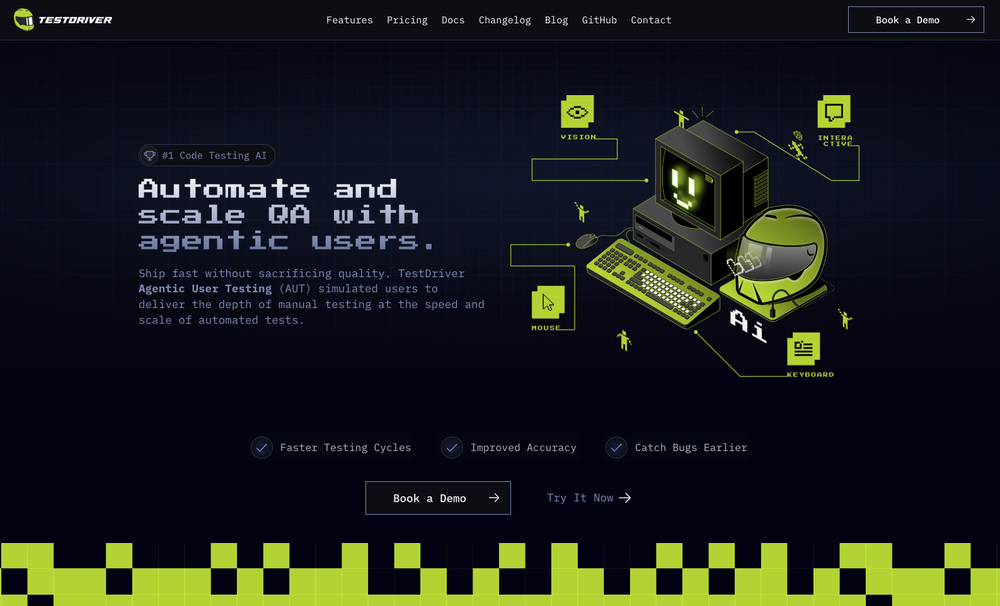 Test failure can be triggered by: - Text not being found - Image not being found - "Assert" condition not being met (according to AI with 90% confidence)
 -
 Approve/reject Claude code permission requests from anywhere on MacOpen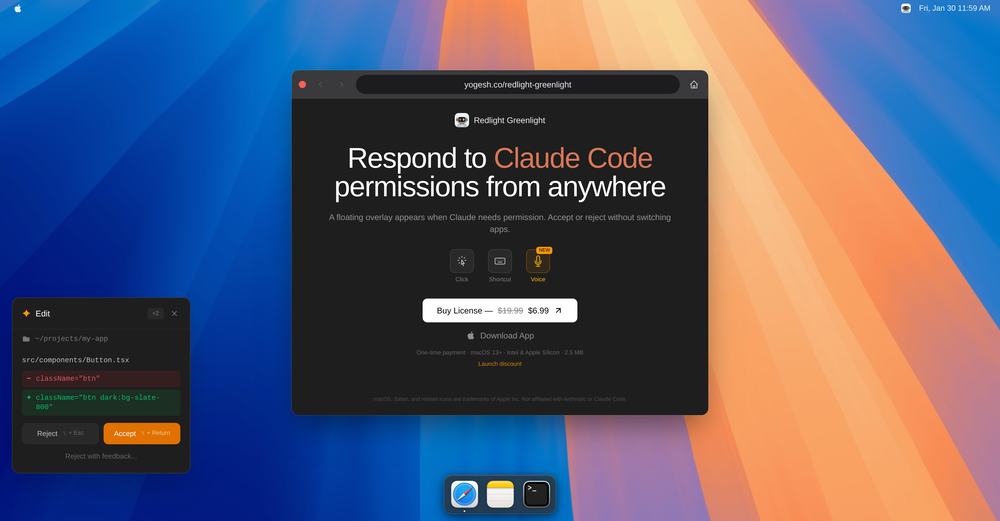
-
 Maybe give it another go now? It works just fine for me
 -
 Modular & Cross-Platform Vibe Coding Editor and Workflow Automation on Any DeviceOpen
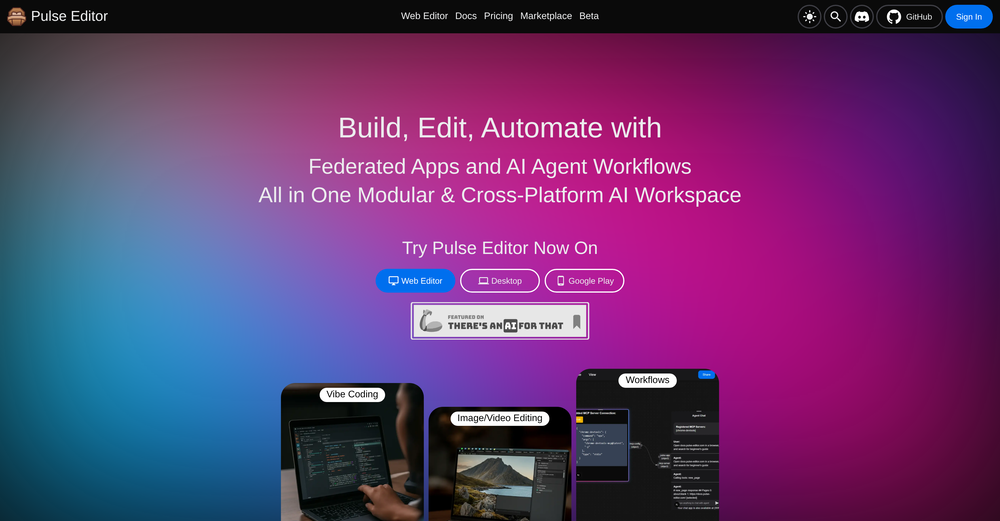 good!A different kind of AI tool that has been very helpful for my work!
 -
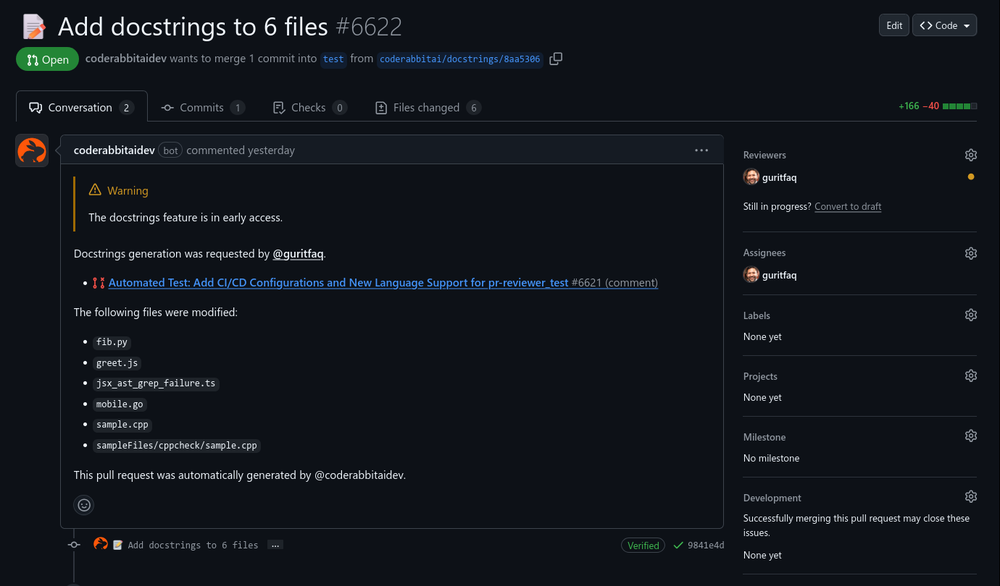 Reducing manual efforts in first-pass during code-review process helps speed up the "final check" before merging PRs
 -

-
 LLM-driven security review and fixes, seamlessly integrated into your GitHub pull requests.Open
-

-
 Converts JavaScript code to TypeScript.Open
-
 Didn't really like the output, made some good directives for me and insight that i haven't came across so far. Not really sure if i will trust it with my main projects though. How safe is it?












Other tools
- Sponsor
 MongoDB - Build AI That Scales🗄️ Database
 -
 OpenI built Remy to solve a problem I face every day: Newsletter overload 📬 Remy is your personal AI assistant that summarizes all your newsletters into a single digest email. Go from a cluttered inbox to a clear, concise briefing in one go.
 -
 Just type what you need — AI fills Sheets™, Docs™, and Slides™OpenJust type what you need — AI fills Sheets™, Docs™, and Slides™. FREE Forever with your API key for up to 100 execution per month! Zero formula typing, natural language instructions, zero complexity. Fill spreadsheets, create and edit documents, generate slide presentations, create images, and more.
 -
 Open
Open -
 OpenTubeYakker matches how I already use YouTube. Saving things for later and processing them bit by bit. The UI is pretty minimal, which I like, though it took me a minute to understand the intended workflow. Keep it up ;-)
 -
 AI-powered personality insights for professional and personal growth.Open
 - Didn't find the AI you were looking for?
-
finally don't have to babysit my campaigns at 2am. alex ai actually catches issues before they burn through budget. paused three underperforming ads last night while i was asleep. worth every penny
-
FineVoice Video to Audio feature is now live. Generate high-quality sound effects and music that perfectly matches the visuals, actions, and environment in your videos.
-
 OpenHi everyone — Vera here, the maker 👋 I built FaceShapeDetector because most “face shape” tools only tell you a label (oval, round, etc.) without real guidance. This tool focuses on accuracy first, then shows you 9 hairstyle previews on YOUR face — plus a Barber Card™ you can bring to your barber/stylist. For best results: • Use a clear front-facing photo • Remove glasses • Keep a neutral expression I’d genuinely love feedback — especially on: Accuracy Hairstyle realism Whether the Barber Card™ is actually useful in real life Launch week deal is live for the TAAFT community ❤️ Thanks for checking it out!
 -
Really like how it finds connection in the content that I save. I don't think any other tool can do that.
-
Have been trial running this tool and am very impressed by what I've seen. Would recommend for persons in need of a reliable, cost-effective and SEO optimized writing solution.
-
 Validate ideas, name your business, create logos, and build websites in minutesOpenIt helped me set up my online business within minutes.
 -
Hi Really like this idea. Helps to brainstorm the idea based on research from various data sources
-
Great tool! Was very helpful in content production
-
Useful to quickly explore the content of and interconnections between research papers. Makes it a more fun process.
-
 AI Product Management with Contextual Intelligence | Second Brain for Software HousesOpenGreat tool for simplifying product requirement tasks. Smooth Jira integration, some AI-generated content might need tweaking. If you’re looking to streamline your process without spending much, it’s definitely worth a try!
 -
 OpenThis tool i found is super cool, I created 5 books from this tool to sell them online, which gives me great profit. I am creating more valuable books to spread knowledge, and earn some bucks as well 🤑.
 -
Farol is been clutch for spotting trends before they blow up everywhere. I've caught a few product launches and tech shifts early enough to actually post something original instead of just adding to the noise. If you're always feeling a step behind on what's trending, this one's worth a look!
-
 Assign Jira tickets directly to Cursor agents and get PRs and Previews.Open
 -
-
Man, with the free models that we have web creation became so easy. But everyone had the same websites. I really like how different they look from others.
-
Base44 is an AI-powered platform for building fully-functional apps with no code and minimal setup hassle. The platform leverages advanced AI technology to translate simple, natural language descriptions into working apps. Let’s make your dream a reality. Right now.
-
I made my website with Pagesmith. Seems the best for fast content based sites.
-
Another ClawdBot inversion, love it. Gotta hope for safety!
-
It is easy to use and the functional details are well done.
-
-
Scrollsequence is a game-changer for interactive storytelling! Smooth animations, intuitive setup, and impressive control over scrolling sequences make it perfect for engaging web experiences. Highly recommend for designers and developers looking to elevate their sites. 🙌
-
Would rate 4.9 if possible, but rounding up to 5 stars because this app truly excels compared to other AI coding tools. Why 5 Stars: Best-in-class AI coding assistance Huge improvements over competitors Actually works for real development Real Impact: I successfully built and published an actual app using this tool - that's game-changing for non-developers like me. Bottom Line: Yes, there's room for improvement, but this is already the top AI coding app available. The fact that ordinary people can create real apps with it says everything. Perfect for anyone wanting to turn ideas into actual apps!
-
 AI agent for Jupyter: Generate code, run cells with natural language.Open
 -
Great tool for engaging customers and repurposing content! I also made a video on it https://youtu.be/cIEUz3bxPRc
-
Hi everyone, Jon here. I love Deep Research but hated reading the slop churned out by the major apps. Try this passion project out and let me know what you think!
-
CodePup AI is incredible — it makes generating professional websites effortless with zero coding required.
-
I tested the application, and after running a simple project, the design page became glitchy and started shaking, making it unusable. The preview works fine, but the design interface is unworkable due to this issue. It's as if the screen is glitching like an old TV.
-
-
Thanks for your feedback! We are also shipping some exciting new features this month!
-
Purely magic. It increases the productivity by a lot and the process is pretty addictive. I've been building websites like there's not tomorrow.
-
 Open
Open -
I am planning to automate my trading system and customise an agent , I chatted with the support right from the dashboard they answered in 15 mins
-
So I tested out Test Your Idea, and it actually works pretty well. You put in your idea, wait a minute, and it shows you the stuff you've been missing. Got some decent pivot suggestions that helped me refocus from a tiny niche to something way bigger. Saved me from probably wasting a few months in the wrong direction if you're actually gonna build something, not just daydreaming about it
-
Hey everyone, I'm Florent, maker of Facet! Please feel free to give me any feedback good or bad you have, it will help me make great improvements! We already have dozens of users and try to use all feedback to enhance the application!
-
This is a fantastic tool for creating a bespoke chatbot that understands the nuances of your business. It's so easy to set up, works with all the platforms I use, like Slack, Google Drive, Notion, and Zapier, and it's massively helped with customer service queries. Would definitely recommend.
-
This team took the time to understand the industry, problem and its users and designed a perfectly engineered solution. Kudos.
-
Really solid on Windows. I’ve tried several similar transcription tools before, but this one feels much better integrated into the system. The customizable global shortcuts are a game changer, you can either just do plain transcription or trigger your own custom prompts/actions with different hotkeys. A lot of competitors do roughly the same thing, but EchoWrite stands out because the basic transcription is essentially free (you just need your own OpenAI API key, which costs next to nothing). If you want the custom prompts and translations, it’s a one-time payment instead of yet another subscription. In 2026 that’s actually pretty fair compared to everything else out there. Big thumbs up.
-
-
-
The only CRM I've actually stuck to. Its AI does everything.
-
Reddit's been a blind spot for us forever and this actually makes it manageable. The AI catches relevant threads before they blow up so we can jump in early. Organic reach has been wild compared to paid channels.
-
Yeah AI has ongoing cost. You have to purchase that model. But if you have a good computer, you can also use local models
-
 OpenI recently tried legasite.io The process was straightforward. You paste in your site’s URL, choose a template, and wait. It didn’t take long before I got a downloadable version built with modern structure (Next/React.js). That alone saved me a decent chunk of manual setup time. The generated layout was clean and usable. Overall, I’d say it’s genuinely useful if you’re modernizing legacy sites and want a head start with the possibility of refining the output if the original website has messy interactions or complex structures.
 -
🚀 THEO 2.0 — Now a Positioning Intelligence Platform Complete rebuild. THEO is no longer a business context engine — it's the first positioning intelligence platform built specifically for brand strategy work. ✨ Competitive Positioning Brief → Receive a strategic artifact with positioning territories, competitive dynamics, and recommended direction — not a dashboard, not raw data 🔍 30+ Competitor Discovery → THEO identifies competitors you didn't know existed, including functional equivalents across industries and markets 🎯 Client-Relative Analysis → Every competitor evaluated from your client's perspective — the same competitor scores differently for different brands 🌍 Multilingual Competitive Analysis → Recognizes competitors across language boundaries and regional terminology — SMB, SME, KMU all map to the same market segment 📊 Consistent Framework Across All Competitors → Same rigorous lens applied to every competitor — no more inconsistent ChatGPT threads stitched together 🔗 Full Source Attribution → Every insight traceable to its source — present findings to clients with confidence Result: A competitive positioning brief that used to take a week of manual research, delivered as your strategic starting point ⚡ Why This Matters: Brand strategists spend their best thinking energy on research mechanics — copying between tabs, prompting ChatGPT inconsistently, assembling fragments into something presentable. THEO handles the competitive intelligence infrastructure so you can focus on what clients actually pay for: strategic direction.
-
Hi, I am Cristian the founder of Konvertly. I built Konvertly because I was tired of juggling 5 different tools just to send a cold email. A tool for leads, A tool for sending, manually writing intros, forgetting to follow up—it was exhausting and confusing with all the credit systems. I thought: "Why isn't there ONE tool that does all of this?" So I built it. Six months of nights and weekends. Then we soft-launched and got 60 paying customers, which honestly blew my mind. Today's the official launch. If you've ever felt buried in manual prospecting, this one's for you. — Cristian
-
-
 AI-powered employee monitoring that turns screen data into productivity insightsOpen
 -
This is exactly what we have been looking for. Can't wait to run it
-
I like that the quiz lessons are intuitive and similar to Duolingo
-
 Your AI-powered partner for smarter, faster, and more productive software engineeringOpen
 -
 Transform complex programming problems into crystal-clear pseudocode.Open
 -
 Transform programming ideas into crystal-clear pseudocode instantly.Open
 -
Great tool! And totally free! Directly from haven
-
This tool took a lot of trial and error to get the vibe I was hoping for, and I'm impressed with it so far. Hopefully people get a kick out of it.
-
 OpenFun and easy to use. You need to fix some lines by yourself but most of code will write for you!
 -
 Open
Open -
 AI-powered code generator for efficient development.OpenIf you just started using python or coding this could help you a lot! I remember first time searching for a string of code and... it wasnt the most easy task at all.
 -
Web Development and App Building Services Overview As a skilled developer, I can assist with creating websites and building mobile applications. I can also generate code to help with programming tasks. Web Development Services Mobile App Development Services Cross-Platform Mobile Apps: I can also develop cross-platform mobile apps using frameworks like React Native, Flutter, or Xamarin. Mobile App Design: I can create user-friendly and intuitive mobile app designs that meet your specific needs. Programming Services Code Generation: I can generate code snippets in various programming languages, including Python, Java, JavaScript, and C . Programming Language Support: I can assist with programming tasks in a variety of languages, including but not limited to: Bug Fixing and Debugging: I can help identify and fix errors in your code. Example Code Generation Here's an example of a simple "Hello, World!" program in Python: def main(): print("Hello, World!") if __name__ == "__main__": main() Or a simple JavaScript function to add two numbers: function addNumbers(a, b) { return a b; } console.log(addNumbers(2, 3)); // Output: 5 Let me know if you have a specific project in mind, and I'll be happy to assist you. I can create websites, build apps and generate codes
-
 AI code assistant: Analyze, explain, and optimize snippets instantly.Open
 -
 Translating code between programming languages, maintaining logic and efficiency.Open
 -
 Generates comments and documentation based on your code.Open
 -
 Nuxt coding assistant, with knowledge of the latest Nuxt documentationOpen
 -
 Open
Open -
 Your friendly coding expert in Python, JavaScript, and cloud technologies.Open
 -
-
 Formal, technical expert in programming language design.Open
 -
 Straightforward Python code formatter, ensuring PEP 8 compliance.Open
 -
 Expert in code optimization, delivering refined code with detailed explanations.Open
 -
 Your expert partner in coding, specializing in pair programming and code reviews.Open
 -
 Transforms code into legal-style documents with precision.Open
 -
 Open
Open













































































































































































Post





