Go to section
Spotlight SureThing.io - "OpenClaw" for BeginnersTask automation
The front page of AI.Used by 90M+ humans.

Generate image
Tasks
Generate text
Free mode
Trending
Leaderboard
Characters
 Mini tools
New
Featured
Lists
Agents
Requests
Jobs
Map
Newsletter
Starter pack
Free tools
Speech to text
Text translator
Remove background
Settings
Edit profile
My tools
Gallery
Dashboard
Inbox
Get featured
Contact TAAFT
For you
Popular
Job impact index
Most saved
Affiliate program
Submit AI tool
Notification preferences
Glossary
Home
Timeline
My profile
Create tool
Deals
Companies
Models
Robots
Papers
Fundraises
Devices
Organizations
Events
Prompt Pack
Merchendise
APIs
Features
Tools
Countries
Collections
Videos
News
Investors
Repositories
Mini tools
New
Featured
Lists
Agents
Requests
Jobs
Map
Newsletter
Starter pack
Free tools
Speech to text
Text translator
Remove background
Settings
Edit profile
My tools
Gallery
Dashboard
Inbox
Get featured
Contact TAAFT
For you
Popular
Job impact index
Most saved
Affiliate program
Submit AI tool
Notification preferences
Glossary
Home
Timeline
My profile
Create tool
Deals
Companies
Models
Robots
Papers
Fundraises
Devices
Organizations
Events
Prompt Pack
Merchendise
APIs
Features
Tools
Countries
Collections
Videos
News
Investors
Repositories
Mini tools
New
Featured
Lists
Agents
Requests
Jobs
Map
Newsletter
Starter pack
Free tools
Speech to text
Text translator
Remove background
Settings
Edit profile
My tools
Gallery
Dashboard
Inbox
Get featured
Contact TAAFT
For you
Popular
Job impact index
Most saved
Affiliate program
Submit AI tool
Notification preferences
Glossary
Home
Timeline
My profile
Create tool
Deals
Companies
Models
Robots
Papers
Fundraises
Devices
Organizations
Events
Prompt Pack
Merchendise
APIs
Features
Tools
Countries
Collections
Videos
News
Investors
Repositories

▼ Latest
Image ai
Free mode
100% free
Freemium
Free Trial
Featured matches
-
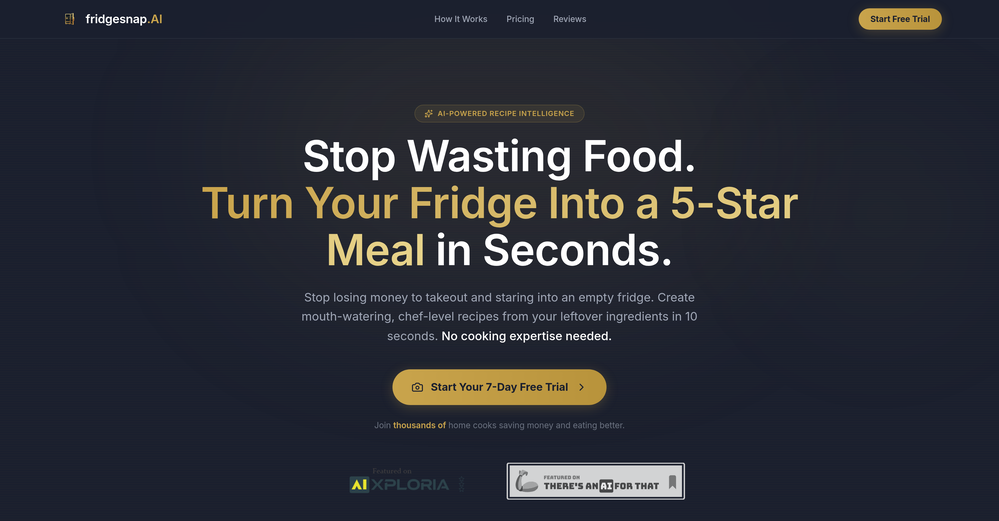
 Aleric Heck🛠️ 4 tools 🙏 245 karmaApr 22, 2026@fridgesnap.AIThis tool is very helpful at quickly creating new recipes based on the food that's already in your fridge! I was surprised at some of the recommendations it came up with for me that were a lot better than I'd think of on my own. I also love that you can get your first snap completely for free as well. Highly recommend!
 -
-
-
-
-
-
-
-

-








Verified tools
-
 Create on-brand image and video ads in minutesOpen
 -
 Open
Open - SpotlightSureThing.io - "OpenClaw" for BeginnersTask automation
-
 Turn prompts into polished images and videos, instantly.Open
 -
This looks like a solid tool for quick text to image work, especially with all the extra features like watermark removal and photo restore. If anyone here is experimenting with bold typography or pop style visuals, I have also tried https://allbratgenerator.com for fast brat inspired text and cover style graphics. It is simple and works well for social posts.
-
 Chain AI tasks with no-code into workflows for chatbots, video, documents, andOpenThis tool removes all of the prep work of getting an LLM API endpoint running. I can try out ideas quickly and see within minutes whether an endpoint concept actually works. And when it does, moving it into a production app is about as easy as it gets.
 -
 Turn small, noisy images into crisp assets - automatically.Open
 -
 AI chat with images – Create, edit, innovate for free!Openthis is completely free, and it is amazing that you can change pictures into art and animations without paying anything.
 -
calling this freemium feels like a stretch as the free version is extremely limited. results are covered in watermarks and the upscaling isn't great either...
-
 OpenCool idea! If you can actually use it to turn smartphone photos into professional photos, then that's a game changer! Can't wait to try it out! 🚀
 -
This app is awesome because it has two cool features. First, it lets you chat with an AI that talks like a real person, perfect for customer service or just having fun conversations. The second feature lets you create amazing artwork instantly using AI. The app is super easy to use, and you don’t even need to sign up. Plus, it’s a free mobile app, so you can take it anywhere! It’s a fun, creative tool for everyone.
-
5 minutes to create account. 1 minute to discover poor photo enhancing. Waste of time
-
 Open
Open -
RenderCAD has been such an incredible asset to my company, At Home By Design. We specialize in both commercial and residential design, and their renderings have truly brought my visions to life. The level of detail, professionalism, and presentation has been beyond impressive.
-
 Open
Open -
 AI jewelry retouching, virtual try-ons & video — studio quality in secondsOpenWe teach product photographers for a living, so we're picky about what actually holds up to a pro eye. NeuroViz surprised us. The retouching keeps the real texture of metal and stones instead of plasticky AI smoothing — that's the part most tools get wrong. We've started recommending it to students who need clean catalog shots fast without losing the craft. It doesn't replace a good photographer, it just removes the boring 80% so you can focus on the shot that matters.
 -
-
 Open
Open -
I tried testing Seedance 2.0 on several platforms, but most of them required a membership upgrade first — even Dreamina. SeeGen AI offers a free trial, and that’s the main reason I recommend it.
-
I’ve purchased boilerplates before but honestly this is by FAR the most thorough and useful. I mean check out the documentation alone. I get that ppl might be “boilerplated out” by now but seriously don’t sleep on this if you want to save literal days/weeks of building. Using it now to build a microsaas in 48 hours!!
-
A very simple-to-use, yet very powerful app. It made my work so much easier, my scanned and downloaded files are no longer a mess.
-
Image3D feels like a practical tool rather than just a demo. The workflow is simple, the preview loads in-browser, and I can export common formats like GLB, OBJ, STL, and PLY. I would recommend it for fast 3D asset drafts and 3D printing experiments.
-
I'm absolutely blown away by the design quality of the presentations they look so vibrant and stylish. I was also pleasantly surprised that the AI asks lots of clarifying questions to make sure the final result is exactly what I wanted, not just something random. Vibes 🔥
-
Using Refabric has elevated my design work, flawlessly interpreting sketches into various fashion styles. Its unique approach to texture realism and bias management sets it apart in AI tools.
-
 Turn text and images into production-ready 3D models with AI in seconds.OpenThis tool is definitely good for basic stuff, no doubt. Just keep the prompts super duper simple and it gets the job done. But once I put in something a bit more complex at it… it kinda screwed up the thing. Still, I see potential here
 -
An absolute game-changer! Easy, efficient, and impressive! I put in some pics from my DIY cosmetics for the webstore and the clicks doubled! 📸💫
-
very good tool. done your work in seconds with Retouch Pro
-
very slow , no help and you did not have any feedbck on what happened also It deducts points even without providing any videos or photos.
-
-
Klayn looks really solid — simple to use, clean interface, and genuinely useful. It saves a lot of time on tasks that would normally take way longer. Definitely a tool worth trying!
-
i really wanted something fast. works really good. Certainly doesn't justify the price tag
-
 Open4K resolution is one of its major advantages in the relevant field.
 -
-
-
-
This one gives some pretty decent logo directions quickly. The first concepts are useful, but I’d still want finer control over typography and spacing before calling anything final.
-
Asks for payment straight away, no way to establish an opinion without subscription.
-
Fast updates, and every ai image and video model imaginable
-
this one’s pretty fun for anime clips. tried pushing a character through a few different styles and it kept the main look surprisingly well. motion can get a little weird, but the good outputs are really good.
-
 OpenI'm thoroughly impressed by Maze Guru's text to image technology, which effortlessly converts written descriptions into captivating visuals.
 -
Pixelcut is not free if you want to generate AI images (5$). They lie about it on their website.
-
All of this tools offer API access, which is useful for developing your own AI tools at a low cost.
-
Speed is amazing ! I will definitely utilize the tool in the future for film generation
-
We're live folks! Do check us out and drop your feedback or requests.
-
This release introduces Flint, a new family of each::labs image models designed to deliver frontier-quality results with production-ready economics.
- flint-image: Generate four distinct images from a single prompt in one call for $0.20, compared with $0.60 for a standard generation.
- Flexible output controls: Set the output format and aspect ratio for each run, so generated images fit directly into your layout.
- Available across each::labs: Access Flint through the API at api.eachlabs.ai or the visual no-code AI Flows builder, with pay-per-call pricing and no subscription required.
- Coming next: Additional Flint models for clean 4K image generation and editing, available at the same $0.20 per-call price.
-
I handle a large number of tasks simultaneously through VoooAI to complete my creative work, thereby accomplishing the workload equivalent to one month in one day
-
Great product to offload the data analytics workflow.
-
 Open
Open -
It works surprisingly well. Clean plus you can actually try it first without having to drop money right away. helps if you are not sure it'll fit your needs. Solid stuff.
-
 Generate images, video, and audio with 150+ AI models.Open
 -
 Unlimited AI Clothing Generator — Design, Try-On & Fashion Video | WearMindOpen
 -
-
I tried Animon for a bit and it’s actually pretty solid. It does a good job with simple animations and keeps the original image style pretty well, so the results usually look clean.
-
I tried using stuvio, but honestly the experience was disappointing. The platform looks promising at first, but many features feel unfinished and confusing. The interface is not very user-friendly, and it takes a lot of time to understand how things actually work.
-
was looking for comfyui alternatives - i want workflows - but there's so much pain to get nodes to work on comfy - but this floyo solves this entirely
-
CreatOK is an AI-based video generator designed for TikTok e-commerce. The tool allows users to create original sales content and mimic viral content with ease. It excels at transforming product photos and descriptions into engaging videos optimized for TikTok. Also, it offers the option to generate videos from scratch by inputting product information for AI to create high-quality sales videos or replicate popular trends by uploading a viral video.
-
Just paste content in, layout will automatically be desigend
-
 AI-native OCR platform, 95%+ accuracy, zero prompt engineering, flags uncertain fields.OpenWe are a team of founders who worked before in data extraction, with traditional manual review of each document to check accuracy / errors. We are so excited about AI and the new LLM models because we have created DeepRead using those and the accuracy is 95% and we flag uncertain fields so no one has to manually review entire documents (whew), only the exceptions! We hope you try it out and please share your review, comments and feedback. Looking forward to hearing from users!
 -
great for quick mockups when i need placeholder art. not as robust as some other tools but it's fast and the visuals are clean enough for client presentations. gets the job done without overthinking it
-
-
Hi Taaft community! I’m the creator of ConceptViz. We built this tool specifically for educators and researchers who deal with complex information daily. ConceptViz uses AI to instantly transform dense lesson plans, curriculum notes, or research frameworks into clear, structured diagrams. Our goal is to help K12 teachers make abstract concepts tangible for students and to help researchers map out logical workflows without the manual drudgery of drawing. I’d love to hear how this fits into your academic or classroom workflow—your feedback will help us build a better tool for the education community! 🚀
-
used this to turn a couple of our engagement pics into line drawings for the welcome sign + menu ideas and they came out sooo cute!! the minimal ones looked really clean, especially for wedding stationery. some of the tiny details got a little lost but still gave me a really good starting point!!
-
 Turn photos into realistic AI kissing videos instantly.Open
 -
-
"CrePal integrates all the top-performing models on the market and automatically crafts the best-formatted prompts for each of them. All I need to do is chat with it, and I can create a viral TikTok short—absolutely amazing!
-
YO?! I've been trying a bunch of background removal tools within taaft and this one works beautifully, I think it's the best one so far.. whaaaat
-
Tried Synexa AI for a quick deployment last week—clean and straightforward. No clutter, just worked.
-
 Transforming creativity and automation with AI-powered image, video, and content editing toolsOpen
 -
































































































Other tools
-
It worked very good to upscale the image. But it upscaled the size as well from 1.63mb to 10.7mb.
-
No imprint with business location, owner or contact. Also no contact form or email for support. Trying the free version the test videos are showing onyl 'in progress' after several days. Scam?
-
 Openyou only get 10 credits better to use other upscalers
 -
Feels illegal to be this early, quick run with Grok Imagine: great for teaser bits. The image-to-video pass holds up for shorts ~6s loops with decent motion and sound sync. Style range is solid. Access sits behind the Grok sub on mobile, so not fully free and I’d love longer clips!
-
pretty good for quick visuals. output’s clean and it follows prompts better than i expected, not bad at all.
- Didn't find the AI you were looking for?
-
The renders look cinematic straight out of the gate. Flux handles texture and lighting beautifully.
-
Diffusion pulls out extremely good images from simple prompts. Renders were a little slow on higher quality, but totally worth it for the results. The controls feel clear enough and the outputs look legit. Good one here!
- Waitlist
-
-
It does not load the processor. Fast in operation.
-
This is basically Magnific Ai integrated into this service since they have bought the company.
-
Pay your money, upload an image, ask to animate it and uses a generic image, not the one you upload. Garbage
-
-
I tried other tools aswell, this was the only accurate. Other ais didn't even get the country right. Compared to the others it had the advantage that I could specify the area in which the location was. I only tried it once so far but I am satisfied.
-
Very high quality, amazing realism. You can change ethnicities and expressions as well, including full body skin.
-
Do not not buy ANYTHING from this site!!! Do not buy anything from this website. I purchased the lifetime membership and then about two weeks later they charged me for a year membership. I contacted my credit card company to dispute the charge and art space did not like this. They still have my money from the lifetime membership, but they have blocked my access to their website. I was a member of their group on Facebook and I decided to ask if other people had problems with their customer service and within eight hours, I have been removed from their group. Very untrustworthy business practices. All they want is your money and give you no customer service whatsoever and their image in generation is not that great either you can find other places that are free but are much better.
-
-
Very good service but it doesn’t always display what the prompt tells. Do you plan to add a feature for negative prompting?
-
This one is great for logo and poster concepts. The vector-style output looks clean, and it handled a few pixel-art prompts better than expected. I’d still like tighter controls for fonts and style consistency, but it’s a strong tool overall.
-
Would be nice to try some other feature without paying even if only 5 trys
-
-
made a few random social visuals with it and the results came out pretty clean. not every generation hit, but the good ones were definitely usable. decent tool for quick ideas.
-
Results are ok, you maynget nothing younget results thatbare barley acceptable, but they are very generous with their free offerings.
-
I like Artimator because it is intuitive, fast and provides full rights to use the images I created for commercial use!
-
Incredible value for money, you can really get a staggering amount of video from 1 month's subscription and you get a massive selection of rendering options.
-
kaspersky notified me of this platform when I registered it leaked personal data, ip history, name, password, email address.
-
-
I tried to test it, but no trail option before subscribing.
-
you have build an incorrect customer journey where you mostly feel user feel cheated and dissapointed as you dont even allow to try your product before payment. I wont use this tool again unless you change your model.
-
Prodia is free with unlimited generations, but limits the size and features for paid subscribers. I do not downrate it for that as it's completely reasonable.
-
-
-
Will not let you test on a HD picture without paying. I found a lot of these "programs" do a poor job and I am tired of paying for a test. Maybe offer 1 HD picture, but crop it (user crop)?
-
I was on their premium plan. 9 usd per month. Good features with alot of bugs and zero user support. I wrote them more than 10 support requests without even one reply. At last i lost control to my account and every try to login was unsuccessful because of an unknown error message. They didn't even help me to rectify the problem. 9 usd has been wasted .
-
would've loved to try but daaamn the price is crazy. looks real nice though :(
-
-
-
-
this is a solid AI generator. you get 75 free daily generations, which is plenty to experiment. it doesn’t just do images, there are character, logo and avatar tools too. the interface is a bit plain but easy to use. results came out pretty good overall, not mind-blowing, but usable. it's a nice free option. :)
-
-
I forgot to take videos on my trip, so I gave this a shot with just the photos I had. Surprisingly, it created a short clip that actually looked real, super cool. Just wish it didn’t take forever to render
-
-
Hey SFS, it seems the app works with credits via an API key, priced at $0.01 per credit. The lowest generation cost is 0.9 credits, and the highest is 8 credits. We’ve also updated the app’s price description. Thank you very much!
-
No free use because I use a VPN?? I'm out. I should have a choice to stay private if I want to and still be able to review the product without penalty. Others allow it - I will use them before buying. If you have that big of an issue with what you feel are multiple accounts using your free services, then reduce the amount of free use.